

Stop Trusting Your Cache Hit Rate. 7 Tests Show Why.


Key Takeaways
- A high semantic cache hit rate does not mean correct answers, so measure false-positive rate alongside hit rate, latency, and cost savings.
- In Banking77 tests, a 0.83 similarity threshold brought the false-positive rate to 4.8% at a 70.1% hit rate on held-out queries, but thresholds alone cannot catch negation, changed numbers or dates, cross-tenant matches, or stale answers.
- Targeted safeguards work better: exact checks for negation and values, MUST filters on tenant and intent, stale-entry invalidation, and optional local verification for high-stakes intents.
- Set a correctness target, calibrate thresholds on your own labeled queries, and validate every safeguard before deploying to production.
Semantic caching can cut large language model (LLM) costs and reduce latency by reusing responses to similar queries instead of calling the model every time. If you run a semantic cache, you probably measure its success by hit rate and the number of model calls it avoids. But a cache hit does not guarantee a correct answer. A cache can return a confident, irrelevant response and still report a healthy hit rate.
The problem lies in how the cache decides which queries are similar enough to share an answer. Most semantic caches use a similarity threshold to make that decision. Lower the threshold, and more queries get a match. Raise it, and the cache rejects more matches and sends more requests to the model.
We tested this problem across seven tests to find out how often semantic caching returns the wrong answer and what you can do to prevent it. The tests examine whether a cache can distinguish between queries that look similar but require different answers. We measure the false-positive rate alongside the hit rate rather than treating more hits as an automatic improvement.
If you build or operate LLM applications, this article shows you how to evaluate your cache before trusting it in production.

TL;DR
- A high semantic cache hit rate does not guarantee correct answers. Measure false-positive rate (FPR) alongside hit rate, latency, and cost savings.
- In tests using Banking77, a similarity threshold of 0.83 achieved a 4.8% FPR and a 70.1% hit rate on held-out queries.
- Similarity thresholds alone cannot prevent wrong matches caused by negation, changed numbers and dates, cross-tenant queries, or stale answers. Use targeted checks, filters, and cache invalidation.
- Set a correctness target, test against your own queries, and validate safeguards before deploying your semantic cache to production.
The Hit Rate Promise
Hit rate only tells you how often the cache finds a match according to its configured threshold. It does not tell you whether the stored response answers the new query correctly. If you loosen the threshold, more queries can match existing entries. Your dashboard may show more cache hits and greater potential savings, even when some of those matches pair questions that need different answers.
TrueFoundry’s guide to semantic caching discusses how embedding-based similarity matching lets applications reuse responses to differently worded queries. But those savings do not tell you whether the cache returned the right answer.
Consider a banking support assistant. One user asks, “How do I cancel my bank card?” Another asks, “How do I prevent my bank card from being cancelled?” Their queries share several words and may have similar embeddings, but their intentions differ. If the cache returns cancellation instructions to the second user, the request still counts as a hit. The system saves a model call, but the user receives the wrong answer.
That is the gap between cache performance and cache correctness. You should keep tracking hit rate, latency, and inference costs because they show whether caching improves efficiency. However, you also need to measure how often a hit returns an answer that should not have been reused. Without that measure, you cannot tell whether a higher hit rate reflects better caching or if the cache is willing to accept questionable matches.
To understand that trade-off, you need to look at the similarity threshold and measure what happens to both hit rate and false-positive rate as you change it.
The Threshold is a Dial Between Two Failures
A higher similarity threshold can reduce wrong hits, but it also rejects more queries that could have reused a correct answer. The right threshold is the one that meets your false-positive-rate target while preserving as many safe hits as possible.
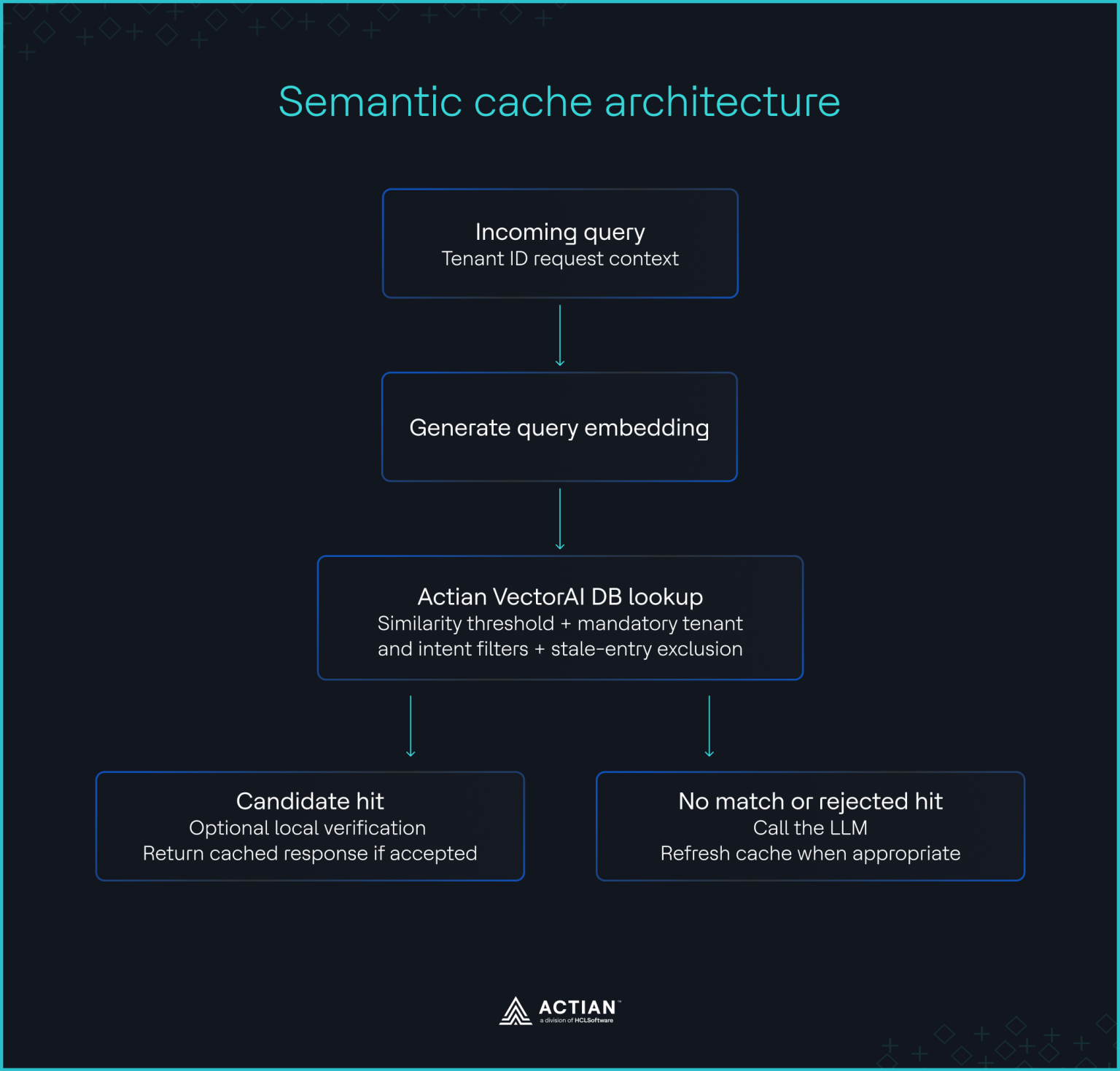
A semantic cache typically converts a query into an embedding, compares it with stored query embeddings, and checks whether the closest match meets the threshold. If it passes, the cache returns the stored response. Otherwise, the application sends the query to the model. The threshold controls how readily the cache accepts a match, but it does not establish that two queries have the same intent.
A higher threshold demands a closer match, while a lower threshold accepts a wider range of queries. This single setting influences how often your cache serves an existing response and how often it rejects a query that could have used one.
A strict threshold can undermine the savings you introduced caching to achieve. Users rarely phrase the same question identically, and small differences in wording do not always indicate a change in intent. If your cache rejects too many valid matches, your application makes unnecessary model calls. You pay for answers you could have reused, and latency increases.
A loose threshold creates the opposite problem. The cache accepts more matches, but embedding similarity does not guarantee that two queries require the same response. As Portkey’s guide to semantic caching thresholds discusses, the threshold determines how readily the system reuses a response, and an overly permissive setting can introduce false positives.
Neither extreme gives you a reliable basis for choosing a threshold. You need to know how much reuse each setting delivers and how often the cache returns an answer that does not belong to the current query. That requires evaluating hit rate and false-positive rate together, rather than tuning one metric in isolation.
The practical decision is to set a correctness target first, then determine which threshold meets it without sacrificing more cache efficiency than necessary. The right setting depends on your queries, the consequences of a wrong answer, and the results of your own evaluation.
What a Wrong Hit Actually Costs
A cache miss costs you another model call. A false positive can give your user the wrong answer while your application reports a successful cache hit.
Tian Pan’s analysis of semantic caching in production highlights the danger of returning wrong answers with high confidence. A semantic cache does not necessarily know when a close match changes the meaning of a query. It can find a response with high embedding similarity even when the user needs a different answer.
Negation makes this problem particularly clear. Compare “cancel my card” with “do not cancel my card.” The two queries share almost all their words, but they express opposing instructions. Reusing the wrong response could cause an application to act against the user’s wishes. You cannot assume that a high similarity score means the queries are interchangeable.
Numbers and dates create another risk. A wrong cache hit can return an answer that looks plausible but contains an outdated or incorrect value. In Test 3, “Set my daily card limit to 2500” matched a cached query using “250” at a similarity score of 0.962. Despite the high score, the two queries specify different limits. The example shows why similarity alone cannot protect values that change the meaning of a request.
These are the failure modes that hit rate cannot reveal. Your cache may count every match as a success even when a changed word, amount, or date makes the stored response unsuitable. The cost extends beyond another model call. Depending on your application, a wrong answer can mislead a customer, trigger an incorrect action, or undermine trust in the system.
Semantic Cache Architecture
Prerequisites and Setup
To reproduce the experiments, you need Docker to run VectorAI DB locally, Python to run the test scripts, and uv to manage the Python environment and dependencies.
Before you begin, install the following:
- Docker Desktop or Docker Engine with Docker Compose
- Python 3.11 or 3.12
- uv, the Python package and environment manager used by the project
Clone the repository and start VectorAI DB
In your terminal, clone the Actian developer-content repository and move into the semantic cache project directory.
git clone https://github.com/actian-devs/developer-content.git
cd developer-content/blog/semantic-cache-fp
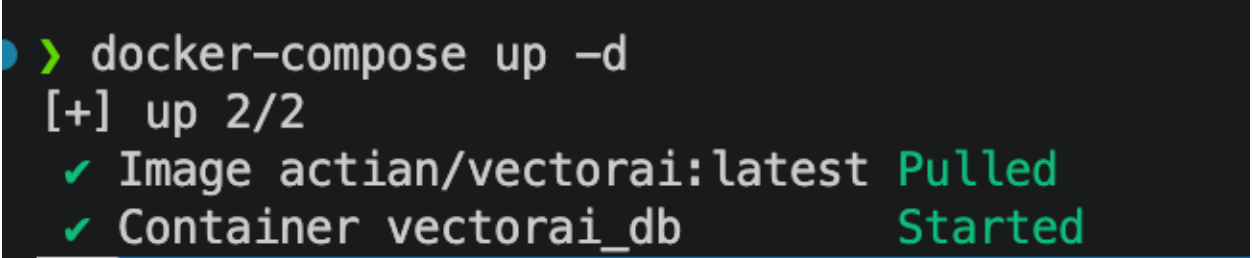
Start VectorAI DB with Docker Compose.
docker-compose up -dYou should see the result:
Starting VectorAI DB
Install the Python dependencies and create the virtual environment.
uv syncWait for VectorAI DB to finish starting before running the tests. You can check the container status with docker ps.
Run the seven tests
Run the threshold sweep first. It evaluates thresholds from 0.50 to 0.99 and identifies a threshold that meets the 5% false-positive-rate target on the calibration data.
uv run python test1_threshold_sweep.py --threshold 0.80Use 0.80 to reproduce the seven-test results reported in this article. The threshold sweep also evaluates which threshold meets the 5% false-positive-rate target. In our evaluation, 0.83 met that target on the held-out split.
uv run python test2_negation.py --threshold 0.80
uv run python test3_numbers_dates.py --threshold 0.80
uv run python test4_partitions.py --threshold 0.80
uv run python test6_query_length.py --threshold 0.80
uv run python test7_stale_answers.py --threshold 0.80
Test 5 runs a small verification model. Export the cache lookups first, then run the model on them. decider-0.8b runs on a laptop. Larger models such as decider-4b need a GPU.
uv run python test5_decider_verify.py \
  --threshold 0.80 \
  --export-hits data/test5_lookups.json
uv run --extra decider python test5_decider_verify.py \
  --threshold 0.80 \
  --model Mapika/decider-0.8b \
  --max-hits 100 \
  --hits-file data/test5_lookups.json
Once the tests have finished, compile the results table.
uv run python make_table.pyThe scripts write their results to the results/ directory. These include the threshold-sweep data, the data used to build the results table, and individual JSON files containing each test’s measurements. The first run downloads the dataset and embedding model, so it may take longer than subsequent runs.
Seven Tests, One Picture
At a similarity threshold of 0.80, the cache returned 610 hits from 770 lookup queries, giving a hit rate of 79.2%. Of those hits, 39 were wrong, producing a false-positive rate of 6.4%. The threshold sweep identified 0.83 as the setting that met the 5% false-positive target on the held-out evaluation split. On that split, the cache achieved a 70.1% hit rate and a 4.8% false-positive rate.
The experiments used VectorAI DB to store embeddings for 3,075 questions from Banking77, a public dataset of banking support queries labeled with 77 intents. This fits within the Community Edition limit of 5,000 vectors. We looked up another 770 questions from the same dataset using the sentence-transformers/all-MiniLM-L6-v2 embedding model. For each query, VectorAI DB returned the closest stored question. A match counted as a hit when its cosine similarity met the threshold of 0.80.
We defined a wrong hit as one where the cached question had a different intent, belonged to another simulated tenant, or referred to a source that had changed. The false-positive rate (FPR) is the number of wrong hits divided by all hits. Our target was an FPR of 5% or lower. We calibrated thresholds on one half of the lookup set and evaluated them on the other half.
The dataset is a sample rather than the full Banking77 collection. We simulated tenants and source changes, and generated the pairs used in the negation and number tests from templates. The results therefore show how these failure modes behave under controlled conditions, not how often they occur in every production cache.
Test 1: The threshold sweep
What it tests: Most semantic caches rely on one main setting, the similarity threshold. This test asks what happens to correctness as you turn that dial. You look up 770 questions against the cache at every threshold from 0.50 to 0.99 and count two things at each step: how often the cache answers (hit rate) and how often its answer is wrong (false-positive rate).
At 0.80, the cache returned 39 wrong answers across 610 hits. That is an FPR of 6.4%, or about five wrong answers per 100 incoming queries. Some wrong matches had very high similarity scores. For example, “Why was I unable to do a transfer?” matched “Why was I not able to complete my transfer?” at 0.921, even though the questions carried different Banking77 intents, declined_transfer and failed_transfer.
Raising the threshold to 0.83 brought the FPR to 4.8% on the held-out evaluation set, meeting the 5% target. The hit rate fell to 70.1%. That is the trade-off a hit-rate-only dashboard hides. The higher threshold reduced incorrect reuse, but it also sent more queries to the model.
Figure 2 plots the hit rate and false-positive rate across the tested thresholds. Use the curve to choose an operating point against a correctness target, rather than treating the highest hit rate as the goal.

Hit rate and false-positive rate across similarity thresholds
Run test 1 on your terminal:
uv run python test1_threshold_sweep.py --threshold 0.80Tests 2 and 3: Negation, numbers, and dates
What they test: These tests evaluate whether a semantic cache can distinguish between similar questions with different meanings while reusing answers for questions that mean the same thing. For example, “Cancel my card” and “Don’t cancel my card” differ by one word but require opposite responses. Similarly, “Send $250” and “Send $2500” differ by a single digit but specify different amounts. The tests cache one question from each pair and ask the other to verify that the cache does not incorrectly reuse the cached answer. They also include reworded questions with the same meaning to verify that the cache correctly reuses those answers.
The semantic cache struggled to distinguish questions with opposite meanings, even when they differed by just one word. It incorrectly reused cached answers for 74 of the 75 negated questions (98.7%). For example, “Should I not cancel my card?” matched “Should I cancel my card?” with a similarity score of 0.990, despite the opposite intent.
Threshold tuning alone could not resolve this problem. Negated pairs had a median similarity of 0.946, higher than the 0.936 recorded for paraphrases that preserved the original intent. No threshold up to 0.99 prevented at least 95% of negation errors. By contrast, a simple check that rejected matches when only one query contained negation reduced the share of negated questions served from 98.7% to 4.0%, while maintaining a paraphrase rate of 72.1%.
Changed numbers and dates posed a similar challenge. The 38 pairs with changed values had a median similarity of 0.906, close to the 0.911 median for the 44 paraphrase pairs. The cache served all 38 changed-value queries. For example, “Set my daily card limit to $2500” matched “Set my daily card limit to $250” at 0.962. Similarly, a question about being charged on 21 June matched one about 21 July at 0.964.
Blocking at least 95% of these changed-value queries required a threshold of 0.97, which reduced the paraphrase rate from 95.5% to 13.6%. An exact-match check for numbers and date words blocked all changed values in this test while maintaining the paraphrase rate at 95.5%.
These checks are deliberately simple and have limitations. The negation check may miss indirect changes in meaning, while the value check does not recognize equivalent formats such as “fifty dollars” and “$50”.
Run tests 2 and 3 on your terminal:
uv run python test2_negation.py --threshold 0.80
uv run python test3_numbers_dates.py --threshold 0.80
Test 4: Tenant and intent boundaries
What it tests: This test checks whether a cache can prevent answers from being shared across customers (tenants) or unrelated topics. For example, one customer shouldn’t receive another customer’s cached answer, and a question about card fees shouldn’t return an answer about transfers. The test uses three simulated tenants to identify incorrect cache matches, then repeats the lookups with VectorAI DB filters to see whether restricting searches by tenant and topic prevents these errors.
Without filters, 425 of 610 hits were wrong, giving a false-positive rate of 69.7%. Of those hits, 409, or 67.1% of all hits, crossed tenant boundaries. The remaining wrong hits included queries that matched the wrong intent within a tenant.
A MUST filter on the tenant removed cross-tenant hits and reduced the overall FPR to 9.1%, with a hit rate of 61.4%. The remaining errors included matches to neighboring intents. Because each tenant partition held fewer examples per intent, the closest available match was more likely to come from a different intent.
Adding a second MUST filter for the intent predicted by a lightweight classifier reduced the FPR to 4.7%, with a hit rate of 58.4%. The classifier predicted the correct intent 88.4% of the time. Allowing matches from the classifier’s top two intents through a SHOULD filter produced a higher hit rate of 60.6%, but the FPR rose to 7.9%.
Per-intent thresholds did not improve the result in this experiment. With only about five questions per intent available for calibration, the FPR on held-out queries was 9.6%. That is a limitation of this sample, not evidence that per-intent thresholds cannot work with more data.
The results show why similarity alone is not an access-control mechanism. A cache lookup should enforce tenant boundaries and, where appropriate, restrict candidates by intent before selecting a response.
Run test 4 on your terminal :
uv run python test4_partitions.py --threshold 0.80Test 5: Local verification
What it tests: Thresholds and filters still let some wrong answers through. This test adds a second opinion: before the cache serves a hit, a small local model reads both questions and judges whether one answer can serve both. The test measures how many wrong hits the model catches, how many good hits it rejects by mistake, and how much time each check adds.
To test an additional safeguard, we sent 100 sampled hits to Mapika’s decider-0.8b model on an Apple Silicon M3 MacBook.
At a yes-probability cut-off of 0.5, the verifier caught four of the six wrong hits in the sample. It also rejected 25 of 94 good hits, or 26.6%. The median verification latency was 106 milliseconds per hit, with a 116-millisecond 95th percentile on the laptop at batch size one.
A lower cut-off of 0.3 rejected only two good hits but caught just one wrong hit. These results illustrate the trade-off between catching bad matches and preserving useful cache hits. Because the sample contained only six wrong hits, this is a preliminary result, not a reliable estimate of the verifier’s effectiveness. A full evaluation across all 610 hits is still needed. The measured latency is not a production benchmark. Treat local verification as a safeguard worth testing for high-stakes intents, not a proven fix.
Test 6: Short versus long queries
What it tests: Short questions such as “card not working” carry little detail, so unrelated short questions can look alike. This test splits the 770 questions into short, medium, and long, compares how often each group gets a wrong answer, and checks whether a stricter threshold for short questions helps.
Query length also affected reliability. Queries of eight words or fewer made up 43% of the lookup set and accounted for 27 of the 39 wrong hits. At the 0.80 threshold, their FPR was 9.4%, compared with 2.9% for medium queries of nine to eleven words and 4.6% for queries longer than eleven words.
To meet the 5% target, the calibrated thresholds were 0.87 for short queries, 0.80 for medium queries and 0.83 for long queries. Applying these length-aware thresholds reduced the FPR to 2.0% on held-out queries, with a hit rate of 64.2%. By comparison, the single 0.83 threshold produced a 4.8% FPR and a 70.1% hit rate.
Length-aware thresholds improved correctness in this sample, at the cost of fewer hits. You should validate the same pattern against your own query distribution before adopting different thresholds by length.
Run test 6 on your terminal:
uv run python test6_query_length.py --threshold 0.80Test 7: Stale answers after source changes
What it tests: A cached answer can match the question perfectly and still be wrong, because the policy behind it has changed since it was cached. This test changes 20% of the underlying policies after caching, then checks how often the cache serves an outdated answer. It then marks the affected entries as stale in VectorAI DB and checks again.
We treated each Banking77 intent as a source and changed 15 of the 77 sources after caching. Before invalidation, the FPR rose to 24.9%. In 113 hits, the cache found a question with the right intent but returned an outdated answer.
We used one filtered set_payload call to mark all 600 entries from the changed sources as stale, then added a MUST NOT filter to exclude stale entries from lookups. The FPR fell from 24.9% to 11.4%, and the hit rate was 67.4%. This reduced the problem but did not eliminate it. Some queries about changed policies matched a neighboring intent that still cleared the similarity threshold. Invalidation should therefore be paired with cache refill or appropriate intent filtering, followed by another evaluation to check for remaining errors.
Run test 7 on your terminal:
uv run python test7_stale_answers.py --threshold 0.80The results in one table
| Test | Failure mode | Mitigation | Result |
| 1. Threshold sweep | One threshold accepts too many wrong matches | Calibrate against a 5% FPR target | At 0.83, FPR was 4.8% and hit rate was 70.1% on held-out queries |
| 2. Negation | Negated questions score like paraphrases | Check for negation differences | Negated queries served fell from 98.7% to 4.0%; paraphrase rate stayed at 72.1% |
| 3. Numbers and dates | Changed values still match | Require exact matches on numbers and date words | Changed-value queries served fell from 100% to 0%; paraphrase rate stayed at 95.5% |
| 4. Tenant and intent boundaries | Matches cross partitions or intents | MUST filters on tenant and predicted intent | FPR fell to 4.7%, with a hit rate of 58.4% |
| 5. Local verification | Wrong hits pass the threshold and filters | Check sampled hits with decider-0.8b | FPR fell from 6.0% to 2.8% in a 100-hit sample; results are provisional |
| 6. Query length | Short queries produce more wrong hits | Calibrate thresholds by query length | FPR fell to 2.0%, with a hit rate of 64.2% on held-out queries |
| 7. Stale answers | Cached responses outlive their source data | Mark stale entries and exclude them from lookup | FPR fell from 24.9% to 11.4%; refill or add intent filtering |
The overall FPR at 0.80 hid failures that were concentrated in specific query types and cache conditions. Negation and changed values defeated similarity thresholds, tenant boundaries required filters, and stale answers required invalidation. Short queries benefited from a stricter threshold, while local verification showed promise but needs a larger evaluation.
These results depend on the selected embedding model, the Banking77 sample, and the experiment’s definition of a wrong answer. Intent labels are an imperfect proxy for whether two questions can safely share a response, so some matches may be misclassified in either direction. The results are useful evidence of specific failure modes, not a universal prediction of production performance.
Running a Cache You Can Trust
Start from a correctness target, not a hit-rate goal. Decide how many wrong answers your application can accept, then build the cache to meet that number.
Set the threshold against a correctness target
Measure the false-positive rate on a labeled sample of your own traffic, sweep the threshold, and choose the lowest setting that meets your target. Report the false-positive rate beside the hit rate on every dashboard. Use a stricter threshold for short queries.
Partition so a hit cannot cross a boundary
Store the tenant, intent, and source with every cached entry, and let VectorAI DB filter on them during the search. A MUST filter on tenant keeps each customer inside their own data. An intent filter keeps a card question from receiving a transfer answer. A MUST NOT filter on a stale flag keeps outdated answers out after a source changes.
Verify the hits you cannot afford to get wrong
Before you serve a hit, compare the details similarity misses: negation, amounts, and dates. For high-stakes intents such as refunds and cancellations, add a local verification model. Track the wrong hits it catches, the good hits it rejects, and the latency it adds.
Run this check on a schedule. A hit rate means something only when you report the false-positive rate beside it.
Wrapping Up
A high hit rate shows that your semantic cache is firing, not that it is right. The seven tests show that wrong answers concentrate where they cost the most: negated requests, changed amounts and dates, another tenant’s data, and outdated policies. A threshold alone cannot catch them. Set the threshold against a correctness target, partition the cache with VectorAI DB filters so a hit cannot cross a tenant or intent boundary, and verify the hits you cannot afford to get wrong.
To see how your own cache performs, start with Actian VectorAI DB Community Edition. Run the same checks against a labeled sample of your own queries, measure how often cache hits return incorrect answers, and use those results to tune your threshold and safeguards.
Pull the Community Edition Docker image to get started.
docker pull actian/vectorai:latestThen follow the VectorAI DB documentation to start the database and run your evaluation. The Community Edition supports up to 5,000 vectors, making it suitable for reproducing these experiments on a local development machine. Join the Actian Discord community for help and discussion.
Join Discord
Stay connected
Data insights delivered to you.
(i.e. sales@..., support@...)
