
Which Quantization Level Should You Use for Edge LLM Deployment?


Key Takeaways
- LLM quantization reduces model precision to lower memory use and increase inference speed, with some trade-off in output quality.
- Q4_K_M is the best default for most edge deployments because it balances VRAM usage, throughput, and model quality.
- Higher levels like Q5_K_M and Q8_0 improve precision for coding and structured reasoning but require more memory.
- GGUF is the preferred format for Ollama and llama.cpp on local and edge hardware, while AWQ is better suited for cloud GPU inference.
- If Q4_K_M does not fit your hardware, choosing a smaller model is usually better than using more aggressive Q3 or Q2 quantization.
LLM quantization reduces the precision of Large Language Model (LLM) weights so the model uses less memory and runs faster at inference. The trade-off is some loss of output quality in exchange for lower Video Random Access Memory (VRAM) requirements. For most edge deployments, Q4_K_M is the right default because it sits at the best point on the VRAM, throughput, and quality curve.
The research consistently shows that Q4_K_M delivers near FP16 quality while reducing memory requirements enough to run efficiently on constrained hardware. Move to Q5_K_M or Q8_0 only when your hardware has sufficient VRAM and your workload demands higher output fidelity, particularly for coding and structured reasoning. If you are still deciding which model to deploy, use the model selection guide to choose the right model for your edge hardware.
The challenge is that GGUF repositories present several options, including Q4_0, Q4_K_S, Q4_K_M, Q5_K_M, Q6_K, Q8_0, and IQ4_XS, without explaining which one best matches your hardware or workload. That leaves many engineers guessing which file to download for a Raspberry Pi 5, Jetson Orin Nano, Mac Mini M4, or a consumer Graphics Processing Unit (GPU). In practice, the decision is about choosing the point where available VRAM, inference throughput, and output quality align with your deployment target.
In this article, you will learn what each GGUF quantization level means, which one matches your hardware, and when it makes sense to choose Q4_K_M, Q5_K_M, or Q8_0. You will also learn when lower quantization levels are worth the memory savings and when they reduce output quality too much.
PTQ vs. QAT
For most edge deployments, Post-Training Quantization (PTQ) is the approach you will use. PTQ applies the quantization process after a model has already been trained, allowing you to convert an existing model into a quantized model without retraining it. This makes PTQ the practical choice for engineers deploying open-weight LLMs with Ollama or llama.cpp because it requires no access to the original training data or training pipeline. PTQ produces most GGUF files, including the Q4_K_M and Q8_0 variants. It reduces model size, memory usage, and compute requirements with minimal quality loss.
Quantization-Aware Training (QAT) takes a different approach. Instead of performing quantization after training, it integrates quantization into the training process so the model learns to compensate for quantization error as its weights are updated. This usually delivers better maximum accuracy retention than PTQ because the neural network adapts to lower precision throughout training. The trade-off is that QAT requires access to the full training setup, including the training data, optimization pipeline, and fine-tuning process. Unless you are training or fine-tuning your own model, QAT is not a practical option.
QAT also consumes extra resources in terms of time and parameter selection.
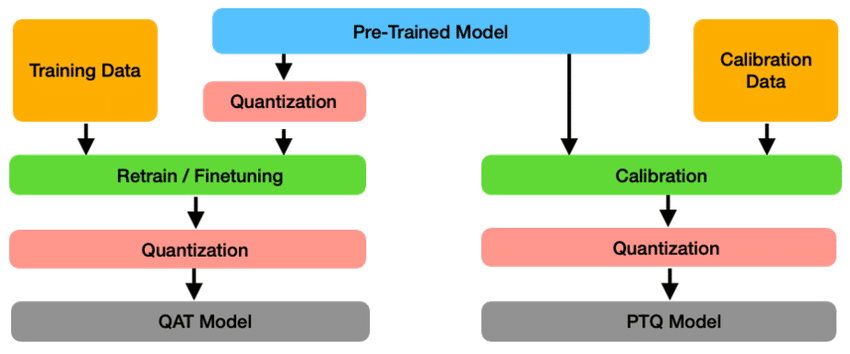
The running mechanism of QAT and PTQ
GPTQ, AWQ, and GGUF for Runtime
Choose the quantization format that matches your inference runtime. GPTQ, Activation-Aware Weight Quantization (AWQ), and GPT-Generated Unified Format (GGUF) all reduce model size and memory usage, but they target different deployment environments.
GPTQ targets fast inference on NVIDIA GPUs. It applies post-training quantization layer by layer, using calibration data to minimize quantization error while preserving model quality. GPTQ models work well for server deployments where GPU acceleration is available, making them a common choice for self-hosted inference services and machine learning workloads running on dedicated GPU hardware.
AWQ also targets GPU inference, but it uses activation patterns to identify and preserve the most important weights during the quantization process. This allows AWQ models to maintain high accuracy while delivering excellent inference speed on supported hardware. AWQ is the preferred format for cloud deployments using vLLM because it is faster than GPTQ on compatible systems.
GGUF serves a different purpose. It is optimized for local and edge inference with Ollama and llama.cpp, supporting modern K-quant and IQ-quant variants such as Q4_K_M, Q5_K_M, Q8_0, and IQ4_XS. If you are deploying on a Raspberry Pi, Mac Mini, Jetson, or other edge devices, GGUF is the correct choice.
A study by Local AI Master compares the performance of different quantization formats, presenting the results in a quantization scoreboard.
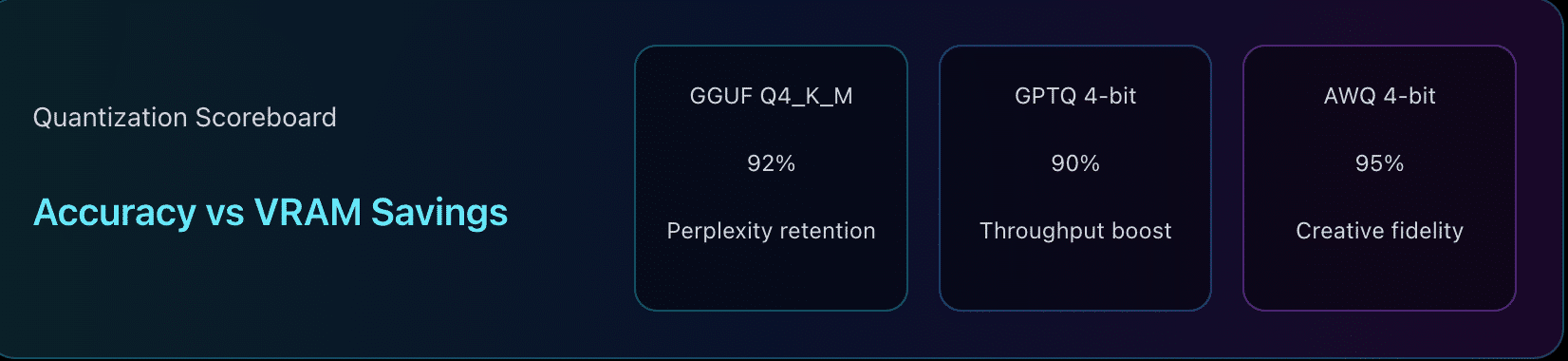
Quantization scoreboard between GGUF, GPTQ and AWQ
Understanding the Naming Convention
You can identify the right GGUF file by reading its name. Once you understand what each part of the naming convention represents, options such as Q4_0, Q4_K_M, Q5_K_M, Q6_K, Q8_0, and IQ4_XS become straightforward to compare.
The number immediately following the “Q” indicates the average number of bits used to store each model weight. Lower numbers reduce VRAM requirements and usually increase inference throughput, while higher numbers preserve more of the original model’s quality. In practice, Q4 is the default choice for most edge deployments because it delivers the best balance between memory usage and output quality. Q5, Q6, and Q8 progressively improve quality, but each step increases memory consumption.
The suffix identifies the quantization method. The K family represents modern mixed-precision quantization, with different layers of the model stored at different precision levels. Among these variants, Q4_K_M is the standard recommendation because it allocates more precision to quality-sensitive layers such as the attention matrices and output projection while keeping less sensitive layers at lower precision. This approach produces measurably better output than older uniform 4-bit formats without a significant increase in memory usage. Q4_K_S uses a slightly more aggressive compression strategy, while Q4_K_M remains the preferred default for most workloads.
The 0 suffix, as in Q4_0 or Q8_0, indicates symmetric quantization with no zero-point offset. Every weight receives the same number of bits, regardless of its importance to model quality. This design makes Q4_0 noticeably less accurate than Q4_K_M, even though both are nominally 4-bit formats. Unless Q4_K_M exceeds your available memory or is unavailable for your chosen model, you should avoid Q4_0 and select the K-quant version instead.
The IQ prefix stands for Importance-matrix Quantization. Instead of treating weights equally, IQ quantization uses an importance matrix to preserve the weights that contribute most to model quality. As a result, formats such as IQ4_XS can achieve similar quality to Q4_K_M while using even less memory. That advantage mainly applies to GPU inference. On Central Processing Unit (CPU)-only systems such as Raspberry Pi deployments, the additional dequantization overhead often offsets the memory savings, making K-quant the better choice.
Floating Point 16-bit (FP16) serves as the reference quality baseline rather than the default deployment format. It preserves the model without quantization loss, but its memory requirements place it beyond the practical limits of most edge devices, since it uses more bandwidth and energy. Unless you have abundant VRAM or are benchmarking model quality, Q4_K_M, Q5_K_M, or Q8_0 will provide a better balance of memory usage and inference performance.
The Trade-Off in VRAM, Throughput, and Quality
You should treat quantization as a resource allocation decision, because you cannot maximize VRAM efficiency, inference throughput, and output quality at the same time. Every quantization level occupies a different point on this curve. Lower-bit quantization reduces memory usage and increases inference speed, but it also discards more information from the original model. Higher-bit quantization preserves more of the original model’s quality, but it requires significantly more memory and delivers lower throughput. Your goal is not to choose the highest or lowest quantization level. Your goal is to choose the point that best matches your hardware and workload.
The trade-off becomes obvious when you compare the memory requirements of the same model. A 7-billion parameter (7B) model in FP16 format requires approximately 14 GB of VRAM, which immediately rules out most edge devices. The same model at Q4_K_M requires approximately 4 to 4.5 GB of VRAM while retaining approximately 97 to 99 percent of FP16 quality and delivering roughly two to three times the throughput. In practice, this is often the difference between a model that loads successfully and one that fails with an out-of-memory error. At the other end of the spectrum, Q8_0 remains effectively lossless, with perplexity staying within approximately 0.02 to 0.05 points of FP16, but it requires roughly twice the VRAM of Q4_K_M. That extra quality is valuable only if your hardware can accommodate it.
The research consistently places Q4_K_M at the sweet spot for edge deployment because it balances all three constraints better than any other widely used GGUF format. Going below Q4 saves additional memory, but the quality loss becomes increasingly noticeable, especially for coding, structured reasoning, and agentic workloads. Moving above Q4 improves output quality, but the additional VRAM requirement limits the hardware that can run the model efficiently. For most engineers using Ollama or llama.cpp, the question is whether the quality improvement justifies the additional memory cost on your hardware.
| Quantization level | Approximate VRAM (7B model) | Quality retention vs. FP16 |
| Q4_K_M | 4 to 4.5 GB | Approximately 97 to 99% |
| Q5_K_M | 6 to 7 GB | Higher than Q4_K_M |
| Q6_K | 7 to 9 GB | Higher than Q5_K_M |
| Q8_0 | Approximately twice the VRAM of Q4_K_M | Effectively lossless; within approximately 0.02 to 0.05 perplexity points of FP16 |
| FP16 | Approximately 14 GB | 100% |
Quantization trade-off for a 7B model
VRAM Tiers and the Right Quantization for Each
Your available VRAM should determine your quantization level. Once you know how much memory your hardware provides, you can narrow the options quickly. For most edge deployments, Q4_K_M remains the best default. As more VRAM becomes available, you can move to higher quantization levels that improve output quality, especially for precision-sensitive workloads. Hardware constraints also influence broader deployment choices, including agent design.
4 to 6 GB VRAM
If you are on the higher end of this bracket (6 GB), a 7B or 8B model at Q4_K_M fits within available memory. If you only have 4 GB, opt for a smaller model class (like 3B) at Q4_K_M rather than forcing a 7B model to fit or dropping to Q3 or Q2. A smaller model running at Q4_K_M almost always produces better results than a heavily compressed larger model because aggressive quantization introduces a much larger quality penalty.
8 to 12 GB VRAM
Q4_K_M remains the best choice for most workloads in this range. The additional VRAM gives you more flexibility to run larger models, increase context length, or move to higher quality quantization levels. If your primary workload involves coding, structured reasoning, or other precision-sensitive tasks, move to Q5_K_M. The additional memory cost is justified by the measurable improvement in output quality for these workloads.
12 to 16 GB VRAM
Move to Q5_K_M or Q6_K if your hardware provides between 12 and 16 GB of VRAM. Both formats improve quality over Q4_K_M, with the improvement becoming most noticeable for code generation, mathematical reasoning, and structured output. Research also shows that the quality gain from Q4_K_M to Q6_K is larger than the gain from Q6_K to Q8_0, making Q6_K an attractive option when you have enough memory but do not need the additional VRAM required by Q8_0.
16 to 24 GB VRAM
Q8_0 becomes the preferred choice once your hardware reaches this tier. It produces output that is effectively lossless, with perplexity remaining within approximately 0.02 to 0.05 points of FP16, while avoiding the substantial memory requirements of FP16 itself. If you regularly perform software development, complex reasoning, or other accuracy-sensitive tasks, this is the point where the additional VRAM produces measurable benefits.
24 GB VRAM and above
FP16 becomes practical on this class of hardware for models up to approximately 8B. Larger models such as 13B are typically deployed at Q8_0 even on 24 GB GPUs. If your goal is maximum model fidelity and memory is no longer the limiting factor, FP16 removes quantization loss entirely. For most edge deployments, however, the improvement over Q8_0 is small enough that many engineers still choose Q8_0 to reduce memory consumption while maintaining virtually identical output quality.
One recommendation remains consistent across every hardware tier. If your hardware can run either a larger model at Q4_K_M or a smaller model at Q8_0, choose the larger model. Research consistently shows that a larger model at Q4_K_M almost always outperforms a smaller model at Q8_0 on equivalent hardware because model capacity has a greater impact on output quality than small improvements in quantization.
| VRAM tier | Quantization | Typical supported model size | Task notes |
| 4 to 6 GB | Q4_K_M | 7B | Best balance of quality, memory, and throughput. Choose a smaller model if memory is insufficient. |
| 8 to 12 GB | Q4_K_M, Q5_K_M for coding | 7B to 13B | Q4_K_M for general inference. Q5_K_M for coding and structured reasoning. |
| 12 to 16 GB | Q5_K_M or Q6_K | 13B | Better quality for precision-sensitive workloads with manageable memory requirements. |
| 16 to 24 GB | Q8_0 | 13B and larger | Effectively lossless quality. Best for reasoning and software development tasks. |
| 24 GB and above | FP16 | Up to 8B (FP16) | Maximum model fidelity when memory is not a constraint. |
Recommended quantization by available VRAM
When to Deviate from Q4_K_M
You should stick with Q4_K_M unless your workload or hardware gives you a clear reason to choose something else. For general conversation, question answering, Retrieval-Augmented Generation (RAG), and agent tool calling, Q4_K_M works well. The trade-off changes when output precision becomes more important than memory efficiency or when your hardware cannot comfortably accommodate the model.
Coding and structured reasoning
Move to Q5_K_M or Q8_0 if you have enough VRAM, for workloads that require higher output precision. The quality difference between Q4_K_M and higher quantization levels is usually imperceptible for conversational tasks, but it becomes measurable for code generation, mathematical reasoning, structured output, and tasks that require consistent formatting. If your hardware has enough VRAM, the additional memory cost is worthwhile because it improves accuracy where small mistakes are more likely to affect downstream systems.
CPU-only systems with less than 4 GB of memory
Choose a smaller model instead of a more aggressively quantized version of a larger one. If a 7B model at Q4_K_M exceeds your available memory, moving to Q3 or Q2 may allow the model to load, but the reduction in quality is significant for agentic workloads. A 3B model at Q4_K_M will usually produce more reliable responses than a 7B model forced into Q3 or Q2 because it preserves more of the model’s learned capabilities. If your hardware cannot comfortably run the model at Q4_K_M, reduce the model size rather than the quantization level.
General chat and agent workloads
Stay with Q4_K_M for general conversational workloads. Q4_K_M is effectively imperceptible for everyday chat, question answering, RAG, and agent tool calling. For most production chatbots and on-device AI assistants, Q4_K_M delivers the best balance of response quality, throughput, and memory efficiency.
Choose the Right Format for Your Runtime
Use GGUF for local inference and Activation-Aware Weight Quantization (AWQ) for cloud serving. The quantization level you choose is only part of the deployment decision. You also need to select a model format that matches your inference runtime. Using the wrong format either prevents the model from loading or reduces inference performance.
If you are deploying with Ollama or llama.cpp on edge hardware, download the GGUF version of your model. GGUF is optimized for local inference and is the native format supported by both runtimes. It supports modern quantization methods such as Q4_K_M, Q5_K_M, Q6_K, and Q8_0, making it the standard choice for Raspberry Pi, Jetson Orin Nano, and Mac Mini M4. You do not need to convert models manually because Ollama can pull compatible GGUF models directly from its model library.
Use AWQ when serving models with vLLM in GPU-optimized cloud environments. AWQ is designed for high-throughput GPU inference and integrates with runtimes built for production serving. Attempting to load a GGUF model into vLLM results in a format mismatch or significantly lower throughput than native GGUF runtimes such as llama.cpp.
The rule is straightforward: Match the model format to the runtime. Use GGUF for Ollama and llama.cpp on local and edge hardware, and use AWQ for vLLM in cloud GPU deployments. Choosing the correct format ensures that the performance benefits of your selected quantization level are not lost because of an incompatible runtime.
Wrapping Up
Choose Q4_K_M unless your hardware or workload gives you a reason to do otherwise. It delivers the best balance of VRAM usage, inference throughput, and output quality for most edge deployments, making it the right default for Ollama and llama.cpp. Move to Q5_K_M or Q8_0 only when your hardware has enough VRAM and your application benefits from the additional precision, such as coding, structured reasoning, or other accuracy-sensitive tasks.
Quantization is only one layer of a successful edge deployment. Once you have selected the right model and GGUF file, you still need an efficient retrieval layer to power RAG and agent workflows. This becomes especially important on resource-constrained edge devices, where pairing models such as Gemma 2 with an edge-optimized vector database like Actian VectorAI DB enables fast, accurate retrieval while keeping latency and resource usage low.
Get started with Actian VectorAI DB Community Edition today. Check the documentation for deployment and usage instructions, and participate in the Discord community for support and discussions.
Frequently Asked Questions
Is Q4_K_M good enough for production agent workloads?
Yes. Q4_K_M retains approximately 97 to 99 percent of FP16 quality while using much less VRAM. It is a reasonable default for chatbots, RAG, and agent tool calling. If your workload focuses on code generation, mathematical reasoning, or structured output, move to Q5_K_M or Q8_0 (if your hardware has enough resources to accommodate it).
Should I use Q4_0 if Q4_K_M is unavailable?
Only if you have no alternative. Q4_K_M uses mixed-precision, allocating more bits to quality-sensitive layers such as attention matrices and output projection. Q4_0 uses older uniform 4-bit quantization, which produces measurably lower quality. Whenever both options are available, choose Q4_K_M.
What happens if I go below Q4?
Dropping to Q3 or Q2 reduces memory usage, but the quality loss becomes noticeable. While these formats may allow a larger model to fit into limited memory, they often produce weaker reasoning, poorer instruction following, and less reliable agent behavior. If Q4_K_M does not fit, choosing a smaller model is usually a better decision than using Q3 or Q2.
Common Problems
Model throws an out-of-memory error at Q4_K_M
Check whether your hardware has enough available VRAM for both the model and its context window. If memory is still insufficient, choose a smaller model rather than dropping below Q4. This approach preserves output quality more effectively than aggressive quantization.
Throughput is lower than expected
Verify that your runtime is using GPU acceleration instead of falling back to the CPU. If GPU acceleration is unavailable, confirm that the required drivers and runtime configuration are correctly installed before lowering the quantization level.
Output quality is poor on reasoning tasks
If your workload involves code generation, mathematical reasoning, or structured output, upgrade from Q4_K_M to Q5_K_M or Q8_0 if your hardware has enough VRAM. Research shows these higher quantization levels provide measurable quality improvements for precision-sensitive tasks.

Stay connected
Data insights delivered to you.
(i.e. sales@..., support@...)
