
Build a Local AI Agent on a Raspberry Pi 5 With VectorAI DB


Key Takeaways
- A Raspberry Pi 5 can run a fully local AI agent with Ollama and Actian VectorAI DB while keeping memory persistent across restarts.
- The agent uses Qwen 2.5 1.5B for responses, nomic-embed-text for embeddings, and VectorAI DB for semantic memory retrieval.
- On the test Pi, relevant memories were retrieved in 1.8 ms while local model inference took 3.6 seconds.
- VectorAI DB returned top-five results from 100,000 vectors with p99 retrieval latency under 5 ms on the tested hardware.
- NVMe storage, active cooling, and sufficient power help the Pi sustain local AI workloads, while larger models and multi-agent systems may require stronger hardware.
If you’re building an agent on a Raspberry Pi, it needs to remember past sessions after a process restart, reboot, power cycle, or crash. For the greenhouse monitor in this tutorial, that means retrieving a sensor reading from last week when you ask about it today.

The memory layer also needs to work within the Pi’s hardware limits. Some databases slow down as the collection grows. Others require a separate server process that uses RAM alongside Ollama. We also need to know how retrieval latency changes as the agent’s memory grows from 10,000 to 100,000 vectors. We tested this on a Raspberry Pi 5.
$ uv run agent.py
Agent ready on Raspberry Pi 5 Model B Rev 1.1, 8 GB RAM | LLM: qwen2.5:1.5b | 2 memories in VectorAI DB. Ctrl+C to quit.

you> Which greenhouse sensor was reading high, and what was going on in zone B?

agent> The greenhouse sensor 3 was reading 41 degrees, indicating a high temperature. In zone B, the irrigation pump was switched off for maintenance.
Both facts came from an earlier session, and we restarted the database in between. Actian’s VectorAI DB found them in 1.8 ms, and Qwen 2.5 1.5B answered in 3.6 seconds on the Pi’s CPU, with no cloud API.
The hardware is a Raspberry Pi 5 8GB with an NVMe SSD and the official Active Cooler. Ollama runs the model, and Actian VectorAI DB keeps the agent’s memory on disk. The agent stores what you tell it as vectors, searches them when you ask a question, and passes the relevant ones back to the model.
By the end of this tutorial, you will have this agent running on your own Pi 5, with memory that survives restarts. You’ll also have a benchmark showing how retrieval latency changes as the collection grows from 1,000 to 100,000 vectors.
Prerequisites
- Raspberry Pi 5 8GB with a PCIe NVMe HAT, NVMe SSD, official Active Cooler, and the official 27W USB-C power supply.
- Raspberry Pi OS 64-bit (Trixie).
- Docker with the Compose plugin (
curl -fsSL https://get.docker.com | sh), and your user in the docker group (sudo usermod -aG docker “$USER”, then log out and back in). - uv, the Python package manager (Step 3 installs it). It installs a compatible Python 3.11+ for you if your system doesn’t have one.
- A VectorAI DB license or 30-day trial. The free Community edition caps collections below 5,000 vectors. That is plenty for this tutorial, but the 10K and 100K benchmark runs need the license.
- All code is in the GitHub repo. Clone it and run
./setup.sh, which covers Steps 1 to 5 except the memory-limit reboot, then skip to Step 6.
What You are Building
The setup runs on the Pi: two Docker containers and one Python script.
Ollama runs two models in a Docker container capped at 4GB. qwen2.5:1.5b generates answers. nomic-embed-text turns text into 768-dimensional vectors. With both loaded, Ollama used 1.58 GiB on the test board.
Actian VectorAI DB runs in a second container capped at 2GB. It stores each user message as a vector in an HNSW (Hierarchical Navigable Small World) index and writes to a local SSD volume, so memory survives restarts. It used 125 MiB with small collections.
agent.py connects them in under 100 lines with no agent framework. It calls Ollama over HTTP with requests and talks to VectorAI DB through the official Python SDK.
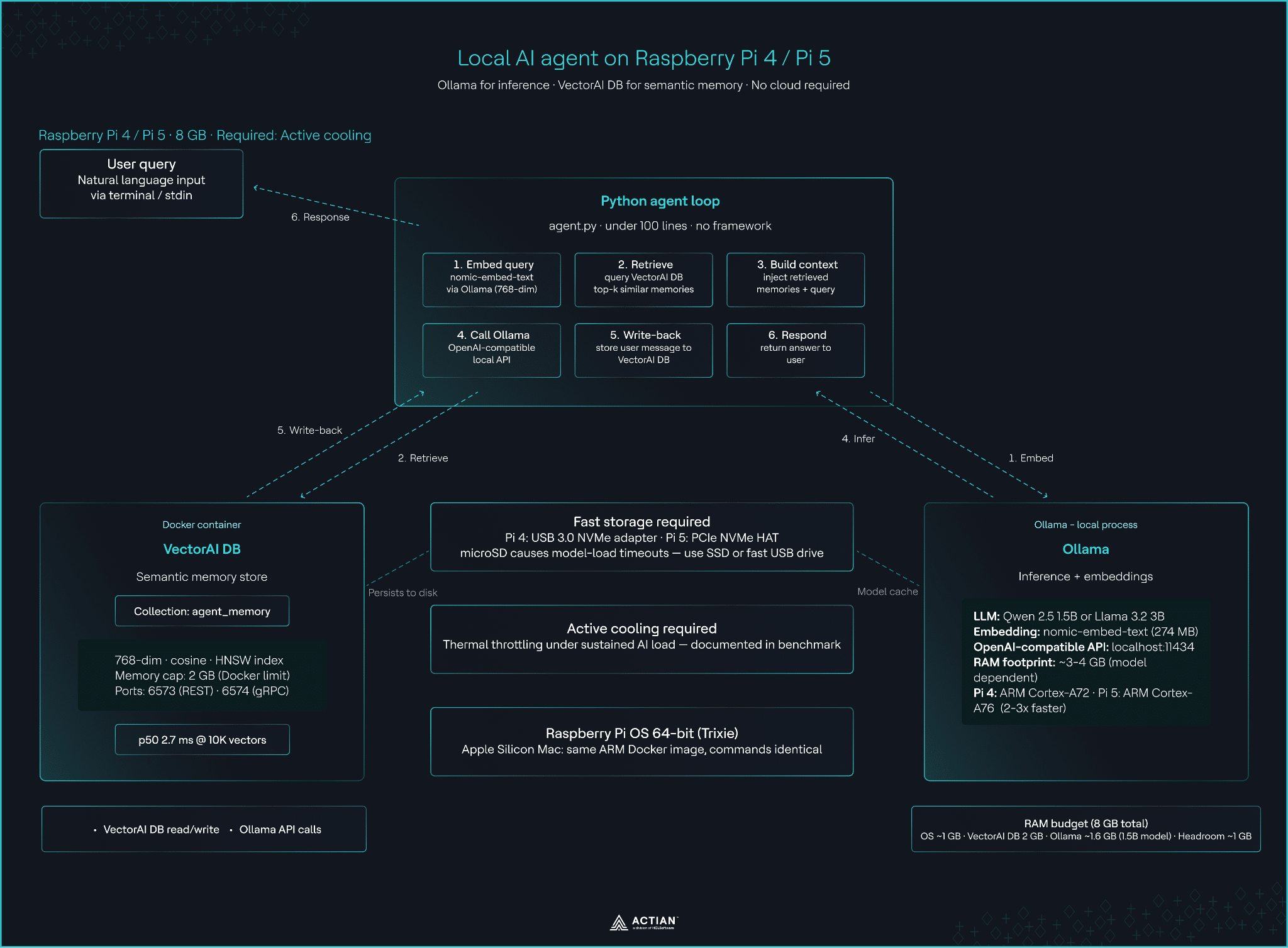
Architecture diagram. You ask a question. The agent embeds it, retrieves related memories from VectorAI DB, injects them into the prompt, calls Qwen 2.5 1.5B through Ollama, and stores your message back in VectorAI DB. The entire stack runs on the board
Hardware You Will Need
Use an 8GB Pi 5 with NVMe storage and active cooling. Each part below fixes a failure you would otherwise hit.
| Part | What you need |
| Board | Raspberry Pi 5, 8GB |
| Storage | NVMe SSD on a PCIe HAT |
| Cooling | Official Active Cooler or equivalent |
| Power | Official 27W USB-C supply |
| OS | Raspberry Pi OS 64-bit (Trixie) |
RAM. With both models loaded, the stack used 2.38 GiB in total: about 630 MB for the OS, 1.58 GiB for Ollama, 125 MiB for VectorAI DB (179 MiB right after a restart), and the rest for the agent process. A 4GB board might run this exact setup, but we didn’t test it.
NVMe. The test Pi boots from microSD and keeps only the model and vector data on the NVMe. From a warm cache, qwen2.5:1.5b reloaded in 3.1 seconds and nomic-embed-text in 0.26 seconds. Right after a reboot, Qwen took 4.4 seconds to load. The Pi 5 runs PCIe at Gen 2 by default. The benchmark ran at Gen 3, which you enable with one line.
echo "dtparam=pciex1_gen=3" | sudo tee -a /boot/firmware/config.txt
sudo reboot
Cooling. During the 100K benchmark, the SoC went from 46.6°C to 68.6°C and vcgencmd get_throttled reported 0x0 before and after, so the CPU never throttled. In an earlier 100K run, the SoC peaked at 77.4°C with the fan at 8,731 RPM. The Pi 5 starts throttling its CPU at 80°C, so a passive heatsink would likely cross the threshold. An early run on a weaker power supply showed 0x50000 (undervoltage); the official 27W supply fixed it.
No Pi: An Apple Silicon Mac runs the same arm64 images and every command here. Your latency numbers will be lower, so do not compare them directly with the Pi results.
Step 1: Start VectorAI DB and Ollama
Enable memory limits first. Raspberry Pi OS boots with the memory cgroup disabled, so Docker silently ignores mem_limit until you turn it on:
sudo sed -i '1 s/$/ cgroup_enable=memory/' /boot/firmware/cmdline.txt
sudo reboot
After the reboot, docker info should no longer warn No memory limit support.
Create the project directory:
mkdir -p pi5-vectorai-agent && cd pi5-vectorai-agent
mkdir -p data ollama results
sudo chown 999:999 data     # VectorAI DB runs as UID 999 and crash-loops on a root-owned mount
Save this as:docker-compose.yml
services:
  vectorai:
    image: actian/vectorai:latest
    container_name: vectorai
    # the licence is tied to the host identity; a fixed hostname keeps it valid when the container is recreated
    hostname: vectorai
    ports:
      - "6573:6573" # REST
      - "6574:6574" # gRPC
    volumes:
      # vector data persists across restarts
      - ./data:/var/lib/actian-vectorai
    environment:
      - VECTORAI_LOG_LEVEL=info
      - ACTIAN_VECTORAI_ACCEPT_EULA=YES
    mem_limit: 2g
    restart: unless-stopped

  ollama:
    image: ollama/ollama:latest
    container_name: ollama
    ports:
      - "11434:11434"
    volumes:
      - ./ollama:/root/.ollama
    mem_limit: 4g
    restart: unless-stopped
Start both services:
docker compose up -d
docker ps
Both containers should show Up. VectorAI DB takes about 15 seconds to finish starting. If you want to add a license, do it now. Recreating the container later (for example with --force-recreate) invalidates it.
Step 2: Pull the Models
qwen2.5:1.5b is about 1.1 GB and nomic-embed-text about 274 MB:
docker exec ollama ollama pull qwen2.5:1.5b
docker exec ollama ollama pull nomic-embed-text
Pulling only downloads the models. Ollama loads each one into RAM on first use and keeps it loaded for five minutes after the last request (Ollama’s default), so the first message after a pause takes longer.
Step 3: Install Python Dependencies
This project uses uv, which manages the virtual environment and installs a compatible Python for you. Install it:
curl -LsSf https://astral.sh/uv/install.sh | sh
source $HOME/.local/bin/env
Save this as pyproject.toml in the project directory:
[project]

name = "pi5-vectorai-agent"
version = "0.1.0"
description = "Offline AI agent with semantic memory on a Raspberry Pi 5: Ollama + Actian VectorAI DB"
requires-python = ">=3.11"
# uv run agent.py reads this, creates .venv and installs these on first run
dependencies = [
    "requests",                # Ollama's HTTP API
    "actian-vectorai-client",  # VectorAI DB client (gRPC); brings numpy, protobuf, grpcio
    "numpy",                   # benchmark vectors
    "matplotlib",              # benchmark chart only
]
Then create the environment:
uv syncuv sync reads pyproject.toml, creates .venv, and installs the four packages. From here on, start each Python command with uv run; there’s no environment to activate. numpy and matplotlib are only for the benchmark and chart.
Step 4: Smoke Test Both Services
Confirm both services respond before writing agent code:
uv run python -c 'from actian_vectorai import VectorAIClient

with VectorAIClient("localhost:6574") as c: print(c.health_check())'


curl -s http://localhost:11434/api/embed \
  -d '{"model":"nomic-embed-text","input":"hello"}' | head -c 120

curl -s http://localhost:11434/api/generate \
  -d '{"model":"qwen2.5:1.5b","prompt":"Say hi in five words.","stream":false}'
{'title': 'Actian VectorAI DB', 'version': 'Actian VectorAI DB 1.0.2 / VDE 1.0.2'}

{"model":"nomic-embed-text","embeddings":[[0.017874617,-0.0058246492,-0.17537898,...

{"model":"qwen2.5:1.5b",...,"response":"Hello there!","done":true,...}
Check RAM with both models loaded:
docker stats --no-stream --format "{{.Name}}: {{.MemUsage}}"On the test board:
ollama: 1.58GiB / 4GiB
vectorai: 125MiB / 2GiB
If the limit column shows your total RAM instead of 4GiB and 2GiB, the cgroup change from Step 1 did not apply.
Step 5: Create the Memory Collection
Create a collection sized for nomic-embed-text‘s 768-dimensional vectors:
uv run python - <<'EOF'

from actian_vectorai import VectorAIClient, VectorParams, Distance
with VectorAIClient("localhost:6574") as client:

    client.collections.create(

        "agent_memory",

        vectors_config=VectorParams(size=768, distance=Distance.Cosine),

    )

EOF
This step is optional; the agent creates the collection on first run. Running it now confirms the database accepts writes. (setup.sh does the same thing over the REST API on port 6573.)
Step 6: Build the Agent
Save this as agent.py:
Save this as agent.py:
"""Local AI agent with semantic memory: Ollama (Qwen 2.5 1.5B) + Actian VectorAI DB."""

import os

import sys

import time

import requests

from actian_vectorai import Distance, PointStruct, VectorAIClient, VectorParams

OLLAMA = "http://localhost:11434"

VECTORAI = "localhost:6574"

CHAT_MODEL = "qwen2.5:1.5b"

EMBED_MODEL = "nomic-embed-text"

EMBED_DIM = 768            # nomic-embed-text output size

COLLECTION = "agent_memory"

TOP_K = 3

MIN_SCORE = 0.6            # unrelated memories score ~0.3-0.55 with nomic-embed-text, related ones 0.7+


def embed(text: str) -> list[float]:

    r = requests.post(f"{OLLAMA}/api/embed", json={"model": EMBED_MODEL, "input": text}, timeout=60)

    r.raise_for_status()

    return r.json()["embeddings"][0]


def chat(messages: list[dict]) -> str:

    # Ollama exposes an OpenAI-compatible endpoint, so any OpenAI client works here too

    r = requests.post(f"{OLLAMA}/v1/chat/completions", timeout=300,

                      json={"model": CHAT_MODEL, "messages": messages, "temperature": 0.3})

    r.raise_for_status()

    return r.json()["choices"][0]["message"]["content"]


# Tell the model what it runs on, so "what hardware is this?" gets a real answer

MODEL_FILE = "/proc/device-tree/model"

BOARD = open(MODEL_FILE).read().strip("\x00\n ") if os.path.exists(MODEL_FILE) else "unknown board"

HARDWARE = f"{BOARD}, {os.sysconf('SC_PAGE_SIZE')  os.sysconf('SC_PHYS_PAGES') / 1024*3:.0f} GB RAM"


def step(db: VectorAIClient, user_msg: str) -> str:

    # 1. Embed the incoming query on the Pi CPU

    t0 = time.perf_counter()

    qvec = embed(user_msg)

    t1 = time.perf_counter()

    # 2. Retrieve the closest past exchanges from VectorAI DB (HNSW index)

    hits = db.points.search(COLLECTION, vector=qvec, limit=TOP_K, with_payload=True)

    t2 = time.perf_counter()

    memories = [h.payload["text"] for h in hits if h.score >= MIN_SCORE]

    # 3. Inject retrieved memories into the system prompt, labelled as past notes

    #    so a small model doesn't mistake them for the current message

    context = "\n".join(f"- {m}" for m in memories) or "- (none)"

    messages = [

        {"role": "system", "content": f"You are a helpful assistant running fully offline on {HARDWARE} "

         f"with {CHAT_MODEL} via Ollama and Actian VectorAI DB for memory.\n"

         "Every message the user sends is saved to your memory automatically. If the user tells you "

         "a fact, confirm in one sentence that you will remember it.\n"

         "Answer in 1-3 sentences. Only use the notes below if they help answer the current message.\n\n"

         "Notes from earlier conversations:\n" + context},

        {"role": "user", "content": user_msg},

    ]


    # 4. Local inference through Ollama

    answer = chat(messages)

    t3 = time.perf_counter()


    # 5. Write the user's message back so future sessions can recall it. Only the user's

    #    side is stored: the facts come from the user, and storing the model's own replies

    #    would feed any wrong answer back into later prompts. The query vector is reused.

    db.points.upsert(COLLECTION, [PointStruct(

        id=time.time_ns() // 1000,  # microsecond timestamp as a unique integer ID

        vector=qvec,

        payload={"text": f"User said: {user_msg}", "ts": time.time()},

    )])

    t4 = time.perf_counter()


    print(f"
")

    return answer


def main() -> None:

    with VectorAIClient(VECTORAI) as db:

        if db.collections.exists(COLLECTION):

            # VectorAI DB keeps collections on disk but only loads them when opened;

            # without this, search and count fail after every DB restart

            db.vde.open_collection(COLLECTION)

        else:

            db.collections.create(COLLECTION, vectors_config=VectorParams(size=EMBED_DIM, distance=Distance.Cosine))

        print(f"Agent ready on {HARDWARE} | LLM: {CHAT_MODEL} | "

              f"{db.points.count(COLLECTION)} memories in VectorAI DB. Ctrl+C to quit.")

        if len(sys.argv) > 1:  # one-shot mode: python agent.py "your question"

            print(step(db, " ".join(sys.argv[1:])))

            return

        try:  # Ctrl+C quits cleanly, even mid-answer

            while True:

                user_msg = input("\nyou> ").strip()

                if user_msg:

                    print(f"agent> {step(db, user_msg)}")

        except (EOFError, KeyboardInterrupt):

            print()


if name == "__main__":

    main()
Each turn runs five stages:
Embed. nomic-embed-text converts your message to a 768-dimensional vector on the Pi’s CPU, in about 80 ms once the model is warm. The same vector is reused for write-back, so each message costs one embedding.
Retrieve. VectorAI DB returns the three stored messages closest to your question, each with a similarity score higher means closer. The agent keeps only the ones scoring 0.6 or higher. On the test Pi, messages on the same topic as the question scored 0.7 or higher, and unrelated ones scored between 0.3 and 0.55, so 0.6 sits in the gap between them. When you ask a general-knowledge question that nothing in memory relates to, the agent passes no memories to the model.
Inject. Memories go into the system prompt under the label “Notes from earlier conversations.” A 1.5B model needs that label. Without it, small models mistake old notes for the current message.
Generate. The prompt goes to Ollama’s OpenAI-compatible /v1/chat/completions endpoint. Capping answers at one to three sentences keeps CPU inference time predictable. Qwen 2.5 1.5B ran at 12.1 tokens per second, identical across three runs.
Store. Only your message is saved, never the model’s reply, so a wrong answer cannot feed back into later prompts. The ID is a microsecond timestamp, which keeps entries unique without an ID generator.
Run it:
uv run agent.pyPersistence. Memory survives restarts because VectorAI DB writes to ./data on the SSD. After a database restart, a collection stays on disk but is not loaded until the application opens it, which is why main() calls db.vde.open_collection(). Without that call, search and count fail after every restart. To test it, tell the agent a fact, quit, run docker compose restart vectorai, start the agent again, and ask about it.
For how agents store, rank, and expire memory, read What Is Agent Memory? Architecture and Deployment Patterns.
The Benchmark
On the test Pi 5, VectorAI DB returned top-5 results from 100,000 vectors in 4.17 ms at p50 and 4.98 ms at p99. Here is how to reproduce it.
Method
- Hardware: Raspberry Pi 5 Model B Rev 1.1, 8GB; boots from microSD; Kingston NV3 500 GB (SNV3SM3500G) NVMe on a Raspberry Pi M.2 HAT+ (SC1166) at PCIe Gen 3 (8.0 GT/s) holding
data/andollama/; official Active Cooler; Raspberry Pi OS 64-bit (Trixie), kernel 6.18.50+rpt-rpi-2712; VectorAI DB 1.0.2 capped at 2GB; Ollama running with both models loaded. - Corpus sizes: 1,000, 10,000, and 100,000 vectors, each in a fresh collection. The 10K and 100K runs used a licensed instance.
- Vectors: 768 dimensions, unit-normalized, cosine distance, VectorAI DB’s default HNSW parameters.
- Queries: 10 warm-up searches, then 100 timed top-5 searches per corpus size.
The vectors are synthetic random unit vectors, not real text embeddings. Real embeddings cluster by topic, which is easier for HNSW to search, so these numbers are a conservative bound on what you would see in production.
benchmark.py loads each corpus in batches of 500, times the searches, and writes a CSV that also records the board, RAM, storage device, end temperature, and throttle state:
"""Retrieval latency benchmark for VectorAI DB on Raspberry Pi 5.

Loads 1K / 10K / 100K vectors (768-dim, same size as nomic-embed-text), runs

100 timed top-k searches per corpus size, and writes p50/p95/p99 to CSV.

Vectors are synthetic (random, unit-normalized) so the 100K load finishes in

minutes instead of hours of on-device embedding. Random vectors are a harder

case for HNSW than real text embeddings, so treat these numbers as conservative.
The free Community edition caps the server at 5,000 vectors; without a licence

run it with --sizes 1000 2000 4000.


Usage: python benchmark.py [--sizes 1000 10000 100000] [--queries 100]

"""

import argparse

import csv

import platform

import statistics

import subprocess

import time

from pathlib import Path


import numpy as np

from actian_vectorai import Distance, PointStruct, VectorAIClient, VectorParams


DIM = 768

TOP_K = 5

BATCH = 500

WARMUP = 10


def hardware() -> dict:

    def read(path: str) -> str:

        try:

            return Path(path).read_text().strip("\x00\n ")

        except OSError:

            return "unknown"


    def cmd(*args: str) -> str:

        try:

            return subprocess.run(args, capture_output=True, text=True, timeout=5).stdout.strip()

        except (OSError, subprocess.SubprocessError):

            return "unknown"


    mem_kb = next((line.split()[1] for line in read("/proc/meminfo").splitlines() if line.startswith("MemTotal")), "0")

    # ask Docker where the vectorai container keeps its data, so the CSV names the drive

    # the database actually writes to (the NVMe), wherever this script was cloned

    data_dir = cmd("docker", "inspect", "-f", '{{range .Mounts}}{{if eq .Destination "/var/lib/actian-vectorai"}}'

                   '{{.Source}}{{end}}{{end}}', "vectorai") or str(Path(__file__).resolve().parent / "data")

    return {

        "board": read("/proc/device-tree/model"),

        "arch": platform.machine(),

        "kernel": platform.release(),

        "ram_gb": round(int(mem_kb) / 1024 / 1024, 1),

        "storage": cmd("findmnt", "-no", "SOURCE", "-T", data_dir) or "unknown",

        # vcgencmd prints "temp=48.3'C" / "throttled=0x0"; keep only the value

        "temp": cmd("vcgencmd", "measure_temp").split("=")[-1],

        "throttled": cmd("vcgencmd", "get_throttled").split("=")[-1],  # 0x0 means no throttling since boot

    }


def unit_vectors(n: int, rng: np.random.Generator) -> np.ndarray:

    v = rng.standard_normal((n, DIM)).astype(np.float32)

    return v / np.linalg.norm(v, axis=1, keepdims=True)


def load(db: VectorAIClient, name: str, n: int, rng: np.random.Generator) -> float:

    if db.collections.exists(name):

        db.collections.delete(name)

    db.collections.create(name, vectors_config=VectorParams(size=DIM, distance=Distance.Cosine))

    t0 = time.perf_counter()

    for start in range(0, n, BATCH):

        vecs = unit_vectors(min(BATCH, n - start), rng)

        db.points.upsert(name, [

            PointStruct(id=start + i, vector=v.tolist(), payload={"i": start + i})

            for i, v in enumerate(vecs)

        ])

    return time.perf_counter() - t0


def measure(db: VectorAIClient, name: str, queries: int, rng: np.random.Generator) -> list[float]:

    qs = unit_vectors(queries + WARMUP, rng).tolist()

    for q in qs[:WARMUP]:  # first searches load the collection into memory

        db.points.search(name, vector=q, limit=TOP_K)

    lat = []

    for q in qs[WARMUP:]:

        t0 = time.perf_counter()

        db.points.search(name, vector=q, limit=TOP_K)

        lat.append((time.perf_counter() - t0) * 1000)

    return lat


def pct(values: list[float], p: float) -> float:

    return float(np.percentile(values, p))


def main() -> None:

    ap = argparse.ArgumentParser()

    # Community edition (no licence) is capped at 5K vectors: use --sizes 1000 2000 4000

    ap.add_argument("--sizes", type=int, nargs="+", default=[1_000, 10_000, 100_000])

    ap.add_argument("--queries", type=int, default=100)

    ap.add_argument("--host", default="localhost:6574")

    ap.add_argument("--out", default="results/benchmark.csv")

    ap.add_argument("--keep", action="store_true", help="keep benchmark collections afterwards")

    args = ap.parse_args()


    hw = hardware()

    print("Hardware:", ", ".join(f"{k}={v}" for k, v in hw.items()))

    rng = np.random.default_rng(42)

    rows = []


    with VectorAIClient(args.host) as db:

        for n in args.sizes:

            name = f"bench_{n}"

            print(f"\n== {n:,} vectors ==")

            load_s = load(db, name, n, rng)

            print(f"  loaded in {load_s:.1f} s ({n / load_s:,.0f} vectors/s)")

            lat = measure(db, name, args.queries, rng)

            row = {

                "vectors": n, "dim": DIM, "top_k": TOP_K, "queries": len(lat),

                "p50_ms": round(pct(lat, 50), 2), "p95_ms": round(pct(lat, 95), 2),

                "p99_ms": round(pct(lat, 99), 2), "mean_ms": round(statistics.mean(lat), 2),

                "max_ms": round(max(lat), 2), "load_s": round(load_s, 1),

            }

            rows.append(row)

            print(f"  p50 {row['p50_ms']} ms | p95 {row['p95_ms']} ms | p99 {row['p99_ms']} ms")

            if not args.keep:

                db.collections.delete(name)


    hw_after = hardware()

    out = Path(args.out)

    out.parent.mkdir(parents=True, exist_ok=True)

    with out.open("w", newline="") as f:

        w = csv.DictWriter(f, fieldnames=list(rows[0]) + ["board", "ram_gb", "storage", "temp_end", "throttled_end"])

        w.writeheader()

        for r in rows:

            w.writerow({**r, "board": hw["board"], "ram_gb": hw["ram_gb"], "storage": hw["storage"],

                        "temp_end": hw_after["temp"], "throttled_end": hw_after["throttled"]})

    print(f"\nWrote {out}. End state: temp={hw_after['temp']}, throttled={hw_after['throttled']}")


if name == "__main__":

    main()
Run it, then draw the chart:
uv run benchmark.py                          # licensed: 1K / 10K / 100K

uv run benchmark.py --sizes 1000 2000 4000   # Community edition

uv run plot_benchmark.py                     # writes results/benchmark.png
Results
| Vectors | p50 (ms) | p95 (ms) | p99 (ms) | Load time |
| 1,000 | 2 | 1.97 | 2.01 | 0.4 s |
| 10,000 | 3 | 3.12 | 3.47 | 28.7 s |
| 100,000 | 4 | 4.75 | 4.98 | 526 s (8.8 min) |
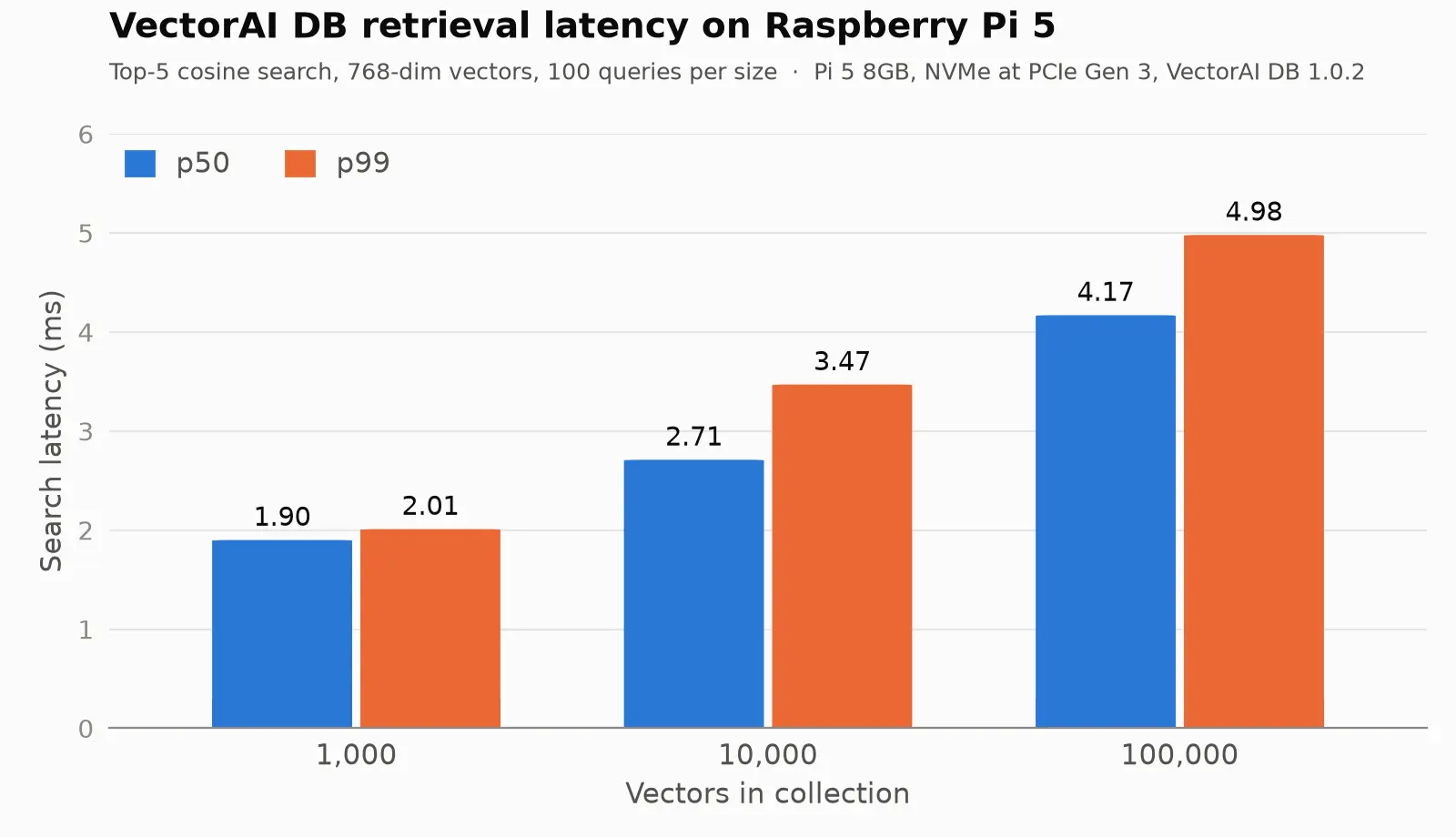
p50 and p99 latency vs. corpus size (results/benchmark.png)
Get VectorAI DB Community Edition and run the same benchmark on your own board.
A 100x larger corpus raised p50 latency from 1.90 to 4.17 ms, a 2.2x increase, and p99 stayed under 5 ms. These numbers are from a board running PCIe Gen 3 (enabled in the “On NVMe” section above). The benchmark was not run at Gen 2, where load times in particular may be longer. Loading 100,000 vectors took 526 seconds, about 190 vectors per second, a one-time cost; the agent adds one memory at a time in 6 ms. The SoC went from 46.6°C to 68.6°C over the run, and vcgencmd get_throttled reported 0x0 before and after.
For your agent, retrieval is not the bottleneck. In the opening demo, search took 1.8 ms, embedding 83 ms, and inference 3.6 seconds. Nearly all of the wait is the language model.
When You Hit the Pi’s Limits
A Pi 5 runs one agent with a 1.5B model well. Past that, move inference off the board.
What the Pi handles poorly:
- Multi-agent setups. Two agents sharing one Qwen instance take turns, so response time roughly doubles.
- Larger models. A 7B model at 4-bit quantization needs about 4.5GB for weights alone, more than the 4GB Ollama cap.
- Vision tasks. Multimodal models are larger and slower, too slow on a Pi CPU for an interactive loop.
Trade-offs to know before you build:
- The Python SDK speaks gRPC. Agent code goes through the official Python or JavaScript SDK on port 6574. The REST API on port 6573 handles setup and licensing.
- The 2GB cap is below Actian’s general guidance. The install guide lists 8GB RAM for a typical deployment. On the test Pi, the container stayed far under the cap at small corpus sizes; usage at 100K vectors was not measured.
- The Community edition caps collections below 5,000 vectors. Each message you send adds one, so a busy agent reaches the cap within weeks. The 30-day trial removes it.
- Questions are stored too. The agent saves every message, including questions. Over months, a past question can outrank the fact you need for one of the three retrieval slots. For a long-lived agent, store only statements, or tag messages and filter at retrieval.
When to move to Jetson Orin. For production deployments with multiple cameras, 7B+ models, or several concurrent agents, a Jetson Orin adds a GPU and more memory in a similar edge footprint. VectorAI DB runs there on the same arm64 image and API, so your agent code does not change.
Use the Pi as a retrieval node. Use the Pi as a retrieval node. Keep VectorAI DB on the Pi and send the model calls to a stronger machine on your network by changing one constant in agent.py:
OLLAMA = "http://192.168.1.50:11434" # inference box on your LANThis moves both embedding and inference to that machine. On it, start Ollama with OLLAMA_HOST=0.0.0.0 so it accepts connections from the Pi, and pull both models there. Memory and retrieval stay on the device near your sensors, and nothing leaves your network.
Conclusion
The agent built in this tutorial does something most local LLM setups do not. When it answered the greenhouse question in the opening demo, both facts came from a session that had ended and whose database had been restarted between the two runs. Retrieval took 1.8 milliseconds.
That result comes from three decisions working together: run the models locally so nothing leaves the board, store memory as vectors so retrieval is semantic rather than exact-match, and use VectorAI DB as the memory layer so that storage persists across restarts and scales to 100,000 entries without a code change.
The same arm64 image and the same API run on a Jetson Orin or an on-premises server. Your agent.py does not change when you move there. The only line that changes is OLLAMA, if you want to split inference off the Pi onto a stronger machine on your LAN. Sign up for VectorAI DB Community Edition, read the Docker install guide, and join the Actian community on Discord to see what others are building on edge hardware.
FAQ
Can a Raspberry Pi 5 run a full AI agent locally?
Yes. A Raspberry Pi 5 with 8GB of RAM runs a complete agent with no cloud connection. Ollama serves Qwen 2.5 1.5B on the CPU, nomic-embed-text turns messages into vectors, and VectorAI DB stores long-term memory. On the test board, the agent retrieved relevant memories in 1.8 ms and answered in 3.6 seconds; Qwen runs at 12.1 tokens per second on this board. Use NVMe storage, active cooling, and the official 27W power supply to keep performance steady under sustained load.
What vector database works best on a Raspberry Pi?
For this build, Actian VectorAI DB is a strong fit. It supports arm64, persists data to disk, and uses HNSW for approximate nearest-neighbor search. On the Raspberry Pi 5, it returned the top five results from 100,000 vectors in 4.12 ms at p50 under a 2GB memory cap. Its local persistence also lets the agent’s memory survive database restarts.
Is VectorAI DB supported on ARM hardware?
Yes. The official actian/vectorai Docker image ships for both amd64 and arm64, so docker pull actian/vectorai:1.0.2 fetches a native build on a Pi 5, an NVIDIA Jetson, or an Apple Silicon Mac, with no emulation. The same Python and JavaScript SDKs and API work on every platform, so code you write on a laptop runs unchanged on edge hardware.

Stay connected
Data insights delivered to you.
(i.e. sales@..., support@...)
