

Build an Offline Visual Defect Search System With CLIP and VectorAI DB



Key Takeaways
- CLIP and Actian VectorAI DB let manufacturers search defect images by text or photo while keeping the entire workflow offline.
- CLIP converts images and text into a shared vector space, while VectorAI DB stores those vectors with searchable defect metadata.
- Metadata filtering lets teams restrict results by part category or defect status during search instead of filtering results afterward.
- FAISS delivers faster raw search at small scale, while VectorAI DB adds durable storage, metadata filtering, and multi-machine access.
- For industrial deployments, encoding throughput is often the bigger constraint than vector storage or database search latency.
Manufacturing plants often keep years of defect photographs with no way to search them. When a part comes off the line with an unfamiliar mark, someone has to open folders and look. CLIP turns images and text into vectors you can compare. Actian VectorAI DB stores and searches those vectors. Together, they replace folder searches and run offline on hardware inside the plant.

A quality engineer can type a description or hand the system a photograph of the new defect. Both examples below run against the MVTec AD defect dataset.
Searching by description:
$ uv run query.py --text "surface scratch on metal component" --part-category metal_nut

Text query: "surface scratch on metal component"  [part_category=metal_nut]
  score  category     defect           path
 0.2814  metal_nut    scratch          ./mvtec_ad/metal_nut/test/scratch/003.png
 0.2691  metal_nut    scratch          ./mvtec_ad/metal_nut/test/scratch/011.png
 0.2607  metal_nut    color            ./mvtec_ad/metal_nut/test/color/007.png
 0.2588  metal_nut    scratch          ./mvtec_ad/metal_nut/test/scratch/000.png
 0.2470  metal_nut    bent             ./mvtec_ad/metal_nut/test/bent/014.png

encode 18.4 ms | search 2.1 ms | total 20.5 ms
Searching by photograph:
$ uv run query.py --image ./line_capture_0412.png --defect-only

Image query: ./line_capture_0412.png  [is_defect=true]
  score  category     defect           path
 0.8912  hazelnut     crack            ./mvtec_ad/hazelnut/test/crack/006.png
 0.8744  hazelnut     crack            ./mvtec_ad/hazelnut/test/crack/002.png
 0.8593  hazelnut     print            ./mvtec_ad/hazelnut/test/print/010.png
 0.8471  hazelnut     hole             ./mvtec_ad/hazelnut/test/hole/004.png
 0.8226  hazelnut     crack            ./mvtec_ad/hazelnut/test/crack/013.png

encode 41.7 ms | search 1.9 ms | total 43.6 ms
Text scores cluster around 0.26. Image scores cluster around 0.89. A sentence and a photograph never land as close together as two photographs do. Compare scores within one query mode, never between them.
Both searches ran with a filter,--part-category held the text search to images of metal nuts, so no bottle or hazelnut defect could surface, and--defect-only excluded every image tagged as a good part from the photograph search. Both filters read metadata stored beside each vector while the search runs, rather than trimming a finished result list afterward. A plain vector index supports neither filter, because it stores only vectors and numeric IDs, with nowhere to record that an image shows a metal nut or that the part was faulty.
Timing comes from a CPU-only machine. CLIP encoding takes most of it. Database search runs about two milliseconds. The benchmark section breaks both numbers out on stated hardware.
Why FAISS Does Not Work for Production
FAISS is an index. VectorAI DB is a database. FAISS stores vectors and integer IDs inside one process. VectorAI DB stores each vector with a metadata payload, filters on those fields during the search, and runs as a service other machines can reach.
A common claim is that FAISS cannot save an index or filter its results. FAISS does both, as this snippet shows.
import faiss, numpy as np, tempfile, os

d, n = 512, 1000
x = np.random.randn(n, d).astype('float32'); faiss.normalize_L2(x)
idx = faiss.IndexFlatIP(d); idx.add(x)

fd, path = tempfile.mkstemp(suffix='.faiss'); os.close(fd)
faiss.write_index(idx, path)                                  # persistence
reloaded = faiss.read_index(path)
print(np.array_equal(idx.search(x[:1], 5)[1],
                     reloaded.search(x[:1], 5)[1]))           # True

allowed = np.array([5, 10, 15, 20, 25, 30], dtype='int64')
sel = faiss.IDSelectorBatch(allowed)                          # filtering
_, ids = idx.search(x[:1], 3, params=faiss.SearchParameters(sel=sel))
print(set(ids[0]).issubset(set(allowed.tolist())))            # True
The first check reloads the index from disk and returns the same neighbors as the original. The second restricts the search to six allowed IDs, and every result falls inside that list. A FAISS maintainer confirmed write_index since 2017, and IDSelector filtering is in the wiki.
FAISS still costs you three things on a plant deployment.
- You maintain the metadata store by hand: FAISS holds vectors and integer IDs. It does not hold “this is a metal_nut, the defect is a scratch, the file is at this path.” That lives in a pickle or a SQLite file beside the index, and keeping the two in sync is your job. Filtering by part category means building a category-to-ID map, loading it, and constructing an IDSelector per query, then rebuilding the map every time the corpus changes. When an ingestion run dies halfway, you reconcile the index and the sidecar by hand.
- Filtering on a graph index costs recall, latency, or both: The snippet above uses IndexFlatIP, which is exact, so filtering there is free. Production corpora use HNSW instead. A selective filter interacts badly with graph traversal. The walk keeps landing on neighbors the filter rejects. At default settings, the search misses most of what it should find and sometimes can’t even fill the result set. Recovering that recall means raising efSearch far above default and paying for it in query time. The benchmark section measures the trade-off in real numbers. VectorAI DB applies the filter inside the search instead of leaving you to discover this parameter yourself.
- There is no server: FAISS runs inside one Python process. Two inspection stations querying the same corpus means two copies of the index in two processes, or you write the service layer yourself, including its concurrency and restart behavior.
VectorAI DB supplies those three directly. Metadata lives in the payload, filters apply inside the search, and the database runs in a container any machine can reach. Those same properties let an edge retrieval pipeline run without an internet connection, and this system applies them to images. FAISS remains the right tool for comparing retrieval methods in a notebook, and if you want the fuller case for where FAISS and libraries like it fit versus a production database, see Best Python Vector Database Libraries.
What You are Building
You will build a single index that answers both kinds of query and makes no network calls once it is set up.
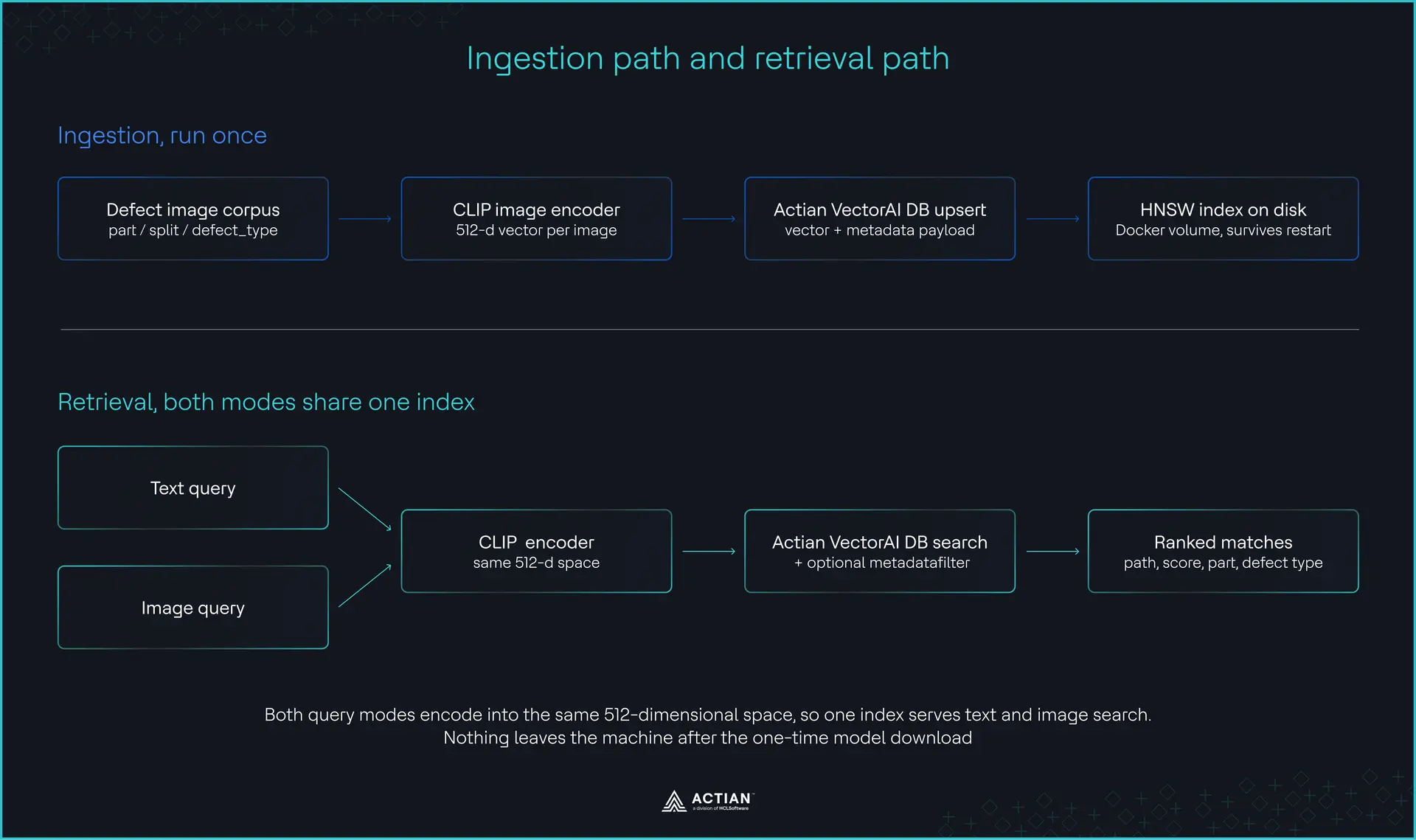
Ingestion path and retrieval path
CLIP is what makes both modes possible from a single index. The openai/clip-vit-base-patch32 checkpoint runs a ViT-B/32 image encoder and a twelve-layer text transformer, then projects both into the same space. Its model config sets projection_dim to 512, so a photograph and a phrase both become 512-dimensional vectors sharing one coordinate system. That single fact is why one collection answers both questions.
VectorAI DB stores each vector with a payload: part_category, defect_type, image_path, and an is_defect flag. The payload is what turns “find similar images” into “find similar defects on bottles, excluding good units.”
One caveat is worth stating before you build on this. OpenAI’s own model card states CLIP was not developed for general deployment, recommends thorough in-domain testing before applied use, and notes that performance varies with how classes are designed. Retrieval quality on your part is something you measure, not assume. The benchmark section is how.
After the one-time model download, nothing here touches the network.
Setting Up the Stack
Before you index anything, you need the CLIP weights on disk, the database running with a mounted volume, and a corpus to search.
Create the project and add the dependencies
This tutorial uses uv, which resolves and pins everything in one step and keeps the environment reproducible.
uv init defect-search
cd defect-search
uv add torch transformers pillow actian-vectorai-client matplotlib
If you use pip instead, pip install torch transformers pillow actian-vectorai-client matplotlib installs the same packages, and each uv run below becomes a plain python call.
Download the CLIP weights while the machine still has network access, because the factory machine may never have it:
uv run huggingface-cli download openai/clip-vit-base-patch32The checkpoint is about 605MB and caches to ~/.cache/huggingface, where from_pretrained finds it on every later run. To move it to an air-gapped machine, copy that directory across and set HF_HUB_OFFLINE=1 so the library never tries to reach the internet.
Start VectorAI DB
Create a docker-compose.yml file to install VectorAI DB:
services:
  vectorai:
    image: actian/vectorai:latest
    container_name: vectorai
    ports:
      - "6573:6573"   # REST API
      - "6574:6574"   # gRPC API, used by the Python SDK
      - "6575:6575"   # local web UI
    volumes:
      - ./vectorai_data:/var/lib/actian-vectorai
    environment:
      - ACTIAN_VECTORAI_ACCEPT_EULA=YES
    restart: unless-stopped
Start the container by running the command:
docker-compose up -dYou should see the result:

Starting VectorAI DB
Port assignments and the EULA variable come from the VectorAI DB Docker setup guide. Before going further, save this as smoke_test.py and run it to confirm the database answers:
# smoke_test.py
from actian_vectorai import VectorAIClient

with VectorAIClient("localhost:6574") as client:
    print(client.health_check())
Run the test like this:
uv run smoke_test.pyIf that prints server details rather than a connection error, the database is ready.
Get a corpus
This tutorial uses MVTec AD, which contains 5,354 high-resolution images across 15 object and texture categories, five textures and ten objects, with more than seventy distinct defect types.
Download it from MVTec’s site and unpack it to ./mvtec_ad.
Dataset licence: research and evaluation only. MVTec AD is released under CC BY-NC-SA 4.0. MVTec state that the dataset is for non-commercial research use and may not be used commercially, so if you are building this for a plant that sells what it makes, do not ship MVTec images inside it. Point ingest.py at your own inspection archive instead. Nothing here depends on MVTec: the script reads any directory laid out as <part_category>/<split>/<defect_type>/<image>, and scan_corpus is the only function to change if yours differs.
Write the shared encoder
Both scripts import from one module, so the image path and text path can’t drift apart.
# clip_encoder.py
from __future__ import annotations

from pathlib import Path
from typing import Sequence

import torch
from PIL import Image
from transformers import CLIPModel, CLIPProcessor

MODEL_ID = "openai/clip-vit-base-patch32"
EMBED_DIM = 512


def _features(out) -> torch.Tensor:
    """
    transformers 4.x returns a Tensor from get_image_features and
    get_text_features. transformers 5.x returns a
    BaseModelOutputWithPooling whose pooler_output holds the
    projected vector. Handle both so this does not break on upgrade.
    """
    return out if isinstance(out, torch.Tensor) else out.pooler_output


class ClipEncoder:
    def __init__(self, model_id: str = MODEL_ID, device: str | None = None) -> None:
        self.device = device or ("cuda" if torch.cuda.is_available() else "cpu")
        self.model = CLIPModel.from_pretrained(model_id).to(self.device).eval()
        self.processor = CLIPProcessor.from_pretrained(model_id)

    @torch.inference_mode()
    def encode_images(self, paths: Sequence[str | Path]) -> torch.Tensor:
        images = [Image.open(p).convert("RGB") for p in paths]
        inputs = self.processor(images=images, return_tensors="pt").to(self.device)
        vecs = _features(self.model.get_image_features(**inputs))
        return torch.nn.functional.normalize(vecs, dim=-1).cpu()

    @torch.inference_mode()
    def encode_text(self, texts: Sequence[str]) -> torch.Tensor:
        inputs = self.processor(
            text=list(texts), return_tensors="pt", padding=True, truncation=True
        ).to(self.device)
        vecs = _features(self.model.get_text_features(**inputs))
        return torch.nn.functional.normalize(vecs, dim=-1).cpu()
That features helper exists because transformers 5.x changed get_image_features to return a BaseModelOutputWithPooling object instead of a tensor. The one-line call in most published CLIP tutorials now fails on a fresh install withAttributeError: 'BaseModelOutputWithPooling' object has no attribute 'shape', and the helper works on both versions. Normalizing each vector before returning it turns cosine similarity into a plain dot product.
Indexing the Defect Corpus
Ingestion encodes in batches and upserts each vector with its metadata. CLIP encoding is the bottleneck; database writes are nowhere close.
MVTec stores files as <part_category>/<split>/<defect_type>/<file>.png, which means the directory structure already contains every metadata field you need:
# ingest.py
from __future__ import annotations

import argparse
import time
from pathlib import Path

from actian_vectorai import (
    VectorAIClient, PointStruct, VectorParams, Distance, CollectionExistsError,
)

from clip_encoder import ClipEncoder, EMBED_DIM

IMAGE_SUFFIXES = {".png", ".jpg", ".jpeg", ".bmp"}


def scan_corpus(root: Path) -> list[dict]:
    """Read metadata straight out of the directory layout."""
    records: list[dict] = []
    for path in sorted(root.rglob("*")):
        if path.suffix.lower() not in IMAGE_SUFFIXES:
            continue
        if "ground_truth" in path.parts:      # segmentation masks, not photos
            continue
        try:
            rel = path.relative_to(root)
            part_category, _split, defect_type = rel.parts[0], rel.parts[1], rel.parts[2]
        except (ValueError, IndexError):
            continue
        records.append(
            {
                "image_path": str(path),
                "part_category": part_category,
                "defect_type": defect_type,
                "is_defect": defect_type != "good",
            }
        )
    return records


def main() -> None:
    ap = argparse.ArgumentParser()
    ap.add_argument("--data", default="./mvtec_ad")
    ap.add_argument("--collection", default="defect_search")
    ap.add_argument("--url", default="localhost:6574")
    ap.add_argument("--batch-size", type=int, default=32)
    args = ap.parse_args()

    records = scan_corpus(Path(args.data))
    if not records:
        raise SystemExit(f"No images found under {args.data}")
    print(f"Found {len(records)} images")

    encoder = ClipEncoder()
    print(f"CLIP running on {encoder.device}")

    with VectorAIClient(args.url) as client:
        try:
            client.collections.create(
                args.collection,
                vectors_config=VectorParams(size=EMBED_DIM, distance=Distance.Cosine),
            )
            print(f"Created collection '{args.collection}'")
        except CollectionExistsError:
            print(f"Collection '{args.collection}' already exists, appending")

        started = time.perf_counter()
        done = 0

        for start in range(0, len(records), args.batch_size):
            batch = records[start : start + args.batch_size]
            vectors = encoder.encode_images([r["image_path"] for r in batch])

            client.points.upsert(
                args.collection,
                points=[
                    PointStruct(id=start + offset, vector=vec.tolist(), payload=record)
                    for offset, (record, vec) in enumerate(zip(batch, vectors))
                ],
            )

            done += len(batch)
            elapsed = time.perf_counter() - started
            rate = done / elapsed if elapsed else 0.0
            remaining = (len(records) - done) / rate if rate else 0.0
            print(
                f"\r{done}/{len(records)} images "
                f"| {rate:.1f} img/s | ~{remaining/60:.1f} min left",
                end="", flush=True,
            )

        print(f"\nIndexed {done} images in {(time.perf_counter()-started)/60:.1f} min")
        print(f"Collection now holds {client.points.count(args.collection)} points")


if __name__ == "__main__":
    main()
Some lines in that script look like arbitrary choices, but changing them will cause trouble. scan_corpus skips the ground_truth folders because they hold pixel masks, and indexing masks fills your results with black-and-white shapes that match nothing a camera produces. The collection is created at 512 dimensions with cosine distance to match the encoder, and a mismatch here produces no error at all, only search results that quietly stop making sense.
The except clause catches CollectionExistsError specifically because a bare except Exception would also hide a refused connection or a dimension conflict, and you want a dimension conflict to stop the script immediately rather than surface weeks later as bad results.
Run the ingestion:
uv run ingest.py --data ./mvtec_ad
Found 5354 images
CLIP running on cpu
Created collection 'defect_search'
5354/5354 images | 2.1 img/s | ~0.0 min left
Indexed 5354 images in 42.5 min
Collection now holds 5354 points
Budget 45 to 90 minutes for the full corpus on a CPU-only machine, and a few minutes on a modern GPU. The run above was a Ryzen 7 5800X with 32GB of RAM, CPU only. Batch size 32 is a sane default; raise it if you have VRAM spare.
The persistence check
This is the difference from FAISS, and it takes ten seconds to prove:
docker compose restart
uv run query.py --text "cracked surface"
Results come back immediately against all 5,354 vectors. Nothing re-encodes, because the index was written to the mounted volume as it was built rather than snapshotted at the end.
Running Queries
Both query modes are the same three steps: encode, filter, search. Only the encoder changes.
# query.py
from __future__ import annotations

import argparse
import time

from actian_vectorai import VectorAIClient, FilterBuilder, Field

from clip_encoder import ClipEncoder

COLLECTION = "defect_search"   # must match the name ingest.py created


def build_filter(part_category: str | None = None, defect_only: bool = False):
    """Metadata filter, applied inside the search rather than after it."""
    builder = FilterBuilder()
    if part_category:
        builder = builder.must(Field("part_category").eq(part_category))
    if defect_only:
        builder = builder.must(Field("is_defect").eq(True))
    return None if builder.is_empty() else builder.build()


def search_by_text(client, encoder, text, part_category=None, defect_only=False, limit=5):
    vector = encoder.encode_text([text])[0].tolist()
    return client.points.search(
        COLLECTION, vector, limit=limit,
        filter=build_filter(part_category, defect_only), with_payload=True,
    )


def search_by_image(client, encoder, image_path, part_category=None, defect_only=False, limit=5):
    vector = encoder.encode_images([image_path])[0].tolist()
    return client.points.search(
        COLLECTION, vector, limit=limit,
        filter=build_filter(part_category, defect_only), with_payload=True,
    )


def main() -> None:
    ap = argparse.ArgumentParser()
    ap.add_argument("--text")
    ap.add_argument("--image")
    ap.add_argument("--part-category")
    ap.add_argument("--defect-only", action="store_true")
    ap.add_argument("--limit", type=int, default=5)
    args = ap.parse_args()
    if not args.text and not args.image:
        raise SystemExit("Pass --text or --image")

    encoder = ClipEncoder()
    with VectorAIClient("localhost:6574") as client:
        t0 = time.perf_counter()
        if args.text:
            results = search_by_text(client, encoder, args.text,
                                     args.part_category, args.defect_only, args.limit)
        else:
            results = search_by_image(client, encoder, args.image,
                                      args.part_category, args.defect_only, args.limit)
        total = (time.perf_counter() - t0) * 1000

    print(f"  score  {'category':<12} {'defect':<16} path")
    for r in results:
        p = r.payload
        print(f"{r.score:7.4f}  {p['part_category']:<12} {p['defect_type']:<16} {p['image_path']}")
    print(f"\ntotal {total:.1f} ms")


if __name__ == "__main__":
    main()
The COLLECTION name must match what ingest.py created, or every search fails with a collection-not-found error while the data sits untouched in the database. The filter builder is worth a second look too: FilterBuilder.must() takes one condition per call and returns the builder, so you chain calls to add conditions rather than passing several at once.
Run either kind of search from the command line:
uv run query.py --text "surface scratch on metal component" --part-category metal_nut
uv run query.py --image ./line_capture_0412.png --defect-only
If inspection stations should reach the system over the network instead of running Python locally, a small FastAPI service can sit in front of it. This part is optional:
# app.py  (optional)
from fastapi import FastAPI
from actian_vectorai import VectorAIClient
from clip_encoder import ClipEncoder
from query import search_by_text

app = FastAPI()
encoder = ClipEncoder()          # load once at startup, not on every request
client = VectorAIClient("localhost:6574")
client.connect()


@app.get("/search")
def search(q: str, part_category: str | None = None, limit: int = 5):
    hits = search_by_text(client, encoder, q, part_category=part_category, limit=limit)
    return [
        {"score": h.score, "path": h.payload["image_path"], "defect_type": h.payload["defect_type"]}
        for h in hits
    ]
At this point, both kinds of search work against one filtered index with no network dependency, so you can point them at your own inspection photos with VectorAI DB Community Edition before reading the performance numbers.
The Benchmark
Measure two things: how search latency behaves as the corpus grows, and whether the results are correct.
benchmark.py runs 100 queries per corpus size and reports p50 and p99, then computes Recall@5 against the MVTec test split. A result counts as a hit when at least one of the top five neighbors shares the query image’s defect type:
# benchmark.py
def measure_recall_at_k(client, encoder, collection, test_records, k=5) -> float:
    hits = 0
    for record in test_records:
        vec = encoder.encode_images([record["image_path"]])[0].tolist()
        results = client.points.search(
            collection, vector=vec, limit=k + 1, with_payload=True
        )
        neighbours = [
            r for r in results if r.payload["image_path"] != record["image_path"]
        ][:k]
        if any(r.payload["defect_type"] == record["defect_type"] for r in neighbours):
            hits += 1
    return hits / len(test_records) if test_records else 0.0
Excluding the query image is not optional. Leave it in and every query retrieves itself at similarity 1.0, and Recall@5 reads 100% no matter how badly the model performs.
Two rules govern how you report the numbers.
Separate search latency from encoding latency. They scale differently, and averaging them together tells you nothing about either. Database search grows far more slowly than the corpus because HNSW traversal is sublinear. CLIP encoding is constant per query and, on CPU, dominates the total. Report them separately, or your chart is measuring the model rather than the database.
State the hardware, and never mix CPU and GPU runs in one table. A latency figure with no machine attached is not a measurement, and a CPU encode time sitting in the same column as a GPU one is worse than no number at all. make_chart.py takes the hardware string as a required argument for exactly that reason:
uv run benchmark.py --out benchmark.csv
uv run make_chart.py --csv benchmark.csv --hardware "Ryzen 7 5800X, 32GB RAM, CPU-only"
Here is the shape to expect, measured with 100 queries per corpus size against the FAISS flat index as the baseline:
| Corpus | VectorAI DB p50 | VectorAI DB p99 | FAISS flat p50 | FAISS flat p99 | Recall@5 |
|---|---|---|---|---|---|
| 1,000 | 0.148 ms | 0.198 ms | 0.053 ms | 0.112 ms | 1.000 |
| 5,000 | 0.676 ms | 0.725 ms | 0.410 ms | 0.462 ms | 0.996 |
| 10,000 | 1.036 ms | 1.272 ms | 0.809 ms | 0.863 ms | 0.974 |
Hardware: state your CPU, RAM, and whether CLIP ran on CPU or GPU. Search time only; CLIP encoding is excluded.
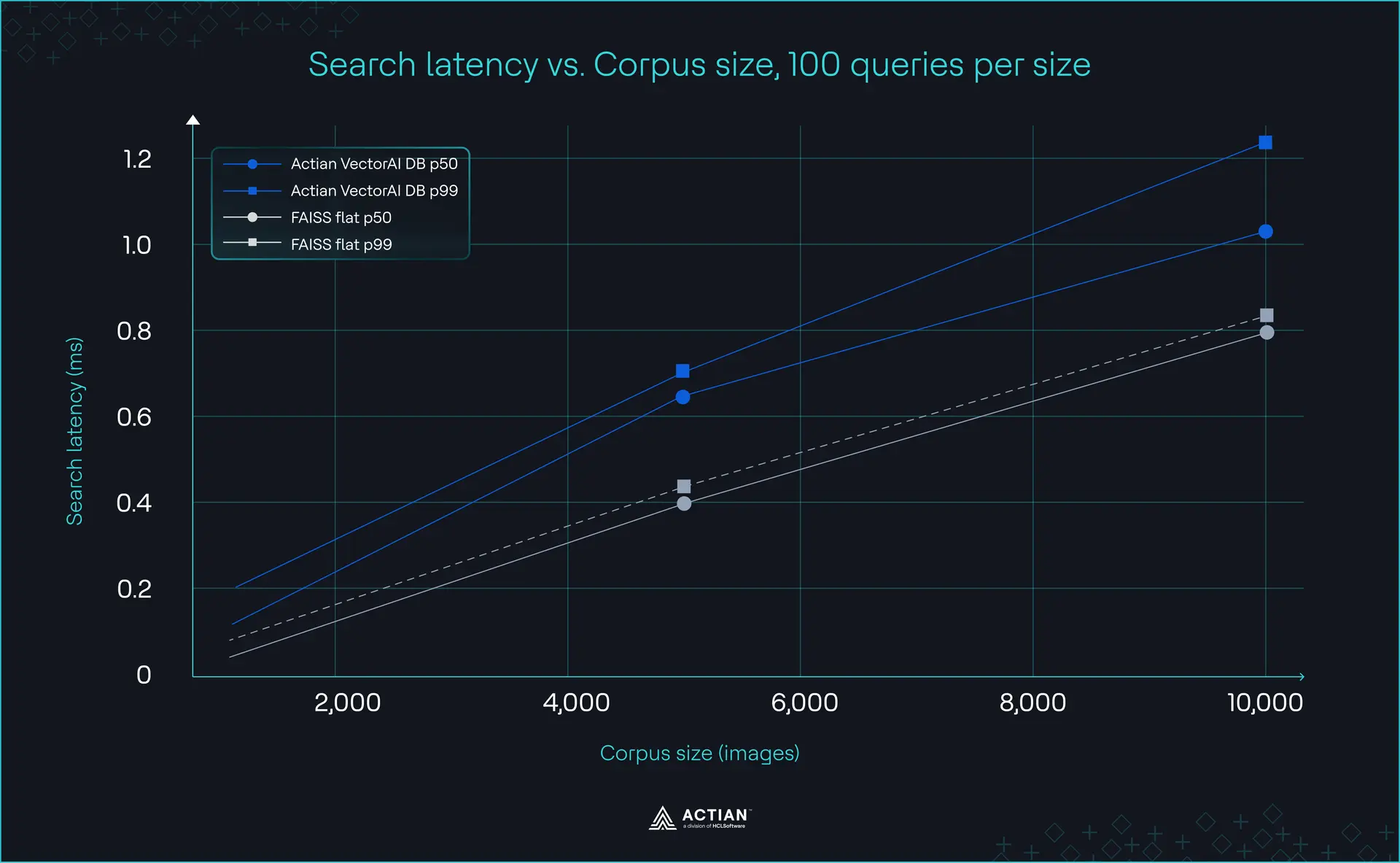
Latency chart: p50/p99 vs corpus size, generated from benchmark output
FAISS wins on raw search time at this scale, and that is the honest read. A flat index over ten thousand vectors is a brute-force dot product in the same process, with no graph to traverse and no transport between the query and the vectors. VectorAI DB is answering over gRPC, so a fixed per-call cost sits under every number in its columns. Recall@5 holds at or above 0.974 throughout, so the retrieval quality is not what you are trading.
What you are trading a fraction of a millisecond for is metadata filtering, durable writes, and a service several machines can query at once. On a corpus this size, that trade is cheap. It stays cheap as the corpus grows, because the flat index scales linearly with the number of vectors while the graph index does not.
The filtered-HNSW trade is the number most likely to surprise you.
This is the cost the FAISS section referred to. Running 20,000 vectors with a filter that admits one percent of the corpus, scored against exact filtered search as ground truth:
| efSearch | Results returned (of 10) | Recall@10 | ms/query |
|---|---|---|---|
| 16 (default) | 9.0 | 0.17 | 0.12 |
| 64 | 10.0 | 0.39 | 0.35 |
| 256 | 10.0 | 0.77 | 1.11 |
| 1024 | 10.0 | 0.99 | 2.62 |
At the default setting, the filtered search misses most of what it should return and cannot always fill the result set. Getting recall above 0.95 took efSearch 64 times the default and moved query time from 0.12 ms to 2.62 ms. The filter works, you pay for it, and you have to know to tune for it.
Two caveats on that table. It came from an Intel Xeon container running faiss-cpu 1.15.0, and it uses random Gaussian vectors, which are close to a worst case for graph traversal. Real CLIP embeddings cluster, so your recall at a given efSearch will be better. Reproduce it on your own vectors with filter_recall_test.py before you size anything on it.
On storage: at 512 dimensions in float32, one embedding is 2KB, so the entire MVTec corpus is about 11MB of vectors against roughly 5GB of source images. Feature storage is not the constraint, which is what industrial deployments usually get backward. Plan around encoding throughput instead. At two images per second on CPU, a 50,000-image archive is a weekend job. You pay it once, unless you change embedding models, because vectors from two different models are not comparable even at identical dimensions.
Frequently Asked Questions
What is CLIP and how does it work for image search?
CLIP is a model from OpenAI trained on image-caption pairs that learns to place an image and its description near each other in a shared vector space. For search, that shared space is the whole point: You encode your image corpus once, then encode either a text query or a query image at retrieval time, and compare with cosine similarity. The variant used here,clip-vit-base-patch32, outputs 512-dimensional vectors and runs on a CPU.
How do I search manufacturing defect images by visual similarity?
Encode every image in your archive with CLIP’s image encoder and store the vectors in a database alongside metadata like part category and defect type. When an operator captures a new defect, encode that photograph the same way and run a nearest-neighbor search. The results are past images that look similar, ranked by cosine similarity, which in practice means similar defects on similar parts.
Can I run CLIP image search offline without a cloud service?
Yes, and that is the configuration described here. CLIP weights download once, about 605MB, and then run locally on CPU or GPU. VectorAI DB runs as a Docker container on your own hardware. After the initial download, no image, query, or embedding leaves the machine, which is what makes the approach workable in an air-gapped plant.
What is the difference between FAISS and VectorAI DB for image search?
FAISS is a similarity search library that holds vectors and integer IDs inside one process. It does persist to disk viawrite_index, and it does filter by ID via IDSelector, contrary to a common claim. It does not store metadata alongside vectors, filter on named fields, or serve multiple processes. VectorAI DB does those three things, which is what the “database, not an index” distinction actually means in practice.
Run it on your own corpus:
docker pull actian/vectorai:latestCommunity Edition is self-hosted and free up to 5,000 vectors, which covers the MVTec corpus almost exactly. The documentation covers collection tuning and filter syntax, and the Actian Discord is where people running this stack compare notes.

Stay connected
Data insights delivered to you.
(i.e. sales@..., support@...)
