
5 Best Python Vector Database Libraries


Key Takeaways
- Production issues in vector DBs often stem from packaging, APIs, and environment mismatches—not speed.
- Client architecture (cloud, OSS, embedded, extension) impacts scalability and deployment success.
- Key factors: API stability, installation reliability, async support, and debugging clarity.
- Qdrant offers strong local-to-production parity; Pinecone simplifies cloud use.
- Actian VectorAI DB emphasizes stability, portability, and enterprise-ready deployment.
Most comparisons of Python vector database libraries focus on retrieval speed, indexing algorithms, or benchmark results. These metrics matter, but production failures stem from various factors: installation inconsistencies, client packaging differences, version churn, and unexpected API changes. In reality, a different class of problems appears once the application leaves the notebook environment and runs inside a production service.
A typical example occurs with embedded ChromaDB setups. A project may work perfectly during development, only to fail in production with an error such as:
RuntimeError: Chroma running in http-only client modeA structural conflict between the chromadb and chromadb-client packages triggers this error because the client-only package lacks the default embedding functions the application depends on. Diagnosing this can take hours.
Client packaging choices and library design decisions, not retrieval quality or indexing performance, produce this type of failure.
This article compares the leading Python vector database libraries from that perspective, examining client architecture, installation stability, API design, and long-term maintainability, rather than benchmark numbers alone.
TL;DR
- ChromaDB: Fastest setup for prototyping and notebook environments with minimal configuration.
- Pinecone: Fully managed cloud solution with zero infrastructure management overhead.
- Qdrant: Zero code changes from local development to production; the strongest open-source option for API stability.
- Weaviate: Hybrid search combining vector similarity and keyword filtering at scale.
- Actian VectorAI DB: On-premises deployment with same architecture from laptop to production; Actian designed it for edge and air-gapped environments.
The Python Landscape: Understanding the Options
The relationship between a Python vector database library and its storage backend determines how you will develop, test, and eventually scale your application. The wrong library choice often triggers the environment-specific failures described above, since each architecture handles local and production environments differently.
These differences generally fall into four distinct categories, each with its own approach to the interaction between infrastructure and code.
Four client architectures
- Cloud-only (e.g., Pinecone): These clients act as a full API abstraction for serverless environments. The primary advantage is zero infrastructure management, but this requires an active internet connection and an API key for all local development and testing.
- OSS with managed option (e.g., Qdrant, Weaviate, Milvus): This set of tools uses the same API for both self-hosted Docker instances and managed cloud services. This provides excellent development-production parity, though it often requires managing a local server or a Docker container during development.
- Embedded libraries (e.g., ChromaDB, FAISS): These tools run in-process and embed the database logic in your Python application. While they are ideal for notebooks and rapid prototyping, their developers never designed them for distributed production environments, and they do not offer a well-defined migration path as the application scales.
- Extension approach (e.g., pgvector via Timescale vector): This model adds vector search capabilities to traditional relational databases. It allows existing PostgreSQL infrastructure to support vector similarity search. However, query performance varies with index configuration, dataset size, and workload characteristics; some scenarios benefit from the relational foundation, while others favor purpose-built vector architectures.
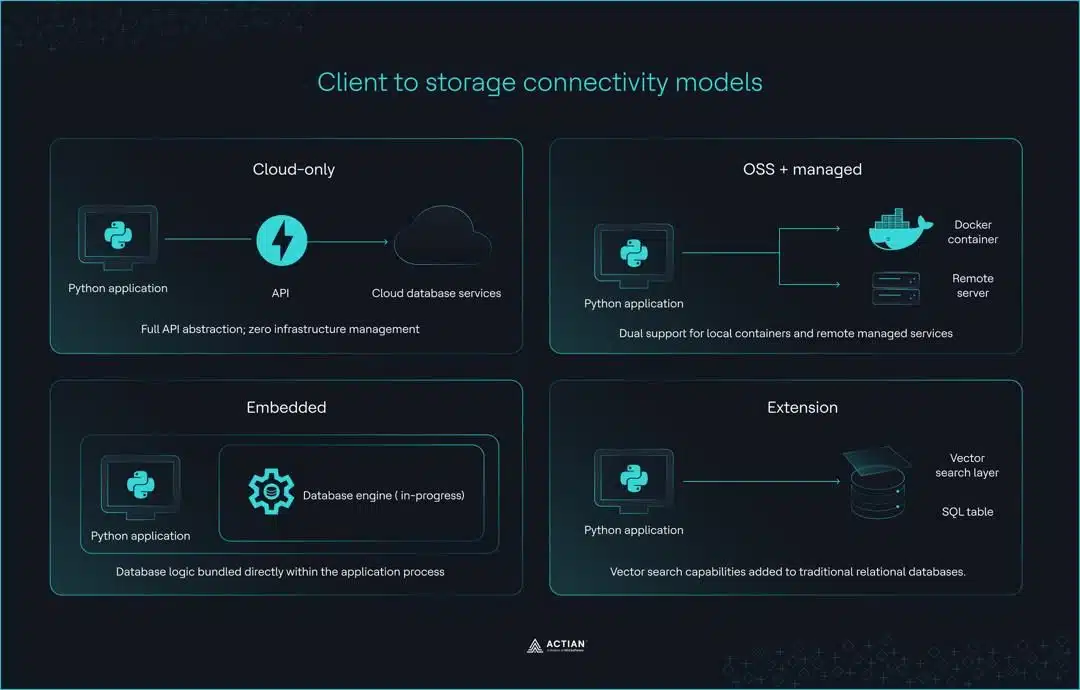
These four models describe how a client connects to storage, but they also show a practical separation between standalone search libraries and managed database systems. Choosing the wrong model generates some of the most persistent production friction in vector search applications.
A vector database provides the infrastructure required for production readiness, going beyond what developers’ standalone libraries offer. Libraries such as FAISS or Annoy are static, in-memory tools focused on approximate nearest neighbor search across large datasets. They are highly efficient for similarity search within a fixed vector space, but they cannot manage data over time.
Specialized databases like Pinecone, Qdrant, or Milvus go further, providing full CRUD support, metadata-based filtering, and distributed persistence for large datasets.
The table below summarizes where each architecture fits across common use cases.
| Category | Primary trade-off | Production migration path |
| Cloud-only | No infrastructure management; requires network connectivity and API authentication for all environments | Same client code across development and production |
| OSS + managed | Identical API for local and cloud deployments; requires Docker or server setup | Zero code changes between local Docker instance and managed cloud service |
| Embedded | In-process execution with minimal setup; limited to single-machine architecture | Client class replacement required; distributed deployment needs redesign |
| Extension | Integrates with PostgreSQL infrastructure; performance varies by configuration | Depends on existing PostgreSQL setup and scale requirements |
Client Comparison: Developer Experience Deep Dive
Architecture does narrow your options, but the day-to-day experience of working with a Python vector database library comes down to how each client handles connection setup, version stability, and the friction points encountered during active development.
We’re comparing the four clients below based on what developers deal with in real-world use.
1. Pinecone Python client
Pinecone offers one of the more polished connection experiences among cloud-only vector database clients, with extensive type hints and a straightforward initialization pattern.
from pinecone import Pinecone

pc = Pinecone(api_key="your-api-key")
index = pc.Index("your-index-name")
Strengths:
- Extensive type hints and IDE autocompletion support.
- Pinecone introduced AsyncIO support in v6 via Pinecone Asyncio.
- gRPC mode offers higher throughput for demanding workloads.
- Well-maintained official documentation.
Pain points:
- Pinecone shipped three major versions in 18 months (v5, v6, and v7), introducing breaking changes to the connection logic and renaming the package from pinecone-client to pinecone.
- Historical confusion between the pinecone and pinecone-client packages.
- query_namespaces async operations under load require thread pool tuning.
2. Weaviate Python client
Weaviate’s v4 client is a meaningful step forward from v3, adding typed classes and gRPC support that noticeably improve query performance.
import weaviate

client = weaviate.connect_to_local()
collection = client.collections.get("your-collection-name")
Strengths:
- gRPC mode delivers 40-70% faster query performance than v3.
- Typed property and DataType classes replace untyped v3 dictionaries.
- Built-in hybrid search combining vector and keyword search.
- Strong support for multi-tenancy workloads.
Pain points:
- Weaviate has fully deprecated the v3 API, and teams report that the migration takes weeks of work.
- gRPC requires port 50051 to be open, which creates friction in restricted network environments.
- Batch API redesign caused significant confusion (Issue #433).
- LangChain did not ship v4 support until several months after Weaviate’s release (Issue #14531).
3. ChromaDB Python client
ChromaDB offers one of the easiest onboarding experiences among Python vector database libraries, making it a natural starting point for notebooks and early-stage prototyping.
import chromadb

client = chromadb.Client()
Strengths:
- Simplest API surface of any client in this comparison.
- Mature LangChain integration with well-documented examples.
- In-memory mode requires zero configuration for notebook environments.
- Large and active open-source community.
Pain points:
- Python 3.13 incompatibility (Issue #3651).
- Windows instability above 99 records (Issue #3058).
- Confusing chromadb with chromadb-client breaks production deployments.
- hnswlib compilation errors on ARM Mac processors.
- Requires SQLite 3.35 or higher, creating an environment-specific setup overhead.
4. Qdrant Python client
Developers value Qdrant for its local-to-production parity. The same client code runs against an in-memory instance during development and a fully managed cloud deployment in production, without requiring any modifications.
from qdrant_client import QdrantClient

client = QdrantClient(":memory:")
Strengths:
- :memory: mode enables a zero-code-change local-to-production workflow.
- Qdrant introduced a native AsyncQdrantClient for high-concurrency workloads.
- Pydantic model type safety throughout the client interface.
- Rust-backed implementation with lower memory overhead compared to JVM-based alternatives.
Pain points:
- Developers must explicitly set prefer_grpc=True to enable gRPC, a step they often overlook.
- Port split between REST (6333) and gRPC (6334) requires careful network configuration.
- Pydantic version constraints: v1.10.x or v2.21 and above only.
- Cloud connection issues (Issue #112).
When to choose Qdrant:
- Local-to-production parity is a priority, and zero code changes between environments matter.
- High-concurrency async workloads require native AsyncQdrantClient support.
- You prefer a self-hosted, open-source vector database deployment over a managed cloud service.
- Hybrid search that combines dense and sparse vectors is a core requirement.
When to avoid Qdrant:
- The team has no Docker experience and needs a simpler local setup.
- The target environment cannot support gRPC network configuration.
- Pydantic version constraints conflict with existing project dependencies.
Installation and Environment Management
In ideal environments, installing a Python vector database library is straightforward. In practice, the target platform, Python version, and existing package dependencies each introduce variables that can turn a simple pip install into a multi-hour debugging session. A quick compatibility check before committing to a client is worth the effort, since most of these issues only surface after the setup is complete.
The compatibility matrix
The following matrix shows client behavior across Python 3.8–3.13 on macOS ARM, Windows, and Linux.
| Client | macOS ARM (M1/M2) | Windows | Linux (Debian) | Python 3.13 |
| Pinecone | ✓ Full support | ✓ Full support | ✓ Full support | ✓ Supported |
| Weaviate | ✓ Full support | ✓ Full support | Requires Docker for gRPC | ✓ Supported |
| ChromaDB | hnswlib compilation errors | Instability above 99 records (#3058) | Requires Debian Bookworm+ | ✗ Broken (#3651) |
| Qdrant | ✓ Full support | ✓ Full support | ✓ Full support | ✓ Supported |
ChromaDB carries the heaviest compatibility burden of any client in this comparison. On macOS with ARM processors, hnswlib produces compilation errors during installation, forcing developers to manually pin Python to 3.11 or 3.12.
On Windows, ChromaDB destabilizes once a collection exceeds 99 records, making the embedded client unsuitable for anything beyond early prototyping. On Linux, Debian-based distributions require Bookworm or later to install and run ChromaDB cleanly.
Virtual environment best practices
python -m venv venv
source venv/bin/activate  # On Windows: venv\Scripts\activate
pip install chromadb
Pinning the client version in a requirements.txt file matters equally, since several of these clients have a history of introducing breaking changes between minor releases.
chromadb==0.4.x
qdrant-client==1.7.x
pinecone==3.x
weaviate-client==4.x
ChromaDB’s two-package architecture confuses many developers. When someone installs chromadb-client instead of chromadb, the application throws this error on its first attempt to call the default embedding function.
ValueError: You must provide an embedding functionExtras and optional dependencies
# Pinecone with gRPC support
pip install pinecone[grpc]

# Qdrant with FastEmbed for local embedding generation
pip install qdrant-client[fastembed]

# ChromaDB with sentence-transformers for local embedding support
pip install chromadb sentence-transformers
gRPC has the highest impact on optional installation for query performance. Weaviate sees 40-70% faster queries over gRPC than over REST, while Qdrant gains roughly 15% in query speed. The trade-off is that gRPC requires additional network configuration, which may not be feasible in restricted environments.
FastEmbed and sentence-transformers both enable local embedding generation without an external API dependency, keeping latency and embedding costs down for semantic search and similarity search workloads.
Qdrant’s native AsyncQdrantClient and Pinecone’s PineconeAsyncio deliver 3–5x throughput improvements under high-concurrency workloads.
Local Development Workflows
Developers make most vector database decisions in the local development environment. The critical question is: Which client requires the least code change when moving to production?
The migration path
Here is how each client handles the move from local deployment to production.
# Qdrant - zero code changes required
client = QdrantClient(":memory:")              # Development
client = QdrantClient(                         # Production
    url="https://your-cluster-url",
    api_key="your-api-key"
)

# ChromaDB - client class change required
client = chromadb.Client()                     # Development
client = chromadb.HttpClient(                  # Production
    host="your-host",
    port=8000
)

# Pinecone - same code in both environments
pc = Pinecone(api_key="your-api-key")          # Development and production
index = pc.Index("your-index-name")
Qdrant :memory: mode carries identical client code from local development all the way to production. The vector store configuration, cosine similarity settings, and hnsw index parameters remain the same across environments.
ChromaDB requires a change to the client class when moving to production. The more widely the codebase uses the client, the more of the application this change touches.
Pinecone uses the same code in both development and production since everything runs in the cloud regardless of the stage.
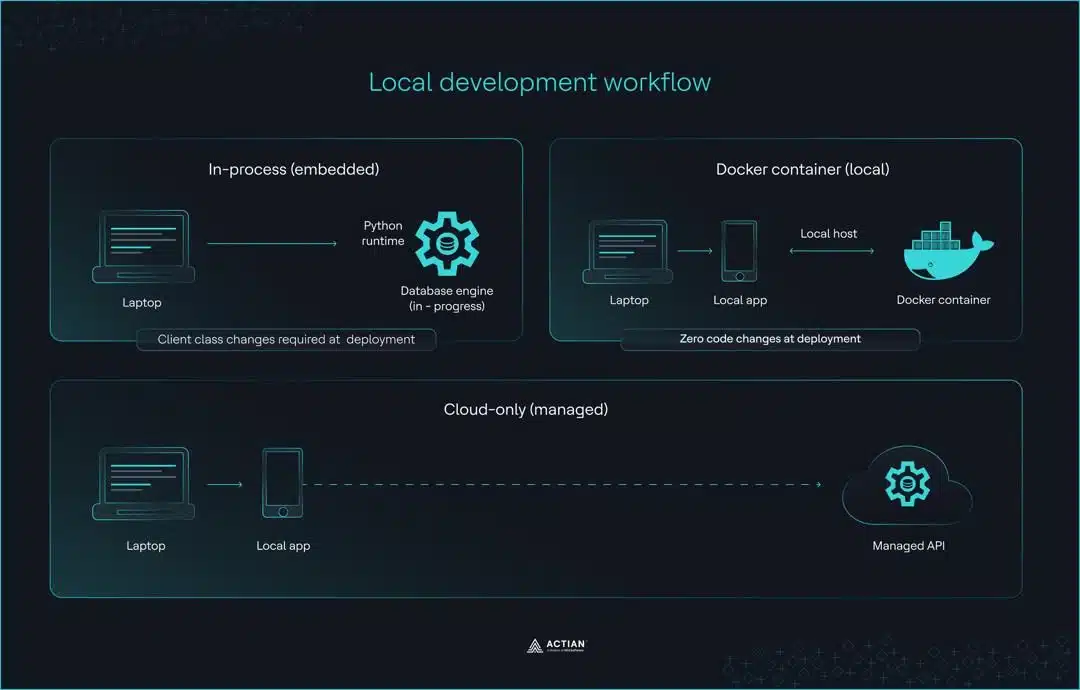
These migration differences stem from three distinct local development approaches: embedded mode, Docker, and cloud-only.
Embedded mode
ChromaDB’s default embedded client stores data only in memory. When the application stops running, the data is lost. For developments involving persistent collections, PersistentClient writes data to disk instead.
# In-memory only: data lost when process ends
client = chromadb.Client()
collection = client.create_collection("my_collection")
collection.add(documents=["doc1", "doc2"], ids=["1", "2"])

# Persistent local storage
client = chromadb.PersistentClient(path="/local/path")
Qdrant’s :memory: mode uses the same client interface as a production deployment. Whatever code works locally also works in production without any changes.
client = QdrantClient(":memory:")
client.create_collection(
    collection_name="my_collection",
    vectors_config=VectorParams(size=384, distance=Distance.COSINE)
)
Both clients work well for early prototyping and notebook environments, and the differences surface only at the production boundary.
Docker for local development
Docker runs the vector database in an isolated local container using the same configuration as in a production deployment. Qdrant and Weaviate are both open-source vector databases that support this approach.
# Qdrant
docker run -p 6333:6333 qdrant/qdrant

# Weaviate
docker run -p 8080:8080 -p 50051:50051 cr.weaviate.io/semitechnologies/weaviate:latest
Once the container is running, the client connects to localhost the same way it would to a self-hosted vector database in production.
# Qdrant
client = QdrantClient(url="https://localhost:6333")

# Weaviate
client = weaviate.connect_to_local()
The main advantage is that vector index configuration behaves the same way locally and in production, and issues that surface locally are genuine issues rather than environment-specific artifacts.
The trade-off is the overhead of Docker installation and port configuration, particularly Weaviate’s requirement for both ports 8080 and 50051.
Cloud-only development
Integration Ecosystem: LangChain and LlamaIndex
from langchain_pinecone import PineconeVectorStore
from langchain_chroma import Chroma
from langchain_qdrant import QdrantVectorStore
from langchain_weaviate import WeaviateVectorStore
from llama_index.vector_stores.qdrant import QdrantVectorStore- The client releases a new version with breaking changes.
- LangChain and LlamaIndex update later.
- Pipelines break temporarily.
Performance Considerations: Beyond Raw Speed
Most client comparisons overlook three factors that significantly affect vector database performance: protocol choice, the quality of async support, and connection pooling.
Protocol choice: REST vs. gRPC
gRPC and REST are the two transport protocols available across these clients. As mentioned earlier, Weaviate sees 40 to 80% faster queries over gRPC, and Qdrant gains roughly 15% in query speed with gRPC enabled. In restricted network environments where port 50051 is not accessible, REST is the more practical option.
Async support quality
Most teams build production LLM applications on FastAPI or similar async frameworks, which makes async client support a meaningful performance consideration. Using a synchronous client within an async application results in blocking calls, which sharply reduces throughput.
Qdrant’s native AsyncQdrantClient, available since v1.61, provides a well-established async implementation. Pinecone introduced PineconeAsyncio in v6, bringing proper async support to cloud-only vector search workloads. Weaviate added async support in v4.7, making it the most recent of the four to reach production-ready async capabilities. ChromaDB’s async support remains limited across all four.
The throughput difference is substantial. For I/O-bound workloads where network latency is the bottleneck, async clients typically deliver 3–5x higher throughput than their synchronous equivalents.
Connection pooling and resource management
This is one of the configuration areas where default settings tend to fall short in production. Qdrant and Pinecone both expose parameters that give more control over connection management under sustained production traffic.
# Qdrant connection pool configuration
client = QdrantClient(
    url="https://your-cluster-url",
    api_key="your-api-key",
    timeout=30,
    pool_size=10
)

# Pinecone connection pool configuration
index = pc.Index(
    "your-index-name",
    pool_threads=30,
    connection_pool_maxsize=30
)
For Pinecone, query_namespaces requires tuning pool_threads and connection_pool_maxsize for production workloads. For Qdrant, increasing pool_size above the default reduces connection contention for applications that handle large volumes of document embeddings in parallel.
Teams that tune these settings before deployment avoid considerable debugging time when the application runs under load.
Error Handling and Debugging
Vector database libraries handle a lot of complexity internally. When something fails, how clearly the client communicates that failure determines how quickly teams can fix it.
Error message quality
The quality of error messages varies considerably across the four clients.
Pinecone produces clear, actionable error messages that typically suggest a solution alongside the failure description, reducing the time teams spend searching for the root cause.
Qdrant error messages are helpful and point directly to the source of the problem. The UnexpectedResponse exception includes a specific reason field that identifies exactly which parameter failed validation.
qdrant_client.http.exceptions.UnexpectedResponse: Status 400, reason: "Wrong input: Vector dimension error: expected dim: 384, got 768"ChromaDB error messages are frequently vague and require a GitHub search to diagnose. When the two-package mix-up occurs, ChromaDB raises a ValueError about missing embedding functions instead of reporting the actual root cause. The SQLite version requirement produces a similarly unhelpful error:
RuntimeError: Your system has an unsupported version of sqlite3. Chroma requires sqlite3 >= 3.35.0.This error is a common roadblock for Python developers deploying on older Amazon Linux 2 or Streamlit environments.
Weaviate v3 silently failed, returning null objects or dictionaries with an errors key that developers had to check manually. The v4 rewrite addressed this with typed exceptions, such as WeaviateQueryError and WeaviateGRPCUnavailableError.
Logging and observability
Observability capabilities differ across the four clients.
- Qdrant supports structured logging, distributed tracing, and metrics without additional configuration, which makes it a strong fit for production machine learning applications that require visibility into vector search engine performance.
- Pinecone provides basic logging through its managed infrastructure.
- ChromaDB has limited logging with no structured output, which makes diagnosing issues in production AI applications considerably harder.
Common pitfalls and solutions
Three error patterns recur across all four clients in production environments.
- Client version mismatches cause frequent, unexpected failures, particularly amid Pinecone’s three releases over 18 months and Weaviate’s v3-to-v4 migration. Teams can control this by pinning client versions in a
requirements.txtfile. - Embedding dimension mismatch occurs when the query embedding dimensions do not match the collection’s expectations. Verifying that the embedding model’s output size matches the collection configuration before deployment prevents this.
- Rate limiting affects cloud-only deployments on Pinecone and Weaviate Cloud. Implementing exponential backoff on API calls is the standard solution for production workloads that approach rate limits under sustained traffic.
How often version mismatches surface, how broadly platform incompatibilities spread, and how clearly error messages communicate failures together determine a client’s real maintenance cost in production.
The version churn across Pinecone, Weaviate, and ChromaDB has left many production teams looking for a client that prioritizes operational stability over feature velocity. Actian VectorAI DB addresses this directly.
Actian VectorAI DB
- Same architecture across environments.
- Docker-based deployment.
- HNSW indexing.
- Real-time indexing.
- Python and JavaScript SDKs.
- Native LangChain and LlamaIndex integration.
Decision Framework: Choosing Your Python Client
Decision matrix
| Criteria | Pinecone | Qdrant | Weaviate | ChromaDB | Actian VectorAI DB |
| API stability | Medium | Good | Improving | Low | High |
| Local development | ✗ No local mode | ✓ :memory: mode | Docker required | ✓ Embedded | ✓ :memory: + SQLite |
| Platform compatibility | ✓ Cloud only | ✓ All platforms | ✓ All platforms | ✗ Issues on ARM, Win | ✓ All platforms |
| Async support | ✓ v6+ | ✓ Native | ✓ v4.7+ | ✗ Limited | ✓ Native |
| Cost | $50-500+/mo | Free / Self-hosted | Free / Managed | Free | Enterprise pricing |
Final Thoughts
The ChromaDB production failure from the opening example stems from client packaging issues that developers only encounter after deployment. This comparison helps avoid similar failures: platform incompatibilities, breaking changes from version migrations, and client class redesigns that propagate across codebases.
ChromaDB gets projects started quickly but tends to show its limitations once the application moves to production. Pinecone is polished and well-managed, but version churn and permanent cloud dependencies are real costs. Qdrant is the strongest open-source option for teams that want local-to-production parity without code changes. Weaviate’s v4 client significantly improves on v3 and is well-suited for teams that need hybrid search at scale.
For teams where API stability and platform compatibility are critical, enterprise-grade clients like Actian VectorAI DB provide production-ready stability with verified cross-platform support.
Explore Actian VectorAI DB for guaranteed production stability.

Stay connected
Data insights delivered to you.
(i.e. sales@..., support@...)
