After a recent Actian webinar featuring Forrester Research, John Bard, senior director of product marketing at Actian, asked Forrester principal analyst Michele Goetz more about the trends in today’s enterprise data market.  Here is the first part of that conversation:

John Bard, Actian:  The enterprise market tends to think of “hybrid” as on-premises or cloud, but there are several other dimensions for hybrid. Can you elaborate on other ways “hybrid” applies to the data management and integration markets?

Michele Goetz, Forrester:  Hybrid architecture is really about spanning a number of dimensions: deployment, data types, access, and owner ecosystem. Analysts and data consumers can’t be hindered by technology and platform constraints that limit the reach into needed information to drive strategy, decisions, and actions to be competitive in fast-paced business environments. Information architects are required to think about aligning to data service levels and expectations, forcing them to make hybrid architecture decisions about cloud, operation, and analytic workloads; self-service and security; and where information sits internally or with trusted partners.

JB:  What factors do you think are important to customers evaluating databases when it comes to satisfying both transactional and analytic workloads?

MG:  Traditional approaches to database selection fell into either operational or analytic. Database environments were designed for one or the other. Today, operational and analytic workloads converge as transactional and log events are analyzed in streams and intelligently drive capabilities such as robotic process automation, just-in-time maintenance, and next-best-action or advise workers in their activities. Databases need the ability to run Lambda architectures and manage workloads across historical and stream data in a manner that supports real-time actions.

JB:  What are some of the market forces driving these other aspects of “hybrid” in data management?

MG:  Hybrid offers companies the ability to build adaptive composable systems that are flexible to changing business demands for data and insight. New data marts can spin up and be retired at will, allowing organizations to reduce legacy marts and conflicting data silos. Hybrid data management provides a platform where services can be built on top using APIs and connectors to connect any application. Cloud helps lower the total cost of ownership as new capabilities are spun up, at the same time management layers are allowing administrators the ability to easily shift workloads and data between cloud and on-premises to further optimize cost. Additionally, data service levels are better met by hybrid data management, as users can independently source, wrangle, and build out insights with lightweight tools for integration and analytics. In each of these examples, engineering and administration resources hours are reduced or current processes are optimized for rapid deployment and faster time-to-value for data.

JB:  What about hybrid data integration? That can span both data integration and application integration. What about business-to-business (B2B) integration? What about integration specialists versus “citizen integrators”?

MG:  Hybrid integration is defined by service-oriented data that spans data integration and application integration capabilities. Rather than relying strictly on extract, transform, and load (ETL)/extract, load, and transform (ELT) and change data capture, integration specialists have more integration tools in their toolbox to design data services based on service-level requirements. Streams allow integration to happen in real time with embedded analytics. Virtualization lets data views come into applications and business services without the burden of mass data movement. Open source ingestion provides support for a wider variety of data types and formats to take advantage of all data. APIs containerize data with application requirements and connectivity for event-driven views and insight. Data becomes tailored to business needs.

The other wave in data integration is the emergence of self-service, or the citizen integrator. With little more than an understanding of data and how to manipulate data in Excel with simple formulas, people with less technical skills can leverage and reuse APIs to get access to data or use catalog and data preparation tools to wrangle data and create data sets and APIs for data sharing. Data administrators and engineers still have visibility into and control over citizen integrator content, but they are able to focus on complex solutions and open up the bottlenecks to data that users experienced in the past.

Overall, these two trends extend flexibility, allow deployments to scale, and get to data value faster.

Hybrid data management and integration is the next-generation strategy for enterprises to go from data rich to data driven. As companies retool their businesses for digital, the internet of things (IoT), and new competitive threats, the ability to have architectures that are flexible and adapt and scale for real-time data demands will be critical to keep up with the pace of business change. Ultimately, companies will be defined and valued by the market according to their ability to harness data to stay ahead and viable.


Imagine this scenario – you have just “clicked” on an item that you are ordering online. What kind of “data trail” have you generated? Well, you are sure to have generated a transaction – the kind of “business event” that goes into a seller’s accounting system, and then on to their data warehouse for subsequent sales analysis. This was pretty much your entire data trail until just a few years ago.

In recent times, the whole notion of data trails has exploded. The first wave of new data entering your data trail consisted of web and mobile interactions – those dozens or hundreds (or even thousands) of “human events” – research clicks and social media postings that you execute leading up to and after an online order. It turns out that these human interactions, when blended with business transactions, are critical to yielding more insight into behavior.

And now we are entering the next wave of new data – the observations made by the ever-increasing number of intelligent sensors that record every “machine event.” In our example above, for each human interaction supporting your online order, there may be hundreds or thousands of software, network, location, and device metrics being gathered and added to your data trail. Further integrating and correlating these machine observations into your particular flow of business transactions and human interactions would enable game-changing advanced analytic capabilities – promising a “closed-loop” of ever more timely and accurate decisions.

The bottom line is that we find ourselves in a hybrid data landscape of such stunning heterogeneity that it forever changes both the challenges and the opportunities around the capture and analysis of relevant operational data – the business, human, and machine events that make up your data trail. The ability to manage, integrate, and analyze all these hybrid data events at price/performant scale – to build the necessary data-to-decision pipelines – becomes the key to modern data infrastructure and succeeding with modern analytics.


It is rare in life that one gets an opportunity to step back, take a fresh look and reset one’s mission and trajectory. For Actian, today is such a day, as we launch a new vision, a new product solution portfolio and of course, a new tagline. Got to have a new tagline! Although time will tell whether we have hit the mark, I can safely say that we are excited to reveal our new thinking and shine a bright light on it for all the world to see.

Our new vision is built on three observations:

1. The World is Flat
It is an incontrovertible fact that data is “flattening” within organizations today. Diverse data is being created and consumed in every corner of a company and across its data ecosystem. Increasingly, the traditional one-place-for-everything data warehouse and today’s centralized data lake just seem like old tired thinking.

2. Data is a Social Animal
Data doesn’t like to live alone – to be effective, data needs to live in an ecosystem that is constantly changing and expanding as it is touched by entities both within and outside a company’s four walls. To truly extract insight from data, one needs context, and that context more often than not comes from other applications, processes, and data sources.

3. Think Big When You Think of the Cloud
Today, the cloud is much more than a place to deploy apps and data. Although the agility and economics of hybrid cloud computing are compelling, it is just the start. A “true” cloud solution is designed to enable companies to blend together data without physically moving it and derive actionable insight, including machine learning, that can be put to work at the speed of an organization’s business (e.g., make a real-time offer to a customer on your website). The traditional static monthly report, for most companies, has the same value as yesterday’s news – zero!

4. Activate Your Data
It seems clear that now is the time for a simple call to action – a call for organizations to “activate their data.” Forward-thinking companies are applying best-fit design tools and innovative technologies to embrace their data ecosystems to ensure their data makes a difference. Whether it is powering a real-time e-commerce offer, detecting financial fraud before it happens or predicting supply chain disruptions, it is critical that the underlying insight garnered can be acted upon at the speed of a company’s business.

This is a reversal of the traditional thinking that analytics tools dictate to the business what the data can and cannot do. Now, the business dictates what insight is needed—where, when and for whom. If an organization’s IT department can’t address these needs in an economical and agile fashion, then knowledge workers are increasingly finding alternative ways, often through a new generation of SaaS solutions, to get their needs met. Serve or be served…out the door!

Meet a Big Idea – Hybrid Data!
And behind all this new thinking is the powerful new concept of hybrid data. Hybrid data has multiple dimensions, including diverse data type and format, operational and transactional data, self-service access, external B2B data exchange and hybrid cloud deployment. Our view is simple – all data needs to be viewed as hybrid data that can be joined and blended with other data across an enterprise’s data ecosystem by anyone at any point in time. It is only when an organization can adopt this progressive approach that it can address the inherent limitations of traditional monolithic data repositories (a nice way to say Oracle or SAP) or alternative siloed point solutions.


Back when I started off in the industry, some 20-something years ago (I do pretend I am still in my 20s so that number has a nice ring to it) there was only one IT Department with one manager in most large organizations. Now there are multiple managers within different departments, some aligned to different parts of the organization. Some pieces are outsourced, some in-sourced and some have contractors working on it.

When it comes to connecting most systems together, the industry is focused on “having a connector to this or that” while the real hard part is how to connect to that particular implementation of that system.

As the technologies evolved over the years the pillars (or silos) of teams evolved. So providing an integration solution to connect multiple systems together is more of a project management (herding cats) nightmare than a connector nightmare. Let’s take a typical mid-sized company that wants to connect its cloud-based applications (CRM, HR, etc.) to its on-premises applications (SAP, Oracle Finance, Dynamics, Databases, etc.). Pretty simple task as we have all the connector options and worst case we can always fall back on a web-serviced based JSON/XML connector and database connectors. The problem of “do we have a connector to each system” is solved within minutes.

The real problem and the time killer is how to connect and to whom we will give access. If we consider the layers of technology involved (taking OSI model as a method of stepping through access):

  • Physical Layer – how is the server connected and what speed limits could this be restricted by (is the server connected?).
  • Data Link Layer – what level of QoS do we have, are there any restrictions, which VLAN are we on and what does that VLAN have/not have access to?
  • Network Layer – can we perform a network test to each system we need to connect?
  • Transport Layer – can we retain a connection and what is the performance of that connection?
  • Session Layer – what are the authentication mechanisms for each system? Can we authenticate?
  • Presentation Layer – can we gain access to the metadata behind each system? Do we have sufficient rights?
  • Application Layer – Can we see a sample of the data that we are connecting to? Does the data look like what we expected? Can we perform updates, inserts, upserts, deletes, and reads? Has the application been customized and can we access those customizations?

Achieving all of this requires working with different IT teams both internally and externally. It may require working with vendors or other developers outside of the organization as well. Consider the following roles (not an exhaustive list) that would require gaining their trust and knowledge/assistance:

  • Server/Hardware Manager – Virtual server, capacity, server install.
  • Operating System Specialists – Windows / Linux / AIX / etc. Ability to run your integration software? Installation, patching and maintenance? Remote access to the server?
  • Network Manager – In which zone was the server installed? Does it have connectivity to each system? Remote access to the server?
  • Security/Firewall – Which ports are locked down and needed opening for this new service? Is the anti-virus software causing issues? Remote access to the server? Browser access to the server?
  • Cloud Application Specialist – Method of access, security, ability to access? Can we log in?
  • Database Administrators – Database access, rights, simple database read tests.
  • Specialist Applications (SAP BAPI Developers) – Are there some custom BAPIs that need to be used? Which of the standard BAPI’s should not be used? Can we use the fat client/web application to view and query the system? Can we use a test/development system?
  • Application Developers – Is there a standard method for requirements gathering, development methodology, peer reviews, user acceptance testing, system testing, load testing?

When we are required to prove we can connect to a system, we spend 90% of our time working with the people above and 10% in doing the actual connection. Knowing who to work with and gaining their trust and buy-in is the real hard yards.


Recently I worked on a POC that required some non-standard thinking. The challenge was that the customer’s use case did not only need high-performance SQL analytics but also a healthy amount of ETL (Extract, Transform, and Load). More specifically, the requirement was for ELT (or even ETLT if we want to be absolutely precise).

Why “might” this have been an issue? Well typically analytical databases and ETL-style processing don’t play well together; the latter tends to be row orientated while the typical analytical database definitely prefers to deal with data in a “chunky” fashion. Typically analytical databases are able to load data in bulk at very high speed but tend to offer modest row-by-row throughput.

Another typical characteristic is the use of table-level write locking – serializing write transactions to one at a time. This is generally accepted as the use cases for analytical databases tend to be about queries rather than any kind of transaction processing. However, when some form of ETL is required it is perhaps even more problematic than the row-by-row throughput as it requires the designer and the loading tool to be aware of this characteristic. The designer often has to “jump through hoops” to figure out how to get the data into the analytical database in a way that other team members can understand and that the tool can deliver.

I’m setting the scene here for the “big reveal” that the Actian Vector processing databases do not suffer from these drawbacks. They can deliver both high-end analytical capabilities and offer “OLTP capabilities” in the manner of the HTAP (Hybrid Transactional/Analytical Processing) technologies.

Note the quotes around “OLTP capabilities” – just to be clear we at Actian wouldn’t position these as high-performance OLTP databases, we’re just saying that the capabilities (row-level locking and concurrent tables modifications) are there even though the database is a columnar, in-memory, vector processing engine).

However they are viewed, it was these capabilities that allowed us to achieve the customer’s goals – albeit with a little cajoling. In the rest of this post, I’ll describe the steps we went through and the results we achieved. If you’re not currently a user of either Actian Vector or Actian Vector in Hadoop ((VectorH) then you might just skip to the end, however if you are using the technology then read on.

Configuring for ETL

So coming back to the use case, this customer’s requirement was to load large volumes of data from different sources in parallel into the same tables. Now above we said that we offer “OLTP capabilities”, however out-of-the-box the configuration is more aligned to deal with one bulk update per table – we needed to alter the configuration to deal with multiple concurrent bulk modifications.

At their core, Actian databases have a columnar architecture and in all cases the underlying column store is modified in a single transaction. The concurrent update feature comes from some clever technology that buffers updates in-memory in a seamless and ACID compliant way. The default configuration assumes a small memory model and so routes large scale changes directly to the column store while smaller updates are routed to the in-memory buffer. The maintenance operations performed on the in-memory buffer – such as flushing changes to the column store – are triggered by resource thresholds set in the configuration.

It’s here where, with the default configuration, you can face a challenge – situations arise where large scale updates sent directly to the column store can clash with the maintenance routine of the in-memory buffer. To make this work well we need to adjust to the configuration to cater for the fact that there is – almost certainly – more memory than what the default configuration assumes. Perhaps the installer could set these accordingly, but with a large installed base it’s safer to keep the behaviour the same to keep consistency between versions.

So we needed to do two things; first we wanted to route all changes through the in-memory buffer, and second configure the in-memory buffer large enough to cater for the amount of data we were going to load. We might also have done a third thing which is to make the maintenance routines manual and bake the commands to trigger these into the ETL processes themselves, giving them complete control of what happens when.

Routing all changes through the in-memory buffer is done using the insertmode setting. Changing this means that bulk operations that would normally go straight to the column store now go through the in-memory buffer allowing multiple bulk operations to be done concurrently.

Sizing the in-memory buffer is simply a matter of adjusting the threshold values to match the amount of memory available or as suggested above making the process completely in control of the ETL process.

The table below describes the configuration options that effect the process:

Option Meaning
update_propagation Is automatic maintenance enabled.
max_global_update_memory Controls the amount of memory that can be used by the in-memory buffer.
max_update_memory_per_transaction As above per transaction.
max_table_update_ratio Threshold for the percentage of a table held in the buffer before the maintenance process is initiated.
min_propagate_table_count Minimum row count a table must have to be considered by the maintenance process.

To trigger the maintenance process manually execute:

modify <table> to combine

If you want to see more technical details of how to implement this processing, a knowledge base article available here:

Results

The initial run load of the customer’s data – with the default configuration – took around 13 minutes. With some tuning of the memory parameters to have the maintenance routine invoked less often this came down to just over 9 minutes. Switching to all in-memory (still a single stream at this point) moved the needle to just under 9 minutes. This was an interesting aspect of the testing – routing everything through the in-memory buffer did not slow down the process, in fact it improved the time, albeit by a small factor.

Once the load was going via the in-memory buffer the load could be done in parallel streams. The final result was being able to load the data in just over a minute via eight parallel streams. This was a nice result given that the customers’ existing – OLTP based – system took over 90 minutes to load the same data with ten parallel streams.

Conclusion

Analytical databases typically face challenges when trying to load data via traditional ETL tools and methods – being characterised by low row-by-row processing speed and, most notably, table level write locking.

Actian’s vector processing databases have innovative technology that allows them avoid these problems and offer “OLTP capabilities”. While stopping short of targeting OLTP use cases, these capabilities allow Actian’s databases to utilize high performance loading concurrently and thereby provide good performance for ETL workloads.

Read KB Article


Actian Vector and Vector in Hadoop are powerful tools for efficiently running queries. However, most users of data analytics platforms seek to find ways to optimize performance to gain incremental query improvements.

The Actian Service and Support team works with our customers to identify common areas that should be investigated when trying to improve query performance. Most of our recommendations apply equally well to Actian Vector (single node) as to Actian Vector in Hadoop (VectorH, a multi-node cluster on Hadoop).

Actian has recently published an in-depth overview of technical insights and best practices to help all Vector and VectorH users optimize performance, with a special focus on VectorH.

Unlike SQL query engines on Hadoop (Hive, Impala, Spark SQL, etc.) VectorH is a true columnar, MPP, RDBMS with full capabilities of SQL, ACID transactions (i.e. support for updates and deletes in place), built-in robust security options, etc. This flexibility allows VectorH to be optimized for complex workloads and environments.

Note that Vector and VectorH are very capable of running queries efficiently without using any of the examined techniques. But these techniques will come in handy for demanding workloads and busy Hadoop environments and will allow you to get the best results from your platform.

Through our work with customers, we have found the following areas should be investigated to achieve maximum performance.

Partition Your Tables

One very important consideration in schema design for any Massively Parallel Processing (MPP) system like VectorH is how to spread data around a cluster so as to balance query execution evenly across all of the available resources. If you do not explicitly partition your tables when they are created, VectorH will by default create non-partitioned tables – but for best performance, you should always partition the largest tables in your database.

Avoid Data Skew

Unbalanced data, where a small number of machines have much more data than most of the others, is known as data skew. Data skew can cause severe performance problems for queries, since the machine with the disproportionate amount of data governs the overall query speed and can become a bottleneck.

Missing Statistics

Data distribution statistics are essential to the proper creation of a good query plan. In the absence of statistics, the VectorH query optimizer makes certain default assumptions about things like how many rows will match when two tables are joined together. When dealing with larger data sets, it is much better to have real data about the actual distribution of data, rather than to rely on these estimates.

Sorting Data

The relational model of processing does not require that data is sorted on disk – instead, an ORDER BY clause is used on a query that needs the data back in a particular sequence.

However, by using what is known as MinMax indexes (maintained automatically within a table’s structure without user intervention), VectorH is able to use ordered data to more efficiently eliminate unnecessary blocks of data from processing and hence speed up query execution, when queries have a WHERE clause or join restriction on a column that the table is sorted on.

Using the Most Appropriate Data Types

Like any database, choosing the right data type for your schema and queries can make a big difference to VectorH’s performance, so don’t make it a practice to use the maximum column size for convenience. Instead, consider the largest values you are likely to store in a VARCHAR column, for example, and size your columns accordingly.

Because VectorH compresses column data very effectively, creating columns much larger than necessary has minimal impact on the size of data tables. As VARCHAR columns are internally stored as null-terminated strings, the size of the VARCHAR actually has no effect on query processing times. However, it does influence the frontend communication times, as the data is stored as the maximum defined length after it leaves the engine. Note however that storing data that is inherently numeric (IDs, timestamps, etc) as VARCHAR data is very detrimental to the system, as VectorH can process numeric data much more efficiently than character data.

Memory Management for Small Changes

VectorH has a patent-pending mechanism for efficiently dealing with many small changes to data, called Positional Delta Trees (PDTs). These also allow the use of update and delete statements on data stored in an append-only file system like HDFS.

However, if a lot of update, insert or delete statements are being executed, memory usage for the PDT structures can grow quickly. If large amounts of memory are used, the system can get slower to process future changes, and eventually, memory will be exhausted. Management of this memory is handled automatically, however the user can also directly issue a ‘combine’ statement, which will merge the changes from the PDT back into the main table in a process called update propagation. There are a number of triggers that make the system perform this maintenance automatically in the background (such as thresholds for the total memory used for PDTs, or the percentage of rows updated), so this is usually transparent for the user.

Optimizing for Concurrency

VectorH is designed to allow a single query to run using as many parallel execution threads as possible to attain maximum performance. However, perhaps atypically for an MPP system, it is also designed to allow for high concurrency with democratic allocation of resources when there is a high number of queries present to the system. VectorH will handle both these situations with “out-of-the-box” settings, but can be tuned to suit the needs of the application (for example if wanting to cater for a higher throughput of heavy-duty queries by curtailing the maximum resources any one query can acquire).

The number of concurrent connections (64 by default) that a given VectorH instance will accept is governed by the connect_limit parameter, stored in config.dat and managed through the CBF utility. But there are usually more connections than executing queries, so how are resources allocated among concurrent queries?

By default, VectorH tries to balance single-query and multi-query workloads. The key parameters in balancing this are:

  • The number of CPU cores in the VectorH cluster.
  • The number of threads that a query is able to use.
  • The number of threads that a query is granted by the system.
  • The number of queries currently executing in the system.

Summary

Vector and VectorH are very capable of running queries efficiently without using any of the techniques and tips described here. But the more demanding your workload, in terms of either data volumes, query complexity or user concurrency, the more that applying some the tips defined in the full report will allow you to get the best results from your platform.


One of the hottest projects in the Apache Hadoop community is Spark, and we at Actian are pleased to announce a Spark-Vector connector for the Actian Vector in Hadoop platform (VectorH) that links the two together. VectorH provides the fastest and most complete SQL in Hadoop solution, and connecting to Spark opens up interfaces to new data formats and functionality like streaming and machine learning.

Why Use VectorH With Spark?

VectorH is a high-performance, ACID-compliant analytical SQL database management system that leverages the Hadoop Distributed File System (HDFS) or MapR-FS for storage and Hadoop YARN for resource management. If you want to write in SQL and do complex SQL tasks, you need VectorH. SparkSQL is just a subset of SQL and must be invoked from a program written in Scala, R, Python, or Java.

VectorH is a mature, enterprise-grade RDBMS, with an advanced query optimizer, support for incremental updates, and certification with the most popular BI tools. It also includes advanced security features and workload management. The columnar data format in VectorH and optimized compression means faster query performance and more efficient storage utilization than other common Hadoop formats.

Why Use Spark With VectorH?

Spark offers a distributed computational engine that extends functionality to new services like structured processing, streaming, machine learning, and graph analysis. Spark, as a platform for the data scientist, enables anyone who wants to work with Scala, R, Python, or Java.

This Spark-Vector connector dramatically expands VectorH access to the broader reach of Spark connectivity and functionality. One very powerful use case is the ability to transfer data from Spark into VectorH in a highly parallel fashion. This ETL capability is one of the most common use cases for Apache Spark.

If you are not a Spark programmer yet, the connector provides a simple command line loader that leverages Spark internally and allows you to load CSV, Parquet and ORC files without having to write a single line of Spark code. Spark is a standard supported component with all major Hadoop distributions so you should be able to use the connector by following the information on the connector site.

How Does it Work?

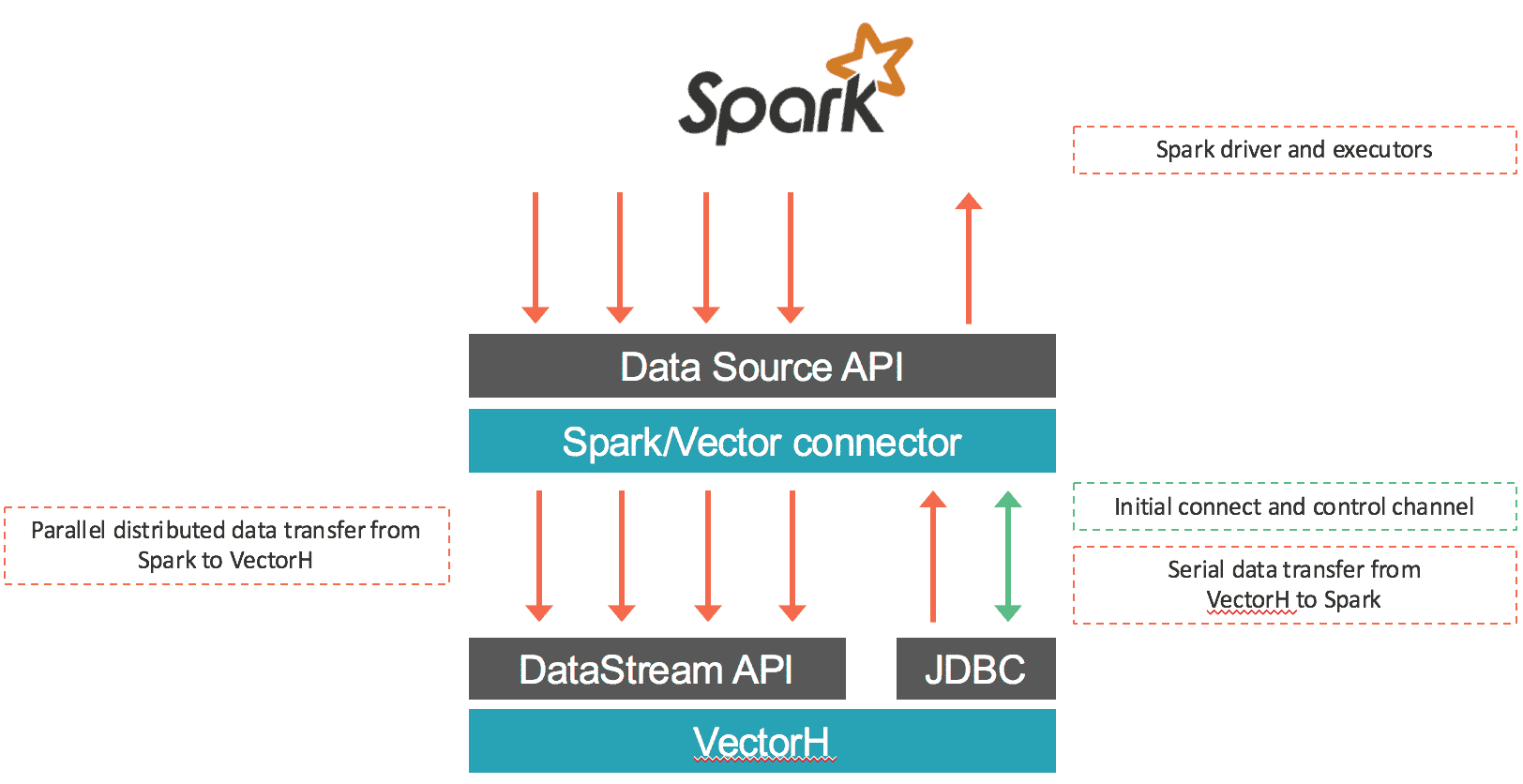
The connector loads data from Spark into Vector as well as retrieves data via SQL from VectorH. The first part is done in parallel: data coming from every input RDD partition is serialized using Vector’s binary protocol and transferred through socket connections to Vector end points using Vector’s DataStream API. Most of the time this connector will assign only local RDD partitions within each Vector end point to preserve data locality and avoid any delays incurred by network communications. In the case of data retrieval from Vector into Spark, data gets exported from Vector and ingested into Spark using a JDBC connection to the leader Vector node. The connector works with both Vector SMP and VectorH MPP, and with Spark 1.5.x. An overview of the data movement is shown below:

spark

What Else is There?

This latest VectorH release (4.2.3) also includes the following new features:

  • YARN support on MapR, in addition to the Cloudera and Hortonworks distributions already certified. With native support in YARN, you can run multiple workloads in the same Hadoop cluster to share the entire pool of resources.
  • Per query profile files can be written to a specified directory, including an HDFS directory. This feature provides more flexibility and control to manage and share query profiles across different users.
  • New options to display the status of cluster services, including basic node health, Kerberos access if enabled, MPI access, HDFS Safemode, and HDFS fsck.
  • A new option to create MinMax indexes on a subset of columns as well as improved memory management of MinMax, resulting in lower CPU and memory overhead.

Learn more at https://www.actian.com/products/ or contact sales@actian.com to speak with a representative.


Recently I helped a customer perform an evaluation of Actian Vector in Hadoop (VectorH) to see if it could maintain “a few seconds” performance as the data sizes grew from one to tens of billions of rows (which it did, but that’s not the subject of this entry).

The customer in question was only moderately invested in Hadoop and so was looking for a way to establish the environment without having to get deep into the details of Hadoop. This aligns nicely with Actian’s vision for the Hadoop versions of its software– allowing customers to run real applications for business users in Hadoop without having to get into the “developer-heavy” aspects that Hadoop typically requires.

Actian has released a provisioning tool called the Actian Management Console (AMC) that will install and configure the operating system, Hadoop, and Actian software in a click-of-a-button style that will be ideal for this customer. AMC currently supports Amazon EC2 and Rackspace clouds.

At the time of the evaluation however, AMC wasn’t available so we looked for something else and thought we would try Amazon’s EMR (Elastic MapReduce), which is a fast way to get a Hadoop cluster up and running with minimal effort. This entry looks at what we found and lists out the pros and cons.

Pros and Cons of Amazon EMR

EMR is very easy to set up – just go to the Amazon console, select the instance types you want, and the number of them, push the button and in a few minutes you have a running Hadoop cluster. This part would be faster to get up and running than using the AMC to provision a cluster from scratch since EMR pre-bakes some of these installation steps to speed them up for you.

By default, you get Amazon’s Hadoop flavor, which is a form of Apache Hadoop with most of the recommended patches and tweaks applied. It is possible however to specify Hortonworks, Cloudera, and MapR to be used with EMR, and other add-ons such as Apache Spark and Apache Zeppelin. In this case, we used the default Apache Hadoop distribution.

Hadoop purists may get a “wrinkled brow” from some of the terms used – for example, the DataNodes are referred to as “core” nodes in EMR, and the NameNode is referred to as the “master” node (for those new to both EMR and VectorH be aware that the term “master” is used by both, for different things).

The configuration of certain items is automatically adjusted depending on the size of the cluster. For example, the HDFS replication factor is set to one for clusters of less than 4 nodes and to two for clusters between 2-10 nodes and then the usual three for larger clusters than 10 nodes. This and other properties can be explicitly set in the start up sequence via “bootstrap” options.

That brings us nicely onto the main thing to be aware of when using EMR – in EMR everything (including Hadoop) is transient; when you restart the cluster everything gets deleted and rebuilt from scratch. If you want persistence of configuration then you need to do that in the bootstrap options. Similarly if you require data to be persistent across cluster reboots then you need to stage the data externally in something like S3. EMR can read and write S3 directly, so you would not need to copy raw data from S3 into HDFS just to be able to load data in VectorH – you could load directly from S3 using something like Actian’s new Spark loader.

This may seem like a drawback, and indeed it is for some use cases, however it really just reflects the purpose of EMR. EMR was never intended to be a long running home for a persistent DataLake, but rather a transient “spin up, process, then shutdown” environment for running MapReduce style jobs. Amazon would probably state that S3 should be the location for persistent data.

In our case we were testing a high-performance database – definitely a “long lived” service with persistent data requirements – so in that sense EMR was maybe not such a good choice. However although we did have to reload the database a few times after wanting to reconfigure the cluster we did quickly adapt to provisioning from scratch by building a rudimentary provisioning script (aided here by the fast loading speed of VectorH and the fact that it doesn’t need indexes) and so it actually worked quite well as a testing environment.

The second thing to be aware of with EMR, especially for those used to Hadoop, is that (at least with the default Hadoop we were using) some of the normal facilities aren’t there. The thing we noticed most of all was the absence of the usual start/stop controls for the Hadoop daemons. We were trying to restart the DataNodes to enable short circuit reads and found it a little tricky – in the end we had to restart the cluster anyway and so put this into the bootstrap options.

Another aspect you don’t have control over with EMR is using an AWS Placement Group. Normally in AWS if you want a high performance cluster you would try and make sure that the different nodes were “close” in terms of physical location, thereby minimizing network latency. With EMR there didn’t seem to be any way to specify that. It could be that EMR is actually being a little clever under the covers and doing this for you anyway. Or it could be that, when dealing with larger clusters Placement Groups maybe become a little impractical. Either way (or otherwise) our setup didn’t use any specified Placement Groups. Even without them, performance was good.

In fact, performance was good enough that the customer reported the results to be better than their comparable testing on Amazon Redshift!

In summary, this exercise showed that you can use Amazon EMR as a “quick start” Hadoop environment even for long lived services like Actian VectorH. Apart from the absence of a few aspects – most of which can be dealt with via bootstrap options – EMR behaves like a regular Hadoop distribution. Due to its transient nature, EMR should only be considered for use cases that are transient (including testing of long lived services).

Customers wanting click-of-a-button style provisioning of Hadoop for production in things like Amazon EC2 should consider installing with Actian’s Management Console, available now from https://esd.actian.com.


The Actian technology teams have recently posted a number of technical tools and snippets to the Actian account on Github that will be of interest to customers, partners and prospects. We encourage all of you to take a look and make contributions of your own – either to enhance these tools, or else to let us know about other tools that you have created for yourselves, and we will mention them here. Our intention is to publish new contributions here over time, and to publish future Blog entries that go into more detail on some of these tools and contributions.

Examples of the projects you can already find on GitHub include:

  • The Actian Spark Connector for Vector in Hadoop (VectorH) is maintained here.
  • A Vagrant package that will take a downloaded Vector .tgz file and automatically install it into a freshly-built CentOS virtual machine.
  • A Unit Testing framework for OpenROAD.
  • A collection of scripts for testing VectorH alongside other Hadoop data analysis engines, referenced as part of a forthcoming conference paper.
  • A Maven-based template for creating new custom operators in Dataflow, together with a couple of examples that use this template, including a Dataflow JSONpath expression parser and an XML and XPath parser.
  • A utility called MQI which is designed to make it easier to run an operating system command across all of the nodes in a VectorH Hadoop cluster.
  • A collection of small Vector Tools that will do things like calculate the appropriate default number of partitions for a large table, look for data skew within a table, check whether the Vector min/max indexes are sorted or not (better performance if your data is sorted on disk and the min/max indexes will show this), and also a tool to take a collection of SQL scripts and turn them into a concurrent user throughput test, complete with some stats on overall runtime.
  • A collection of new operators for Dataflow to implement operations like passing runtime parameters into a Dataflow as a service, and a ‘sesssionize’ operator to group timestamped data into ‘sessions’, and a lead/lag node for handling timestamped data, and various others.
  • A performance benchmark test suite for Actian Vector, based on the DBT3 test data and queries. This project will create test data at a scale factor you choose (defaults to Scale Factor 1, which is around 1Gb of data in total), load that test data into Vector/VectorH, and then execute a series of queries and time the results.

Please take a look, download, and contribute to extend and enhance them to meet your needs!


Big Data engineering has invented a seemingly endless supply of workaround solutions. These are for both scalability and performance problems. Ultimately, our approach to solving these problems dictates how sustainable they will be. This post compares some modern best practices with pre-processing cube environments. 

3 Ways a Hadoop Database Competes With Cube Analytics

  • Software design trumps pre-processing.
  • Data management capability is crucial.
  • Control data explosion and platform complexity.

Cube engines (OLAP) for analyzing data warehouses are nothing new, but applying them in today’s distributed data management architectures is. This post compares high-performance SQL analytics databases with Cube analytics in today’s distributed environment.

Enterprise cube platforms help users wade through massive amounts of data easily. However, with the operating system for data analytics moving to a massively parallel computing architecture with distributed data sources, it can be confusing whether or not cube-based analytics will help your next project.

Hadoop itself gives little help in getting high-performance analytics out of the box. While you may gain transparent access to a wide variety of data, you often sacrifice performance and other critical features such as data management and data expansion control – three key components for mastering the data lake as it grows.

This is why Hadoop adopters likely will not have cube analytics in the future, as “fast” databases bypass the overhead and complexity of maintaining a cube-based system.

Software Design Trumps Pre-Processing

Cube analytics are the bailout for bulging data warehouses or under-equipped analytic databases when they get too big, too heavy and too slow to keep up with running increasingly difficult workloads.  Why have these databases worked so poorly as data volumes scaled or required advanced hardware? Because legacy approaches to software engineering has limited performance improvements.

As a result, the industry is excited when there are merely linear improvements in their query performance when compared to hardware improvement. Are hardware improvements (à la Moore’s Law) accelerating all our queries that much faster or do we even notice?  I bet not. How does that make sense when, for example, chip vendors regularly add more ways to optimize processing?

Actian has taken advantage of several improvements in both hardware and software to power highly optimized analytic environments.

Leveraging Better Hardware

Simply, most systems do not take advantage of the inherent power of modern computing platforms. Put in faster disks (SSD), better RAM and improve the network connects – naturally things can run faster. Add cube analytics on top of that and you still improve performance, but only improved against legacy systems running on similarly designed architectures.

Modern databases that utilize the latest processor improvements (chip cache, disk management, memory sizes, columnar storage, etc.) all give a performance gain over the legacy approaches. These improvements show better than linear, often exponential, improvements over other popular solutions on the market. This is where Actian hangs its hat in the Big Data space (see Actian’s Vector on Hadoop platform).

We should all come to expect significant improvement between generations of both hardware and software. After all, today’s engineers are better educated than ever before and are using the best hardware ever developed.

If you aren’t leveraging these advantages then you’ve already lost the opportunity for a “moon shot” via big data analytics. You won’t be able to plug the dam with old concrete – you need to pour it afresh.

High performance databases are removing the limits that have strangled legacy databases and data warehouses over the past decades. While cube engines can still process on top of these new analytic database platforms, they are often so fast that they do not need the help. Instead, common Business Intelligence (BI) tools can plug into them directly and maintain excellent query performance.

Data Management Capability is Crucial

Back-end database management capabilities are crucial to any sustainable database. Front-end users merely need SQL access, but DBAs always need tools for modifying tables, optimizing storage, backing up data and cleaning up after one another. This is another area that differentiates next generation analytical databases and cube engines.

Many tools in the Hadoop ecosystem do one thing well – i.e. read various types of data or run analytical processes. This means they cannot do all the things that an enterprise database usually requires. Cube engines are no exception here – their strength is in summarizing data and building queries against it.

When your data is handled by a cube system you no longer have an enterprise SQL database. Granted, you may have SQL access but you have likely lost insert, update, and rollback capabilities among others. These are what you should expect your analytic database to be bring to the table – ACID compliance, full SQL compliance, vector-based columnar approach, natively in Hadoop, along with other data management necessities.

Closely related to data management is the ability to get at raw data from the source. With a fast relational database there is no separation of summary data from detailed records. You are always just one query away to higher granularity of data – from the same database, from the same table. When the database is updated all the new data points are readily available for your next query regardless of whether they’ve been pre-processed or not.

Data Management Matters!  

Data changes as new data is ingested but also because users want to modify it, clean it or aggregate it in different ways than before. We all need this flexibility and power to continue leveraging our skills and expertise in data handling.

Control Data Explosion and Platform Complexity

Data explosion is real. The adage that we are continually multiplying the rate at which data grows begs the question: how can we keep it as manageable as possible?

This is where I have a fundamental issue with cube approaches to analytics. We should strive to avoid tools that duplicate and explode our exponentially growing data volumes even further. Needless to say, we should also not be moving data out of Hadoop as some products do.

Wouldn’t it make more sense to engineer a solution that directly deals with the performance bottlenecks in the software rather than Band-Aid a slow analytic database by pre-processing dimensions that might not even get used in the future?

Unfortunately, cube approaches inherently grow your data volumes. For example, the Kylin project leaders have said that they see “6-10x data expansion” by using cubes. This also assumed adequately trained personnel who can build and clean up cubes over time. It quickly becomes impossible to estimate future storage needs if you cannot be assured of how much room your analytics will require.

Avoid Juggling Complex Platforms

Many platforms require juggling more technological pieces than a modern analytic database. Keeping data sources loaded and processed in a database is hard enough, so adding layers on top of it for normalization, cube generation, querying and cube-regeneration, etc. make a system even harder to maintain.

Apache’s Kylin project, as just one example, requires quite a lot of moving pieces: Hive for aggregating the source data, Hive for storing a denormalized copy of the data to be analyzed, HBase for storing the resulting cube data, a query engine on top to make it SQL compliant, etc. You can start to imagine that you might need additional nodes to handle various parts of this design.

That’s a lot of baggage; let’s hope that if you are using it, you really need to!

Consider the alternative, like Actian Vector on Hadoop. You compile your data together from operational sources. You create your queries in SQL. Done. Just because many Hadoop options run slow does not mean they have to and we don’t need to engineer more complexity into the platform to make up for it.

With an optimized platform you won’t have to batch up your queries to run in the background to get good performance and you don’t need to worry about resource contention between products in your stack. It’s all one system. Everything from block management to query optimization is within the same underlying system and that’s the way it should be.

SQL Analysts vs. Jugglers

The final thing you should consider are your human resources. They can handle being experts at a limited number of things. Not all platforms are easy to manage and support over the lifetime of your investment.

We work with a lot of open source projects, but at the end of the day we know our own product inside and out the best. We can improve and optimize parts of the stack at any level. When you use a system with many sub-components that are developed and managed by different teams, different companies, even different volunteer communities you sacrifice the ability to leverage the power of a tightly coupled solution. In the long term you will want those solutions to be professionally supported and maintained with your needs in mind.

From a practical standpoint I have aimed to show how many of the problems that cubes seek to solve are less of an issue when better relational databases are available.  Likewise, careful consideration is important when deciding if the additional overhead of maintaining such a solution is wise. Obviously this varies by situation but I hope these general comparisons are useful when qualifying technology for a given requirement.


Blog | Data Quality | | 5 min read

Never Underestimate the Importance of Good Data Quality

blue lights coming up from a sphere

One of the things I talk to organizations about regularly when they’re trying to get their heads around big data and analytics is the importance of data quality before they start with analytics. Here, I am reminded of the old database acronym of GIGO (garbage in, garbage out), and yet I am astounded by how many companies still skip this most important step.

For example, the other day I was talking to a business professional who could not understand why response rates to campaigns and activities were so low. Nor why they couldn’t really use analytics to get competitive advantage. A quick investigation of their data and their systems soon showed that a large section of the data they were using was either out-of-date, badly formatted or just erroneous.

Today we are blessed, and perhaps at the same time cursed, by the sheer number of solutions available that promise to make it easy for marketers to get their message out to an audience, and yet many of them do not help the fundamental issue of ensuring good data quality. And while there are also umpteen services that will append records to or automatically populate fields in your database for you, professionals are then dependent on them to offer good quality which is not always guaranteed. As I have stated before, data is such a commodity that it is bought, sold and peddled around the world like mad. It can soon become stale or end up in the wrong fields as it is copied and pasted from Excel sheet to Excel sheet. And yet, to turn it into an asset, you need to be able to get good insights and take the right action as a result.

I would also argue that very few businesses run manual data quality checks on their data. And yet they will spend thousands of dollars on maintaining servers and systems that are essentially still full of a large amount of poor data. It’s like owning a fast sports car, washing and polishing it every morning to make it look its best, and yet not service the car, leaving old oil in it and filling it with the cheapest, most underperforming fuel. What’s the point of that?

The reasons why pristine data counts for a lot are numerous. First, you’re not falling at the first hurdle. There’s no sense in crafting the best advertising campaign if the audience you’re sending it to just doesn’t exist or doesn’t see it. Moreover, for those in marketing, good data means potentially great leads for the sales team to follow up on.  Nothing annoys a good salesperson more than non-existent leads or those of poor quality. As a result, conversion rates will go up and you won’t need to keep pumping your database with replacement data.

Second, good data means less time spent hunting around for the right phone number or email or mailing address. How many times have you seen customer records with badly formatted phone numbers or erroneous email addresses? The importance here is also on the recognition that systems set up to accept US mailing addresses or phone numbers must also work beyond the borders of North America. Zip codes outside the US are not always numeric and telephone area codes are not always composed of three digits. Having a system that does not truncate field values to fit a US-model is therefore imperative.

But the biggest reason why all companies should exercise good data quality is in the eyes of many business leader the most important: money. Good data means less money wasted on poor campaigns and less money spent on trying to fix the issue later on. Plus, you’ll spend less money on your staff hunting for the right data. And what’s more, good data will lead to better conversion rates more quickly, so you can quickly find out what is working, what isn’t and then choose to spend your marketing and operational dollars, pounds, euros and yen more wisely on what counts and works first time.

Sure, you might argue that all this is good common sense, but I tell you that large chunks of poor data still exists in many systems out there in enterprises large and small.  It’s time to stop watching bad data rates just go up and start actively flushing out data in your system so you can then get the results you need to act on.

There are a few tricks here. First, don’t be afraid to delete bad data. I know many companies don’t like deleting data at all but what is the point of having your systems full of incorrect information. Second, design systems that can capture and have the most pertinent information in them, nothing more. It’s far better to have 15 fields that are all filled out correctly, than have 150 fields that no-one has the time nor the will to complete and therefore remain empty. And third, learn quickly from your mistakes and adapt behaviours accordingly. There is no point doing the same thing over and over again expecting different results. Einstein once said that was the definition of insanity.  And businesses cannot afford to be labelled mad.

So, before you start on your big data journey, before you start joining data together and before you start wanting to analyze data to act on it, it’s time to make sure your data is healthy and kept in good shape. If you want to run your business like a fast sports car, make sure you tune it, service it and give it the best care possible. And that starts with good data quality.

Why not start today and talk to us at Actian – we’ll help you understand your systems and data and how you can get the most value from it in the shortest of timescales.


Blog | Data Integration | | 4 min read

Emergence of the Chief Data Officer Caffeinates Data Integration

Emergence of chief data officer Blog

We often watch new positions sprout up around emerging technology. These days, we see new titles such as the chief cloud officer, and other titles that seem just as trendy.  However, the strategic use of data within many enterprises led those in charge to assign data management responsibility to one person; the chief data officer or CDO.

I’m not a big fan of creating positions around trends in technology. Back in the day, we had the chief object officer, chief PC officer, chief Web officers, you name it. However, data is not a trend. It’s systemic to what a business is, and thus the focus on managing it better, and centrally, is a positive step.

Adding a CDO to the ranks of IT makes sense. The analyst firm, IDC, predicts the global big data technology and services market will reach $23.8 billion by 2016, while the cloud and cloud services market is expected to see $100 billion invested in 2014. We’ve all seen the explosion of data in enterprises, as the use of big data systems begins to take root, including the ability to finally leverage data for a true strategic business advantage.

The arrival of the CDO has a few advantages for larger enterprises. Appointing a CDO:

  • Sends a clear message to those in IT that data is strategic to corporate leadership, and that they are investing in the proper management and use of that data.
  • Provides a single entity to govern how data is gathered, secured, managed, and analyzed holistically.  The enterprise will no longer lock data up in silos, controlled by various departments in the company.
  • Provides a common approach to data integration. The CDO governs most of the data that needs to be governed, as well as how the data flows from place to place to place.

The role of the CDO will be around the strategic use of business data. Many enterprises will see this instantiated through projects to put the right technology in place, including emerging big-data systems that manage both structured and unstructured data, key analytics systems, and data integration systems to break down enterprise silos.

The use of data analytics is most interesting, considering that data analytics is all about understanding data in the context of other data. When the first generation of data warehouse systems first hit the streets many years ago, the focus was on taking operational data, placing it in another database model, and then slicing and dicing the data to cull out the required information.

When considering traditional approaches to analytics, the data was typically outdated, months or years old in many cases. Moreover, the approach was to analyze the data itself. We could analyze operational trends, such as increasing or decreasing sales, but we would not really understand the reasons for those trends.

Missing was the ability to manage data in the context of other data. An example would be the ability to analyze sales trends in the context of key economic indicators, or the ability to understand the collation of production efficiency in the context of the average hourly pay of plant workers. These are where the true data analytics answers exist. While they are complex and require true data science to find them, the arrival of the CDO means that the true answers will at least be on the corporate radar.

As these strategic analytics systems rise up within many enterprises, perhaps with the rise of the CDO, so does the focus on data integration. Data integration, like databases themselves, have been around for years and years. As we concentrate more on what the data means, in the context of other data, then there is a need to bring that data together.

In the past, data integration was considered more a tactical problem, something that was solved in ad-hoc ways using whatever technology seemed to work at the time. These days, considering the value of the strategic use of data, data integration has got to be a key best practice and enabling technology that allows the enterprise to effectively leverage the data.

In other words, where once there was much less energy around the use of data integration approaches and technology, these days, data integration is caffeinated. Perhaps that’s due in part to the arrival of people in the organization with both budget and power, who are now charged with managing the data, such as the CDO.

Of course, reorgs and the creation of new positions don’t solve problems. They just provide the potential to solve problems. With the arrival of the CDO comes a new set of priorities around the use of data.  Data integration has got to be at least number 1 or 2 on the priority list.