

Replace CrewAI Memory in Production With VectorAI DB


Key Takeaways
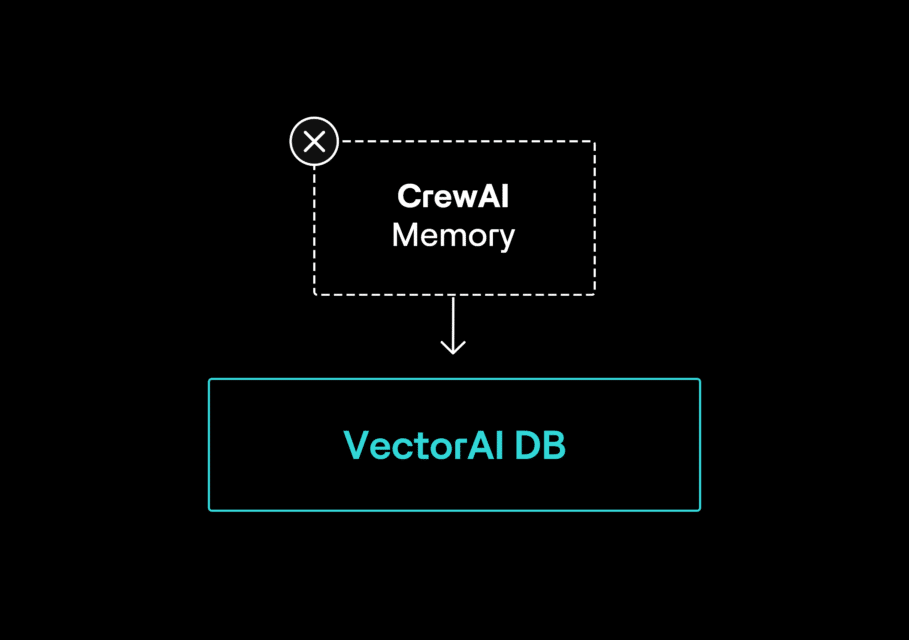
- The tutorial replaces CrewAI’s default memory backend with VectorAI DB to make agent memory more production-ready.
- It addresses three key issues: concurrent locking, lost memory after restarts, and memory leaking between users.
- A custom VectorAIStorage provider adds persistent vector memory while leaving existing agents, tasks, and crew logic unchanged.
- Per-user scopes isolate memories in multi-tenant deployments so agents only retrieve context belonging to the correct user.
- The pattern improves persistent agent memory while leaving long-term SQLite storage and memory extraction behavior unchanged.
If you’ve deployed a CrewAI application with memory=True and you’re seeing "database is locked" errors under concurrent load, lost memory after a container restart, or memory bleeding between users in a multi-tenant deployment, all three trace to the same cause: CrewAI’s default memory backend does not hold up under production conditions.
This tutorial shows you how to replace it with VectorAI DB. The change requires one new file and two lines in your Crew instantiation. Your agents, tasks, and crew logic stay exactly as they are.
Prerequisites
Before you start, you need:
- CrewAI 1.14.6 installed
- Docker installed and running
- VectorAI DB Community Edition running locally
- Python 3.10 or higher
- An OpenAI API key
Why the Default Memory Backend Fails in Production
CrewAI’s default memory backend works well in development. Under production conditions, it breaks in three specific ways.
Concurrent locking
Current CrewAI versions use LanceDB with a retry mechanism. That reduces the problem, but it doesn’t eliminate it. The mem0 production memory setup guide reports that running multiple crews in parallel against shared storage can still produce “database is locked” errors. Too many concurrent writers can also exhaust LanceDB’s retry limit and cause failed writes. Earlier CrewAI versions used ChromaDB as the default vector backend, which has its own single-threading constraints under concurrent load. For a deeper look at how these concurrency limits affect production agent deployments, see our comparison of embedded vector databases.
Ephemeral storage in containers
The default storage location is machine-bound. Without an explicit volume mount, the local LanceDB directory disappears when the container restarts, and all saved memory goes with it. As TechJack Solutions notes in their CrewAI production guide, “default local storage is ephemeral in containers.” We confirmed this directly, and the test script is available on GitHub. Wiping the storage directory erased every saved memory with no recovery path.
No per-user isolation
As the mem0 team notes, “there is no per-user isolation for CrewAI memory types.” In our test, a scope-less recall() call with two users in the same collection returned both users’ private records in the same result set.
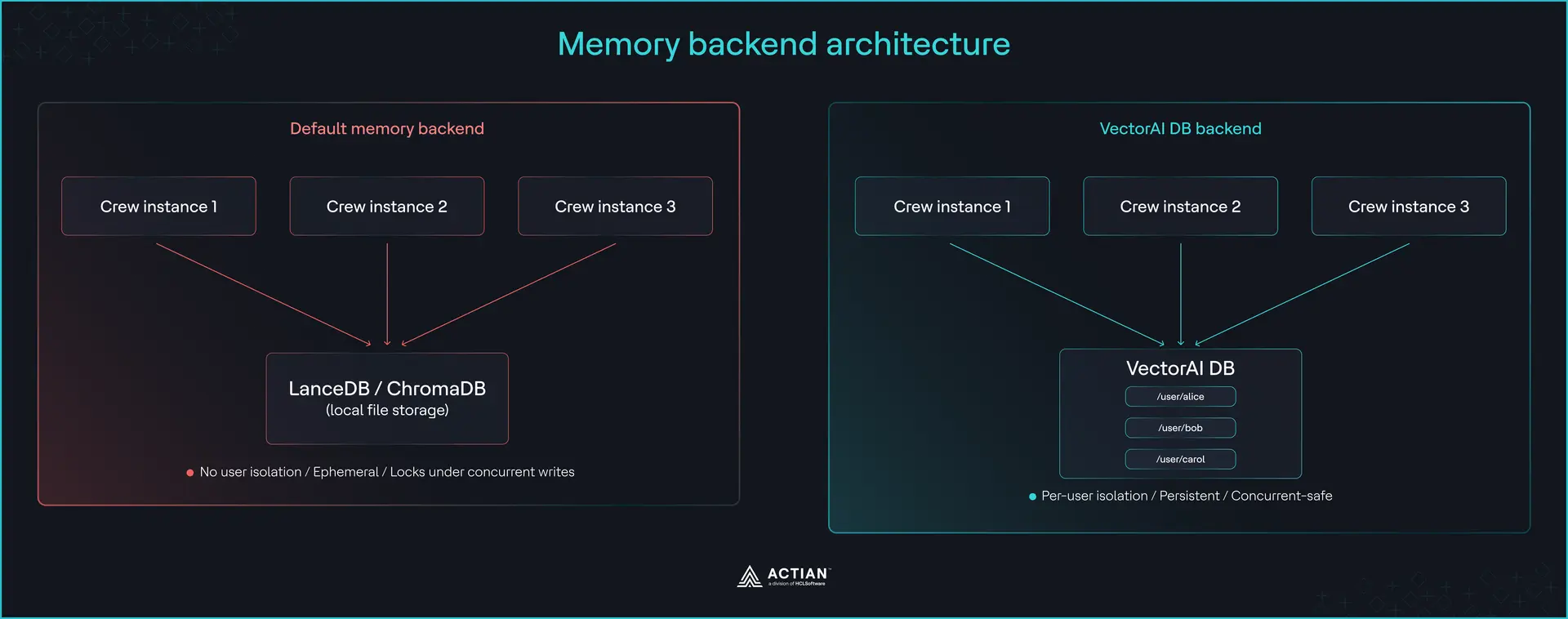
All three failures trace back to the same root: the default storage backend. Here is how to replace it.
How CrewAI’s External Memory Configuration Works
Two things make the swap clear: how CrewAI initializes memory, and where the replacement happens.
When you set memory=True on a Crew, CrewAI auto-initializes a Memory instance backed by LanceDB. It saves records after task execution, recalls relevant context before each agent turn, and uses a background write queue so saves do not block agent execution.
The Memory class accepts a storage parameter that takes any object implementing the StorageBackend protocol. This protocol defines the interface CrewAI calls when reading and writing memory. The excerpt below implements save() and search(). You can find the remaining protocol methods in the GitHub repo. When you pass a custom storage object, CrewAI routes all memory operations through it instead of the default LanceDB backend.
Per-user isolation works through the scope parameter. Every memory record carries a scope path, and every recall operation filters by it. Passing a scope path like /user/alice, where alice is the user’s unique identifier, on every write and read means Alice’s memories never appear in Bob’s results, and vice versa.
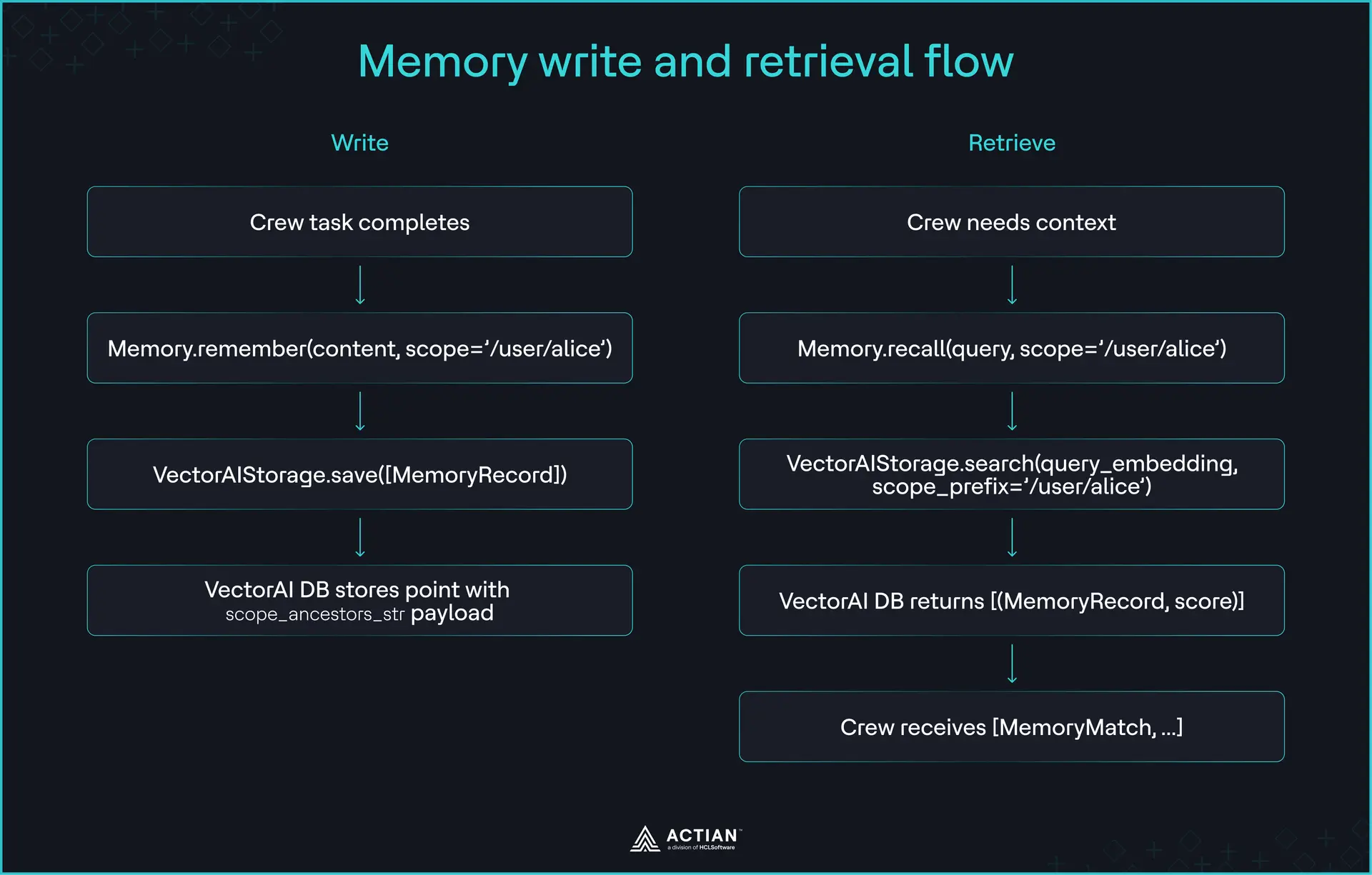
The steps below only replace the vector memory backend.
Step 1: Install Dependencies
Install the two packages together:
pip install "crewai==1.14.6" actian-vectorai-clientIn our test environment, these two packages declared conflicting protobuf requirements. CrewAI’s dependency chain pins protobuf<6.0 via opentelemetry-proto==1.34.1, while actian-vectorai-client requires the 6.33 gencode runtime. Protobuf’s versioning scheme means a 7.x Python runtime satisfies a 6.33 gencode requirement because newer runtimes are backward compatible with older gencode. Pin protobuf to the version we validated:
pip install "protobuf==7.35.1"You’ll see a pip check warning about opentelemetry-proto after this. This is a metadata constraint warning only. We verified that CrewAI and the OpenTelemetry exporters import and run correctly under protobuf 7.35.1.
Step 2: Start VectorAI DB
Pull the image and start the container with a volume mount so memory persists across restarts:
docker pull actian/vectorai:latest
docker run -d --name vectorai \
  -v ./local_data:/var/lib/actian-vectorai \
  -p 6573-6575:6573-6575 \
  -e ACTIAN_VECTORAI_ACCEPT_EULA=YES \
  actian/vectorai:latest
The volume mount (-v ./local_data:/var/lib/actian-vectorai) is what makes memory persist across container restarts. Without it, VectorAI DB loses all stored data when the container stops, which reintroduces the same ephemeral storage problem you’re replacing.
Once the container starts, the gRPC port on 6574 is what VectorAIStorage connects to. The local UI is available at http://localhost:6575.
Step 3: Build the Custom Memory Provider
VectorAIStorage implements the StorageBackend protocol that CrewAI’s Memory class expects. The file below provides the methods CrewAI calls when it saves and retrieves memory records. Create a file called vectorai_storage.py in your project root. The full file is available on GitHub, and the methods below cover the core design decisions.
Scope paths carry user identifiers that may come from user input. Strip pipe characters from any user identifier before passing it to VectorAIStorage to prevent scope filter bypass.
import threading
import uuid
from actian_vectorai import VectorAIClient, VectorParams, Distance, PointStruct, Filter, Field
from actian_vectorai.exceptions import CollectionExistsError
from crewai.memory.types import MemoryRecord, ScopeInfo
# json, datetime, and Any are used in _record_to_payload and _payload_to_record
# in the full file on GitHub

VECTOR_DIM = 1536  # matches OpenAI text-embedding-3-small, CrewAI's default embedder
COLLECTION_NAME = "crewai_memories"
_collection_lock = threading.Lock()

# _record_to_payload and _payload_to_record are defined in the full file on GitHub
# https://github.com/Tiioluwani/crewai-vectorai-memory

def _build_scope_ancestors(scope: str) -> list[str]:
    parts = scope.strip("/").split("/")
    ancestors: list[str] = ["/"]
    current = ""
    for part in parts:
        if part:
            current = f"{current}/{part}"
            ancestors.append(current)
    return ancestors

class VectorAIStorage:
    def __init__(self, host: str = "localhost:6574", collection: str = COLLECTION_NAME) -> None:
        self._host = host
        self._collection = collection
        self._client = VectorAIClient(host)
        self._client.connect()
        self._ensure_collection()

    def close(self) -> None:
        self._client.shutdown()

    def _ensure_collection(self) -> None:
        with _collection_lock:
            try:
                self._client.collections.create(
                    self._collection,
                    vectors_config=VectorParams(size=VECTOR_DIM, distance=Distance.Cosine),
                )
            except CollectionExistsError:
                pass

    def _scope_filter(self, scope_prefix: str | None) -> Filter | None:
        if not scope_prefix or not scope_prefix.strip("/"):
            return None
        prefix = scope_prefix.rstrip("/")
        if not prefix.startswith("/"):
            prefix = "/" + prefix
        return Filter(must=[Field("scope_ancestors_str").text(f"|{prefix}|")])

    def save(self, records: list[MemoryRecord]) -> None:
        if not records:
            return
        points = []
        for record in records:
            vector = record.embedding if record.embedding else [0.0] * VECTOR_DIM
            points.append(
                PointStruct(
                    id=str(uuid.uuid4()),
                    vector=vector,
                    payload=self._record_to_payload(record),
                )
            )
        self._client.points.upsert(self._collection, points)

    def search(
        self,
        query_embedding: list[float],
        scope_prefix: str | None = None,
        categories: list[str] | None = None,
        metadata_filter: dict[str, Any] | None = None,
        limit: int = 10,
        min_score: float = 0.0,
    ) -> list[tuple[MemoryRecord, float]]:
        fetch_limit = max(limit * 20, 200) if (scope_prefix or categories or metadata_filter) else limit
        results = self._client.points.search(
            self._collection,
            vector=query_embedding,
            limit=fetch_limit,
            filter=self._scope_filter(scope_prefix),
        )
        out: list[tuple[MemoryRecord, float]] = []
        for hit in results:
            score = float(hit.score)
            if score < min_score:
                continue
            record = self._payload_to_record(hit.payload)
            if categories and not any(c in record.categories for c in categories):
                continue
            if metadata_filter and not all(
                record.metadata.get(k) == v for k, v in metadata_filter.items()
            ):
                continue
            out.append((record, score))
            if len(out) >= limit:
                break
        return out
The scope_ancestors_str field stores every ancestor path as a pipe-delimited string so VectorAI DB can filter by scope server-side without a native prefix operator. search() overfetches by a factor of 20 when a filter is present because VectorAI DB filters after ranking an internal candidate window, not before. A scope-filtered search may return fewer results than exist when the user’s records fall outside that window, but it never returns records from the wrong user. Call close() when your application exits to release the gRPC connection.
Step 4: Configure the Crew to Use the Custom Provider
With VectorAIStorage in place, create a file called main.py in your project root and add the following:
from crewai import Crew, Agent, Task, Process
from crewai.memory import Memory
from vectorai_storage import VectorAIStorage

# Replace with your actual user identifier
user_id = "alice"

storage = VectorAIStorage(host="localhost:6574")

crew = Crew(
    agents=[
        Agent(
            role="Research Analyst",
            goal="Research and summarize topics accurately",
            backstory="You are an experienced research analyst.",
            llm="gpt-4o-mini",
        )
    ],
    tasks=[
        Task(
            description="Summarize the latest developments in vector databases.",
            expected_output="A concise summary of key developments.",
        )
    ],
    memory=Memory(
        storage=storage,
        root_scope=f"/user/{user_id}",
    ),
    process=Process.sequential,
    verbose=True,
)

result = crew.kickoff()
print(result)
storage.close()
The root_scope parameter scopes every memory operation to /user/alice. In a multi-tenant deployment, create one VectorAIStorage instance per request and pass the current user’s identifier as the root_scope. Two crew instances running concurrently with different root_scope values store and retrieve memory in completely separate namespaces.
Step 5: Verify the Three Failure Modes are Resolved
Before swapping the backend, here is the output from running the test harness against CrewAI’s default LanceDB storage:

With VectorAI DB as the backend, create a file called test_failure_modes.py in your project root. Then add the following:
import threading
from vectorai_storage import VectorAIStorage
from crewai.memory.types import MemoryRecord

def make_record(content, scope, n):
    return MemoryRecord(
        content=content,
        scope=scope,
        categories=["test"],
        importance=0.5,
        # Embeddings are synthetic. Isolation in Test 3 depends on the
        # scope filter, not vector similarity.
        embedding=[float(n % 10) / 10.0] * 1536,
    )

# Test 1: Concurrent writes
print("=== Test 1: Concurrent writes ===")
errors = []

def write_memories(user_id, n):
    try:
        storage = VectorAIStorage()
        for i in range(5):
            storage.save([make_record(f"Memory {i} for user {user_id}", f"/user/{user_id}", i)])
        storage.close()
    except Exception as e:
        errors.append(str(e))

threads = [threading.Thread(target=write_memories, args=(f"user{i}", i)) for i in range(5)]
for t in threads:
    t.start()
for t in threads:
    t.join()

if errors:
    print(f"FAIL: {len(errors)} concurrent write error(s): {errors[0]}")
else:
    print("PASS: 5 concurrent writers completed without errors")

# Test 2: Persistence across reconnect
print("\n=== Test 2: Persistence across reconnect ===")
storage1 = VectorAIStorage()
storage1.save([make_record("Persistent memory test", "/user/persist_test", 1)])
storage1.close()

storage2 = VectorAIStorage()
results = storage2.search(query_embedding=[0.1] * 1536, scope_prefix="/user/persist_test", limit=5)
if results:
    print(f"PASS: Memory persisted across reconnect: {results[0][0].content[:50]}")
else:
    print("FAIL: Memory not found after reconnect")
storage2.delete(scope_prefix="/user/persist_test")
storage2.close()

# Test 3 verifies scope-filter isolation at the storage level.
# Application-level enforcement is handled by root_scope on the Memory class in main.py,
# which automatically prepends the user scope to every save and recall operation.
print("\n=== Test 3: Per-user isolation ===")
storage3 = VectorAIStorage()
storage3.save([make_record("Alice preference: prefers dark mode", "/user/alice", 1)])
storage3.save([make_record("Bob preference: speaks Spanish", "/user/bob", 2)])

alice_results = storage3.search(query_embedding=[0.1] * 1536, scope_prefix="/user/alice", limit=5)
bob_results = storage3.search(query_embedding=[0.2] * 1536, scope_prefix="/user/bob", limit=5)

alice_contents = [r.content for r, _ in alice_results]
bob_contents = [r.content for r, _ in bob_results]

alice_leaked = any("Bob" in c for c in alice_contents)
bob_leaked = any("Alice" in c for c in bob_contents)

if not alice_leaked and not bob_leaked:
    print(f"PASS: Per-user isolation confirmed: Alice sees {len(alice_results)} record(s), Bob sees {len(bob_results)} record(s), no cross-contamination")
else:
    print(f"FAIL: Memory leaked — Alice results: {alice_contents}, Bob results: {bob_contents}")

storage3.delete(scope_prefix="/user/alice")
storage3.delete(scope_prefix="/user/bob")
storage3.close()

print("\nAll failure mode tests complete.")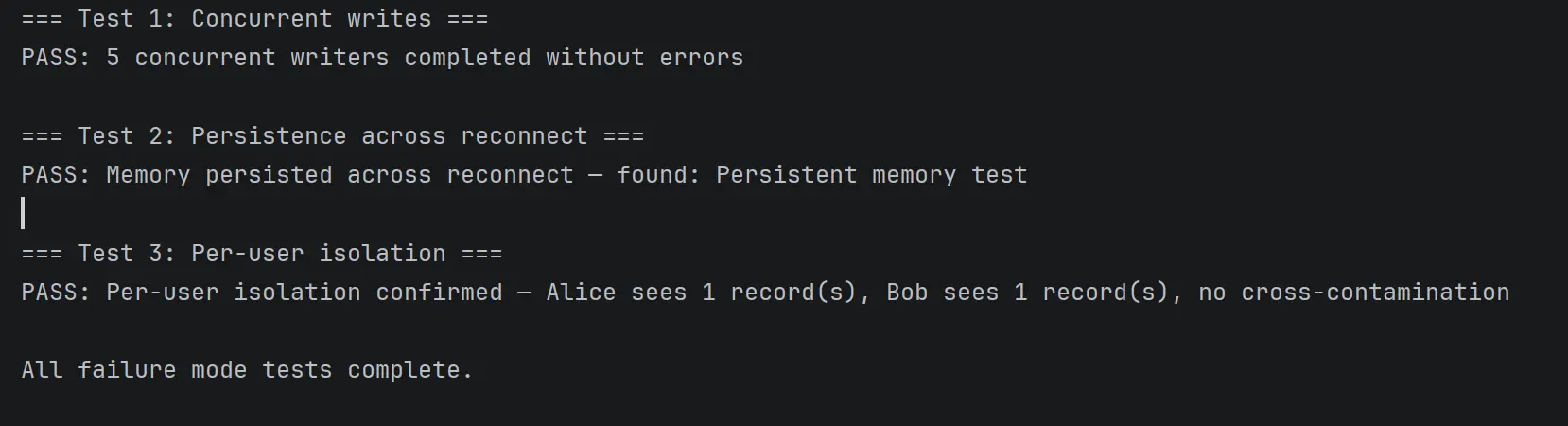
The three tests confirm that VectorAI DB resolves all three production failure modes. VectorAI DB handles concurrent writes without locking under the test load, persists memory across client reconnects, and scopes every recall operation to the user that owns it.
What This Pattern Handles and What to do About the Rest
Three areas remain outside what the swap covers.
Long-term memory: This still uses SQLite via KickoffTaskOutputsSQLiteStorage. This layer stores task execution outcomes across runs and sits outside of what VectorAIStorage touches. If your deployment needs long-term memory to persist across container restarts, mount a volume for the SQLite file or replace that layer separately.
Memory extraction quality: This depends on CrewAI’s built-in LLM analysis pipeline, which this tutorial leaves unchanged. The LLM infers scope, categories, and importance on every save. If your agents are storing low-quality or irrelevant memories, that’s an extraction problem, not a storage problem.
Retrieval latency and token budgets: These grow with memory store size. VectorAIStorage leaves retrieval limits unconfigured. As noted in Step 3, search() overfetches by a factor of 20 when a filter is present. Tuning limit upward without accounting for that multiplier produces inconsistent results at scale. High-volume deployments should tune the limit parameter on recall operations and monitor how much retrieved context each agent turn receives.
Wrapping Up
Replacing CrewAI’s default memory backend with VectorAI DB fixes the three failure modes that make memory=True unreliable in production: concurrent locking, ephemeral storage, and missing per-user isolation. The core change is one new file and one configuration argument on your Crew. Your agents, tasks, and crew logic stay exactly as they are.
You can add a semantic memory extraction layer with mem0 on top of the persistent, isolated backend you’ve just built. The Community Edition is free to get started.
Frequently Asked Questions
Does this tutorial work with CrewAI 1.14.7?
This tutorial targets CrewAI 1.14.6 and is untested on 1.14.7. Before proceeding on 1.14.7, verify that the storage parameter on Memory still exists and that the method signatures in crewai/memory/storage/backend.py match what VectorAIStorage implements.
What happens to long-term memory (SQLite)?
This tutorial replaces only the vector memory backend. Long-term memory via KickoffTaskOutputsSQLiteStorage stays untouched. Mount a volume for the SQLite file if you need it to persist across container restarts.
Can I use this pattern with mem0 instead of a raw VectorAI DB connection?
Yes, but it’s a different integration path. mem0 integrates via the external_memory parameter, not the StorageBackend swap this tutorial covers. Adding a semantic memory extraction layer with mem0 covers that path.
Does using an external memory provider affect crew performance?
Yes. Every memory save now involves a gRPC call to VectorAI DB in addition to CrewAI’s LLM analysis pipeline. The network overhead of a gRPC call is small on a local deployment, but measure both the save and recall latency in your own environment before deploying to production. Tune the limit parameter on recall operations if retrieved context grows too large.
Common Problems
“database is locked” errors persist after switching to VectorAI DB
The Crew is likely still falling back to the default backend. Confirm Memory(storage=VectorAIStorage(...)) is passed correctly in the Crew and that VectorAIStorage imports without errors.
Memory provider instantiation fails
VectorAI DB is likely unreachable. Confirm that the container is running with docker ps and that port 6574 is published. If you’re on a remote host, pass the correct address to VectorAIStorage(host="your-host:6574").
Memory leaks between users after configuring per-user isolation
Check that root_scope is set per user at Crew instantiation and not shared across instances. Two Crew instances sharing the same root_scope value store memories in the same namespace.
VectorAIStorage does not satisfy the StorageBackend protocol
Run this to confirm VectorAIStorage satisfies the protocol:
python -c "from crewai.memory.storage.backend import StorageBackend; from vectorai_storage import VectorAIStorage; print(issubclass(VectorAIStorage, StorageBackend))"If it returns False, compare the method signatures in vectorai_storage.py against crewai/memory/storage/backend.py in your installed package.

Stay connected
Data insights delivered to you.
(i.e. sales@..., support@...)
