
How to Set Up LangChain With VectorAI DB for On-Prem RAG


Key Takeaways
- The tutorial shows how to build a local RAG pipeline using LangChain with VectorAI DB as the vector store.
- LangChain’s VectorStore abstraction lets teams swap vector backends without rewriting the retrieval chain.
- Developers can use OpenAI embeddings or run fully locally with HuggingFace embeddings and Ollama.
- The workflow covers Docker setup, document chunking, vector storage, similarity search, and a complete RAG chain.
- The pattern fits on-prem, air-gapped, edge, and data-residency use cases where cloud vector stores are not ideal.
LangChain’s VectorStore abstraction separates the retrieval chain from the database that stores your embeddings. That means you can replace a hosted vector store with VectorAI DB while keeping the retriever, prompt, and LLM chain structure largely unchanged.
This tutorial builds that pipeline from scratch. You will run VectorAI DB locally with Docker, load and chunk documents, generate embeddings, store them in a local vector database, and connect the store to a LangChain RAG chain. The tutorial covers both OpenAI and local HuggingFace embeddings, and shows how to replace the OpenAI LLM with Ollama for a fully local pipeline.
By the end, you will have a working Retrieval-Augmented Generation (RAG) application that runs without a cloud vector database. If you are migrating from Pinecone, a hosted Qdrant deployment, or another managed vector store, the change is narrower than it might seem. For background on why developers are moving from hosted vector stores to local alternatives, see the embedded vector database comparison article.
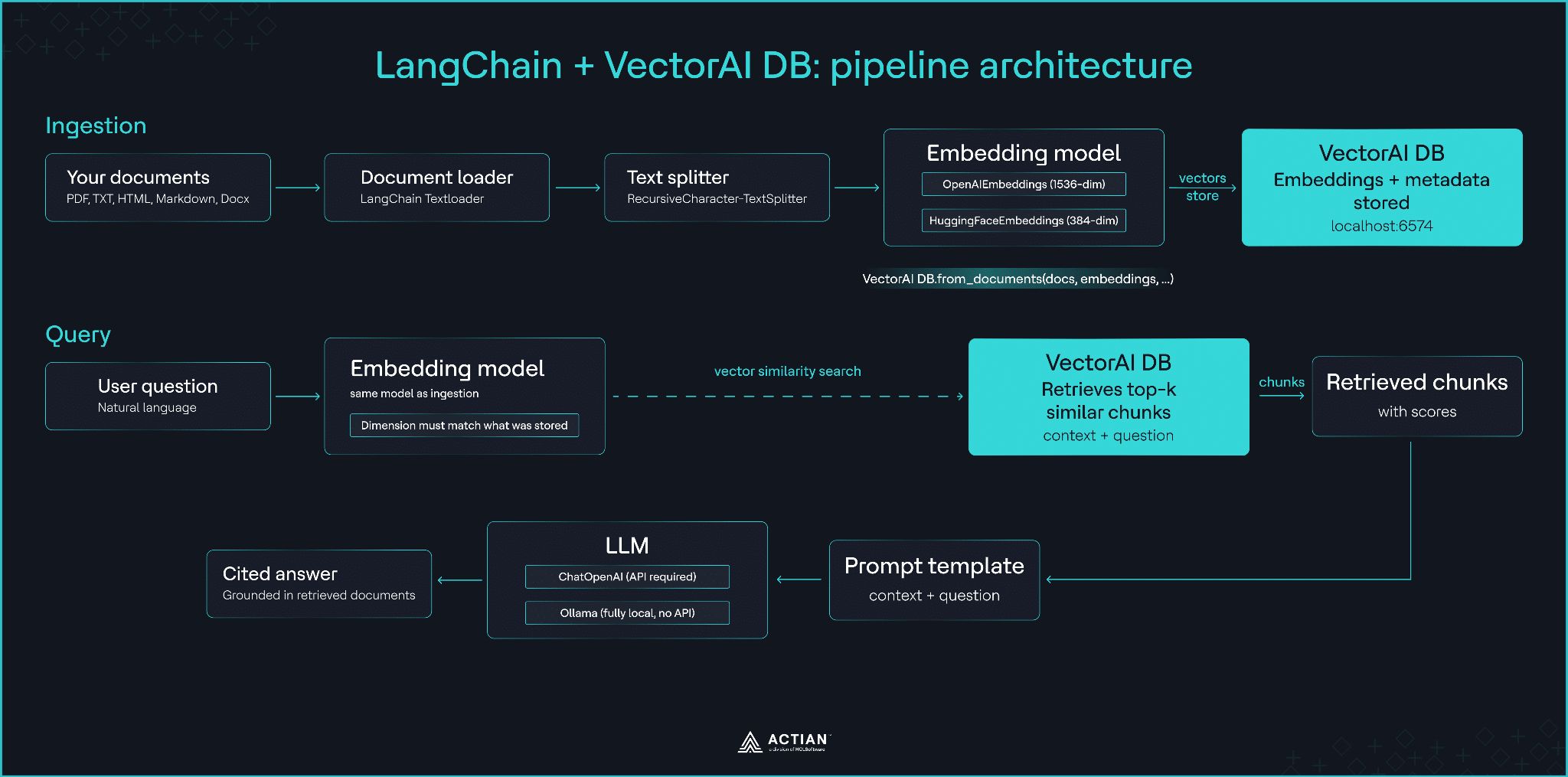
The LangChain + VectorAI DB pipeline architecture. Ingestion path (top): documents flow through the loader, text splitter, embedding model, and into VectorAI DB. Query path (bottom): the user question is embedded with the same model, VectorAI DB retrieves the nearest chunks, and the results flow through the prompt template and LLM to produce a cited answer.
Prerequisites.
Confirm the following before starting.
- Docker installed and running.
- Python 3.10 or higher.
- VectorAI DB Community Edition running locally. If you have not set it up yet, follow the VectorAI DB installation guide before continuing.
- Ollama installed with
llama3.2pulled. Runollama pull llama3.2on a machine with internet access.
How LangChain’s VectorStore Interface Works
LangChain’s VectorStore base class defines a standard interface that every compliant backend implements. The interface covers four core operations: from_documents() to create a store and ingest documents in one call, add_texts() to add content to an existing store, similarity_search() to retrieve the nearest documents to a query, and as_retriever() to convert the store into a retriever for use in a LangChain Expression Language (LCEL) chain.
Any compliant backend can be swapped into the common LangChain retrieval path, although backend-specific features such as filtering syntax, distance metrics, and hybrid search still vary. What does not change is the retrieval chain itself. The retriever, prompt template, Large Language Model (LLM), and output parser remain the same regardless of which backend stores the vectors.
The diagram below makes this concrete. The left panel shows a cloud vector store instantiation. The right panel shows the VectorAI DB equivalent. The import on line 1 and the class name and connection parameters on line 7 change. Lines 8 through 17 (the documents, embedding, retriever call, and LCEL chain) are identical on both sides.
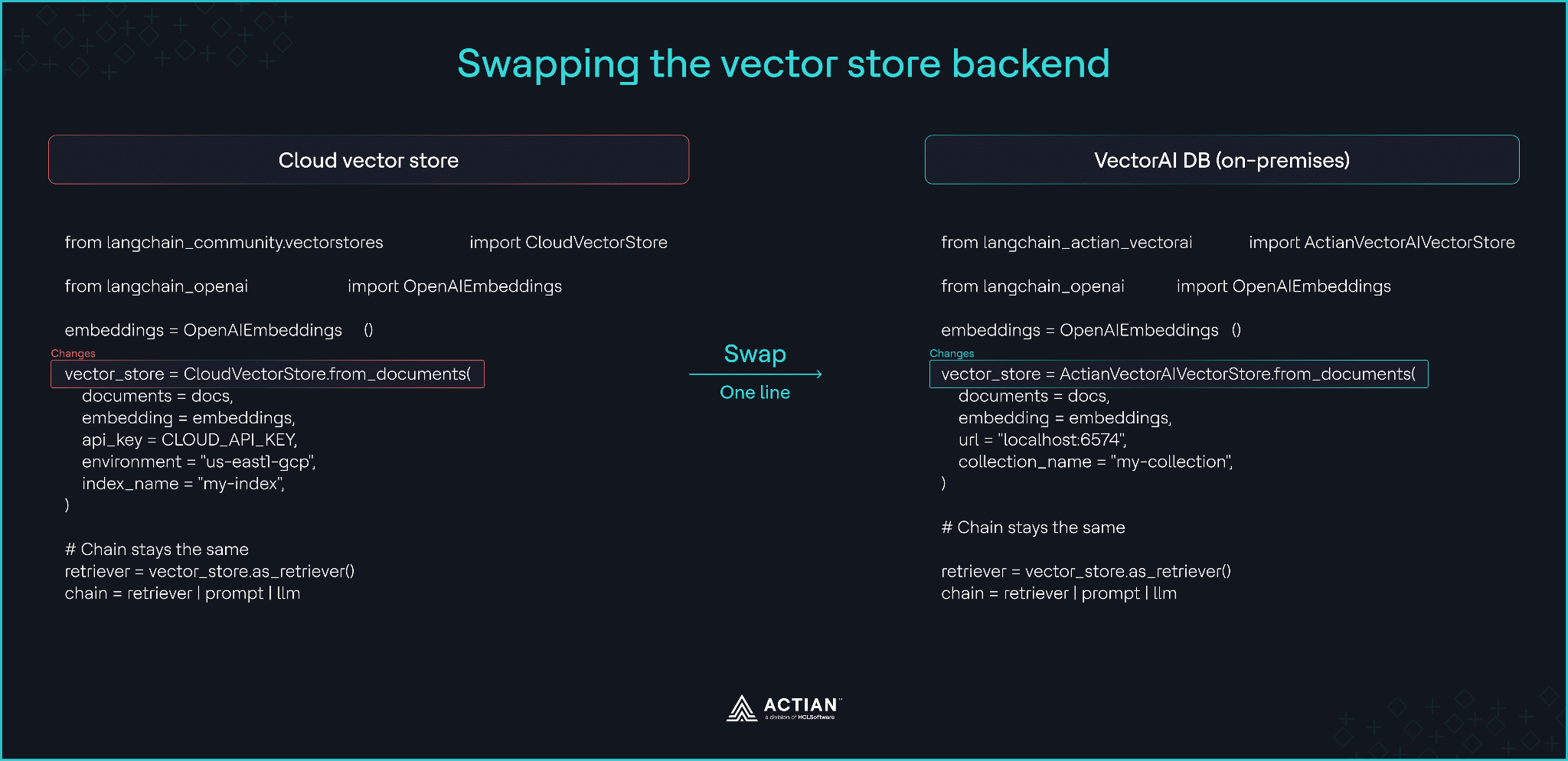
Cloud vector store instantiation versus VectorAI DB instantiation side by side. The import and class name change. The chain logic on lines 15 through 17 is identical.
Step 1: Start VectorAI DB
Run VectorAI DB as a Docker container. Pull the image and start it with a persistent volume:
docker pull actian/vectorai:latest
docker run -d --name vectorai \
  -v ./local_data:/var/lib/actian-vectorai \
  -p 6573-6575:6573-6575 \
  -e ACTIAN_VECTORAI_ACCEPT_EULA=YES \
  actian/vectorai:latest
The container exposes REST on port 6573, gRPC on port 6574, and a local web UI on port 6575. The LangChain integration connects over gRPC at localhost:6574. The Community Edition is sufficient for this tutorial and supports up to 5,000 stored vectors.
Confirm the container started correctly:
docker logs vectoraiYou should see Ready to accept connections... near the end of the output before continuing.
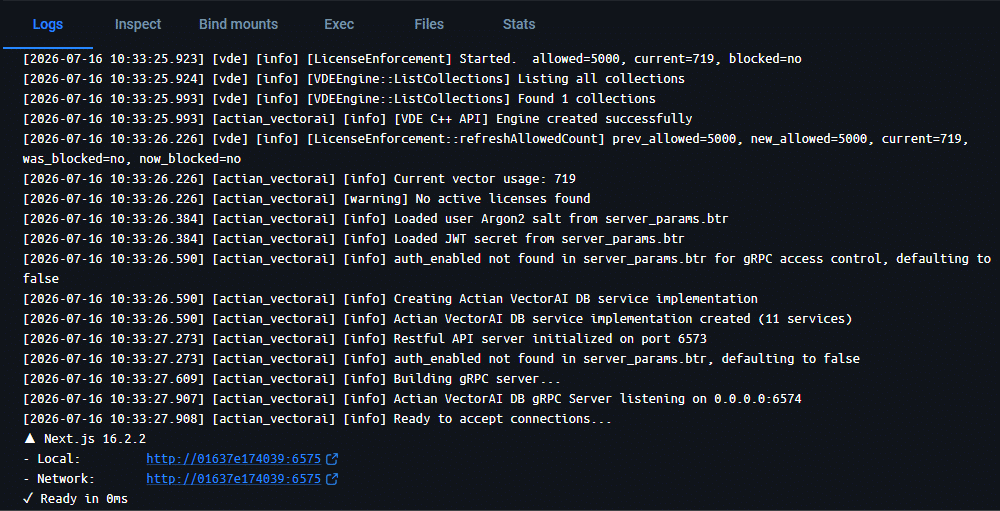
Terminal output from the connection health check confirming the VectorAI DB server version and status.
Step 2: Install the Python Dependencies
Install all required packages in one command:
pip install langchain langchain-core langchain-text-splitters \
  langchain-actian-vectorai langchain-openai \
  langchain-huggingface langchain-ollama \
  actian-vectorai-client sentence-transformers
LangChain has been splitting its integrations into standalone packages. langchain-huggingface replaces the HuggingFace classes previously in langchain-community, and langchain-ollama replaces the Ollama classes. This tutorial uses the current standalone packages throughout. Using the deprecated langchain-community paths will produce deprecation warnings in newer LangChain versions.
If you plan to use the OpenAI embedding path in Step 5, set your application programming interface (API) key before running the embedding code:
export OPENAI_API_KEY="your-api-key-here"Step 3: Connect to VectorAI DB from Python
Verify the connection before loading any documents. Create a test collection, confirm it appears in the collection list, then clean it up. This checkpoint confirms the server is accepting both reads and writes before you proceed.
from actian_vectorai import VectorAIClient, VectorParams, Distance
# Connect to VectorAI DB over gRPC.
client = VectorAIClient("localhost:6574")
client.connect()
# Create a test collection to confirm the server accepts writes.
client.collections.create(
    "connection_test",
    vectors_config=VectorParams(size=128, distance=Distance.Cosine),
)
# Confirm the collection was created.
collections = client.collections.list()
print(f"Collections: {collections}")
# Expected: ['connection_test']

# Remove the test collection before proceeding.
client.collections.delete("connection_test")
print("Connection verified. Ready to proceed.")
client.close()
If client.connect() raises a ConnectionError, check that the Docker container is running with docker ps and that port 6574 is not blocked by another process.
Step 4: Load and Chunk Documents
Use a small set of inline documents, so you have no external dependencies for this step. The content covers vector database and RAG concepts, which produce meaningful retrieval results in Steps 6 and 7.
from langchain_core.documents import Document
from langchain_text_splitters import RecursiveCharacterTextSplitter

# Inline documents keep this tutorial self-contained.
# In a production pipeline, replace this with a document loader
# such as PyPDFLoader, DirectoryLoader, or a custom ingestion process.
raw_documents = [
    Document(page_content="""A vector database stores high-dimensional numerical
representations of data called embeddings. Each embedding captures the semantic
meaning of the original content, allowing the database to find similar items by
comparing their positions in vector space rather than matching exact keywords.""",
    metadata={"source": "intro", "topic": "vector-databases"}),

    Document(page_content="""Retrieval-Augmented Generation combines a retrieval
system with a language model. The retrieval component finds relevant documents from
a vector store based on the user question, and the language model generates an answer
grounded in those retrieved documents rather than relying on its training data alone.""",
    metadata={"source": "intro", "topic": "rag"}),

    Document(page_content="""Embedding models convert text into fixed-length numerical
vectors. The choice of embedding model determines the vector dimension and the quality
of semantic similarity. OpenAI text-embedding-ada-002 produces 1536-dimensional vectors.
Sentence transformers such as all-MiniLM-L6-v2 produce 384-dimensional vectors and
run locally without an external API key.""",
    metadata={"source": "intro", "topic": "embeddings"}),

    Document(page_content="""Metadata filtering narrows the candidate set before
running similarity search. Attaching fields such as document type, date, or source
to each stored vector enables queries scoped to a specific subset of your collection
without changing the embedding or search logic.""",
    metadata={"source": "intro", "topic": "filtering"}),
]

# RecursiveCharacterTextSplitter preserves sentence boundaries before splitting.
splitter = RecursiveCharacterTextSplitter(chunk_size=300, chunk_overlap=50)
docs = splitter.split_documents(raw_documents)

print(f"Produced {len(docs)} chunks from {len(raw_documents)} documents.")
The metadata field on each Document is stored as payload in VectorAI DB and is available for filtering at search time.
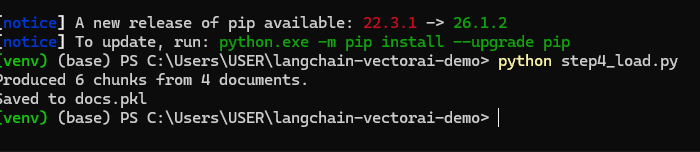
Terminal output showing the chunk count produced from the four inline documents.
Step 5: Embed and Store Documents
This is the core of the tutorial. Two paths are available depending on whether you have an OpenAI API key or need to run fully offline. Choose one and use it consistently throughout Steps 6 and 7.
One constraint applies to both paths. A collection created with one embedding model cannot accept vectors from a different model because the dimensions differ. OpenAI embeddings are 1536-dimensional. The HuggingFace model used below produces 384-dimensional vectors. If you switch embedding models between runs, pass force_recreate=True to drop and recreate the collection automatically.
Path 1: OpenAI embeddings
from langchain_actian_vectorai import ActianVectorAIVectorStore
from langchain_openai import OpenAIEmbeddings
from actian_vectorai import VectorAIClient

store = ActianVectorAIVectorStore.from_documents(
    documents=docs,
    embedding=OpenAIEmbeddings(),    # produces 1536-dim vectors
    collection_name="rag_documents",
    url="localhost:6574",
    force_recreate=True,
)

print("Done.")

# Confirm vectors are stored and queryable.
client = VectorAIClient("localhost:6574")
client.connect()
print(f"Active collections: {client.collections.list()}")
test = store.similarity_search("vector database", k=1)
print(f"Test search returned {len(test)} result. Vectors are queryable.")
client.close()
from_documents() handles the VectorAI DB connection, creates the collection, and inserts the vectors in a single call. This is the only part of the pipeline that changes when you swap the backend.
Path 2: Local HuggingFace embeddings. Use this path if the pipeline must run without external API calls.
from langchain_actian_vectorai import ActianVectorAIVectorStore
from langchain_huggingface import HuggingFaceEmbeddings
from actian_vectorai import VectorAIClient
# all-MiniLM-L6-v2 produces 384-dim vectors and runs on CPU.
# Downloads ~90 MB on first use. Subsequent runs load from cache.
embeddings = HuggingFaceEmbeddings(model_name="all-MiniLM-L6-v2")

store = ActianVectorAIVectorStore.from_documents(
    documents=docs,
    embedding=embeddings,            # produces 384-dim vectors
    collection_name="rag_documents",
    url="localhost:6574",
    force_recreate=True,
)

print("Done.")

# Confirm vectors are stored and queryable.
client = VectorAIClient("localhost:6574")
client.connect()
print(f"Active collections: {client.collections.list()}")
test = store.similarity_search("vector database", k=1)
print(f"Test search returned {len(test)} result. Vectors are queryable.")
client.close()
The initial model download requires an internet connection. Once cached, this path runs fully offline.

Terminal output from Path 2 (local HuggingFace embeddings) confirming the collection was created and vectors are queryable.
When you need explicit collection configuration. The from_documents() constructor infers the vector dimension from the embedding model and creates the collection automatically. If you need direct control over parameters such as the distance metric, use VectorAIClient directly and pass the client to the vector store:
from actian_vectorai import VectorAIClient, VectorParams, Distance
from langchain_actian_vectorai import ActianVectorAIVectorStore
from langchain_openai import OpenAIEmbeddings

client = VectorAIClient("localhost:6574")
client.connect()
client.collections.create(
    "rag_documents",
    vectors_config=VectorParams(size=1536, distance=Distance.Cosine),
)

store = ActianVectorAIVectorStore(
    client=client,
    collection_name="rag_documents",
    embedding=OpenAIEmbeddings(),
)
Step 6: Query the Vector Store
Run a similarity search against the stored documents. The code below reconnects to the existing collection so it runs cleanly from a fresh Python session.
/,code>from langchain_actian_vectorai import ActianVectorAIVectorStore
from langchain_huggingface import HuggingFaceEmbeddings
from actian_vectorai import VectorAIClient

# Use the same embedding model that was used during ingestion.
embeddings = HuggingFaceEmbeddings(model_name="all-MiniLM-L6-v2")
client = VectorAIClient("localhost:6574")
client.connect()

store = ActianVectorAIVectorStore(
    client=client,
    collection_name="rag_documents",
    embedding=embeddings,
)

# Basic similarity search: returns the k most similar documents.
results = store.similarity_search("How does RAG work?", k=3)
for doc in results:
    print(doc.page_content[:120])
    print()
To retrieve documents with their raw scores, use similarity_search_with_score():
scored = store.similarity_search_with_score("How does RAG work?", k=3)
for doc, score in scored:
    print(f"score={score:.4f}  {doc.page_content[:100]}")
When the integration returns cosine distance, lower values indicate closer matches. Use the score distribution from your own data to choose a threshold rather than assuming a universal cutoff:
# Example threshold. Tune this against your own evaluation data.

THRESHOLD = 0.3

confident_results = [

    (doc, score) for doc, score in scored if score < THRESHOLD

]
To get scores normalized to a 0-to-1 range where higher means more relevant, use similarity_search_with_relevance_scores():
relevance = store.similarity_search_with_relevance_scores("How does RAG work?", k=3)
for doc, score in relevance:
    print(f"relevance={score:.3f}  {doc.page_content[:100]}")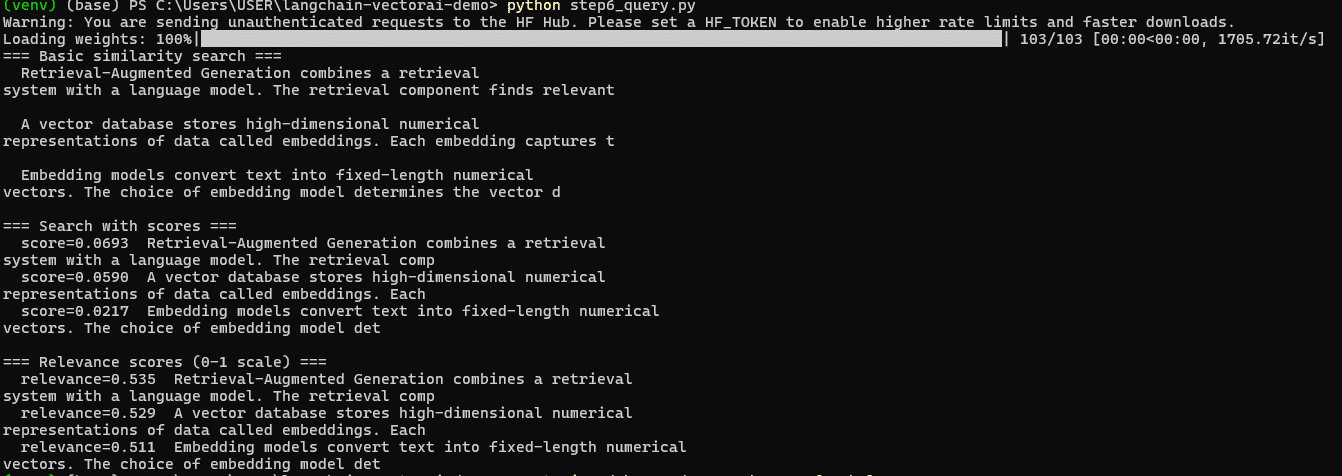
Terminal output showing similarity search results with raw cosine scores and normalized relevance scores across three search methods.
Step 7: Build the RAG Chain
Connect the retriever to an LLM and build a full question-answering chain using LCEL. Both code blocks reconnect to VectorAI DB at the start so they run cleanly from a fresh session.
With OpenAI
from langchain_actian_vectorai import ActianVectorAIVectorStore
from langchain_openai import OpenAIEmbeddings, ChatOpenAI
from langchain_core.prompts import ChatPromptTemplate
from langchain_core.output_parsers import StrOutputParser
from langchain_core.runnables import RunnablePassthrough
from actian_vectorai import VectorAIClient

embeddings = OpenAIEmbeddings()
client = VectorAIClient("localhost:6574")
client.connect()

store = ActianVectorAIVectorStore(
    client=client,
    collection_name="rag_documents",
    embedding=embeddings,
)

retriever = store.as_retriever(search_type="similarity", search_kwargs={"k": 3})

# For diverse results that cover different aspects of the query,
# use Max Marginal Relevance search instead:
# retriever = store.as_retriever(
#     search_type="mmr",
#     search_kwargs={"k": 4, "fetch_k": 20, "lambda_mult": 0.5},
# )

prompt = ChatPromptTemplate.from_template("""Answer the question using only the
context below. If the context does not contain enough information to answer,
say so.

Context:
{context}

Question: {question}

Answer:""")

llm = ChatOpenAI(model="gpt-4o-mini", temperature=0)

chain = (
    {"context": retriever, "question": RunnablePassthrough()}
    | prompt
    | llm
    | StrOutputParser()
)

query = "What is Retrieval-Augmented Generation and how does it work?"
print(f"Query: {query}")
print()
answer = chain.invoke(query)
print(f"Answer: {answer}")
Replace the LLM with Ollama for a fully local pipeline:
from langchain_actian_vectorai import ActianVectorAIVectorStore
from langchain_huggingface import HuggingFaceEmbeddings
from langchain_ollama import OllamaLLM
from langchain_core.prompts import ChatPromptTemplate
from langchain_core.output_parsers import StrOutputParser
from langchain_core.runnables import RunnablePassthrough
from actian_vectorai import VectorAIClient

embeddings = HuggingFaceEmbeddings(model_name="all-MiniLM-L6-v2")
client = VectorAIClient("localhost:6574")
client.connect()

store = ActianVectorAIVectorStore(
    client=client,
    collection_name="rag_documents",
    embedding=embeddings,
)

retriever = store.as_retriever(search_type="similarity", search_kwargs={"k": 3})

prompt = ChatPromptTemplate.from_template("""Answer the question using only the
context below. If the context does not contain enough information to answer,
say so.

Context:
{context}

Question: {question}

Answer:""")

# Run `ollama pull llama3.2` before using this path.
# llama3.2 requires approximately 2 GB of available RAM.
# If you see an out-of-memory error, use llama3.2:1b (~700 MB) instead.
llm = OllamaLLM(model="llama3.2")

chain = (
    {"context": retriever, "question": RunnablePassthrough()}
    | prompt
    | llm
    | StrOutputParser()
)

query = "What is Retrieval-Augmented Generation and how does it work?"
print(f"Query: {query}")
print()
answer = chain.invoke(query)
print(f"Answer: {answer}")
The answer comes directly from the stored documents, not from the model’s training data. The retriever pulled the relevant chunk, the prompt passed it as context, and the LLM generated a response grounded in that material. The OpenAI path produces the same structure with the same query.
The LCEL chain structure is the same on both paths. Only the LLM instantiation changes. This is the same principle as the vector store swap in Step 5. The abstraction keeps the chain logic separate from the component that does the work.

Terminal output from the Ollama path showing the query and the grounded answer retrieved from the stored documents. The OpenAI path produces equivalent output using ChatOpenAI instead of OllamaLLM.
When to Use This Pattern and When to Look Elsewhere
This pattern fits on-premises servers and private cloud deployments, air-gapped networks where documents cannot leave the network, compliance environments with data-residency requirements, edge devices where a lightweight local vector store is preferable to a cloud dependency, and cost-sensitive deployments where cloud vector database egress fees are a concern.
Consider a different approach in these situations. For sub-1M vector workloads on a team already running Postgres, pgvector on the existing database is simpler to operate than an additional container. For serverless functions with strict cold-start requirements, container startup time adds latency that may not be acceptable. For teams without control over their own infrastructure, a managed vector store removes the operational burden this pattern requires.
Wrapping Up
You built a RAG pipeline against a local vector store. The LLM, prompt template, retriever, and output parser are the same ones a hosted backend would use. That is the practical value of LangChain’s VectorStore abstraction: swapping backends touches the instantiation call, not the chain.
The decision rule going forward is straightforward. If your workload fits inside the Community Edition’s 5,000-vector ceiling, the local path covered here is sufficient. If it grows beyond that or requires features like hybrid search or multi-tenancy, VectorAI DB’s paid tier and LangChain’s broader integration ecosystem both scale independently of each other.
For a persistent agent memory backend, see using VectorAI DB as a persistent memory backend for CrewAI agents. For a RAG pipeline running on constrained hardware, see running Gemma 4 on edge hardware with VectorAI DB

Stay connected
Data insights delivered to you.
(i.e. sales@..., support@...)
