
Ist Actian VectorAI DB die beste Alternative zu ChromaDB für den produktiven Einsatz?


Wichtigste Erkenntnisse
- ChromaDB eignet sich hervorragend für die Prototypenentwicklung, die lokale Entwicklung und die ressourcenschonende Vektorsuche auf einem einzelnen Knoten.
- Die wichtigsten Einschränkungen im Produktionsbetrieb sind die Skalierbarkeit auf einen einzelnen Knoten, die manuelle Wiederherstellung sowie der hohe Wartungsaufwand durch häufige Neuerstellungen, wenn sich Löschvorgänge häufen.
- VectorAI DB richtet sich an Teams, die weiterhin Deployment auf einem einzelnen Knoten wünschen, Deployment eine bessere Wartbarkeit und Leistung unter Last benötigen.
- Der Kompromiss besteht darin, dass ChromaDB eine kostenlose, einfache Prototypenerstellung ermöglicht, während VectorAI DB eher auf den produktiven Einsatz ausgerichtet ist.
- Wenn Sie echte horizontale Skalierung oder integrierte Hochverfügbarkeit benötigen, sprechen beide Argumente eher für eine verteilte Alternative.
ChromaDB ist einer der gängigsten Ausgangspunkte für die Vektorsuche. Es läuft als Python oder als Docker-Container, lässt sich in die wichtigsten KI-Frameworks integrieren und ermöglicht Entwicklern abfragen minimalem Einrichtungsaufwand den Weg von der Installation bis abfragen ersten abfragen . Für die lokale Entwicklung, Forschungsworkflows, interne Tools und den leichtgewichtigen Produktioneinsatz ist es nach wie vor eine der am einfachsten zu implementierenden Optionen.
Unter Produktionsbedingungen sieht die Situation anders aus. Eine höhere Anzahl gleichzeitiger Nutzer, größere Indizes, häufige Ein- und Löschvorgänge sowie strengere Anforderungen an die Wiederherstellung stellen das Ein-Maschinen-Design von ChromaDB auf die Probe. In der Dokumentation von Chroma zur Leistung bei einem einzelnen Knoten wird darauf hingewiesen, dass der HNSW-Index im Arbeitsspeicher unter realistischen Einsatzbedingungen wahrscheinlich zum begrenzenden Faktor wird.
Actian VectorAI DB positioniert sich in einem enger gefassten Mittelbereich für Entwicklerteams, die Deployment leistungsfähigeren Wartungs-APIs wünschen. Die Lösung hebt die Beschränkung auf einen einzelnen Knoten nicht auf und bietet zum Start weder Clustering noch horizontale Skalierung. Sie erweitert das Ein-Container-Modell um eine Reihe von Produktionsfunktionen: APIs zur Speicheroptimierung und zum Neuaufbau, eine Verwaltungsschnittstelle, Hersteller-Support sowie im Benchmark getestete Leistung unter gleichzeitiger Auslastung.
Für Teams, die bereits ChromaDB einsetzen, hängt die Entscheidung in der Regel von Workload und der Akzeptanz gegenüber Wartungsaufwand ab. KleineZustimmung , die sich leicht wiederherstellen lassen, sind oft so, wie sie sind, völlig ausreichend. Wenn Neuaufbauten, Wiederherstellungsschritte oder abfragen gleichzeitigen abfragen beginnen, Entwicklungszeit zu kosten, lohnt es sich, einen Blick auf VectorAI DB zu werfen. Anforderungen an horizontale Skalierung oder Hochverfügbarkeit sprechen hingegen für eine verteilte Lösung.
TL;DR
| Kriterium | ChromaDB | VectorAI-DB |
| Deployment | Python oder Docker-Container | Docker-Container oder eingebettet (Edge Edition) |
| Grenzwert für einen einzelnen Knoten | Ja | Ja |
| Integrierte Hochverfügbarkeit / Clustering | Nein | Nein |
| Speicherfreigabe beim Löschen | Exportieren, löschen, Sammlung neu erstellen | APIs optimieren und neu erstellen,ohne die Sammlung zu löschen |
| QPS bei 1 Mio. Vektoren | Über 200 QPS pro Erfassung bei 10 gleichzeitigen Lesevorgängen (von Chroma veröffentlichte Spezifikation) | 1.040 QPS (interne VectorDBBench-Tests von Actian) |
| p99-Latenz bei 1 Mio. Vektoren | Variable unter gleichzeitiger Belastung | 12,7 ms (interne Tests bei Actian) |
| eingebettet | Ja | Nein |
| Kosten für den Eigenbetrieb | Kostenlos (Apache 2.0) | Kostenlose Community-Edition mit bis zu 5. 000 Vektorgrafiken, kostenpflichtige Tarife ab 417 $/Monat |
| Cloud für Managed Cloud | Chroma Cloud Starter 0 $/Monat zzgl. nutzungsabhängiger Kosten, Team 250 $/Monat zzgl. nutzungsabhängiger Kosten | Selbstverwaltet |
| SDK-Sprachen | Python, JavaScript sowie Community-Clients | Python, JavaScript |
| Einhaltung der Vorschriften | SOC II, aufgeführt unter „Chroma Cloud “ | Zum Start liegen noch keine Zertifizierungen vor; die Architektur unterstützt eine DSGVO-, HIPAA- und ISO 27001-konforme Deployment |
Was die Single-Node-Architektur von ChromaDB im Produktivbetrieb bedeutet
ChromaDB unterstützt lokale, eingebettet und Deployment , doch bei jedem dieser Ansätze stößt man an die gleiche Obergrenze von einer Maschine, sobald das Datenaufkommen zunimmt.
1. Die Wiederherstellung erfolgt manuell, wenn der Prozess beendet wird
Wenn der ChromaDB-Prozess abstürzt, werden Abfragen unterbrochen, bis jemand den Dienst neu startet und den Index neu lädt. Persistenz und Backups können dieses Zeitfenster verkürzen, doch die Wiederherstellung muss weiterhin manuell erfolgen. Eine Analyse von Altexsoft aus dem Januar 2026 stellt fest, dass der Single-Node-Architektur von ChromaDB integrierte Hochverfügbarkeit (HA) oder Failover fehlen, sodass Ausfälle das gesamte System lahmlegen können. Ein mehrstündiges Wiederherstellungsfenster ist für interne Tools akzeptabel. Bei Nutzer Systemen, bei denen Bereitschaftsdienst erwartet wird, wird der manuelle Neustart zu wiederkehrenden technischen Kosten.
2. Die gleichzeitige Belastung verhält sich nichtlinear
Die Antwortzeiten von ChromaDB bleiben bis zu einigen Dutzend Abfragen pro Sekunde stabil; danach nimmt die Latenz mit Zustimmung ab. Ein einziger Rechner verarbeitet alle Abfragen, Schreibvorgänge und Indexoperationen, ohne dass eine Möglichkeit zur Verteilung von Traffic-Spitzen besteht. In Erfahrungsberichten von Anwendern wird von Timeouts und Verbindungsproblemen berichtet, wenn ChromaDB unter einer anhaltenden gleichzeitigen Last von einer Million Vektoren getestet wird.
3. Der HNSW-Speicher wächst, schrumpft aber nicht
Der HNSW-Index von ChromaDB muss in Anwendungen mit hohem Löschaufkommen regelmäßig neu aufgebaut werden, da gelöschte Einträge den Speicherbedarf nicht verringern. Dies wird sowohl im GitHub-Issue 2594 von Chroma-core als auch im ChromaDB-Tutorial von Dataquest beschrieben. Eine Sammlung, die nach 500.000 Löschungen noch eine Million aktive Vektoren enthält, belegt weiterhin Speicherplatz für die maximale Anzahl an Einträgen. Um diesen Speicherplatz freizugeben, müssen die verbleibenden Vektoren exportiert, die Sammlung gelöscht und der Index von Grund auf neu aufgebaut werden.
Wo VectorAI DB zum Einsatz kommt
Sowohl ChromaDB als auch VectorAI DB sind nach wie vor Ein-Knoten-Systeme, sodass bei keinem der beiden Produkte die Notwendigkeit entfällt, Downtime, Datensicherungen und die Wiederherstellung einzuplanen. Der Unterschied liegt darin, wie die jeweiligen Produkte davon ausgehen, dass Teams die Wartung handhaben, sobald Datensatz der Datensatz häufig ändert.
Bei ChromaDB erfordert die Speicherfreigabe nach umfangreichen Löschvorgängen in der Regel einen Workflow aus Export, Löschung und Neuerstellung. Dieser Ansatz eignet sich für kleinere oder stabile Datensätze, insbesondere wenn die für den Wiederaufbau benötigte Zeit akzeptabel ist. VectorAI DB löst dasselbe Problem mithilfe von Wartungs-APIs auf Collection-Ebene, die in der Actian-Referenz zur Collection-Wartung dokumentiert sind: `get_stats()` meldet den Status der Collection einschließlich nicht freigegebener Löschvorgänge, `optimize()` komprimiert den Speicher, `rebuild_index()` führt eine Neuaufbau vor Ort durch und `flush()` speichert Schreibvorgänge dauerhaft ab.
Entscheidend ist die Wartungstoleranz. Wenn eine ChromaDB-Sammlung überwiegend nur um neue Einträge erweitert wird und Neuaufbauten selten vorkommen, kann der manuelle Arbeitsablauf ausreichend sein. Sobald Löschvorgänge häufig auftreten und der Neuaufbau der Sammlung zum regulären Betrieb gehört, bietet VectorAI DB dem Team eine besser automatisierbare Lösung, ohne dass die Sammlung gelöscht werden muss.
Die Wiederherstellung folgt dem gleichen Muster. Die Wiederherstellung von ChromaDB hängt davon ab, wie die Persistenz, die Backups und die Verfahren zum Neuladen konfiguriert sind. VectorAI DB nutzt die Persistenz auf Festplatte, sodass Container-Neustarts so ausgelegt sind, dass der Index ohne einen vollständigen Export- und Neuerstellungs-Workflow neu geladen wird. Beide Produkte gehen weiterhin offline, wenn der einzelne Knoten ausfällt, doch VectorAI DB reduziert einen Teil des manuellen Aufwands nach dem Neustart.
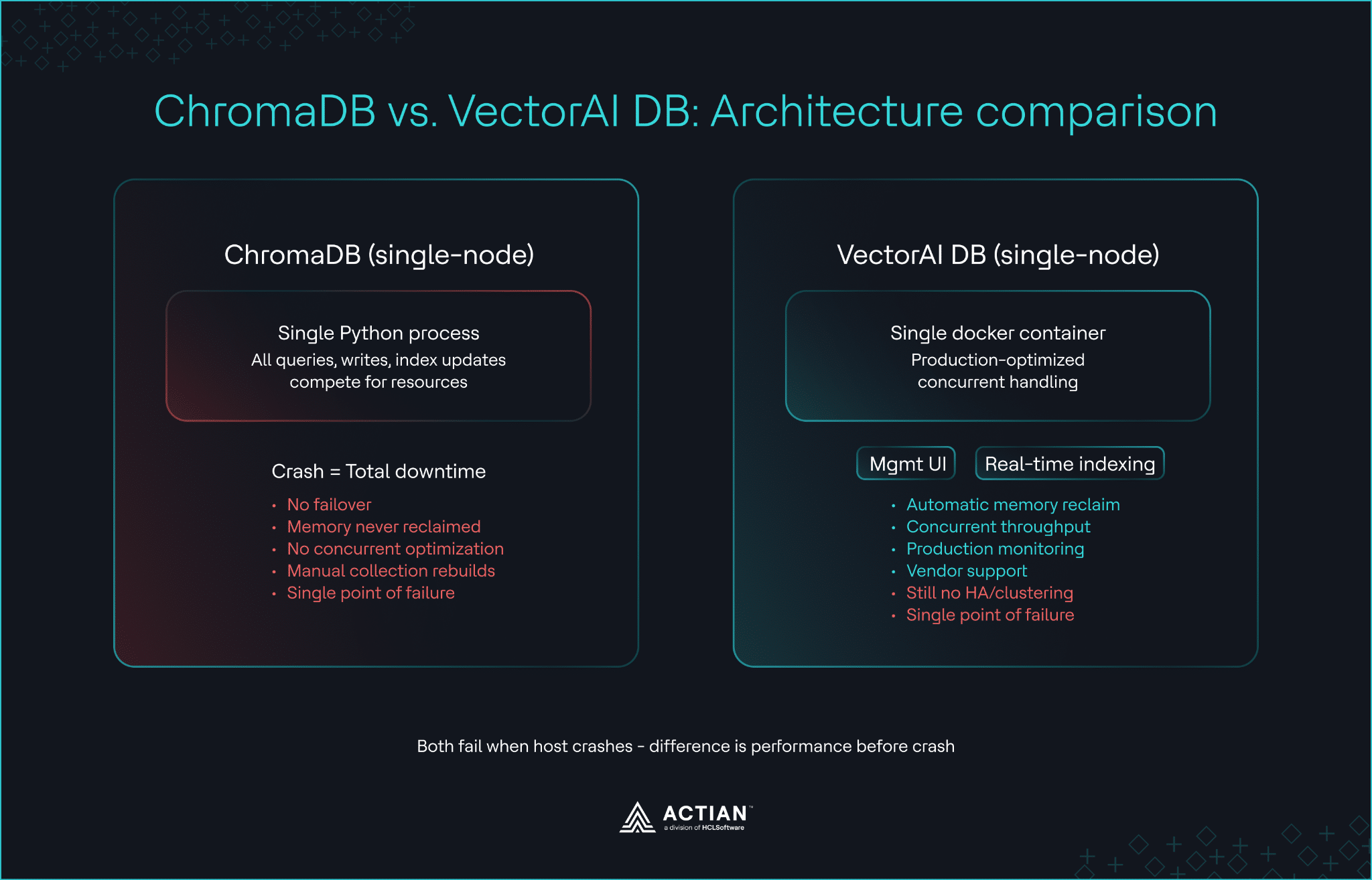
Architekturvergleich zwischen Deployment ChromaDB Deployment mit einem Knoten Deployment Deployment VectorAI-DB Deployment mit einem Container
Für eine Skalierung über die Kapazitäten einzelner Knoten hinaus behandelt der Vergleich zwischen Milvus und VectorAI DB das Thema der verteilten Skalierung.
Leistung bei 1 Million Vektoren
Die unten aufgeführten Zahlen zu VectorAI DB stammen aus Actians internen VectorDBBench-Tests vom April 2026, die auf identischer, selbst gehosteter Hardware durchgeführt wurden. ChromaDB war nicht Teil desselben Testlaufs, daher dienen die Zahlen lediglich als Anhaltspunkt und stellen keinen kontrollierten direkten Vergleich dar.
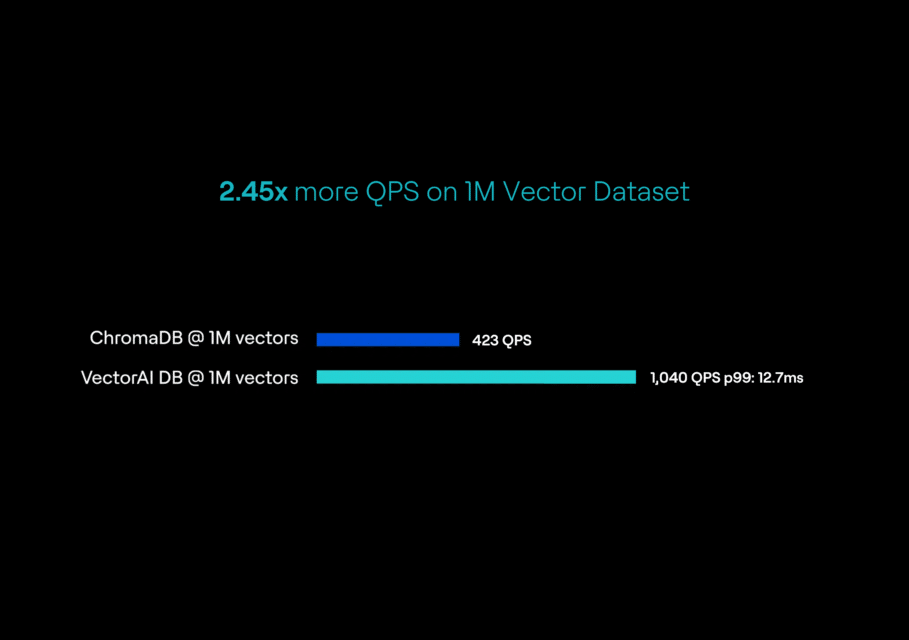
Bei einer Million Vektoren mit 768 Dimensionen bewältigte VectorAI DB unter gleichzeitiger Auslastung mit 20 simultanen Clients 1.040 Abfragen pro Sekunde. Die p99-Latenz lag bei 12,7 ms und die p95-Latenz bei 11,3 ms, bei einem Recall von 99,48 Prozent. Die vollständige Erfassung und Indizierung dauerte 1.242 Sekunden.
In der Produktdokumentation von Chroma werden bei 10 gleichzeitigen Lesevorgängen über 200 QPS für gleichzeitige Lesevorgänge pro Sammlung angegeben. Bei 10 Millionen Vektoren berichtet Actian, dass die VectorAI DB mit 745,2 QPS etwa 72 Prozent ihres Basis-Durchsatzes beibehielt. ChromaDB kann Workloads nahe oder unterhalb der veröffentlichten Spezifikationen bei geringer Zustimmung bedienen.
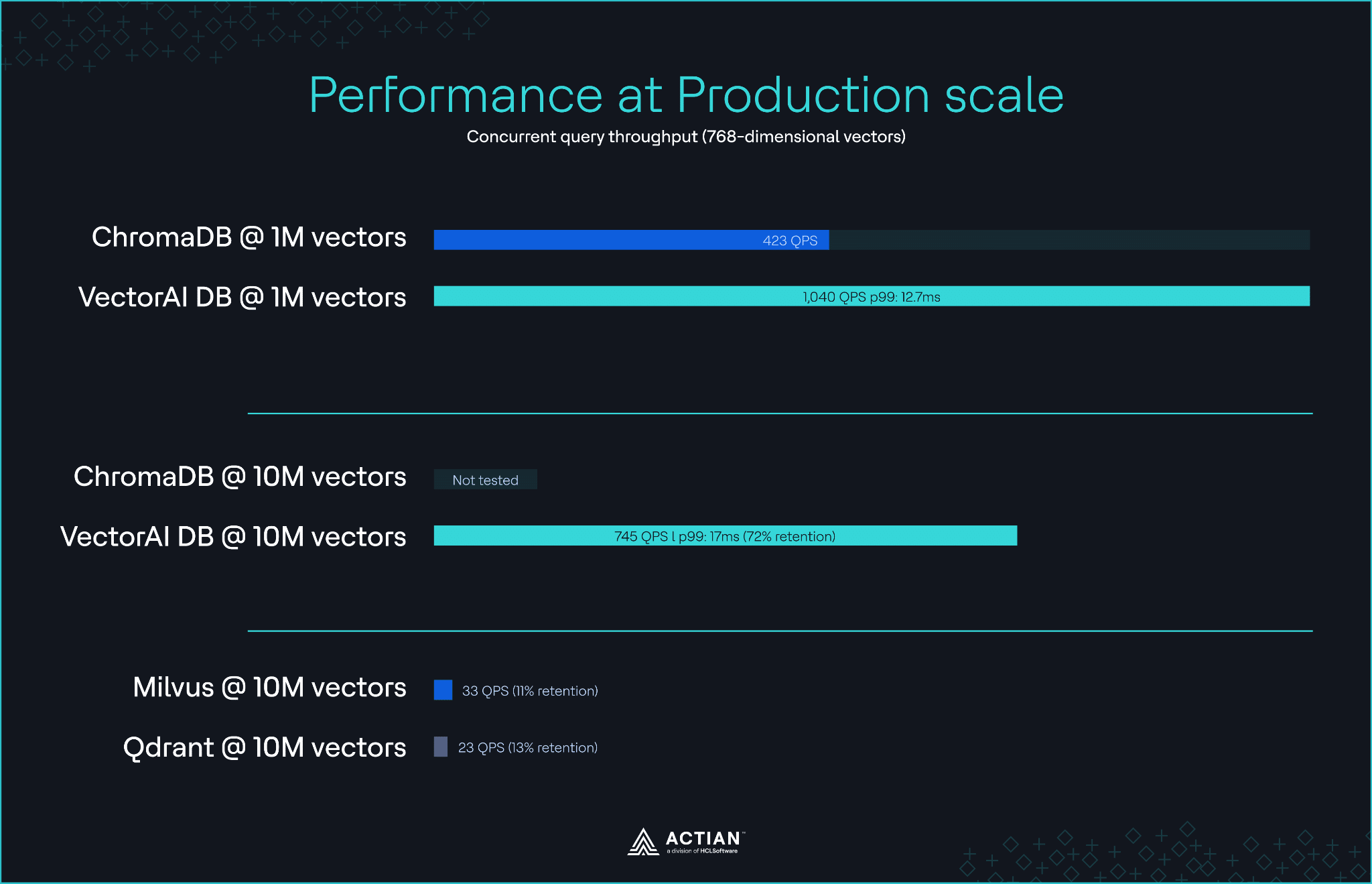
Durchsatzvergleich bei Vektorskalierungen von 1 Mio. und 10 Mio.
Die vollständige Methodik finden Sie im Artikel zum VectorAI-DB-Benchmark.
Kosten vom Prototyp bis zur Serienfertigung
ChromaDB wird unter der Apache 2.0-Lizenz bereitgestellt , und die Software ist kostenlos. Eine Instanz mit 16 GB RAM bewältigt die meisten Prototyp-Workloads; für anhaltende gleichzeitige Abfragen sind größere Instanzen erforderlich. Auf der Cloud Chroma Cloud sind folgende Tarife aufgeführt: „Starter“ für 0 $/Monat zuzüglich nutzungsabhängiger Kosten mit 5 $ Guthaben, „Team“ für 250 $/Monat zuzüglich nutzungsabhängiger Kosten mit 100 $ Guthaben und SOC II sowie „Enterprise“ zu individuellen Preisen mit BYOC.
VectorAI DB nutzt eine Lizenz auf Basis der Vektoranzahl. Auf der Preisseite von Actian ist Folgendes aufgeführt:
- Community-Edition: Kostenlos, bis zu 5.000 Vektorgrafiken
- Starter: 417 $/Monat (jährliche Abrechnung), bis zu 1 Mio. Vektoren
- Growth: 1.250 $/Monat (jährliche Abrechnung), bis zu 5 Millionen Vektoren
- Enterprise: Individuelle Preisgestaltung, über 10 Millionen Vektoren
- Edge: Individuelle Preisgestaltung für eingebettet Air-Gapped-Bereitstellungen
Bei der Preisgestaltung nach Vektoranzahl bleiben die Kosten vorhersehbar, wenn abfragen schwankt, Datensatz jedoch stabil bleibt. Der Nachteil dabei ist, dass das Überschreiten einer Preisstufe zu einer sprunghaften Änderung der Kosten führt. Die Lizenz umfasst außerdem Hersteller-Support, Software-Updates und Beratung zur Architektur.
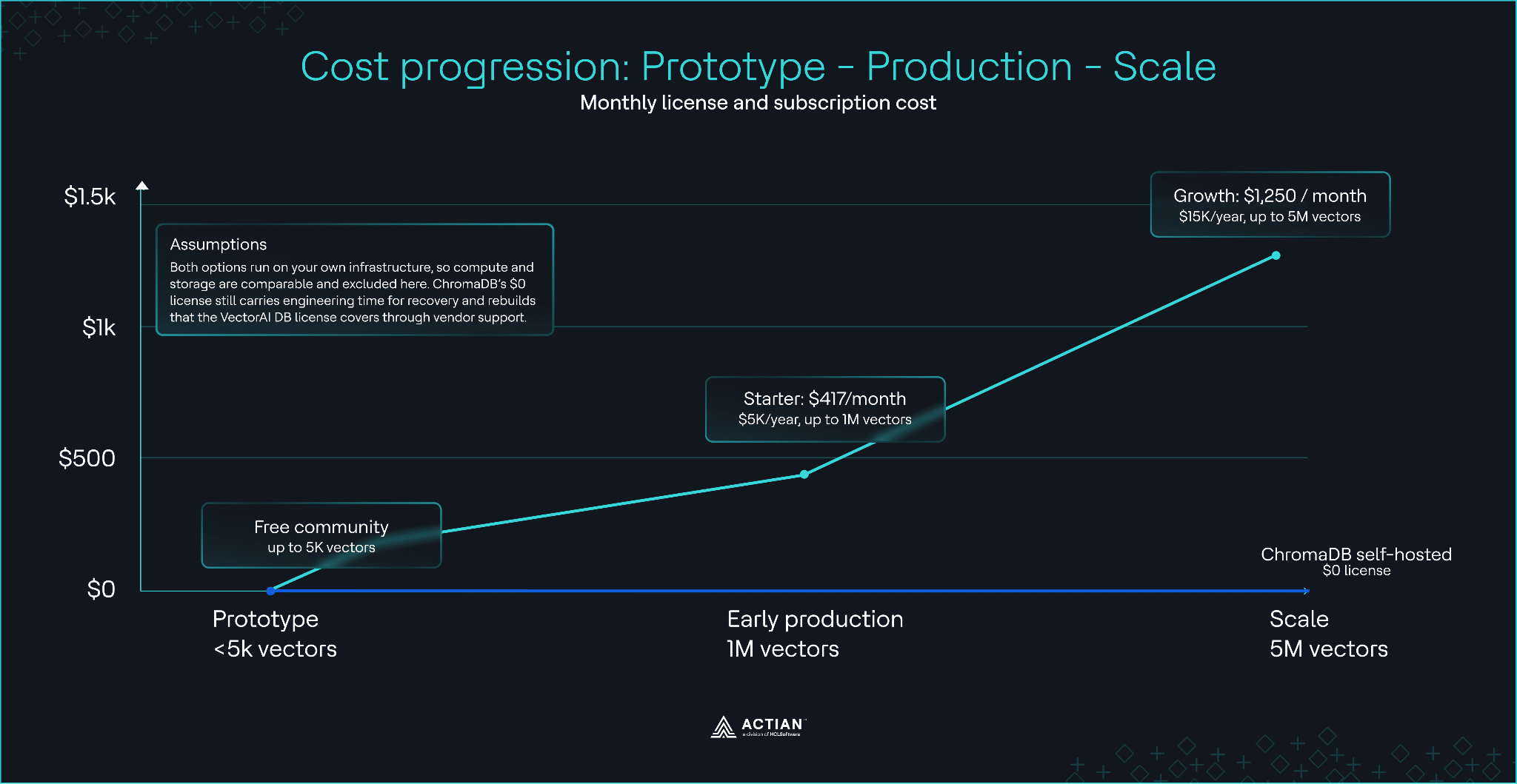
Vergleich der Gesamtbetriebskosten bei einer Vektorskala von 1 Mio.
Der Actian-Leitfaden zu versteckten Kosten bei Vektordatenbanken behandelt die Datenausgangsgebühren, backup und die dimensionsbasierten Gebühren, die bei großem Datenvolumen häufig die Grundlizenzkosten übersteigen.
Wann ChromaDB die richtige Wahl ist
ChromaDB ist die bessere Wahl, wenn:
- Sie erstellen Prototypen oder führen lokale Entwicklungsarbeiten durch. Die Python in drei Zeilen und eingebettet sind schnelle Wege von der Installation bis abfragen ersten abfragen.
- Ihr Datensatz bei geringer Zustimmung nahe an den von Chroma veröffentlichten Lese-Spezifikationen. Workloads in diesem Bereich laufen direkt auf ChromaDB.
- Man braucht ein umfangreiches Ökosystem. Auf der Chroma-Homepage werden über 26.000 GitHub-Stars, 11 Millionen Downloads pro Monat und der Einsatz in über 90.000 Open-Source-Codebasen aufgeführt. LangChain und LlamaIndex werden nativ unterstützt, und das Ökosystem an Tutorials ist außergewöhnlich umfangreich.
- Ihr Budget lässt den Einsatz kommerzieller Software nicht zu. Die Apache-2.0-Lizenz erlaubt eine uneingeschränkte Nutzung ohne Lizenzkosten.
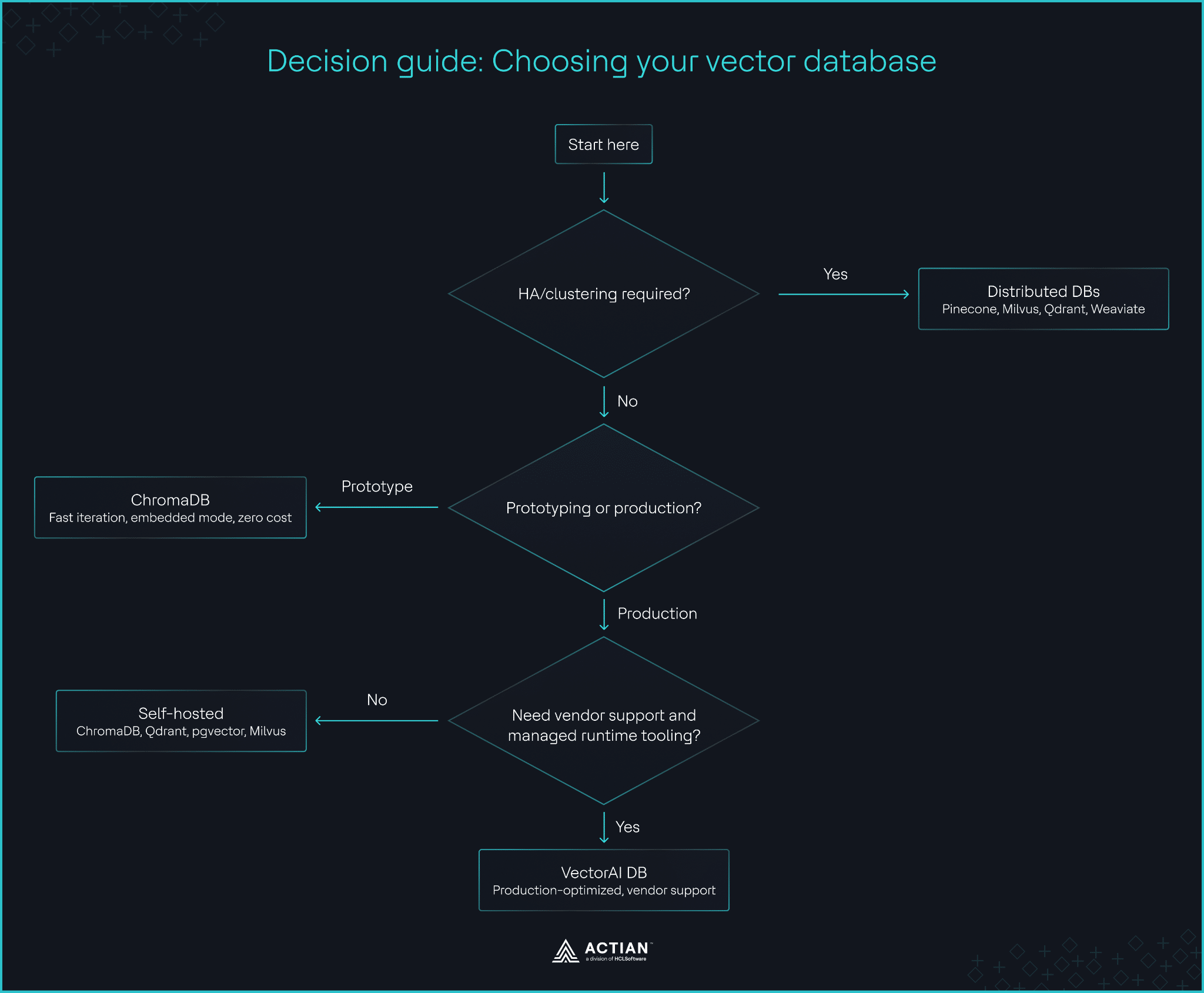
Entscheidungsflussdiagramm zur Auswahl zwischen ChromaDB und VectorAI DB
Für selbst gehostete Lösungen mit hoher Wiederauffindbarkeit im Produktionsmaßstab bietet der Vergleich zwischen Qdrant und VectorAI DB eine Entscheidungshilfe.
Reifegrad des Ökosystems und der Integration
ChromaDB genießt im Prototyping-Bereich des Marktes große Beliebtheit bei Entwicklern. Die SDKs Python JavaScript sind erstklassig, und es gibt Community-Clients in Rust, Java und mehreren anderen Sprachen. LangChain und LlamaIndex werden nativ unterstützt, die integrierte Vektorisierung funktioniert mit OpenAI, Hugging Face und Cohere, und die Tutorials decken die gängigsten Muster ab.
VectorAI DB wurde mit SDKs Python JavaScript, REST- und gRPC-APIs sowie Integrationen mit LangChain und LlamaIndex eingeführt. Der Funktionsumfang ist aufgrund des Zeitpunkts der Einführung noch eingeschränkt.
Parallele Initialisierung (Python)
ChromaDB läuft als In-Process-Anwendung für den in-memory . VectorAI DB stellt eine Verbindung zu einem laufenden Container her.
ChromaDB:
import chromadb
client = chromadb.Client()
collection = client.create_collection("docs")
collection.add(documents=["Doc 1", "Doc 2"], ids=["1", "2"])
results = collection.query(query_texts=["search"], n_results=5)
VectorAI DB:
from actian_vectorai import VectorAIClient, VectorParams, Distance, PointStruct
with VectorAIClient("localhost:6574") as client:
    client.collections.create(
        "docs",
        vectors_config=VectorParams(size=768, distance=Distance.Cosine)
    )
    client.points.upsert("docs", [
        PointStruct(id=1, vector=[0.1]*768, payload={"text": "Doc 1"}),
    ])
    results = client.points.search("docs", vector=[0.1]*768, limit=5)
VectorAI DB stellt über Port 6574 eine Verbindung zum Container her, nimmt bei der Erstellung der Datensammlung eine explizite Vektorgröße und Distanzmetrik entgegen und akzeptiert Vektoren direkt, anstatt diese automatisch aus Text zu generieren. Das Client-Muster wird Entwicklern, die bereits mit Qdrant oder Milvus gearbeitet haben, bekannt vorkommen.
Ein vollständiges Beispiel für die Bereitstellungfinden Sie im Tutorial zur RAG für die Fertigung.
Ein Vergleich mit anderen ChromaDB-Alternativen
Sollten weder ChromaDB noch VectorAI DB den Anforderungen entsprechen, sollten Sie diese Alternativen unter dem Gesichtspunkt der Produktionszuverlässigkeit über einen einzelnen Knoten hinaus in Betracht ziehen.
Pinecone ist eine voll gemanagt mit integrierter Hochverfügbarkeit, die Teams ohne Deployment einen reibungslosen Weg in die Produktion ermöglicht. Die Preise beginnen bei 50 US-Dollar pro Monat, was eine Cloud-Architektur für kostenbewusste Bereitstellungen oder Workloads, die Datenhoheit erfordern, ausschließt.
Milvus ist eine Open-Source-Vektordatenbank, die für groß angelegte, verteilte Bereitstellungen konzipiert ist. Die Kubernetes sowie der Aufwand für den Betrieb von etcd, Objektspeicher und einer Nachrichtenwarteschlange führen dazu, dass der Betriebsaufwand höher ist, als es die meisten ChromaDB-Nutzer erwarten.
Qdrant ist eine Open-Source-Vektordatenbank, die als einzelne Binärdatei selbst gehostet werden kann und sich durch Hochverfügbarkeitsfunktionen sowie hohe Leistung auszeichnet. Sie ist eine gängige Lösung für Teams, die auf Eigenhosting und höhere Zuverlässigkeit setzen möchten, ohne einen vollständigenCluster betreiben zu müssen.
Weaviate ist eine Open-Source-Vektordatenbank mit einer nativen Hybrid-Suche, die Vektorähnlichkeit und BM25-Schlüsselwortabgleich kombiniert, sowie einem leistungsstarken Ökosystem integrierter Vektorisierer. Der Speicherbedarf skaliert linear mit Datensatz , was die Kapazitäten kleinerer Bereitstellungen übersteigen kann.
pgvector erweitert PostgreSQL um die Vektorsuche und eignet sich daher ideal für Anwendungen, die bereits auf Postgres laufen. Mit einem einzigen SQL-Befehl lässt sich die Vektorsuche innerhalb der bestehenden Datenbank aktivieren, allerdings ist hierfür eine vollständige Postgres-Instanz erforderlich.
Vollständige Vergleichstabelle
| Kriterium | ChromaDB | VectorAI-DB | Pinecone | Milvus | Qdrant | Weaviate | pgvector |
| Grenzwert für einen einzelnen Knoten | Ja | Ja | Nein | Nein | Konfigurierbar | Konfigurierbar | Erbt von Postgres |
| Integrierte Hochverfügbarkeit | Nein | Nein | Ja (verwaltet) | Deployment | Deployment | Deployment | Über Postgres |
| Deployment | Bibliothek oder Docker | Docker oder eingebettet (Edge Edition) | Managed SaaS | Kubernetes | Binärdatei oder Docker | Binär oder Kubernetes | Postgres-Erweiterung |
| Open Source | Ja (Apache 2.0) | Nein | Nein | Ja (Apache 2.0) | Ja (Apache 2.0) | Ja (BSD) | Ja (PostgreSQL) |
| Speicherfreigabe | Exportieren, löschen, neu erstellen | APIs optimieren und neu erstellen | Nicht zutreffend | Automatisch | Automatisch | Automatisch | Automatisch |
| Mindestkosten | Kostenlos (selbst gehostet) | Kostenlose Community, kostenpflichtig ab 417 $/Monat | 50 $ pro Monat | Kostenlos (Infrastruktur plus Betrieb) | Kostenlos (siehe unten) | Kostenlos (siehe unten) | Kostenlos (Postgres) |
| eingebettet | Ja | Nein | Nein | Nein | Nein | Nein | Nein |
| Am besten geeignet für | Prototypen, lokale Entwicklung | Live-Bereitstellungen mit einem einzigen Knoten | In großem Maßstab verwaltet | In großem Maßstab verteilt | Selbst gehostet mit hoher Verfügbarkeit | Hybride Suche | Bestehender Postgres-Stack |
Zum Abschluss
ChromaDB ist die richtige Wahl für Prototyping, lokale Entwicklung, Forschung und schlanke, teaminterne Dienste. Bei Workloads, bei denen ein einzelner Entwickler für die Deployment verantwortlich ist, sind die Einrichtung in nur drei Zeilen und eingebettet kaum zu übertreffen. Bleiben Sie bei ChromaDB, bis es einen konkreten Grund für einen Wechsel gibt.
VectorAI DB ist dann sinnvoll, wenn die Beschränkung auf eine einzige Maschine zu einem echten Kostenfaktor wird, wenn die Speicherfreigabe, der parallele Durchsatz oder das Fehlen von Herstellerunterstützung zu viel Entwicklungszeit in Anspruch nehmen. Für Teams, die über einen ChromaDB-Prototyp hinausgehen, ohne auf ein verteiltes System umzusteigen, bietet es einen praktikablen Mittelweg.
Treten Sie der Actian-Community auf Discord bei, um sich mit Entwicklern auszutauschen, die von ChromaDB auf die Vektorsuche in der Produktion umsteigen.

Bleiben Sie in Verbindung
Datenanalysen direkt bei Ihnen.
(z. B. sales@..., support@...)
