
Kann KI in der Fertigung ohne die Cloud funktionieren?


Wichtigste Erkenntnisse
- Dieses Tutorial zeigt, wie man eine vollständig lokal betriebene RAG-Pipeline für Fertigungsumgebungen aufbaut, in denen Cloud durch die Netzwerkarchitektur, Latenzanforderungen, Kosten und gesetzliche Auflagen eingeschränkt ist.
- Die Pipeline besteht aus drei Schichten: der Erfassung von PDF-Wartungsaufzeichnungen in einer Vektordatenbank, der Abfrage abfragen mithilfe von Metadaten und einem lokalen LLM, das aus dem abgerufenen Kontext relevante Antworten generiert.
- Es läuft vollständig auf der Hardware in der Fertigungshalle und nutzt dabei VectorAI DB, Sentence-Transformers für Einbettungen und Ollama für die lokale Sprachmodell-Inferenz.
- Darüber hinaus bietet es praktische Funktionen wie die Filterung nach Geräte- und Datenreihen, ein Audit-Protokoll zur Rückverfolgbarkeit sowie den lokalen Betrieb bei Ausfällen ohne Internetverbindung.
- Das Wichtigste dabei ist, dass die KI-gestützte Wartungssuche sicher innerhalb von OT-Umgebungen (Operational Technology) ausgeführt werden kann und Technikern schnelle, fundierte Antworten auf der Grundlage historischer Daten liefert, ohne dass Daten außerhalb des Werks übertragen werden müssen.
Externen Datenverkehr von den Betriebsnetzwerken fernzuhalten, ist eine bewährte Vorgehensweise, die die meisten Produktionsstätten von Grund auf in ihre Architektur integrieren.
Produktionsnetzwerke nutzen das Purdue-Modell, ein fünfstufiges System, das seit Jahrzehnten die Gestaltung industrieller Netzwerke prägt. Auf der untersten Ebene befinden sich die physischen Maschinen: Sensoren, Motoren und Aktoren auf Ebene 0; Echtzeit-Steuerungen und SCADA-Systeme auf Ebene 1; sowie Überwachungsserver und HMI-Systeme auf Ebene 2. Ebene 3 dient der Betriebssteuerung. Die Ebenen 4 und 5 sind mit dem Unternehmensnetzwerk und dem Internet verbunden.
Die Norm IEC 62443 schreibt strenge Abgrenzungen zwischen diesen Ebenen vor. Datenverkehr aus Stufe 2 gelangt nicht ins Internet. Für Rüstungsunternehmen verschärft ITAR das Problem zusätzlich. Technische Daten müssen auf US-amerikanischem Boden verbleiben und dürfen nur US-Bürgern zugänglich sein. Cloud Vektordatenbanken wie Pinecone, Weaviate Cloud und Qdrant Cloud erfüllen keine dieser beiden Anforderungen. Stufe 2 hat keine Möglichkeit, diese Anfrage zu senden, und andere Branchen haben diese Lektion auf die harte Tour gelernt.
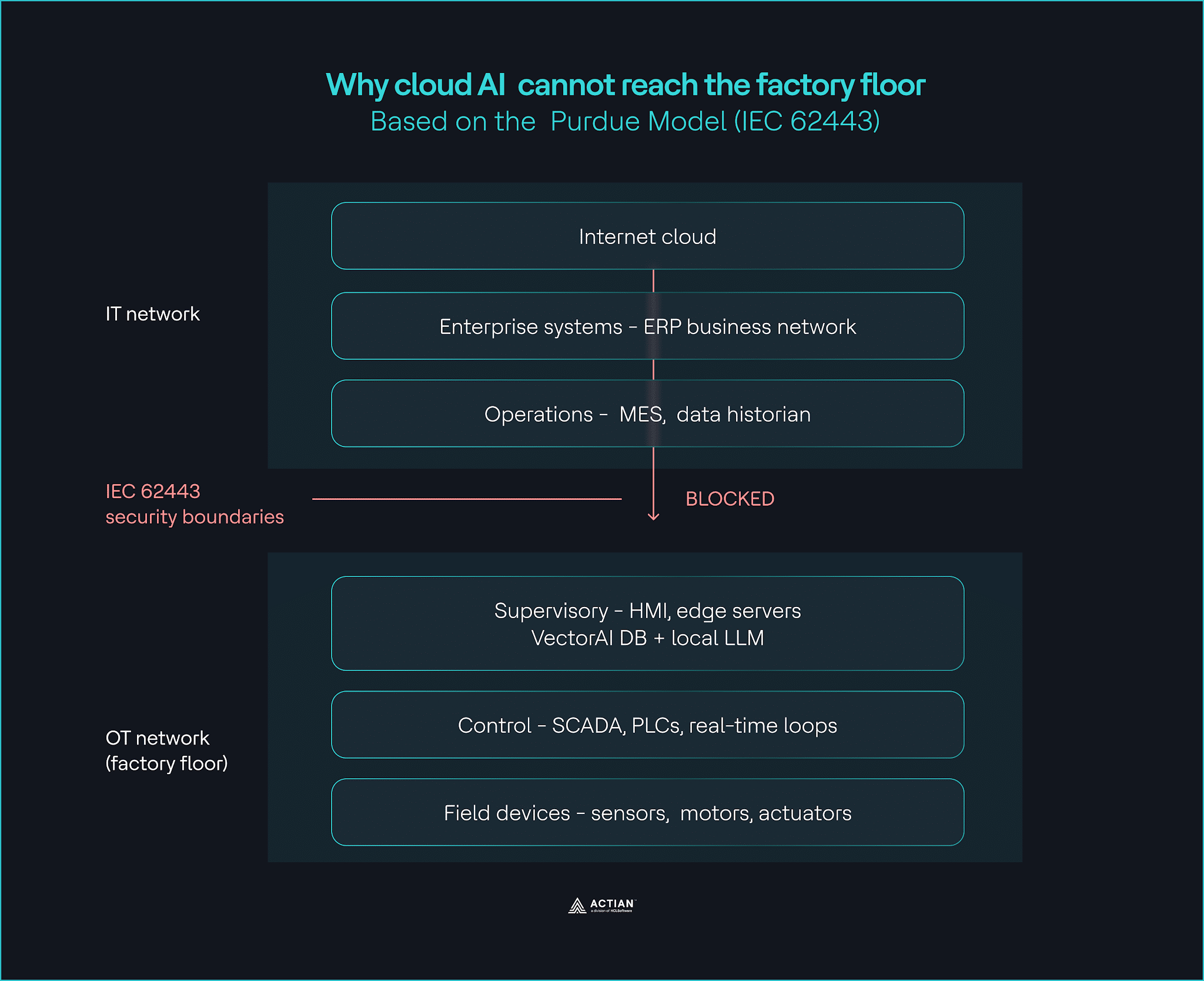
Die Latenz verschärft das Problem zusätzlich. Cloud betragen durchschnittlich 50 bis 500 Millisekunden. Regelkreise auf SPS-Ebene erfordern Reaktionszeiten von unter 10 Millisekunden. Teams, die bei Ausfällen auf KI angewiesen sind, nutzen Deployment , die für Umgebungen ohne Internetverbindung konzipiert sind.
Die Kosten stellen eine weitere Herausforderung dar. Die Standardgebühren für den Datenausgang bei AWS beginnen bei 0,09 US-Dollar pro GB. Bei jedem nennenswerten Produktionsumfang summieren sich Sensor- und Bilddaten schnell, und die Rechnung kommt schneller, als die meisten Teams erwarten.
Architektur, Latenz und Kosten weisen alle in dieselbe Richtung. KI in der Fertigung muss dort laufen, wo sich die Daten befinden.
Dieses Tutorial zeigt Ihnen, wie Sie eine lokale RAG-Pipeline aufbauen, die vollständig auf der Hardware in der Fertigungshalle läuft. Dort kann ein Techniker eine Frage zu einem beliebigen Gerät stellen und erhält eine fundierte Antwort auf der Grundlage jahrzehntelanger Wartungsaufzeichnungen, ohne dass eine Internetverbindung erforderlich ist.
Was du baust
Sie werden eine dreistufige RAG-Pipeline aufbauen, die vollständig innerhalb Ihres Werksnetzwerks läuft. Die Erfassungsschicht verarbeitet PDF-Wartungsdokumente und speichert sie in der Actian VectorAI DB. Die abfragen nimmt die Frage eines Technikers entgegen und liefert eine zitierte Antwort, die schnell genug ist, um interaktiv auf der Hardware in der Fertigungshalle genutzt zu werden.
- Datenaufnahme: Liest die PDF-Wartungsdokumente ein, teilt sie in Blöcke von 256 Token mit einer Überlappung von 25 Token auf, generiert Einbettungen mithilfe von Sentence-Transformers auf einer CPU und speichert alles in der VectorAI-Datenbank zusammen mit Metadaten Anlagenreihe, Dokumentdatum und Quelldatei.
- Abfrage: Nimmt die Frage eines Technikers entgegen, bettet sie in dasselbe Modell ein, führt eine hybride Suche in der VectorAI-Datenbank durch, gefiltert nach Geräteserie und Datumsbereich, und sendet die besten Ergebnisse an ein lokales LLM, das mit Ollama läuft, welches eine zitierte Antwort in einfachem Englisch generiert.
- Audit: Jedes Erfassungs- und abfragen wird als strukturierter JSON-Eintrag in der Datei „./data/audit.log“ protokolliert, mit einem Zeitstempel in UTC versehen und innerhalb Ihrer Sicherheitsgrenze gespeichert, um die Rückverfolgbarkeitsanforderungen der Norm IEC 62443 zu erfüllen.
VectorAI DB bildet das Herzstück aller drei Schichten. Es speichert die von der Erfassungsschicht erzeugten Einbettungen und liefert die Suchergebnisse, die von der abfragen generiert werden. Durch den Betrieb On-Premises in der Cloud verbleibt die gesamte Pipeline innerhalb Ihrer Sicherheitsgrenzen.
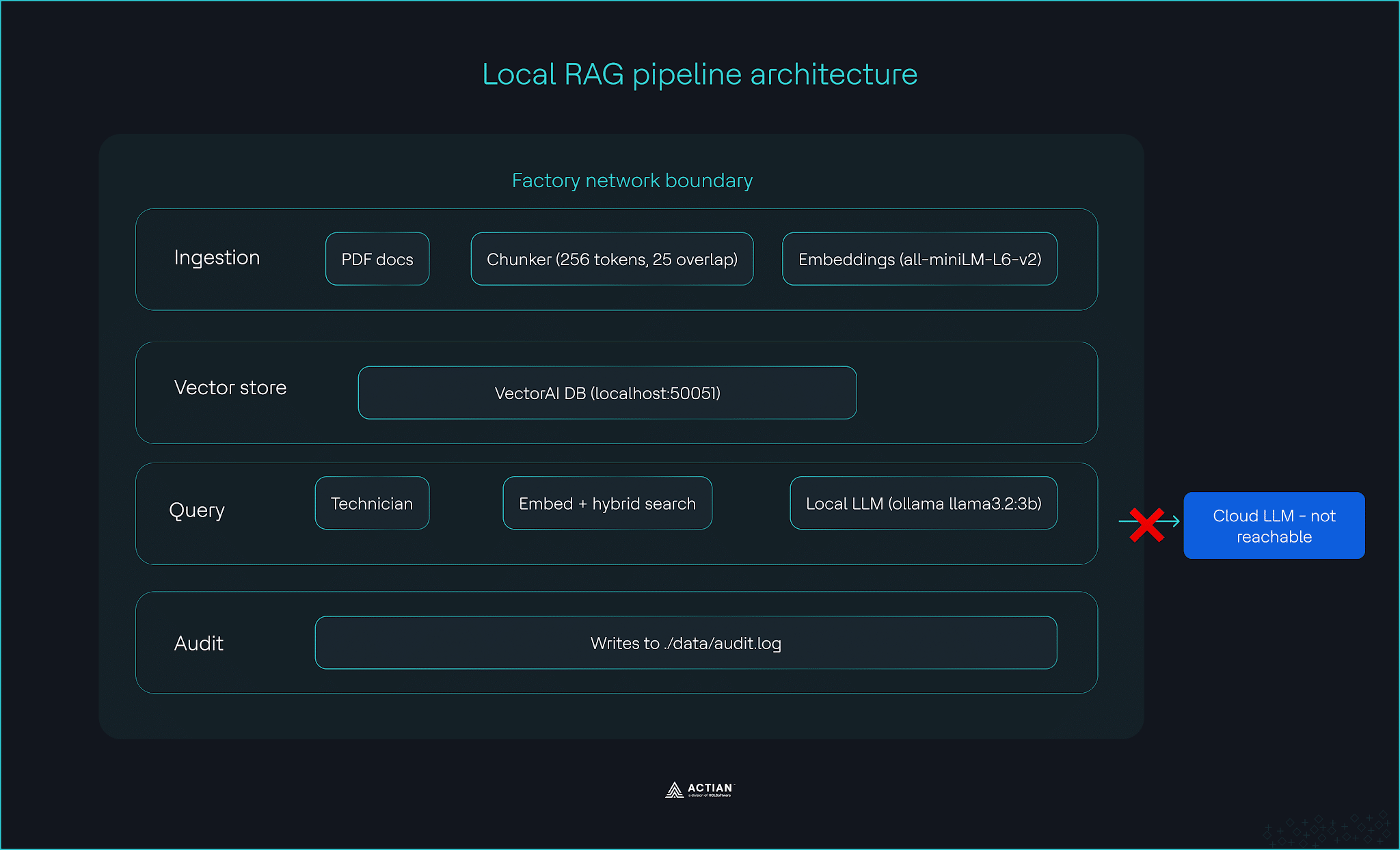
Die Pipeline läuft auf handelsüblicher Edge-Server-Hardware mit Ubuntu 22.04 LTS, 16 GB RAM und einer CPU.
Aufbau einer lokalen RAG-Pipeline mit VectorAI DB
Richten Sie VectorAI DB ein, erstellen Sie die Erfassungspipeline, führen Sie Ihre ersten abfragen durch, fügen Sie Hybridfilter hinzu und verbinden Sie ein lokales LLM.
Voraussetzungen
Registrieren Sie sich zunächst für die VectorAI DB Community Edition und stellen Sie anschließend sicher, dass folgende Komponenten installiert sind:
- Docker und Docker Compose
- Python .10 oder höher
- uv-Paketmanager. Installation mit
curl -LsSf https://astral.sh/uv/install.sh | sh - Ollama. Installation von Ollama.com und ziehe das Modell mit
ollama pull llama3.2:3b
Ihr Computer benötigt mindestens 8 GB RAM (16 GB oder mehr empfohlen) und 10 GB Festplattenspeicher (100 GB oder mehr empfohlen), um VectorAI DB auszuführen. Wenn Sie Windows verwenden, benötigt der Befehl „uv install“ das Skript „sh“, über das PowerShell nicht verfügt. Führen Sie alle Befehle in WSL2 (Windows Subsystem for Linux) aus. Um WSL2 einzurichten, führen Sie „wsl –install“ in PowerShell aus und verwenden Sie dann für dieses Tutorial das Ubuntu-Terminal.
Projektstruktur
Richte deinen Projektordner wie folgt ein:
factory-rag/
├── docker-compose.yml
├── data/
│   └── audit.log
├── config/
└── src/
    ├── healthcheck.py
    ├── ingest.py
    ├── query.py
    ├── llm.py
    ├── audit.py
    └── test_e2e.py
Erstellen Sie die Verzeichnisse:
mkdir -p factory-rag/{data,config,src}
cd factory-rag
Schritt 1: VectorAI DB bereitstellen
Erstellen Sie die Datei „docker-compose.yml“ im Stammverzeichnis Ihres Projekts:
services:
  vectorai-db:
    image: williamimoh/actian-vectorai-db:latest
    platform: linux/amd64
    container_name: vectorai-db
    ports:
      - "50051:50051"
    volumes:
      - ./data:/data
      - ./config:/config
    restart: unless-stopped
    healthcheck:
      test: ["CMD-SHELL", "nc -z localhost 50051 || exit 1"]
      interval: 10s
      timeout: 5s
      retries: 5
      start_period: 15s
Starte den Container mit:
docker compose up -dInstallieren Sie das SDK mit:
uv add actian_vectorai-0.1.0b2-py3-none-any.whlInstallieren Sie die folgenden erforderlichen Bibliotheken:
uv add sentence-transformers pypdfÜberprüfen Sie, ob der Server läuft. Erstellen Sie eine Datei mit dem Namen src/healthcheck.py:
from actian_vectorai import VectorAIClient

with VectorAIClient("localhost:50051") as client:
    info = client.health_check()
    print(f"✓ VectorAI DB is running")
    print(f"  Title:   {info['title']}")
    print(f"  Version: {info['version']}")
Führen Sie das Skript aus:
uv run python src/healthcheck.pyTerminalausgabe:

Schritt 2: Aufbau der Erfassungspipeline
Legen Sie Ihre PDF-Wartungsdokumente im Ordner „data/“ ab, bevor Sie diesen Schritt ausführen. Fügen Sie dort alle Wartungsaufzeichnungen, Inspektionsberichte oder Fehlerprotokolle hinzu.
Die Pipeline nutzt „sentence-transformers/all-MiniLM-L6-v2“, das auf CPU weniger als 200 MB RAM benötigt. Wir teilen den Text in Blöcke von 256 Token mit einer Überlappung von 25 Token auf, um genügend Kontext für eine gute Retrieval-Leistung zu gewährleisten.
Erstelle die Datei src/ingest.py:
from __future__ import annotations

import argparse
import uuid
from pathlib import Path

from actian_vectorai import Distance, PointStruct, VectorAIClient, VectorParams
from pypdf import PdfReader
from sentence_transformers import SentenceTransformer

from audit import log_ingestion

COLLECTION = "maintenance_records"
HOST = "localhost:50051"
MODEL_NAME = "sentence-transformers/all-MiniLM-L6-v2"
VECTOR_DIM = 384
CHUNK_TOKENS = 256
OVERLAP_TOKENS = 25

def chunk_text(text, tokenizer, chunk_size=CHUNK_TOKENS, overlap=OVERLAP_TOKENS):
    token_ids = tokenizer.encode(text, add_special_tokens=False)
    chunks = []
    start = 0
    while start < len(token_ids):
        end = min(start + chunk_size, len(token_ids))
        window = token_ids[start:end]
        decoded = tokenizer.decode(window, skip_special_tokens=True).strip()
        if decoded:
            chunks.append(decoded)
        if end >= len(token_ids):
            break
        start += chunk_size - overlap
    return chunks

def ingest_pdf(pdf_path, equipment_line, doc_date, model, client):
    reader = PdfReader(str(pdf_path))
    full_text = "\n".join(page.extract_text() or "" for page in reader.pages)
    if not full_text.strip():
        print(f"  [warn] No extractable text in {pdf_path.name}, skipping.")
        return 0
    tokenizer = model.tokenizer
    chunks = chunk_text(full_text, tokenizer)
    points = []
    for idx, chunk in enumerate(chunks):
        embedding = model.encode(chunk, show_progress_bar=False).tolist()
        points.append(
            PointStruct(
                id=str(uuid.uuid5(uuid.NAMESPACE_DNS, f"{pdf_path.name}:{idx}")),
                vector=embedding,
                payload={
                    "equipment_line": equipment_line,
                    "doc_date": doc_date,
                    "source_file": pdf_path.name,
                    "text": chunk,
                    "chunk_index": idx,
                },
            )
        )
    if points:
        client.points.upsert(COLLECTION, points)
    return len(points)

def main(data_dir, equipment_line, doc_date):
    data_path = Path(data_dir)
    pdfs = sorted(data_path.glob("*.pdf"))
    if not pdfs:
        print(f"No PDF files found in '{data_dir}'. Add PDFs to ./data/ and retry.")
        return
    print(f"Loading embedding model '{MODEL_NAME}'...")
    model = SentenceTransformer(MODEL_NAME)
    with VectorAIClient(HOST) as client:
        if not client.collections.exists(COLLECTION):
            client.collections.create(
                COLLECTION,
                vectors_config=VectorParams(size=VECTOR_DIM, distance=Distance.Cosine),
            )
            print(f"Created collection '{COLLECTION}' ({VECTOR_DIM}-dim, Cosine)")
        else:
            print(f"Collection '{COLLECTION}' already exists, appending chunks.")
        total = 0
        for pdf_path in pdfs:
            print(f"Ingesting {pdf_path.name} ...")
            count = ingest_pdf(pdf_path, equipment_line, doc_date, model, client)
            print(f"  → {count} chunks stored")
            log_ingestion(pdf_path.name, equipment_line, count)
            total += count
        print(f"\nDone. {total} total chunks stored in '{COLLECTION}'.")

if __name__ == "__main__":
    parser = argparse.ArgumentParser(description="Ingest PDFs into VectorAI DB")
    parser.add_argument("--data-dir", default="./data")
    parser.add_argument("--equipment-line", required=True)
    parser.add_argument("--doc-date", required=True)
    args = parser.parse_args()
    main(args.data_dir, args.equipment_line, args.doc_date)
Führen Sie den Erfassungsschritt aus:
uv run python src/ingest.py --equipment-line turbine-A --doc-date 2024-03-15Erwartetes Ergebnis:

Das Metadaten speichert bei jedem Chunk die Gerätezeile, das Dokumentdatum und die Quelldatei. So können Sie Suchanfragen nach Gerätezeile oder Datumsbereich filtern, ohne die gesamte Sammlung durchsuchen zu müssen.
Schritt 3: Führen Sie Ihre ersten abfragen aus
Ihre Erfassungspipeline hat die Wartungsdatensätze in der VectorAI-Datenbank gespeichert. Die Pipeline kann Fragen beantworten. Wenn ein Techniker eine Frage in normalem Englisch stellt, erfasst die Pipeline die Frage, durchsucht die Sammlung „maintenance_records“ und gibt die fünf relevantesten Textabschnitte mit Ähnlichkeitswerten zurück.
Erstelle die Dateiabfragen.py:
from __future__ import annotations

import argparse
import time

from actian_vectorai import Field, FilterBuilder, VectorAIClient
from sentence_transformers import SentenceTransformer

from audit import log_query

COLLECTION = "maintenance_records"
HOST = "localhost:50051"
MODEL_NAME = "sentence-transformers/all-MiniLM-L6-v2"
TOP_K = 5

def build_filter(equipment_line=None, doc_date=None, doc_date_to=None):
    fb = FilterBuilder()
    if equipment_line:
        fb.must(Field("equipment_line").eq(equipment_line))
    if doc_date and doc_date_to:
        fb.must(Field("doc_date").range(gte=doc_date, lte=doc_date_to))
    elif doc_date:
        fb.must(Field("doc_date").eq(doc_date))
    return fb.build() if (equipment_line or doc_date) else None

def search(question, equipment_line=None, doc_date=None, doc_date_to=None):
    model = SentenceTransformer(MODEL_NAME)
    embedding = model.encode(question, show_progress_bar=False).tolist()
    query_filter = build_filter(equipment_line, doc_date, doc_date_to)
    with VectorAIClient(HOST) as client:
        hits = client.points.search(
            COLLECTION,
            vector=embedding,
            limit=TOP_K,
            filter=query_filter,
        )
    return [
        {
            "score": round(r.score, 4),
            "source_file": r.payload.get("source_file", ""),
            "equipment_line": r.payload.get("equipment_line", ""),
            "doc_date": r.payload.get("doc_date", ""),
            "chunk_index": r.payload.get("chunk_index", -1),
            "text": r.payload.get("text", ""),
        }
        for r in hits
    ]

def main():
    parser = argparse.ArgumentParser(description="Search maintenance records")
    parser.add_argument("question", help="Natural language question")
    parser.add_argument("--equipment-line", default=None)
    parser.add_argument("--doc-date", default=None)
    parser.add_argument("--doc-date-to", default=None)
    args = parser.parse_args()

    start = time.monotonic()
    results = search(args.question, equipment_line=args.equipment_line,
        doc_date=args.doc_date, doc_date_to=args.doc_date_to)
    latency_ms = (time.monotonic() - start) * 1000
    log_query(args.question, args.equipment_line or "", results, latency_ms)

    if not results:
        print("No results found.")
        return

    print(f"Top {len(results)} results for: \"{args.question}\"\n")
    for i, r in enumerate(results, 1):
        print(f"[{i}] score={r['score']:.4f}  {r['source_file']} "
              f"(chunk {r['chunk_index']})  {r['doc_date']}  {r['equipment_line']}")
        print(f"     {r['text'][:200].strip()}...")
        print()

if __name__ == "__main__":
    main()
Probier deine ersten abfragen aus:
uv run python src/query.py "What caused the bearing failure?"Die Suche nutzt dasselbe Modell wie die Erfassung, um einbetten abfragen einbetten , wodurch sowohl die abfragen die gespeicherten Vektoren im selben semantischen Raum verbleiben. Bei Wartungsdatensätzen, die nach diesem Modell verarbeitet werden, weisen Ähnlichkeitswerte zwischen 0,4 und 0,6 auf relevante Treffer hin.
Schritt 4: Hybridfilter hinzufügen
Durch das Filtern nach Geräteserie und Datum bleiben die Suchergebnisse für die aktuelle Arbeit des Technikers relevant. Führen Sie dieselbe abfragen Schritt 3 durch, fügen Sie jedoch folgende Filter hinzu:
uv run python src/query.py "What caused the bearing failure?" --equipment-line turbine-AFügen Sie einen Datumsfilter hinzu, um die Ergebnisse noch weiter einzugrenzen:
uv run python src/query.py "What caused the bearing failure?" --equipment-line turbine-A --doc-date 2024-03-15Erwartetes Ergebnis:

Die Funktion `build_filter` erstellt einen `FilterBuilder abfragen die Ähnlichkeit von Vektoren mit Metadaten exakten Metadaten kombiniert. Ein Techniker, der an Turbine A arbeitet, sieht nur Ergebnisse aus dieser Anlagenreihe und nicht aus der gesamten Wartungshistorie.
Schritt 5: Verbinden Sie das lokale LLM
Die Suchergebnisse werden an ein lokales LLM weitergeleitet, das über Ollama läuft und eine Antwort in leicht verständlichem Englisch generiert. Der gesamte Prozess läuft auf der Hardware in der Fertigungshalle ab.
Erstelle die Datei src/llm.py:
from __future__ import annotations

import json
import os
import sys
import urllib.request
from typing import Any

OLLAMA_HOST = os.environ.get("OLLAMA_HOST", "https://localhost:11434")
OLLAMA_MODEL = "llama3.2:3b"
MAX_NEW_TOKENS = 256
TEMPERATURE = 0.1
TIMEOUT_SECONDS = 300

def build_prompt(question: str, results: list[dict[str, Any]]) -> str:
    if not results:
        return f"Question: {question}\n\nAnswer: I have no relevant context to answer this question."
    context_blocks = []
    for i, r in enumerate(results, 1):
        source = r.get("source_file", "unknown")
        date = r.get("doc_date", "unknown")
        equip = r.get("equipment_line", "unknown")
        text = r.get("text", "").strip()
        context_blocks.append(
            f"[{i}] Source: {source} | Equipment: {equip} | Date: {date}\n{text}"
        )
    context = "\n\n".join(context_blocks)
    return (
        "You are a maintenance records assistant. "
        "Answer the question using ONLY the provided context. "
        "Cite sources inline using [1], [2], etc. "
        "If the context does not contain enough information, say so.\n\n"
        f"Context:\n{context}\n\n"
        f"Question: {question}\n\n"
        "Answer:"
    )

def generate(question: str, results: list[dict[str, Any]]) -> str:
    prompt = build_prompt(question, results)
    payload = json.dumps({
        "model": OLLAMA_MODEL,
        "prompt": prompt,
        "stream": False,
        "options": {
            "num_predict": MAX_NEW_TOKENS,
            "temperature": TEMPERATURE,
        },
    }).encode()
    req = urllib.request.Request(
        f"{OLLAMA_HOST}/api/generate",
        data=payload,
        headers={"Content-Type": "application/json"},
        method="POST",
    )
    with urllib.request.urlopen(req, timeout=TIMEOUT_SECONDS) as resp:
        body = json.loads(resp.read().decode())
    return body["response"].strip()

def answer(question: str, results: list[dict[str, Any]]) -> str:
    reply = generate(question, results)
    print(reply)
    print()
    print("Sources")
    for i, r in enumerate(results, 1):
        print(
            f"  [{i}] {r.get('source_file', '?')} "
            f"(chunk {r.get('chunk_index', '?')}, score {r.get('score', 0):.4f}) "
            f"{r.get('doc_date', '?')} / {r.get('equipment_line', '?')}"
        )
    return reply

if __name__ == "__main__":
    question = sys.argv[1] if len(sys.argv) > 1 else "What maintenance was performed?"
    dummy_results = [
        {
            "source_file": "example.pdf",
            "doc_date": "2024-03-15",
            "equipment_line": "turbine-A",
            "chunk_index": 0,
            "score": 0.95,
            "text": (
                "Performed scheduled bearing inspection on turbine-A. "
                "Replaced worn bearing race on shaft 2. "
                "Torque settings verified per spec TRB-004."
            ),
        }
    ]
    answer(question, dummy_results)
Verbinden Sie alles miteinander, indem Sie die Datei src/test_e2e.py erstellen:
from query import search
from llm import answer

question = "What maintenance was performed on the gearbox?"
results = search(question, equipment_line="turbine-A")
answer(question, results)
Führe die gesamte Pipeline aus:
uv run python src/test_e2e.pyllama3.2:3b passt in den Speicher eines handelsüblichen Edge-Servers. Das LLM erhält nur die abgerufenen Chunks als Kontext, nicht die gesamte Dokumentensammlung, wodurch die Antworten schnell bleiben und sich auf die zitierten Quellen stützen.
Erwartetes Ergebnis:
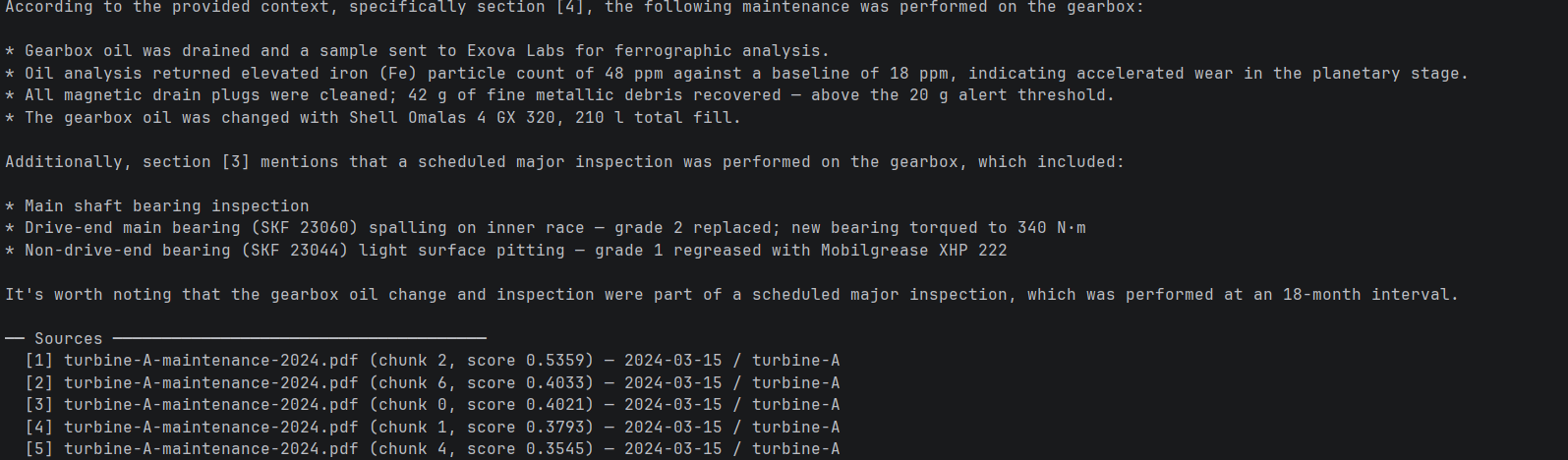
Das System ist voll funktionsfähig. Ein Techniker kann eine Frage stellen, eine belegte Antwort aus den lokalen Wartungsunterlagen abrufen und muss dabei nicht auf das Internet zurückgreifen.
Schritt 6: Protokollierung aktivieren
Die Norm IEC 62443 schreibt eine lückenlose Rückverfolgbarkeit für jeden Vorgang innerhalb des OT-Netzwerks vor. Ohne ein lokales Protokoll verfügt Ihre Pipeline über keine Aufzeichnung , was wann abgefragt wurde oder welche Ergebnisse zurückgegeben wurden.
Erstelle die Datei src/audit.py:
from __future__ import annotations

import json
import logging
from datetime import datetime, timezone
from pathlib import Path

LOG_PATH = Path("./data/audit.log")
LOG_PATH.parent.mkdir(parents=True, exist_ok=True)

handler = logging.FileHandler(str(LOG_PATH))
handler.setLevel(logging.INFO)

logger = logging.getLogger("actian_vectorai.audit")
logger.setLevel(logging.INFO)
logger.addHandler(handler)

def log_query(question: str, equipment_line: str, results: list, latency_ms: float) -> None:
    entry = {
        "event": "query",
        "timestamp": datetime.now(tz=timezone.utc).isoformat(),
        "question": question,
        "equipment_line": equipment_line,
        "results_returned": len(results),
        "latency_ms": round(latency_ms, 2),
    }
    logger.info(json.dumps(entry))

def log_ingestion(source_file: str, equipment_line: str, chunks_stored: int) -> None:
    entry = {
        "event": "ingestion",
        "timestamp": datetime.now(tz=timezone.utc).isoformat(),
        "source_file": source_file,
        "equipment_line": equipment_line,
        "chunks_stored": chunks_stored,
    }
    logger.info(json.dumps(entry))
Führen Sie das Audit-Skript mit diesem Befehl aus:
cat data/audit.logErwartetes Ergebnis:

Die Pipeline führt nun in der Datei „./data/audit.log“ ein strukturiertes Aufzeichnung jedes Einlese- und abfragen , versehen mit einem Zeitstempel in UTC und gespeichert innerhalb Ihrer Sicherheitsgrenzen.
Zum Abschluss
Sie haben gerade eine lokale RAG-Pipeline aufgebaut, die vollständig auf der Hardware in der Fertigungshalle läuft, Abfragen auch bei Netzwerkausfällen bearbeitet und fundierte Antworten aus jahrzehntelangen Wartungsaufzeichnungen liefert.
KI in der Fertigung kann auch ohne Cloud funktionieren. VectorAI DB ermöglicht dies, indem es vollständig innerhalb der Sicherheitsgrenzen der Norm IEC 62443 läuft, ohne auf die Cloud angewiesen zu sein. Selbst wenn die Internetverbindung vollständig unterbrochen wird, läuft die Pipeline weiter.
Ihre Pipeline nimmt PDF-Wartungsdokumente auf, speichert die Einbettungen in der VectorAI-Datenbank auf Ebene 2 Ihres OT-Netzwerks und beantwortet Fragen in natürlicher Sprache mithilfe eines lokalen LLM, ohne in irgendeinem Schritt Cloud . Von hier aus können Sie die Pipeline erweitern, indem Sie weitere Dokumenttypen hinzufügen, das Einbettungsmodell an das Vokabular Ihrer spezifischen Anlagen anpassen, rollenbasierte abfragen nach Techniker hinzufügen oder die Datenaufnahme auf mehrere Anlagenreihen ausweiten.
Die vollständige Dokumentation zur VectorAI-Datenbank sowie das Lager finden Sie hier, um sich weiter zu informieren.
Werden Sie Teil der Community und erfahren Sie mehr über Actian.

Bleiben Sie in Verbindung
Datenanalysen direkt bei Ihnen.
(z. B. sales@..., support@...)
