
Is VectorAI DB the Best Air-Gapped Qdrant Alternative?


Key Takeaways
- The comparison focuses on which vector database works better in truly air-gapped environments.
- Qdrant can run offline, but its air-gap options either add Kubernetes complexity or remove important production tooling.
- VectorAI DB is positioned as the simpler option because it runs as a single Docker container with no outbound dependency.
- Qdrant is stronger when ecosystem maturity, richer filtering, multi-language SDKs, and production track record matter most.
- The main tradeoff is mature flexibility with more air-gap friction versus simpler self-hosted deployment for isolated environments.
If your deployment environment prohibits outbound internet connectivity, Qdrant’s two air-gap-capable tiers both carry significant barriers. Private Cloud requires Kubernetes and an enterprise sales engagement with no published pricing. The open-source Docker binary works offline but removes the management tooling, automated backups, and zero-downtime upgrade logic you need in production.
Actian VectorAI DB ships as a single Docker container with no outbound dependency, no Kubernetes requirement, and built-in operational primitives.
This article explains exactly where each product lands on the air-gap question, where Qdrant remains the stronger choice, and what the performance, cost, and ecosystem tradeoffs look like between the two.
The table below shows how Qdrant and Actian VectorAI DB differ on the core decision criteria for air-gapped deployments.
| Capability | Qdrant | VectorAI DB |
| Deployment model | Hybrid Cloud, Private Cloud Kubernetes (K8s), Open-source Software (OSS) Docker | Single Docker container |
| Air-gap capable (no enterprise contract) | Partial (OSS only, no ops tooling) | Yes |
| Minimum production setup | Kubernetes or manual Docker ops | Docker only |
| QPS at 1M vectors | 181.6 QPS | 1,040 QPS |
| p99 latency at 1M vectors | 33.1ms | 12.7ms |
| Recall at 1M vectors | Highest (≈0.9988) | Slightly lower (≈0.9948) |
| Index types supported | HNSW + quantization options | HNSW (at launch) |
| Minimum cloud cost | Usage-based | N/A (self-hosted first) |
| Pricing model | Usage-based / enterprise | License-based; lower infrastructure overhead |
| SDK languages | 6+ (Python, JavaScript, Rust, Go, .NET, Java) | Python, JavaScript (launch) |
| Compliance certifications | SOC 2 Type II, HIPAA | No certifications at launch; architecture supports deployment within GDPR, HIPAA, and ISO 27001-compliant environments |
The Air-Gap Friction With Qdrant
Qdrant supports three deployment tiers. Each one fails the air-gap requirement differently, and knowing exactly where each breaks is the prerequisite for choosing between them.
Tier 1: Hybrid Cloud
Hybrid Cloud places the data plane inside your cluster, so your vector data never leaves your infrastructure. The catch is the control plane. The Qdrant Cloud Agent that ships with Hybrid Cloud maintains a persistent outbound connection to grpc.cloud.qdrant.io and api.cloud.qdrant.io on port 443. In a true air-gapped environment, this connectivity is prohibited, making Hybrid Cloud a non-starter.
Tier 2: Private Cloud
Private Cloud is the only Qdrant tier that supports true air-gapped operation with no outbound dependency. It runs on-premises with no external control-plane calls. However, it requires a Kubernetes environment and an enterprise sales engagement. Private Cloud is not a self-service product and requires an enterprise sales engagement. There is no published pricing, and no trial or self-service sign-up path. For an engineering team that needs offline vector search this quarter, not after a procurement cycle, this tier is operationally and commercially inaccessible.
Tier 3: Open source vector databases (Standalone)
The Docker-based binary runs offline. For development and prototyping, it works without friction. In production, the gaps are concrete. The OSS distribution ships without the management UI, automated backup tooling, or zero-downtime upgrade logic. Replication requires you to build and operate your own failover layer. Backup means writing and scheduling shell scripts that interact with Qdrant’s snapshot API, with your own retention policy and transfer logic for air-gapped storage. Index upgrades require planned downtime because there is no rolling upgrade path. You are not running Qdrant; you are running Qdrant’s engine plus a production operations layer you have to build yourself.
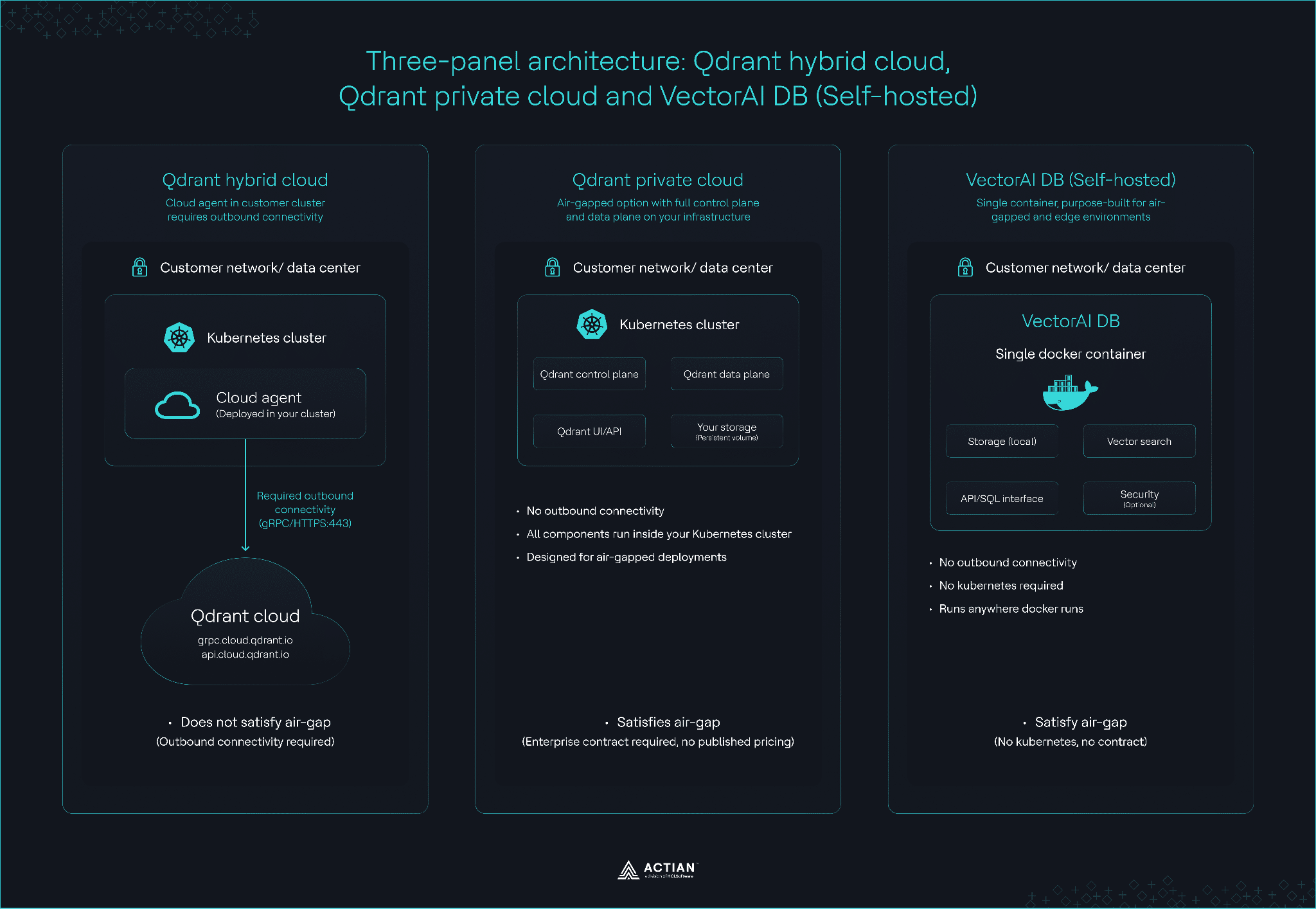
Three-panel architecture comparison of Qdrant Hybrid Cloud, Qdrant Private Cloud, and VectorAI DB
Performance at 1 Million Vectors
Performance benchmarks from April 2026, reveal a stark difference in throughput and scaling key features. At a baseline of one million vectors (768 dimensions), VectorAI DB maintains a 5.7x lead in Queries Per Second (QPS) over Qdrant.
Note that this benchmark used QdrantLocal, the in-process embedded mode, rather than the full Qdrant Standalone server. QdrantLocal does not run the background optimizers available in Qdrant Standalone, which affects throughput under sustained workloads. For a larger-scale third-party reference, the Tiger Data 50M-vector benchmark recorded Qdrant v1.13.4 at 41 QPS with 99 percent recall on an AWS r6id.4xlarge instance.
The more important result is scaling stability. At 10 million vectors, VectorAI DB retained 72% of its original throughput, while Qdrant dropped to roughly 12% of its baseline performance under the same self-hosted conditions. This behavior matters in air-gapped deployments because operators cannot rely on elastic cloud scaling to absorb performance degradation.
Qdrant remains strong in recall quality and ecosystem maturity, but its throughput degradation under larger indexes introduces operational pressure for teams running fully disconnected infrastructure.
The benchmark results indicate that VectorAI DB sustains throughput more effectively as index size increases, avoiding the sharp degradation commonly observed in some HNSW-based deployments.
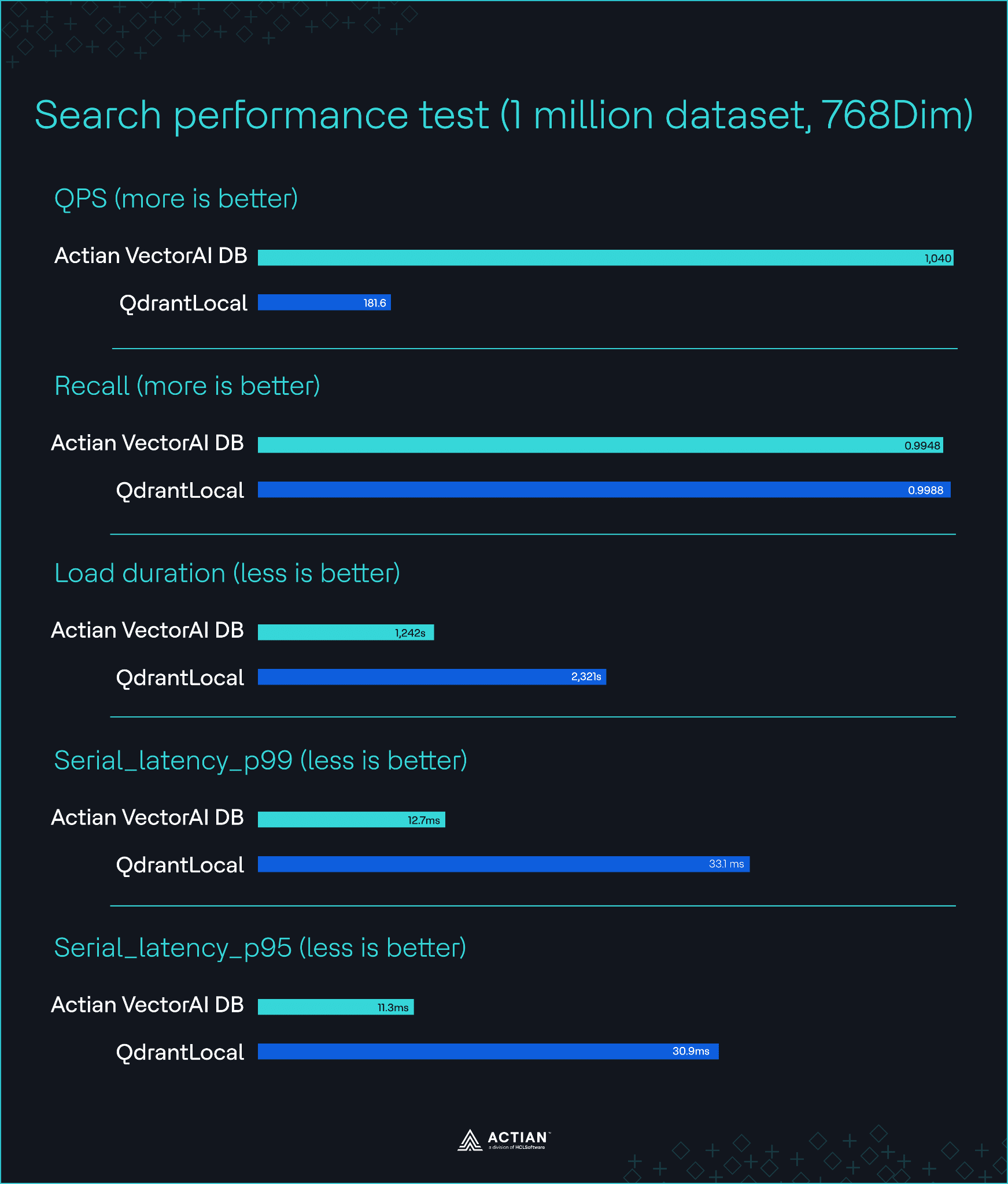
Performance test across VectorAI DB and QdrantLocal at 1M vector scale
Cost of Running Qdrant vs. VectorAI DB
Qdrant
Qdrant Cloud uses a usage-based pricing model tied to compute, memory, and storage consumption. Pricing varies by cluster configuration, cloud provider, and region, and Qdrant does not publicly publish fixed per-resource rates. As infrastructure requirements grow, costs scale with hardware usage, which makes long-term budgeting less predictable for air-gapped deployments.
Qdrant’s Private Cloud pricing is custom and requires a sales cycle that adds weeks to a project timeline. The Open Source version is “free” in terms of licensing, but the hidden cost lies in the “human-hour” requirement to build custom backup scripts, monitoring dashboards, and failover logic, none of which ship with the OSS binary.
VectorAI DB
Actian VectorAI DB offers a starter tier of $417/month (billed annually) for up to one million vectors, designed for small-scale AI applications. The tiers scale up to an enterprise level that supports 10 million+ vectors. Custom edge plans are also available for specialized deployments. Visit the Actian VectorAI DB pricing page and use the interactive estimator to find the right tier.
VectorAI DB ships as a self-hosted deployment with no cloud dependencies or Kubernetes prerequisites.
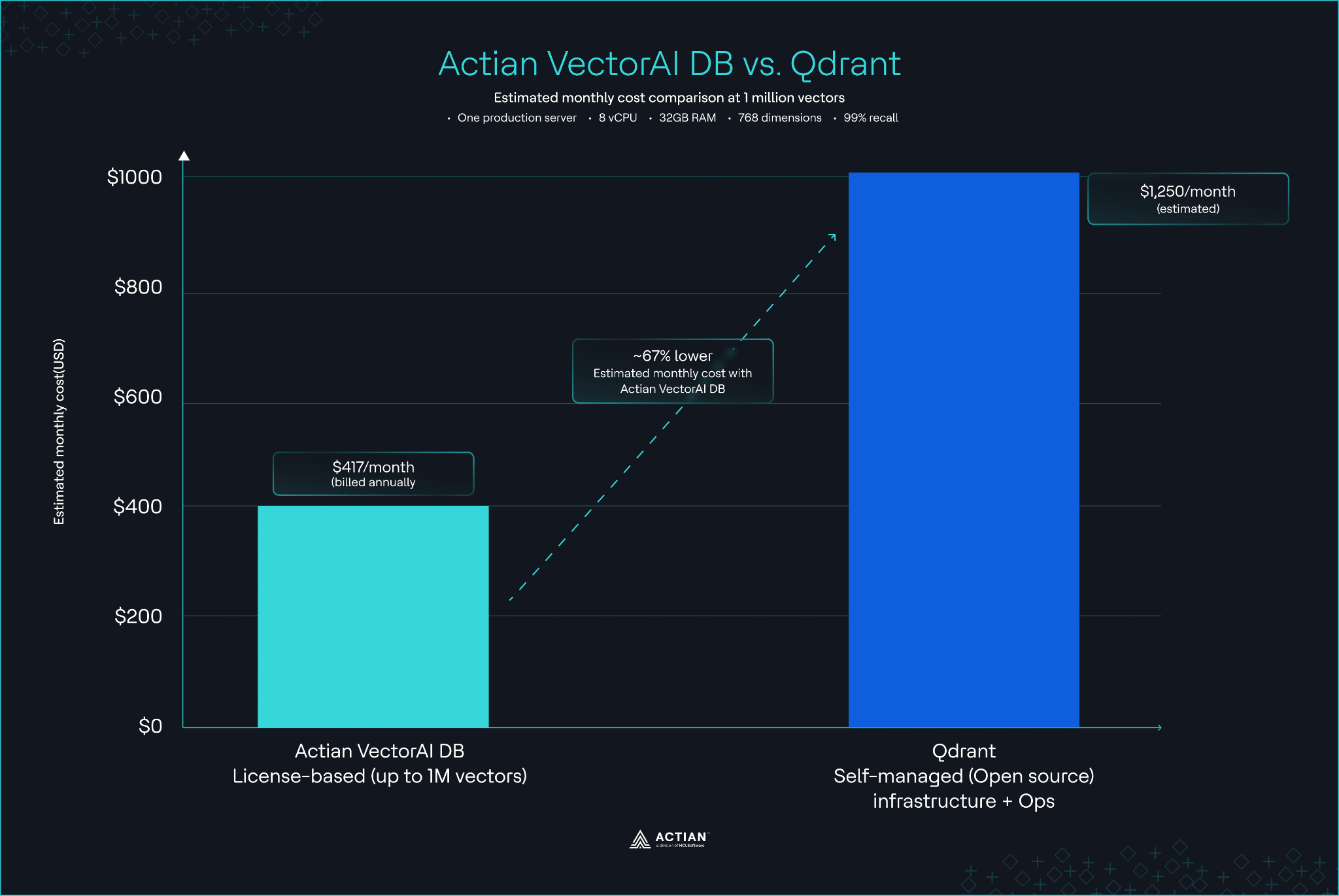
Actian VectorAI DB vs. Qdrant cost comparison at 1M vector scale
When Qdrant is the Right Choice
VectorAI DB is built for disconnected environments, but it is not the right choice for every use case. Qdrant is the stronger choice if:
- You have a reliable internet connection: Qdrant Cloud’s managed service is more mature than VectorAI DB’s initial cloud offering.
- You require advanced quantization: If you need specific binary or scalar quantization options to fit 100M+ vectors into a constrained memory footprint, Qdrant’s HNSW implementation is more flexible.
- You need multi-language support: Qdrant supports SDKs in Python, JavaScript, Rust, Go, .NET, and Java. If your stack falls outside Python or JavaScript, VectorAI DB requires more manual REST or SQL integration work.
- You need a long production track record: Qdrant has shipped in production at companies like HubSpot. VectorAI DB is newer and has less public production history.
- You need advanced filtering: Qdrant offers rich filter expressions that execute efficiently during similarity search and support complex Boolean conditions across multiple fields. Retrieval-Augmented Generation (RAG) workloads need this kind of filtering to restrict retrieval by date, customer ID, document source, or security permissions.
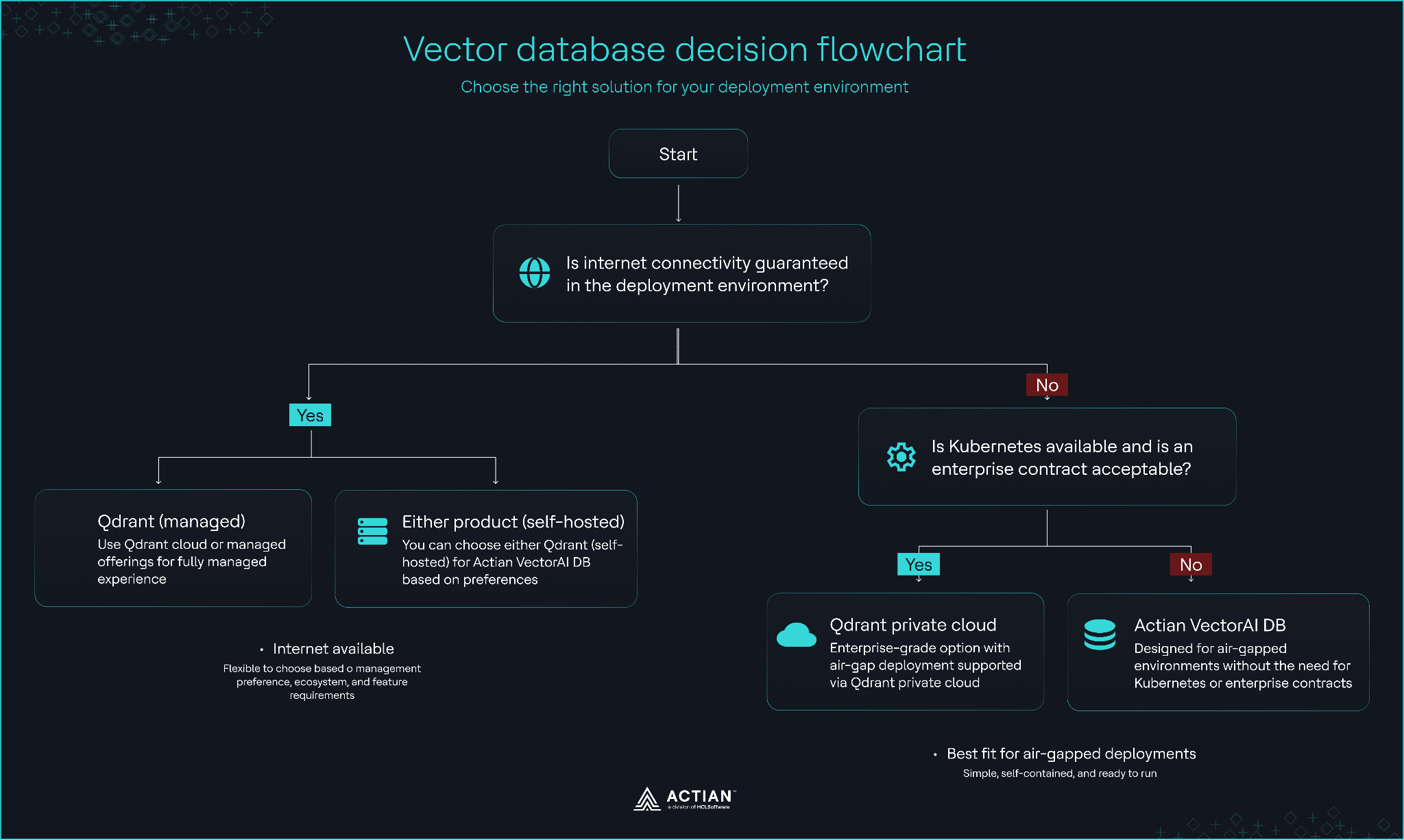
Decision flowchart
Ecosystem and Integration Maturity
The maturity gap is visible in the integration landscape. Qdrant integrates with almost every major tool in the AI stack, from Terraform and Pulumi to LangChain, LlamaIndex, and Haystack. Qdrant also offers SOC 2 Type II and HIPAA certifications, which are vital for cloud deployments.
VectorAI DB launched with Python and JavaScript SDKs, as well as native gRPC and REST APIs. While it supports LangChain and LlamaIndex, its ecosystem is still growing. One advantage of VectorAI DB in a security context is that it enables authentication and encryption by default. In contrast, Qdrant’s authentication is often disabled by default in Docker, requiring manual setup to meet basic production-readiness standards.
Side-by-side initialization (Python)
Both examples initialize a client connection and execute a filtered vector search, but they take different approaches. Qdrant uses a strongly typed client with explicit filter models and manual configuration, while Actian VectorAI DB streamlines initialization with a minimal interface and simple dictionary-based filters.
Qdrant Standalone
from qdrant_client import QdrantClient
from qdrant_client.models import Filter, FieldCondition, MatchValue

client = QdrantClient(
    url="http://localhost:6333",
    api_key="your_key"  # optional for local
)

results = client.search(
    collection_name="docs",
    query_vector=[0.1, 0.2, 0.3],
    query_filter=Filter(
        must=[
            FieldCondition(
                key="jurisdiction",
                match=MatchValue(value="SG")
            )
        ]
    )
)
What the code does
- Connects to a Qdrant instance running at localhost:6333.
- Uses an API key (optional locally, required in production/cloud).
- Executes a vector similarity search.
- Applies a payload filter (jurisdiction = “SG”).
- Queries against a collection named “docs”.
VectorAI DB
from actian_vectorai import VectorAIClient

client = VectorAIClient("http://localhost:50051")

results = client.points.search(
    collection_name="docs",
    vector=[0.1, 0.2, 0.3],
    filters={
        "jurisdiction": "SG"
    }
)
What the code does
- Connects to a VectorAI DB instance (default gRPC/HTTP endpoint).
- Uses built-in container-level security (no explicit API key needed).
- Executes a vector similarity search.
- Applies a simple dictionary-based metadata filter.
- Queries the “docs” collection.
How Other Qdrant Alternatives Compare
If neither Qdrant nor VectorAI DB fits your requirements, consider these alternatives through the lens of air-gap capability:
- Pinecone: A leader in managed vector search, but strictly cloud-only. Its “Bring Your Own Cloud” (BYOC) option still requires an outbound connection to the Pinecone control plane, disqualifying it from true air-gap environments.
- Milvus: Self-hostable on Kubernetes. However, the 20+ pod dependency chain makes it operationally “heavy.” It is overkill for teams that don’t want to manage a complex Kubernetes cluster for their vector search.
- Weaviate: Supports Docker and Kubernetes. It is a strong middle ground, but it requires the entire HNSW index to be held in memory, which can be restrictive for resource-constrained air-gapped hardware.
- ChromaDB: Lightweight and easy to run offline. However, it lacks high availability and production-grade failover mechanisms, making it better suited for prototyping than for mission-critical compliance systems.
- Faiss: A library developed by Meta for efficient similarity search and clustering of dense vectors, often used when performance or GPU acceleration is needed.
- Elasticsearch and OpenSearch: Both have added vector search capabilities, enabling hybrid retrieval.
Full comparison table
This table compares how leading vector databases handle offline and air-gapped deployment requirements.
| Capability | Qdrant | VectorAI DB | Pinecone | Milvus | Weaviate | ChromaDB | Faiss | Elasticsearch / OpenSearch |
| Air-gap capable (no enterprise) | Partial | Yes | No | Yes | Partial | Yes | Yes | Yes |
| Deployment model | Hybrid/K8s/Docker | Docker | Cloud | K8s | Docker/K8s | Local | Embedded library | Distributed search cluster |
| Minimum setup | Medium–High | Low | Low | High | Medium | Low | Low | High |
| Requires continuous outbound connectivity | Partial (Hybrid only) | No | Yes | No | No | No | No | No |
| Open source | Yes | No | No | Yes | Yes | Yes | Yes | Yes |
| Minimum cost | Infra only | Infra only | Usage-based | Infra + ops | Infra | Minimal | Minimal | Infra + ops |
| Compliance certifications | SOC2, HIPAA | No certifications at launch; architecture supports deployment within GDPR, HIPAA, and ISO 27001-compliant environments | SOC2 | None | None | None | None | Varies by deployment |
| Primary strength | Mature vector ecosystem | Air-gap simplicity | Managed operations | High-scale distributed search | Flexible hybrid retrieval | Lightweight local workflows | GPU-accelerated similarity search | Hybrid keyword + vector retrieval |
| Primary tradeoff | Air-gap friction | Smaller ecosystem | Requires connectivity | Operational complexity | Memory-heavy HNSW | Limited production tooling | No built-in distributed ops | Heavy infrastructure footprint |
Most alternatives can run offline in theory, but they introduce operational complexity, missing features, or hidden dependencies. VectorAI DB stands out by treating air-gap support as a primary design constraint rather than an afterthought.
Wrapping Up
Air-gap requirements change the decision entirely. Qdrant supports offline deployment, but it pushes you toward either Kubernetes complexity or reduced operational capability. VectorAI DB removes that tradeoff by packaging everything into a single, self-contained system with no outbound dependency.
If you need proven scale, ecosystem maturity, and managed options, choose Qdrant. If you need true air-gap deployment with minimal operational overhead, VectorAI DB is the more direct fit.
Refer to the VectorAI DB documentation and evaluate whether its simplicity aligns with your deployment constraints.
Sign up for the Actian VectorAI DB Community Edition and begin building today.

Stay connected
Data insights delivered to you.
(i.e. sales@..., support@...)
