
How to Build a Compliance Document Search System for Fintech


Key Takeaways
- Build a fully local RAG system for compliance search so regulatory documents never leave your infrastructure.
- Ingest compliance documents with metadata like jurisdiction, document type, effective date, and regulatory body.
- Enforce jurisdiction-aware retrieval so users only search documents allowed for their regulatory scope.
- Use a local LLM to generate cited answers from retrieved documents without external API calls.
- Log every query locally for audit and update documents incrementally when regulations change.
Fintech companies with European operations cannot rely on cloud-hosted Retrieval-Augmented Generation (RAG) systems by default to search compliance documents. GDPR Article 44 restricts the transfer of regulatory data outside the European Economic Area (EEA) without adequate safeguards. When a new Markets in Crypto-Assets (MiCA) Article 76 update or a Consumer Financial Protection Bureau (CFPB) guidance change arrives, the compliance team must review tens of thousands of pages of regulatory text, internal policies, and audit reports to determine whether existing AML procedures remain compliant. Keyword search is too literal for this task. Cloud RAG would technically solve the retrieval problem, but data sovereignty laws impose a legal constraint on where that system can run.
In this blog, you will build a fully local RAG system for compliance search. You will run it entirely within a private infrastructure, process regulatory documents, answer natural language queries with citations, and log every query for audit.
Why the Cloud is Limited
Regulatory restrictions prevent data from leaving organizational boundaries. Cloud-hosted APIs are unsuitable for practical fintech deployments. You face three primary legal barriers that make local infrastructure a mandatory architectural requirement.
1. Data sovereignty and cross-border transfers
GDPR Article 44 prohibits the transfer of personal data outside the EEA without specific safeguards. If compliance documents contain customer data or employee records, sending them to a US-based cloud vector index creates immediate legal exposure. PSD2 (Revised Payment Services Directive) and MiCA impose strict handling requirements for payment and crypto-asset records. An on-premises architecture ensures your data never crosses these hard geographic and legal boundaries.
2. Auditability and control requirements
Financial Conduct Authority (FCA) and Financial Crimes Enforcement Network (FinCEN) rules require that decisions made from AML data remain within the regulated entity’s direct control. A third-party index does not satisfy the “within your control” requirement. If a regulator asks to inspect the logic behind a compliance decision, you must prove the integrity of the data source. You cannot guarantee this integrity when your vector embeddings reside in a vendor’s cloud environment, where you lack visibility into the underlying infrastructure or data retention policies.
3. Embedding as a regulated processing step
Embedding a document for RAG is a processing step that requires a legal basis under regulations such as GDPR and CCPA. Compliance documents often contain sensitive personal data. When you embed data on a third-party service, you introduce a data transfer and must assess the provider as a data processor under applicable regulations.
Running the embedding pipeline locally reduces cross-border transfer exposure and simplifies processor risk assessments. The data stays within the controlled infrastructure.
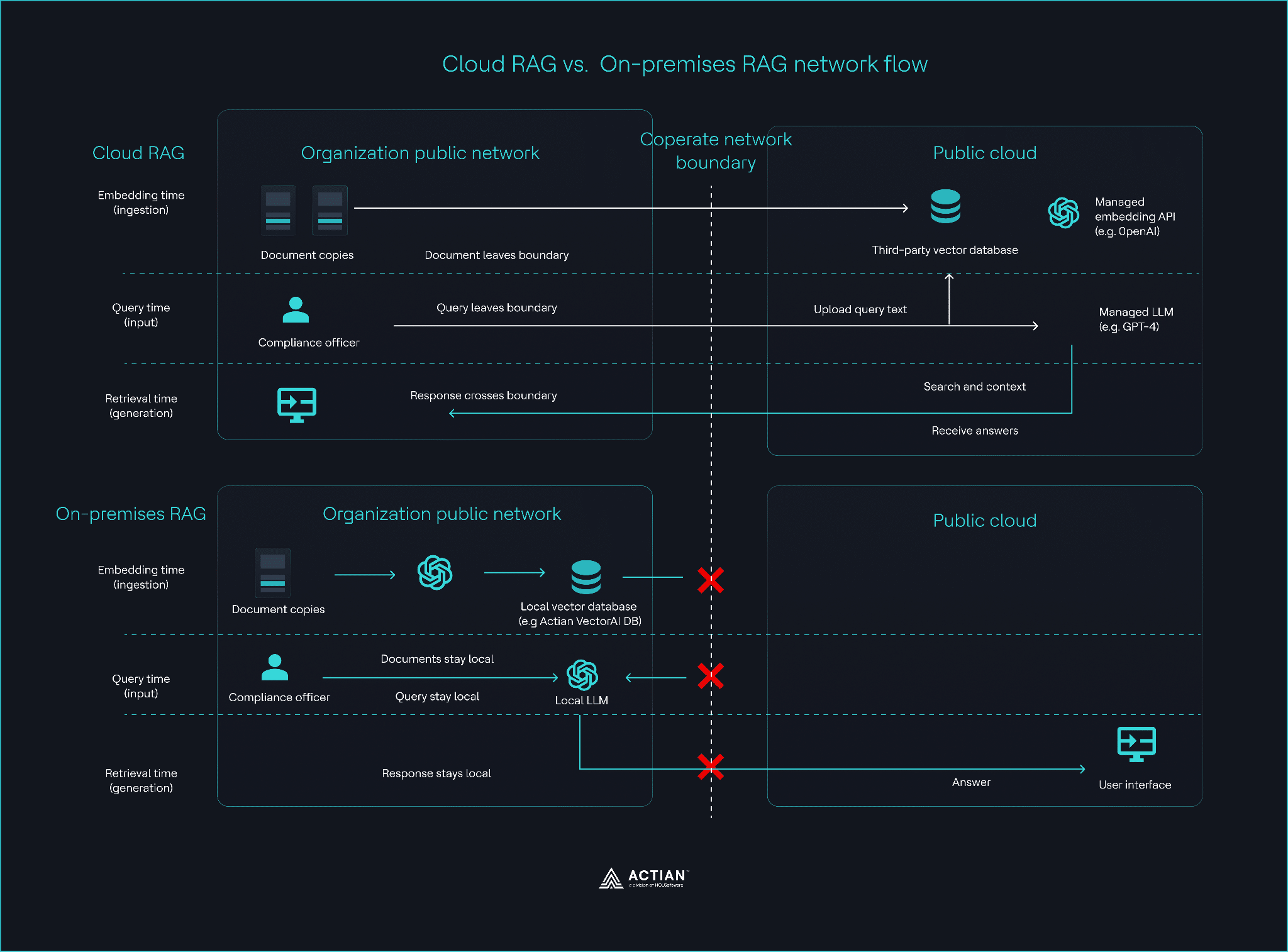
Cloud vs. on-premises RAG data flow
Architectural implication
The compliant design keeps everything local:
- The documents stay within your network.
- Embeddings run locally.
- The vector index stays local.
- Queries execute locally.
- The LLM generates answers locally.
- The audit log stores every action locally.
Any architecture that sends data outward violates at least one regulatory constraint.
What you are Building
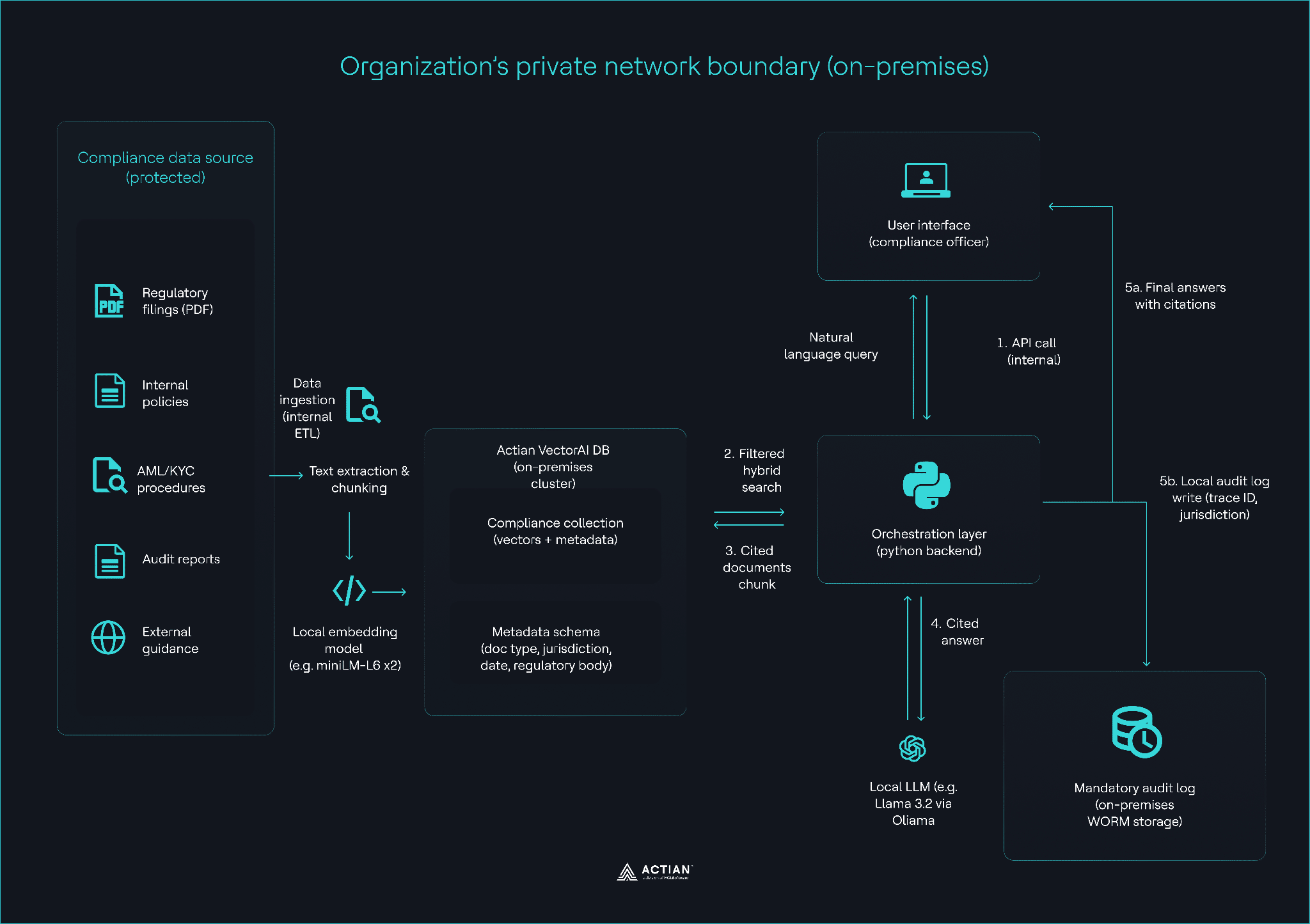
You are building a three-layer compliance search system that runs entirely inside your infrastructure and produces auditable, cited answers.
Layer 1: The ingestion pipeline
Extract text from PDF regulatory filings and internal policies, chunk the content into 512-token segments, and generate embeddings using all-MiniLM-L6-v2. The metadata schema is the most critical part of this layer. You ingest:
- Regulatory filings (GDPR, MiCA, CFPB, MAS, etc.).
- Internal policies.
- AML/KYC procedures.
- Audit reports.
The pipeline:
- Extract text from PDFs.
- Chunk documents (512 tokens, 50 overlap).
- Generate embeddings.
- Store in Actian VectorAI DB with metadata.
The metadata schema should look like this:
- doc_type: regulation | policy | audit
- jurisdiction: EU | US | UK | APAC
- effective_date: ISO date
- regulatory_body: e.g., GDPR, FCA, MAS
Layer 2: Jurisdiction-filtered query
The system performs a hybrid search. When a compliance officer asks a question, the backend injects a metadata filter based on the officer’s region. This prevents MAS guidance from surfacing for a GDPR-related query. The local LLM generates an answer that must include citations (Document Name, Section, and Date).
A compliance officer asks:
“What are GDPR Article 44 data transfer requirements?”
The system:
- Embeds the query locally.
- Runs hybrid search (vector + metadata filter).
- Filters by jurisdiction and document type.
- Retrieves relevant chunks.
- Sends the chunks to a local LLM.
- Returns a cited answer (document name, section, date).
You enforce filtering because relevance depends on jurisdiction.
Layer 3: The mandatory audit layer
Each query creates a local audit record with the user ID, the retrieved chunks, and a hash of the generated answer. This record provides auditors with a clear way to verify that responses are grounded in cited data and that access to information remains controlled.
Organization’s network boundary
Hardware baseline
You can run this system on:
- At least 8 GB RAM (16 GB+ recommended).
- 10 GB disk space (100 GB+ recommended).
Prerequisites
To follow along, install the following tools:
- Docker and Docker Compose.
- Python 3.10 or higher.
- PIP or UV: This guide uses UV for speed and reliability.
Project setup
Before building your compliance search system, configure your local environment so all processing stays within your network boundary. This setup uses uv, a fast Python package installer, to keep the environment reproducible and isolated.
Download the Actian VectorAI client package. This creates a actian_vectorai-0.1.0b2-py3-none-any.whl file.
- Initialize your workspace
Create a dedicated directory for your fintech compliance project.
mkdir compliance-rag && cd compliance-rag
uv init .- Activate the virtual environment
In a new terminal, create and activate a virtual environment:
uv venv- Install dependencies
Add the necessary libraries for vector operations, text extraction, and local embeddings.
# Install the Actian VectorAI Python client (ensure the .whl file is in your directory)
uv pip install actian_vectorai-0.1.0b2-py3-none-any.whl

# Add sentence-transformers, PDF processing tools
uv add sentence-transformers
Building a Compliance Document Search System
In this section, you will build a fully on-premises RAG system that ingests regulatory documents, enforces jurisdiction-aware retrieval, answers compliance queries with citations, and logs every interaction for audit purposes.
Step 1: Deploy a vector database
Deploy a local instance of Actian VectorAI DB with persistent storage for both vector data and audit logs.
Create a docker-compose.yaml file:
services:
  vectorai:
    image: actian/vectorai:latest
    platform: linux/amd64
    container_name: vectorai_db
    ports:
      - "50051:50051"
    volumes:
      # vector data persists across restarts
      - ./data:/app/data
      # audit log lives on host -- not inside the container
      - ./audit_logs:/app/audit_logs
    environment:
      - VECTORAI_LOG_LEVEL=info
    restart: unless-stopped
Run the service:
docker-compose up -dExpected result:

Container startup output
The database starts and exposes port 50051 for local access. Vector data persists in ./data. Audit logs write directly to ./audit_logs on the host, which keeps all access records inside your network boundary.
Note:
- VectorAI DB is under active development. Verify parameters in the official docs before production use.
- Keep audit logs outside the container to preserve evidence of compliance.
Verify the deployment:
docker-compose logs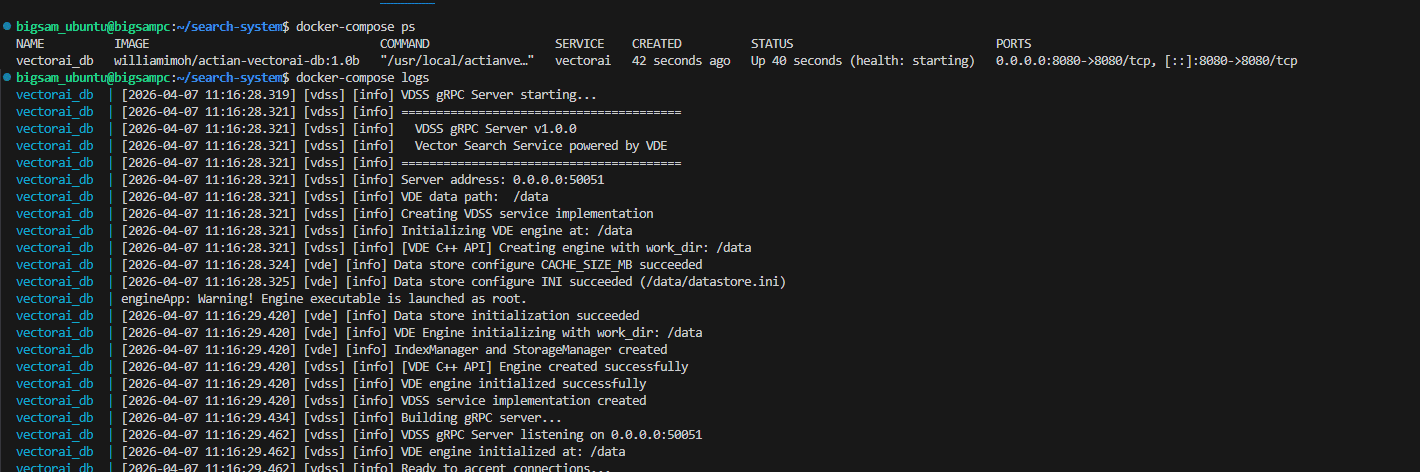
Terminal output showing successful container start and health status
Step 2: Build the ingestion pipeline
Run the ingestion pipeline to convert regulatory filings and internal policies into embeddings and store them in your local vector database.
Create ingest.py and enter the following content:
import hashlib
import json
from sentence_transformers import SentenceTransformer
from actian_vectorai import VectorAIClient, VectorParams, Distance, PointStruct, FilterBuilder, Field

# ── Config ────────────────────────────────────────────────────────────────────
BASE_ADDRESS = "localhost:50051"
COLLECTION = "compliance_docs"
EMBED_MODEL = "sentence-transformers/all-MiniLM-L6-v2"
VECTOR_DIM = 384
CHUNK_TOKENS = 512
OVERLAP_TOKENS = 50

# ── Sample Regulatory Corpus ───────────────────────────────────────────────────
REG_DOCS = [
    {
        "document_id": "MAS_637_2025",
        "jurisdiction": "SG",
        "doc_type": "regulation",
        "section": "Section 2.1: Capital Adequacy Ratios",
        "date": "2025-01-15",
        "text": "MAS Notice 637 on Risk Based Capital Adequacy Requirements for Banks..."
    },
    {
        "document_id": "GDPR_ART_44",
        "jurisdiction": "EU",
        "doc_type": "regulation",
        "section": "Chapter 5: Transfers of Personal Data",
        "date": "2018-05-25",
        "text": "Any transfer of personal data to a third country shall take place only if..."
    }
]

# ── Processing Logic ───────────────────────────────────────────────────────────
def chunk_text(text, size=CHUNK_TOKENS, overlap=OVERLAP_TOKENS):
    tokens = text.split()
    chunks, start = [], 0
    while start < len(tokens):
        end = min(start + size, len(tokens))
        chunks.append(" ".join(tokens[start:end]))
        if end == len(tokens):
            break
        start += size - overlap
    return chunks


model = SentenceTransformer(EMBED_MODEL)


def ingest(docs):
    with VectorAIClient(BASE_ADDRESS) as client:
        # Create collection if it doesn't exist
        try:
            client.collections.create(
                COLLECTION,
                vectors_config=VectorParams(size=VECTOR_DIM, distance=Distance.Cosine),
            )
        except Exception as e:
            if "already exists" not in str(e).lower():
                raise

        points = []
        for doc in docs:
            chunks = chunk_text(doc["text"])
            vectors = model.encode(chunks).tolist()

            for i, chunk in enumerate(chunks):
                point_id = int(
                    hashlib.sha256(f"{doc['document_id']}:{i}".encode()).hexdigest()[:15],
                    16,
                )
                points.append(PointStruct(
                    id=point_id,
                    vector=vectors[i],
                    payload={
                        "document_id": doc["document_id"],
                        "jurisdiction": doc["jurisdiction"],
                        "doc_type": doc["doc_type"],
                        "section": doc.get("section", ""),
                        "date": doc.get("date", ""),
                        "text": chunk,
                    }
                ))

        client.points.upsert(COLLECTION, points)
        print(f"✓ Ingested {len(points)} chunks from {len(docs)} documents")


if __name__ == "__main__":
    ingest(REG_DOCS)
This script performs the following actions:
- Chunks the texts: The system splits regulatory documents into 512-token segments with 50-token overlap to maintain legal context across boundaries.
- Embeds the chunks: The model converts segments into numerical vectors using a local model, ensuring your data never leaves your infrastructure.
- Stores the metadata: Each vector is stored with its jurisdiction and document_type. These fields are mandatory for enforcing your regulatory perimeter during search.
Run ingestion:
uv run ingest.pyExpected result:

Ingestion logs showing the number of chunks indexed
Step 3: Run your queries
Execute queries against your local RAG system and validate retrieval, jurisdiction-based filtering, and audit logging.
Create a file query.py with the following content:
import json
import datetime
import hashlib
import requests # type: ignore
from pathlib import Path
from sentence_transformers import SentenceTransformer # type: ignore
from actian_vectorai import VectorAIClient, Field, FilterBuilder

# ── Config ────────────────────────────────────────────────────────────────────
BASE_ADDRESS = "localhost:50051"
COLLECTION = "compliance_docs"
AUDIT_LOG  = Path("./audit_logs/compliance_queries.jsonl")

# ── Jurisdiction Permissions ──────────────────────────────────────────────────
OFFICER_PERMISSIONS = {
    "sg_compliance_officer": ["SG"],
    "eu_data_privacy_lead":  ["EU"],
    "global_auditor":        ["SG", "EU", "UK", "US"]
}

model = SentenceTransformer("sentence-transformers/all-MiniLM-L6-v2")


def write_audit(record):
    AUDIT_LOG.parent.mkdir(parents=True, exist_ok=True)
    with open(AUDIT_LOG, "a") as f:
        f.write(json.dumps(record) + "\n")

def run_compliance_query(user_id, role, query_text):
    timestamp = datetime.datetime.now().isoformat()
    allowed_jurisdictions = OFFICER_PERMISSIONS.get(role, [])

    if not allowed_jurisdictions:
        write_audit({
            "timestamp": timestamp,
            "user_id": user_id,
            "role": role,
            "query": query_text,
            "docs": [],
            "access": "DENIED"
        })
        return "Access Denied."

    # Embed query
    q_vec = model.encode([query_text])[0].tolist()

    # Build filter for jurisdiction access control (database-level enforcement)
    # Using Filter DSL: for single jurisdiction use must(), for multiple use should() with OR semantics
    if len(allowed_jurisdictions) == 1:
        # Single jurisdiction: use must() for strict enforcement
        jurisdiction_filter = FilterBuilder().must(
            Field("jurisdiction").eq(allowed_jurisdictions[0])
        ).build()
    else:
        # Multiple jurisdictions: OR them together using should()
        filter_builder = FilterBuilder()
        for jurisdiction in allowed_jurisdictions:
            filter_builder = filter_builder.should(Field("jurisdiction").eq(jurisdiction))
        jurisdiction_filter = filter_builder.build()

    with VectorAIClient(BASE_ADDRESS) as client:
        # Search with database-level jurisdiction filter
        # The filter is applied at the database level, not after retrieval
        search_results = client.points.search(
            COLLECTION,
            vector=q_vec,
            limit=3,  # Get top 3 results
            filter=jurisdiction_filter  # Database enforces access control here
        )

    # Convert results to our expected format
    results = [
        {
            "id": result.id,
            "score": result.score,
            "metadata": result.payload
        }
        for result in search_results
    ]

    doc_refs = [
        {
            "doc_id": r["metadata"].get("document_id"),
            "jurisdiction": r["metadata"].get("jurisdiction")
        }
        for r in results
    ]

    # Audit ONLY filtered (authorized) results
    write_audit({
        "timestamp": timestamp,
        "user_id": user_id,
        "role": role,
        "query": query_text,
        "jurisdictions_accessed": allowed_jurisdictions,
        "docs": doc_refs,
        "access": "ALLOWED"
    })

    return results

if __name__ == "__main__":
    print("\n--- Query 1: Authorized SG Officer ---")
    res = run_compliance_query(
        "officer_tan",
        "sg_compliance_officer",
        "What are capital adequacy rules?"
    )
    for r in res:
        print(f"Found: {r['metadata']['document_id']} ({r['metadata']['jurisdiction']})")

    print("\n--- Query 2: EU trying SG data ---")
    res2 = run_compliance_query(
        "officer_schmidt",
        "eu_data_privacy_lead",
        "MAS Notice 637"
    )
    print(f"Results returned: {len(res2)}")
The script performs three core operations:
- Enforces jurisdiction control: The system checks your role before retrieval. Jurisdiction is enforced at the database level by injecting a filter payload into the vector search request. The database returns only documents within the allowed regulatory scope.
- Retrieves filtered data: Vector similarity search is restricted to your specific regulatory perimeter.
- Writes the mandatory audit log: Every query event is recorded locally to satisfy your compliance requirements.
Run:
uv run query.pyExpected result:
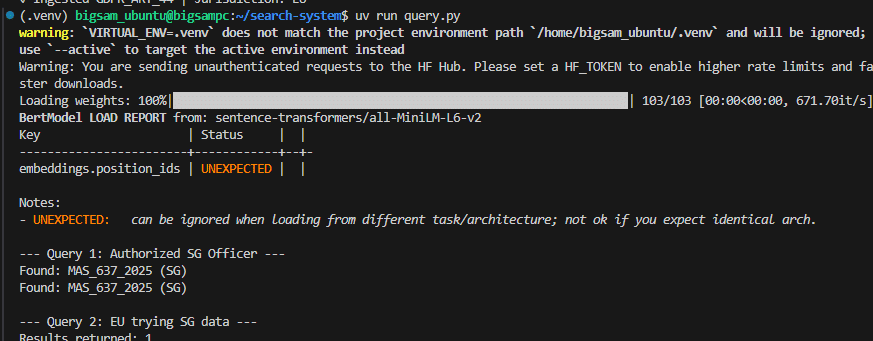
Query output showing retrieved chunks with scores and metadata
Step 4: Generate answers with a local LLM
The answers generate using only retrieved documents.
Start Ollama:
ollama run mistral:7bAdd generation logic to your query.py:
import requests

OLLAMA_URL = "http://127.0.0.1:11434/api/generate"
OLLAMA_MODEL = "mistral:7b"

def build_context(results):
    """Build context string from retrieved documents for LLM prompt."""
    blocks = []
    for idx, result in enumerate(results, start=1):
        md = result["metadata"]
        doc_id = md.get("document_id", "unknown")
        section = md.get("section") or "(section not specified)"
        date = md.get("date") or "(date not specified)"
        text = md.get("text", "")

        blocks.append(
            f"Document {idx}: {doc_id}\n"
            f"Section: {section}\n"
            f"Date: {date}\n"
            f"Text: {text}"
        )
    return "\n---\n".join(blocks)


def generate_answer(results, query_text):
    """
    Generate an answer using Ollama's mistral:7b model.
    Note: First generation may take 2-3 minutes as the model loads into memory.
    Subsequent calls are faster once the model is warm.
    """
    if not results:
        return "No documents retrieved to generate answer from."

    context = build_context(results)
    prompt = f"""
Answer using only the context below.
Include document name, section, and date.

Context:
{context}

Question:
{query_text}
"""

    try:
        # Increase timeout to 600s (10 minutes) for mistral:7b generation
        # First run may take 2-3 minutes as the model loads
        response = requests.post(
            OLLAMA_URL,
            json={
                "model": OLLAMA_MODEL,
                "prompt": prompt,
                "stream": False,  # Ensure non-streaming response
            },
            timeout=600,  # 10 minutes to account for model warmup
        )
        response.raise_for_status()
        payload = response.json()
        # Ollama /api/generate endpoint returns 'response' field
        answer = payload.get("response", "")
        if not answer:
            return f"⚠️  Ollama returned empty response. Payload: {payload}\n\nContext for manual review:\n{context}"
        return answer
    except requests.exceptions.Timeout as e:
        return f"⚠️  Ollama generation timed out after 10 minutes.\n\nMistral:7b can take 2-3 minutes on first run. Try again--it will be faster next time.\n\nContext for manual review:\n{context}"
    except requests.exceptions.ConnectionError as e:
        return f"⚠️  Ollama server not running on {OLLAMA_URL}\n\nTo start Ollama:\n  docker compose up -d ollama\n  docker exec ollama_inference ollama pull mistral:7b\n\nContext for manual review:\n{context}"
    except Exception as e:
        return f"Error calling Ollama: {e}\n\nContext sent:\n{context}"

if res:
        print("\n--- Generated answer for SG officer ---")
        print(generate_answer(res, "What are capital adequacy rules?"))
This step ensures:
- No external API calls.
- Answers grounded in your documents.
- Citations included for auditability.
Run again:
<>uv run query.pyExpected result:
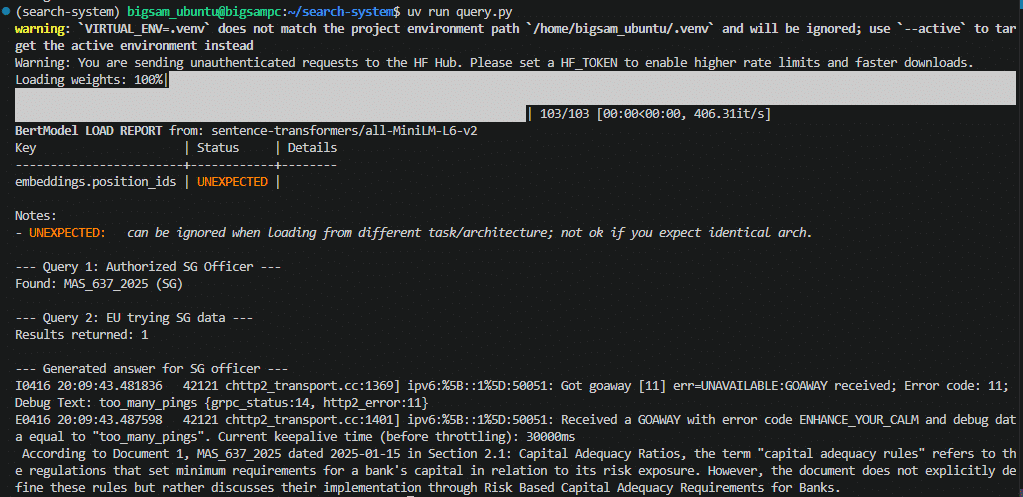
Ollama generated answers logs
Note: Running mistral:7b locally without GPU acceleration takes 2-3 minutes for the first inference, but subsequent queries benefit from model caching.
Step 5: Configure the audit log
Store every query locally by using the volume mapping defined during deployment.
The Docker configuration mounts ./audit_logs from your host into the container. Every interaction with the system creates an entry in compliance_queries.jsonl.
Sample log entry:
{"timestamp": "2026-04-16T20:08:11.929639", "user_id": "officer_tan", "role": "sg_compliance_officer", "query": "What are capital adequacy rules?", "jurisdictions_accessed": ["SG"], "docs": [{"doc_id": "MAS_637_2025", "jurisdiction": "SG"}], "access": "ALLOWED"}
{"timestamp": "2026-04-16T20:08:13.397832", "user_id": "officer_schmidt", "role": "eu_data_privacy_lead", "query": "MAS Notice 637", "jurisdictions_accessed": ["EU"], "docs": [{"doc_id": "GDPR_ART_44", "jurisdiction": "EU"}], "access": "ALLOWED"}
Each entry captures:
- Who made the request.
- What they asked.
- Which documents were accessed.
This file remains entirely your infrastructure and satisfies audit requirements.
Handling Regulatory Updates
Update regulatory documents incrementally without rebuilding the index. When a regulator publishes a new version, you replace only the affected document vectors. This preserves audit integrity and keeps your system current.
When a guidance document changes, delete all vectors tied to the existing document_id, then insert the updated chunks with the new effective date.
Update your ingestion pipeline
Add this function to ingest.py:
def update_regulatory_document(document_id, updated_doc):
    """
    Update a regulatory document by deleting old vectors and inserting new ones.
    This maintains 'Effective Date' integrity by replacing the entire document's chunks.
    """
    with VectorAIClient(BASE_ADDRESS) as client:
        # Delete existing vectors for the old document
        delete_filter = FilterBuilder().must(Field("document_id").eq(document_id)).build()
        client.points.delete(COLLECTION, filter=delete_filter)
        print(f"✓ Deleted old vectors for document {document_id}")

        # Ingest the updated document
        chunks = chunk_text(updated_doc["text"])
        vectors = model.encode(chunks).tolist()

        points = []
        for i, chunk in enumerate(chunks):
            point_id = int(
                hashlib.sha256(f"{updated_doc['document_id']}:{i}".encode()).hexdigest()[:15],
                16,
            )
            points.append(PointStruct(
                id=point_id,
                vector=vectors[i],
                payload={
                    "document_id": updated_doc["document_id"],
                    "jurisdiction": updated_doc["jurisdiction"],
                    "doc_type": updated_doc["doc_type"],
                    "section": updated_doc.get("section", ""),
                    "date": updated_doc.get("date", ""),
                    "text": chunk,
                }
            ))

        client.points.upsert(COLLECTION, points)
        print(f"✓ Updated document {document_id} with {len(points)} chunks (new effective date: {updated_doc.get('date', 'N/A')})")
Example usage
# Update MAS_637_2025 with new content and date

updated_mas_doc = {
    "document_id": "MAS_637_2025",
    "jurisdiction": "SG",
    "doc_type": "regulation",
    "section": "Section 2.1: Capital Adequacy Ratios (Updated)",
    "date": "2026-04-16",  # New effective date
    "text": "Updated MAS Notice 637 text here..."
}

update_regulatory_document("MAS_637_2025", updated_mas_doc)
Run the update
uv run ingest.pyExpected result:
 Ingestion + update logs
This :
- Ingest the initial documents
- Update MAS_637_2025 with new content and date (2026-04-16)
Verify the update
uv run query.pyExpected result:
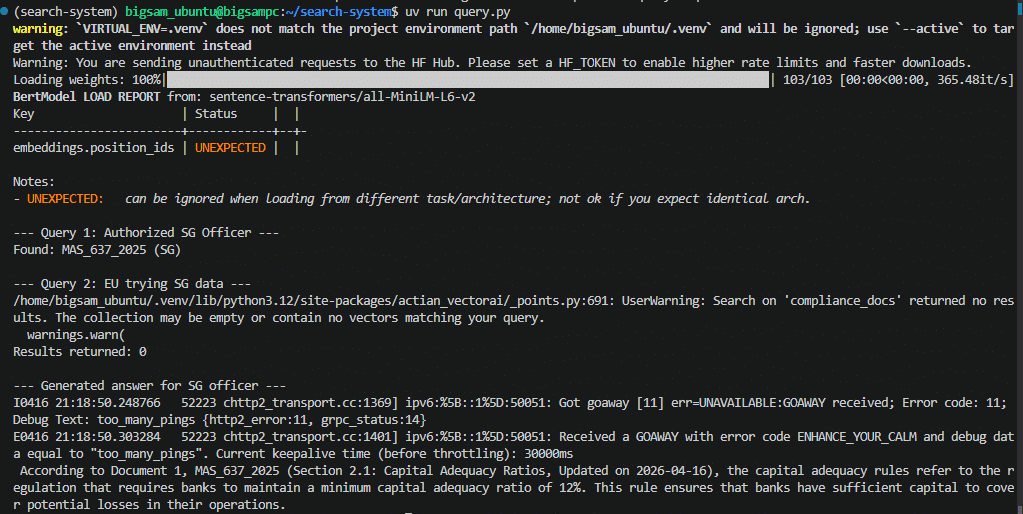
Query output with updated document
The system:
- Returns the updated document (2026-04-16) for SG queries.
- Surfaces the new section in the retrieved results.
- Generates answers grounded in the updated content.
Wrapping Up
Regulatory constraints prohibit sending compliance data to cloud RAG systems. You solved this by building a fully local pipeline in which ingestion, retrieval, generation, and audit logging remain within your infrastructure.
You now have:
- A searchable compliance corpus.
- Jurisdiction-aware filtering.
- Local LLM answers with citations.
- A complete audit trail for every query.
Apply this architecture to other regulated workloads such as fraud analysis or internal risk systems. Check the VectorAI DB documentation and GitHub repository for updates and implementation details.
Join the community and learn more about Actian.

Stay connected
Data insights delivered to you.
(i.e. sales@..., support@...)
