

Knowledge Graphs Explained: How They Work, Examples, and AI Use Cases


Key Takeaways
- Knowledge graphs connect entities, relationships, and attributes to add context to data.
- They help with discovery, governance, analytics, and AI by linking meaning to source data.
- This guide explains how knowledge graphs work and how they differ from ontologies and graph databases.
- It also covers enterprise use cases, limitations, and when a simpler approach may be enough.
Organizations generate more data than ever, but that data often lives in disconnected systems, uses inconsistent business terms, and lacks clear ownership. That makes it hard to answer even simple questions with confidence.
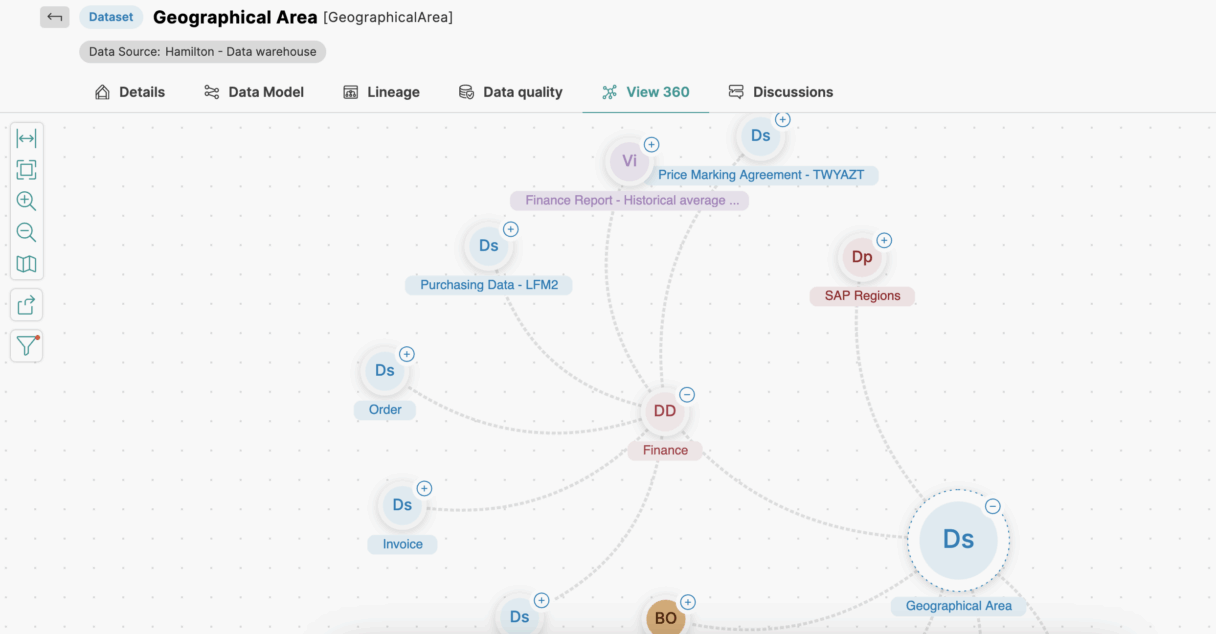
Knowledge graphs help solve this problem by connecting data, meaning, and context. Instead of treating information as isolated records, a knowledge graph maps how people, products, policies, reports, and data assets relate to one another.
In this guide, we’ll explain what knowledge graphs are, how they work, how they differ from related concepts like graph databases and ontologies, and where they fit in modern analytics and AI.
What is a Knowledge Graph?
A knowledge graph is a structured way to represent information by connecting entities, relationships, and attributes. It shows not just what something is, but how it connects to other things.
At a basic level, a knowledge graph includes:
- Entities: The people, places, products, reports, systems, or business terms being described.
- Relationships: The links between those entities, such as “owns,” “contains,” “uses,” or “depends on.”
- Attributes: Details about each entity, such as name, status, owner, location, or creation date.
For example:
- Entity: Customer
- Relationship: placed
- Entity: Order
And that order may also:
- Contain a Product.
- Be fulfilled by a Warehouse.
- Appear in a Report.
- Be governed by a Policy.
This connected structure gives data context. That context is what makes knowledge graphs useful for discovery, search, governance, analytics, and AI.
A Simple Knowledge Graph Example
Imagine a business user asks:
Which revenue dashboard should I trust for active customers in the Northeast region?
That sounds like a reporting question, but answering it reliably may require connecting several kinds of information:
- Business term active customer.
- Approved definition of that term.
- Source table and fields used to calculate it.
- Dashboard that uses those fields.
- Owner responsible for the dashboard.
- Policy that controls access.
- Data quality status of the pipeline feeding it.
In a knowledge graph, those relationships might look like this:
- Business term: Active Customer.
→ Defined by: Customer Metrics Standard.
→ Sourced from: CRM.Customer_Status.
→ Used in: Regional Revenue Dashboard.
→ Owned by: Sales Analytics Team.
→ Fed by: Daily Customer Pipeline.
→ Quality status: Passed latest checks.
Instead of searching across separate tools and documentation, a user can follow the relationship path and understand:
- What the term means.
- Where the data comes from.
- Who owns it.
- Whether it is current and trustworthy.
That is the core value of a knowledge graph: it connects facts in a way people can interpret and act on.
How Does a Knowledge Graph Work?
A knowledge graph is built by collecting information from different sources, identifying the important things in that information, connecting them, and maintaining those connections over time.
Data ingestion
Knowledge graphs can pull from many sources, including:
- Relational databases.
- Cloud data warehouses.
- Data catalogs.
- Business glossaries.
- Dashboards and reports.
- Documents and policies.
- Lineage systems.
- Usage and access logs.
Some of this data is highly structured, while some is semi-structured or unstructured. The goal is to bring relevant facts into a shared model.
Entity recognition and extraction
Next, the system identifies the entities that matter.
These might include:
- Customers
- Products
- Contracts
- Datasets
- Columns
- Business terms
- Reports
- Data owners
In unstructured sources, this can involve extracting entities from text. In structured systems, entities may already be explicit.
Entity resolution and linking
One of the most important steps is figuring out when different records refer to the same thing.
For example:
- “Northeast Revenue Dashboard”
- “NE Revenue Report”
- “Regional Sales Dashboard”
These may be three labels for one asset, or they may be different assets. A useful knowledge graph needs to resolve those identities as accurately as possible and connect them to the right node.
Relationship discovery
After the entities are identified, the graph captures how they relate.
Examples include:
- A report uses a dataset.
- A term is defined by a glossary entry.
- A table feeds a dashboard.
- A policy applies to a data product.
- A steward owns a domain.
These relationships can come from metadata, lineage, modeling, documentation, or system integrations.
Context and semantics
A knowledge graph becomes more useful when it reflects meaning, not just connectivity.
For example, the phrase “active customer” can mean different things in different departments. If the graph links that term to an approved definition, source logic, owner, and downstream usage, users can understand which meaning applies in which context.
This is what makes a knowledge graph different from a simple list of linked records.
Inference and reasoning
Knowledge graphs can also support reasoning based on known relationships.
For example, if a graph knows that:
- Dashboard A uses Dataset B.
- Dataset B is produced by Pipeline C.
- Pipeline C failed this morning.
then the system can infer that Dashboard A may be affected.
This kind of relationship-based reasoning can help teams assess impact, trace dependencies, and answer multi-step questions faster.
Knowledge Graph vs. Ontology vs. Graph Database
These terms are related, but they are not interchangeable.
Knowledge graph vs. ontology
An ontology defines the concepts and relationships in a domain. It acts like a model or vocabulary.
A knowledge graph uses that model to connect actual entities and facts.
In simple terms:
- Ontology: The blueprint.
- Knowledge graph: The populated network.
For example, an ontology may define that a Report can use a Dataset and be owned by a Team. The knowledge graph contains the specific reports, datasets, and teams.
Knowledge graph vs. graph database
A graph database is a storage and query technology designed for graph-shaped data.
A knowledge graph is the information model and connected representation of meaning.
You can store a knowledge graph in a graph database, but the two are not the same thing. One is the concept and structure of the knowledge; the other is one possible implementation.
Knowledge graph vs. semantic layer
A semantic layer helps make data easier for business users and applications to understand by applying common definitions and business-friendly meaning.
A knowledge graph can strengthen a semantic layer by connecting terms, data assets, lineage, policies, and owners. In enterprise environments, the two are often complementary.
Quick comparison
| Concept | Primary role | Main question it answers |
|---|---|---|
| Ontology | Defines concepts and allowed relationships | “What does this domain mean?” |
| Knowledge graph | Connects entities, facts, and context | “How are these things related?” |
| Graph database | Stores and queries graph-shaped data | “How do we manage graph data efficiently?” |
| Semantic layer | Makes data understandable and usable | “How do people consistently access and interpret data?” |
How Enterprise Knowledge Graphs Support Governance and Discovery
In enterprise settings, a knowledge graph is most useful when it connects technical metadata with business context.
That may include linking:
- Business terms to approved definitions.
- Datasets to owners and stewards.
- Reports to source systems.
- Policies to governed assets.
- Quality checks to pipelines.
- Lineage to downstream usage.
- Access permissions to sensitive data.
This helps users answer practical questions such as:
- What does this metric mean?
- Where did this number come from?
- Who owns this dataset?
- Which report should I use?
- What downstream assets will be affected by a change?
- Is this asset governed and current?
Without these connections, users may still find data, but they may not know whether they should trust or reuse it.
Why governance matters
A connected graph is not automatically a trustworthy graph.
Relationships can become stale. Definitions can drift across teams. Data sources can change. Duplicate entities can be linked incorrectly. Permissions can be missing or outdated.
That’s why governance matters. In practice, enterprise knowledge graphs are stronger when they include:
- Accountable owners.
- Authoritative sources.
- Versioned definitions.
- Lineage and provenance.
- Access controls.
- Review and change processes.
- Quality indicators.
The graph should help people understand not just what is connected, but what is approved, current, and fit for use.
How Knowledge Graphs are Used
Knowledge graphs support a wide range of use cases, but they are especially valuable when the answer depends on relationships across multiple systems or domains.
Search and data discovery
Knowledge graphs improve search by connecting terms to context.
A user searching for “customer churn” may find:
- The approved metric definition.
- The curated dataset behind it.
- Related dashboards.
- The owner of the metric.
- Lineage to source systems.
This is more useful than a keyword match alone.
Analytics and decision-making
Analysts often need to trace numbers back to source logic and business meaning.
A knowledge graph can help them understand:
- Which sources were used.
- Which transformations were applied.
- Whether similar metrics already exist.
- Which assets are certified or widely used.
Recommendations
Knowledge graphs can support recommendation workflows by connecting users, products, behaviors, categories, and outcomes.
This makes it easier to answer questions like:
- Which products are commonly purchased together?
- Which content is related to this topic?
- Which data assets are often used together?
Virtual assistants and enterprise copilots
Knowledge graphs can help assistants respond to business questions with more context.
For example, instead of returning a generic answer to “What is gross margin?”, a system could return:
- The approved definition.
- The relevant calculation logic.
- The finance-approved source.
- The dashboard where it is used.
Healthcare
In healthcare, knowledge graphs can connect patients, symptoms, conditions, medications, providers, and research concepts.
That can support use cases such as:
- Surfacing possible relationships across patient histories.
- Linking symptoms to reference information.
- Identifying potential interactions or dependencies.
Financial services
In financial environments, knowledge graphs can connect accounts, customers, transactions, merchants, locations, devices, and policies.
This can help teams:
- Investigate suspicious relationships.
- Detect patterns across entities.
- Understand exposure and dependency chains.
- Improve customer context.
Knowledge Graphs and AI: Where They Help
Knowledge graphs are increasingly discussed in AI because they add structure and context that pure text retrieval may miss.
Where they can help
Knowledge graphs are useful when a question depends on relationships, such as:
- Which dashboards use a metric affected by a changed definition?
- What customer accounts are linked to this parent organization?
- Which reports depend on pipelines that failed today?
These are multi-hop questions. The answer is not always in one document or one row. It may require traversing connected entities.
Knowledge graphs in retrieval workflows
In retrieval-augmented generation, a system often retrieves documents or passages relevant to a question. A knowledge graph can complement that process by adding explicit relationships between concepts, assets, and facts.
This can be useful for:
- Connecting synonyms and business terms.
- Grounding answers in approved definitions.
- Tracing source systems and lineage.
- Navigating from one related entity to another.
Hybrid retrieval often makes sense
Not every question needs graph traversal.
For straightforward lookups, a document search or direct query may be enough. For more complex, relationship-heavy questions, graph-based retrieval can add value.
In many enterprise scenarios, a hybrid approach works well:
- Use search or vector retrieval to find relevant content.
- Use graph relationships to connect context, ownership, and provenance.
- Return answers with links back to sources.
Important caution
A knowledge graph does not guarantee correct AI outputs.
If the graph is incomplete, outdated, or poorly governed, it can still lead to misleading answers. The quality of the result depends on the quality of the underlying definitions, relationships, source mappings, and maintenance processes.
A Public Knowledge Graph Example
One well-known example is Wikidata, a collaboratively maintained knowledge graph used across Wikimedia projects.
It connects entities such as people, places, works, and events through structured properties and relationships.
For example:
- Entity: Leonardo da Vinci
- Related entity: Mona Lisa
- Relationship: creator of
- Attribute: born in 1452
Public examples like this are useful for understanding the concept. In enterprise environments, the same principles apply, but the entities often include business terms, datasets, pipelines, policies, and data products.
How to Build and Maintain a Knowledge Graph
A useful knowledge graph usually starts with a clear scope, not with an attempt to model everything at once.
1. Start with a high-value question
Choose a business question that requires connected context, such as:
- Which reports use this governed metric?
- What downstream assets are affected by this data change?
- Where is sensitive customer data used?
This keeps the project focused.
2. Identify the right sources
Select the systems that contain the facts needed to answer the question, such as:
- Glossary definitions
- Catalog metadata
- Lineage records
- Dashboards
- Quality checks
- Access policies
3. Define the model
Decide which entities and relationships matter.
For example:
- Dataset
- Report
- Business Term
- Owner
- Domain
- Policy
- Pipeline
And relationships such as:
- Uses
- Owned by
- Defined by
- Governed by
- Feeds
- Depends on
4. Resolve identities carefully
Ensure that the same entity is not duplicated under different names, and that similarly named assets are not merged incorrectly.
5. Validate with domain experts
Business and technical experts should review key definitions and relationships, especially those used in governed reporting or AI workflows.
6. Add governance and maintenance
Assign owners, track provenance, monitor freshness, and define how changes are reviewed and published.
7. Measure usefulness
Useful measures may include:
- Time to find a trusted asset.
- Time to identify an owner.
- Number of unresolved duplicates.
- Freshness of critical relationships.
- Ability to trace downstream impact.
Limitations and when a simpler approach is enough
Knowledge graphs are useful, but they are not always necessary.
Common limitations
Challenges can include:
- Incomplete source metadata.
- Ambiguous entity matching.
- Outdated relationships.
- Inconsistent business definitions.
- Ongoing maintenance effort.
- Added modeling complexity.
When a knowledge graph may be unnecessary
A simpler approach may be enough when:
- The question can be answered from one system.
- Relationships between entities are not important.
- The domain is small and stable.
- A direct query or document search solves the problem well.
A practical fit test
A knowledge graph is often a good fit when you need to answer questions that require:
- Multiple sources.
- Shared definitions.
- Relationship traversal.
- Ownership and governance context.
- Explainable provenance.
If those needs are absent, a lighter-weight solution may be more practical.
Improve Data Relationships and Discovery With Actian
Knowledge graphs can help organizations move from isolated data assets to connected, usable context. But enterprise value comes from more than linking records. It comes from connecting data to definitions, ownership, lineage, policies, and usage.
Actian Data Intelligence Platform helps organizations improve data discovery and understanding by connecting business and technical metadata through semantic context, search, and relationship-aware exploration. That can help data consumers find relevant assets faster and understand how those assets relate to business meaning, governance, and downstream use.
To learn more, explore the Actian Data Intelligence Platform or request a demo.
Request Demo
Stay connected
Data insights delivered to you.
(i.e. sales@..., support@...)
