Why Embedded Software Application Developers Adopted Flat Files

Recently, my colleague here in Actian Product Marketing, Pradeep Bhanot, wrote a great blog on data historians in which he called for their retirement in favor of more modern databases to support time-series data processing and analytics. But, in some ways, historians are not as historic as one of the most entrenched embedded data management solutions: the flat file. In fact, I suspect that the use of flat files is far more prevalent than the use of databases or historians as a means of embedded data management. It’s hard to prove because analysts don’t track it as a separate category of data management solutions the way they do databases or say cloud data warehouses. But the reality is that they are out there; we encounter customers in our installed base as well as prospects who are actively using flat files – and not just in their older designs.

Why Did We See All the Flat File Adoption in the First Place?

If you’re a developer and you’re writing code to collect operational technology data from sensors and other edge systems, you’re probably writing your code in C, C++, C# or some other programming language that gives you direct access to data ingested from devices. For example, back in the old days when I was an engineer through inp() and outp() statements (or to really date myself through a series of registers addressed in assembly, yikes I think I’m experiencing PTSD). You quickly find that you need somewhere and some way to store the data more permanently than the temporary memory allocation within your program. The path of least resistance is a file. After all, it’s the simplest approach and almost everyone who takes any programming class or teaches it to themselves can use the file system.

Flat Files Were “Good Enough” for Traditional Embedded Data Management

While the above explains why you have the possibility of adoption, it doesn’t detail why flat files were a good solution for the times. Let me give you a couple of key reasons they were good enough:

1. The Silo of Things Meant All Data Collection Was Local

File systems store data locally which was more than sufficient for most data-embedded applications at the edge because they were purely for local use. There wasn’t a need for additional data from parallel data streams let alone fused with other types of data and shared across networks. Thus, stand-alone file systems without network data transfer were good enough. Concerns about streaming data or extract transform and load (ETL) to some other system were not a major showstopper.

2. There Wasn’t That Much Data, Data Processing, or Analytics

Until recently, most operational technology had very limited compute resources: 32-bit or 16-bit microcontrollers, sub-MB DRAM, and limited flash or EPROM memory, etc. If you don’t know these terms, put it this way, these are your father’s Oldsmobile. With limited resources available, most software was there to perform direct control of the device against a specific process, and data collected was mostly in support of that process, not the instrumentation of the process or for analytics to inform current or future operations of that process.

3. It’s My Data, I’m the Only One Using it, so Buzz Off

Software development specs? Comments, who needs comments? OT Developers are often the only parties using the software they develop and the data generated by their code is seen generally only by them and possibly a few experts in test validation on one end and service and support on the other end. Again, because the data was generated by them and for them, the need to share that data with a business analyst or data scientist back at headquarters let alone line of business would have seemed a bit far-fetched. Traditional IT and cybersecurity professionals in the data center would not be asked nor feel the need to force themselves into these projects.

Respect the Legacy, but Move Towards the Future

I get it, I used to be one of these OT engineers myself as I alluded to above. There are some advantages if you’re a software developer to starting with file systems but, with the increasingly hyperconnected world for edge devices today – aka IoT, far more resources, heck I can get a Raspberry Pi for less than a fancy real pie, and the need to share data to push business agility, innovation, and make OT more responsive and less expensive, there is a need for change. In the next installment in this series we’ll talk about why OT software developers are loathed to let go of their flat file systems and move to modern edge data management systems.

Actian is the industry leader in operational data warehouse and edge data management solutions for modern businesses. With a complete set of solutions to help you manage data on-premises, in the cloud, and at the edge with Mobile and IoT. Actian can help you develop the technical foundation needed to support true business agility. To learn more, visit www.actian.com.


Blog | Actian Life | | 1 min read

Mary Poppins Rocking the Actian Halloween Costume Contest

Actian Costume Contest

A very diverse yet joyful group of masks including Tuesday Taco, Fortune Teller, Squid, Superman, Bob Marley, Hippie, Mary Poppins, Morphsuit, Top Gun’s Maverick, Dead-Priest-Joker, Walrus, Game of Thrones Melisandre, a Slytherin, and Actian’s People Programs Manager abducted by an alien was sighted marching around the Embarcadero Place in Palo Alto, California, on Tuesday, October 29, cheering and wishing random walkers from the surrounding offices Happy Halloween.

Having completed the Halloween Parade, the crew gathered in the office to vote for the winner of this year’s costume contest. Results were tight – as photos demonstrate, all the costumes were awesome – but we were finally able to elect the top ones:

1st place – Mary Poppins

2nd place – Dead-Priest-Joker

3rd place – Fortune Teller

Congratulations to the winners and Happy Halloween to everybody!


Your business is evolving quickly with new competitors, changing customer needs, and the continuous refinement of both your business processes and product/service offerings to make the best of market opportunities. Sustainable competitive advantage in this environment is built on three things – information, innovation, and agility.

Your leaders understand this, which is why they are placing so much pressure on IT and business groups to accelerate digital transformation to leverage technology in new ways and deploy modern capabilities like Integrated Platform as a Service (IPaaS) to support this rapidly changing environment.

At the heart of business innovation and agility is information – more specifically, the ability to integrate analyze, and harvest information into actionable insights that help leaders to understand their environment and continuously refine business operations. The information that leaders need comes from all over your company – sales, finance, manufacturing, customer service, marketing, and others. This information is captured, stored, and managed in a wide variety of IT systems. Some of these may be hosted on-premises in your IT data centers, and others may be SaaS applications or systems managed by suppliers and partners.

Regardless of what IT systems you have, where they are located, or who manages them, the data they contain provides critical insights into opportunities, challenges, and risks that could impact your business’s performance. If you want to be successful, you need to bring your enterprise data together and get those insights in front of the decision-makers in real-time so that it can be translated into business value and competitive advantage.

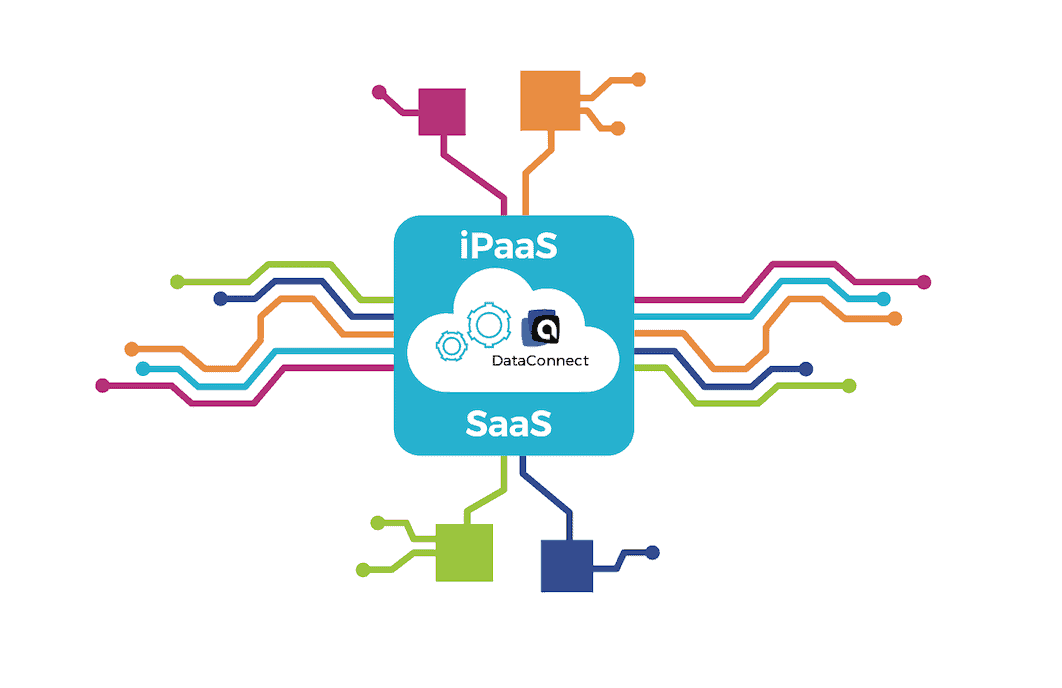
That’s where Integration Platform as a Service comes in. IPaaS provides the tools and capabilities to manage all your company’s data connections in one place – giving you access to data from across the company. Individual business systems may come and go (that’s okay). IPaaS enables you to innovate within individual business functions without losing enterprise data transparency.

The proliferation of SaaS solutions and specialized off-the-shelf software from 3rd parties over the past few years is providing business users with a vibrant marketplace of technical capabilities that they can quickly adopt and begin leveraging. All it takes is little more than the swipe of a credit card and the creation of an online profile. If a better capability is found, users simply abandon the system they were using and start using something new.

In the modern era of technology, software (and hardware) have become disposable resources, and it is data that has evolved into the durable strategic asset that companies are seeking to capture, manage and convert into a competitive advantage. IPaaS solutions like Actian DataConnect are designed to help your IT organization enable the business innovation and agility that users require while at the same time supporting the enterprise’s need for data continuity and end-to-end information insights.

The key to innovation and business agility is enabling change to take place in a safe and controlled manner – you don’t want to slow down change, only minimize disruption. IPaaS solutions provide five key capabilities that your IT organization needs to support business agility:

  1. Centralized management of data connections and credentials.
  2. Data flow orchestration.
  3. Data governance and access control.
  4. Ease of use.
  5. Rapid time to value.

By managing these things in a centralized place, your business processes, analytics, and individual IT systems can be isolated from the impacts of individual application of platform changes. The system as a whole can continue operating while one or more pieces are being evolved. This is powerful because it means your entire business can be transformed into a platform of innovation.

You can try out new things with lower risk, and if they work, migrate off old systems and processes. If they don’t work, you can unplug the test system, capture lessons learned, and try something different.

You may have hundreds or thousands of IT systems, but you only have one company, and IPaaS gives you the tools to manage your enterprise data better. Don’t slow down business innovation – enable and encourage it with the right set of tools to enable change to happen faster, easier, and safer.

Actian can help with industry-leading IPaaS capabilities in Actian DataConnect, combined with a modern cloud data warehouse solution, Actian Data Platform. To learn more, visit DataConnect.


When architecting your data warehouse solution, separating compute and data storage is extremely important for both operational sustainability and economic efficiency. Different things drive the technical needs for each of these, the capacity demands of the organization are different, and the best solution requires optimizing compute and data storage separately.

Data Storage Capacity is a Function of Time

The amount of data storage that your company needs is directly related to the number of business activities you’re doing. As you conduct business, you generate data – data about your customers, your products, your sales, etc. Over time, the amount of data volume your company has will grow. In busy times, the growth rate may be faster than in slow times, but the volume is always increasing. Taking this growth into account is essential when you are architecting your storage solution because the cost is directly related to data volume.

For on-premises data storage, you will need to acquire capacity in advance, based on projected data storage needs. For cloud-based storage solutions that are billed based on utilization, you will need to project your cost growth over time.

Compute capacity for analytics solutions is only partially influenced by the volume of data you are analyzing. The more significant factor at play is the demand for data consumption – during peak business times, the demand is higher, and during slow times, the demand is lower. Consider the example of black Friday in retail.  Business activity spikes, and the demand for analytics about the business activities spike too. A couple of months later, in early January, retail sales slowed, and there was also less demand for analytics. Whether you are talking about retail sales, the launch of a new product/service, or quarter-end financial close, every business has seasonality trends that cause their demand for compute capacity to vary significantly.

For on-premises compute solutions, capacity must be purchased and reserved to accommodate peak performance loads. That means that during slow periods, there is excess capacity. For cloud-based compute solutions where billing is based on utilization, capacity can be scaled up during peak periods and scaled back down during slow periods.

Developing a Hybrid Demand Forecast is Nearly Impossible

The capacity and performance requirements for both compute and data storage environments vary over time based on the activities of the business. The demand curves for each of these solutions look very different from the other, making cost and capacity modeling based on a combined architecture is both difficult and inefficient. Rather than invest the time and resources on-demand and cost forecasting, most companies find it much easier to separate compute and data storage into separate solutions with independent cost models and demand forecasts.

Technology is Changing

Cloud-based technology capabilities are improving and changing at a tremendous pace. When it comes to data analytics and cloud data warehousing, not only is the technology getting better every day, but certain areas are evolving faster than others. For example, the density of cloud-based storage solutions is causing the per-unit cost of data storage to decline in alignment with the deployment of new hardware by cloud service providers. Compute capabilities in the cloud are improving in both capacity/scale with new distributed compute architectures, and in speed/performance with new hardware. While a company may decide to forego a storage upgrade due to the migration costs, leveraging newer compute capabilities may be advantageous.

Separating compute and data storage solutions give companies greater flexibility in upgrading parts of their architecture while leaving other parts alone. When it comes to data analytics, there are a lot of moving parts. Data volumes are increasing. Analytics and compute demands (both performance and capacity) are going up and down with business trends. Developing and executing on an accurate forecast is nearly impossible. All the while, the technology is continuously evolving and the business is demanding better economic performance from IT investments. Companies that are thriving in this environment know that keeping solutions simple and maintaining the highest level of technical flexibility is the key to success. Separating compute and data storage is an essential part of giving you the most options to optimize the data analytics on which your company depends.

Actian Data Platform on Azure provides the flexibility organizations need to optimize the ratio of compute and data storage to meet the performance objectives of the application. Learn more about the Actian Data Platform at www.actian.com/data-platform

Learn Modernization Best Practices From Industry Experts and Insiders

If you are thinking about modernizing your enterprise data warehouse, watch our on-demand webinars featuring leading industry analysts and former executives from Teradata and Netezza.


Blog | Product Launches | | 3 min read

Actian Data Platform on Microsoft Azure

Find Actian on Microsoft Azure

Today we are excited to announce the release of Actian Data Platform on Microsoft Azure. Azure is growing significantly as a platform in the enterprise space and becoming the de facto choice for retail analytics. Hence, making Actian Data Platform available on Microsoft Azure has been a priority for us.

With this release, Actian Data Platform is now available on Microsoft Azure, AWS, and on-premises, delivering on our hybrid and multi-cloud vision. We have added new features to this release, like independent scaling of compute and storage resources. This is particularly appealing to those customers who have large amounts of data which is growing quickly but may not need compute to scale at the same pace. In addition, it will also benefit customers with known compute peaks like retail experiences during holidays or during promotional periods.

True Platform That Analyzes Data Where it Naturally Resides

With the addition of Microsoft Azure, Actian’s customers now have another choice as to where they deploy their analytics. For those with data lakes that span multiple clouds and on-premises, Actian provides a unifying solution that brings analytics to all of that data from a single pane of glass.  When we engage with prospects, they typically tell us that they wish to simplify their data ecosystem and bring the analytics capabilities to the data, rather than duplicating all of their data assets in a cloud data warehouse environment. Our approach is not only simpler and cheaper, it also offers greater security.

High-Performing Analytics That Thrives Under Demanding Scenarios

Actian has a long history of delivering record-breaking analytics performance, and Actian Data Platform on Azure is no different. It offers significant performance advantages over the competition and that advantage grows with data volumes, user volumes and query complexity. Actian Data Platform is designed to support large numbers of concurrent users and when you couple this with the fact that query execution times can be measured in milliseconds, it’s the ideal platform for organizations that wish to equip every business decision-maker in the organization with access to all of the data required to make the most informed decision possible.

The Actian Data Platform’s ability to handle mixed workloads means that data discovery, ad-hoc querying, batch reporting, and real-time data updates can all be happening simultaneously without the need to reconfigure the environment for each different use case and without any one of these use cases feeling the impact of the others.

Try Actian Data Platform With Your Data

You can try out Actian Data Platform  and experience for yourself the high performing engine of Actian Data Platform. I’d love to hear your feedback, so don’t be shy!


Blog | Data Platform | | 5 min read

Getting Started With Actian Data Platform on Azure

data integration with Actian

Actian Data Platform (formerly Avalanche) on  Microsoft Azure launched this week.  This post will walk you through getting set up on Actian Data Platform on Azure. You must first have an Actian account as a customer of Actian 

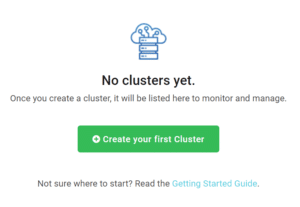
After you log in to the Actian service, you will see the below screen in the center of the Actian console: 

actian console

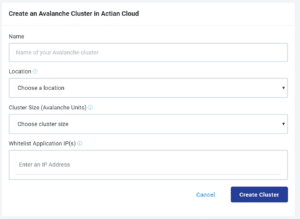
To create your first warehouse, click the green Create your first Cluster button, which will load the below screen to get you set up: 

actian data platform warehouse cluster

All fields depicted above are required fields. After filling in the name of your cluster and location (e.g. East US for where your cluster will be located), you will also need to provide what size cluster you would like to create and enter an IP address to allow access.  

For the cluster size, Actian uses Avalanche Units (AU) to specify the size of your warehouse. AUs are a representation of the cluster’s size, so 2AUs would be a small cluster, and 4AUs would be a larger cluster. Actian offers up to 128AU clusters. AU size of the cluster is not directly linked to the data storage size; your data storage will scale independently of the compute for the cluster. If you are using a trial, Actian recommends using a 2AU cluster to get started, as larger clusters have higher costs. Since the a is associated with a specified amount of credits, a 2AU cluster will provide the maximum amount of time for you to work with Actian 

For the IP address field, if you will be connecting to the cluster from your current location, you can click the Allow List Application IP(s) field, and a small box will pop up that states Use my IP – if you select that box, your IP will auto-populate into the IP address field. The IP address that needs to be added on the Allow List is the IP address that you will be using to connect to the Actian cluster via ODBC, JDBC, or .Net applications. 

Once you are done with filling in the fields, click on the Create Cluster button. You will then be taken to the main dashboard and see the status of your cluster as Creating. 

custom cluster actian data platform

After the instance is provisioned, which will take about 10-15 minutes, the Creating indicator will change to Running as shown below:

creating cluster actian data platform

The Actian cluster is now available to connect to and perform some of the following activities: loading data, performing ad-hoc querying, using BI tools such as Power BI or Tableau for reportingor loading data into a Spark cluster or into a Data Science workbench. 

To get started on your journey to connect to Actian for Azure, you will need to: 

  1. Set a connection password in the Actian web interface. 
    • On the Actian main console, identify the cluster whose password you want to change. 
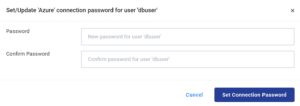
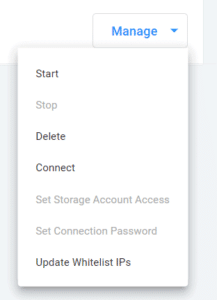
    • From the cluster’s Manage menu, select Set Connection Password. 
    • The Set/Update Connection Password dialog opens: 

connection password actian data platform

      • Enter and confirm the password for the dbuser user.
      • Click Set Connection Password.
      • The connection password is now in effect.
  1. Download a JDBC or Actian client runtime package.
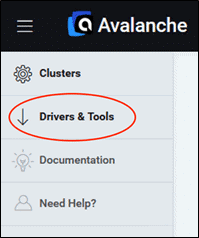
    • To download drivers for Actian, log in to the web console and click the Driver & Tools link, which opens Electronic Software Delivery (ESD) in a new browser tab.

drivers and tools actian data platform

    • The following download packages are available from the RELEASE dropdown for Actian.
      • Actian JDBC (for any platform): includes the JDBC driver to connect to Actian from JDBC applications. To download and install this package, see Download the Actian JDBC Package. 
      • Actian Client Runtime: includes the JDBC driver, ODBC driver, and the Actian SQL Command Line Interface (CLI). To download and install this package, see Download the Actian Client Runtime Package. 
    • If you download an RPM package, you must install as root.
  1.  To connect from your favorite BI tools such as Power BI, Tableau, Looker, or your favorite SQL tools such as DBeaver and Squirrel SQL, or an application that uses ODBC/JDBCyou will need information specific to the application to connect. To get the information required, navigate to the cluster that you would like to connect to, and select the Manage menu and then select the Connect button.
    connect button actian data platform
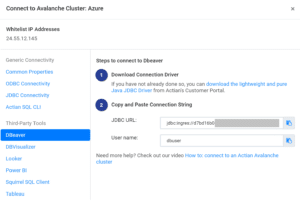
  2.  After pressing the Connect button, a dialog will appear on-screen that provides the connection details.
    connect dialog actian data platform
    The connection string can be copied via the copy button on the right of the connection string field. Once copied, the string can be pasted into the tool you plan to connect to Actian after the Actian driver is installed and connected. 
  3. For more details on how to install the driver for an example application such as DBeaver, please refer to the following how-to link: Install DBeaver and Set Up an Actian Data Platform Driver guide.

The cluster will have sample data available to use for running SQL commands or building visualizations for your favorite query tools. For SQL commands, you can find a set of sample commands here 

If you have additional questions on getting set up with Actian, please feel free to reach out to the support team.


Actian recently announced the availability of the Actian Data Platform on the Azure platform, extending the capabilities already available on AWS. This announcement is exciting news for customers because it means greater flexibility and choice in selecting cloud operating environments as well as creating the opportunity for a multi-cloud deployment.

Actian DataConnect enhances the capabilities of the Actian Data Platform with a scalable Integration Platform as a Service (IPaaS) offering to help you manage connections from all of your source systems into your Actian data warehouse. With DataConnect, you will have the tools to acquire, prepare and deliver data to the Actian Data Platform with ease.

Establish Connections to Any Source

UniversalConnect provides the capabilities to establish data connections for any source, including APIs, SaaS solutions, files, databases, mainframe systems, and on-premises applications. This is important because your IT environment is diverse, but the data insights you need to span the breadth of your enterprise. With UniversalConnect, you can connect your legacy systems, existing data stores, and even third-party platforms into the Actian Data Platform to make the full enterprise dataset available for analysis and reporting.

Flexible Integration Patterns

With DataConnect, you can execute integrations using any integration pattern, including scheduled batch processing, REST APIs, event listeners, and streaming data. Having multiple integration patterns available is because not all your data connections are the same. Real-time streaming data needs to be processed quickly to harvest maximum analytical value, while some transactional data (such as that used for planning) only needs to be updated periodically. The key is making sure you have the most current and correct data available for analysis at the time that it needs to be consumed. DataConnect gives you great flexibility to select the integration patterns that are best for your business.

Design Integration Workflows With DataConnect Studio

Managing data in your business is more than establishing a bunch of connections. DataConnect Studio gives you the capabilities to design workflows to orchestrate the flow of data throughout your IT environment. For example, you might want to:

  1. Extract from a SaaS system like Salesforce or NetSuite.
  2. Standardize and enrich the data using simple functions, joins, etc.
  3. Transform into a simple format like CSV and optionally add columns to tag data or engineer additional data elements.
  4. Deliver the file to a data lake (i.e., S3, ADL).
  5. Dynamically generate SQL statements based on the file’s schema.
  6. Execute SQL commands by pushing them down to the database server for optimal processing.
  7. Create an external table reference to the delivered CSV file so that the Actian Data Platform can query against it directly.
  8. Define subsequent runs of the integration workflow to refresh the data set.

The release of the Actian Data Platform on Azure opens up a host of new opportunities for you to modernize your data management capabilities and move your data warehouse to the cloud. DataConnect provides the tools to connect all your data sources into the new cloud data warehouse environment so you can get the most value out of this investment. Actian Data Platform works best when paired with a scalable IPaaS solution like DataConnect that includes robust tools for establishing connections, acquiring data sets, preparing, and then delivering them into the Actian data warehouse. To learn more, visit DataConnect.