
Stop Shipping Archives to Your Standby: Stream Logs Continuously in Actian NoSQL 11.1


Key Takeaways
- Actian NoSQL 11.1 introduces logstream to continuously replicate committed changes from a primary database to a standby over TCP instead of manually transferring and restoring archive files.
- The standby remains online in read-only mode while receiving updates, so reporting and other read workloads can use it during normal operation.
- Persistent sequence tracking lets replication resume after short network interruptions without manually restoring archive files.
Before Actian NoSQL 11.1, you could not have a standby database running. The standby database was kept in SUSPENDED (= unstartable) mode and it was necessary to manually apply the archive files to the standby database.
Also, the committed transactions were saved into archive logs, and the DBA needs to apply each archive to the standby database and would only restore it with vbackup -resume, if the primary database was damaged.
In case of a failover, a human was running a multi-step restore procedure under pressure. A mistake in that procedure meant a failed recovery.
Actian NoSQL 11.1 removes the manual step. The new logstream utility streams the objects changed by the committed transaction from the primary to the standby database over a TCP connection, applying them continuously, and keeping the standby database in read-only MODE the whole time.
Below is a table showing some key differences between the Rollforward procedure and the new logstream procedure:
What Changes
| ROLL FORWARD Archive standby | Actian NoSQL 11.1 Logstream | |
|---|---|---|
| Transport | Discrete archive files written to disk or tape, then copied | Live, continuous TCP stream |
| Operator effort | vbackup -restore for every update step | logstream -in and logstream -out run continuously |
| Standby state | Suspended (=unstartable) until restore completes | Online and in ‘read-only’ mode |
| Data loss window | Bound by how often you generate and ship archives | Bound by the streaming cadence; depends on network, system load, and operating system TCP settings |
The two operational wins are:
- Recovery no longer depends on a manual restore of the archive files.
- The standby database can now be used to read objects, while receiving rollforward changes.
Architecture
There are two logstream processes that hold a socket open between them.
logstream -outruns on the primary. It reads roll-forward log records as the database produces them, packages them into network batches, and sends them to the standby.logstream -inruns on the standby. It listens on a port you choose, receives the batches, and applies the records to the standby database as they arrive.
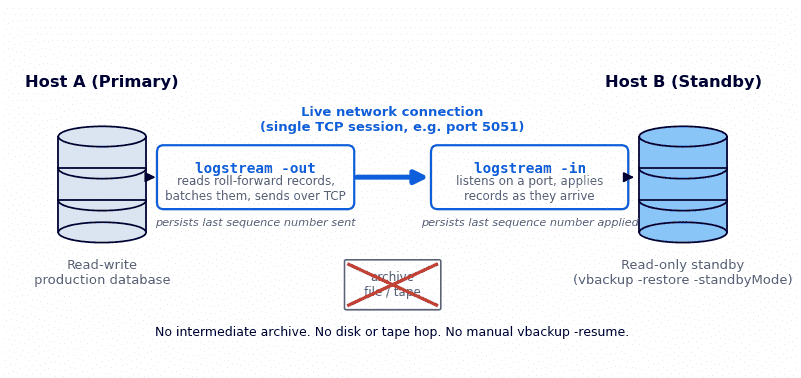
Logstream Utility Workflow
Objects are streamed directly from the Primary to the Standby database without any intermediate manual steps.
The port is any unused port on the standby host. There is no fixed default; the examples in this post use 5051. Ensure that the port chosen is free before you can bind \logstream -in\ to it.
State is persisted on both sides
These two logstream processes are independent from the roll-forward record sequence number it has reached. The \-out\ side knows the last record it transmitted; the \-in\ side knows the last record it applied.
This architecture has one operational rule: start \logstream -in\ on the standby database host before you start \logstream -out\ on the primary. The sender needs a listener on the standby server to connect to.
The Standby Serves Reads While it Syncs
Create the standby baseline in standby mode:
vbackup -restore -standbyMode\A database restored with \-standbyMode\ accepts the incoming write blocks from \logstream -in\ while remaining open for application reads. Client applications can connect and run queries against it. Any attempt to change or write data in any object stored in the standby database fails with \SM_DB_IS_READONLY\, because the database is in standby (=READONLY) mode.
In practice, this means you can point reporting workloads, read-heavy services, or test harnesses at the standby during normal operation instead of paying for a second server that does nothing until a failover.
Surviving a Network Drop
Because both ends persist their sequence position, a dropped connection pauses the stream and nothing else.
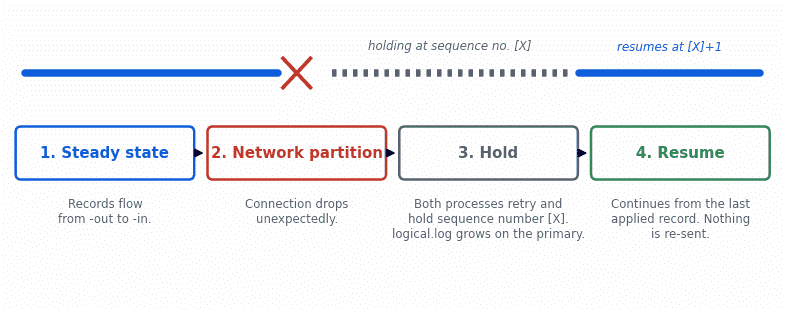
Logstream Utility Resilience
A network partition pauses the stream and the active logstream holds its current sequence position. In the event the connection is re-established after a short time, then both logstream processes will be alive. Over this duration, the primary server’s logical log grows, while saving all committed transactions.
When the connection returns, the logstream processes will resume from the last applied sequence number. There is no need for any operator action to restart any of the logstream processes, even in the event of a transient network issue.
What the DBA Still Owns
Logstream removes the need for a manual restore, but the DBA should still monitor the processes. The DBA should:
- Both processes must be running. The stream only flows while both
logstream -outis up on the primary andlogstream -inis up on the standby. Include both logstream processes under whatever monitoring procedures have been defined by the business. - Watch logical.log on the primary. While the TCP connection between the two processes is down, the primary cannot forward any objects changed by committed transactions, so its
logical.logfile grows in size.
How fast it grows depends on how many client applications are writing to the primary; on a busy system it can grow very quickly. If the disk partition holding logical.log fills completely, the primary database shuts down. A long network outage can therefore turn into a primary database outage, and both logstream processes can terminate after a long TCP timeout if they are not routinely monitored.
A best practice is to ‘Alert’ on both logstream processes ‘active’ state and free space on that partition.
Tuning the Stream
Two parameters on logstream -out control when a batch is sent.
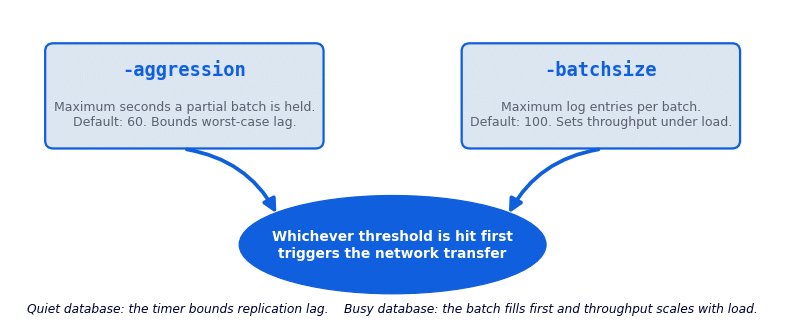
The first threshold reached, elapsed time or batch fill, triggers the transfer.
The -aggression The parameter sets the maximum number of seconds a partial batch is held before it is sent (default 60). -batchsize sets the maximum number of log entries in one batch (default 100). A quiet database sends a small batch when the timer expires; a busy database fills the batch first and sends more often.
The defaults are fine for test environments and are the right place to start in production. Actual replication behavior is governed by more than these two values: the operating system’s TCP settings, system load on both hosts, and network utilization all contribute, so there is no single setting to quote. If you see a performance problem in production, open a case with the Actian Support Team before changing any of these values. Support will ask for a small set of files to identify the cause, and if the analysis points at batching, they will recommend specific values and confirm the improvement with you.
Checking Sync State
vbackup -info reports where each side of the pair stands. On the primary:
> vbackup -info primarydb
Currently transferring logs, next sequential number: #427...
On the standby:
> vbackup -info standbydb
Currently injecting logs...
Records applied up to sequential number #10532...
When both logstream processes are running simultaneously, you will see a sequence number reporting in monitoring output and logs for each. They do not have to match for a healthy state.
When both logstream processes are running simultaneously, you will see a sequence number reporting in monitoring output and logs for each. They do not have to match for a healthy state.
Promoting the Standby: logstream -finish
Promotion turns the standby into a normal read-write standard database. It is used in two situations: a failover after the primary has been lost, and a planned decommission of the primary, for example a hardware change. In both cases the two logstream processes must be stopped first. Promotion cannot and should not run while either process is active, and the promotion command refuses to run if it detects an active logstream process. Below are steps for promoting the Standby server.
- Stop the stream. Stop
logstream -outon the primary if the primary is still reachable, then stoplogstream -inon the standby. - Run the promotion:
logstream -finish standbydb. This CHANGES THE STANDBY DATABASE from read-only TO multi-user, and shuts the database down cleanly. - Start the database:
startdb standbydb. Startup THE DATABASE IN MULTI_USER MODE. IT IS UP TO YOU IF YOU ARE GOING TO USE IT AS YOUR NEW PRIMARY DATABASE then you need to execute “vbackup -rollforward -backup“
Promotion is one-way. Once promoted, the database no longer receives updates from the original source. If you need a new standby, build one from the new primary with vbackup -restore -standbyMode and start a new stream.
Planned Migrations
The same mechanism handles hardware refreshes and data-center moves without an outage window for archive shipping.
- Verify. With both databases active, run
vbackup -infoon each side to confirm that both logstream processes are active and the standby is fully caught up. - Stop the stream in order. Stop
logstream -outon the primary, thenlogstream -inon the standby, while the network is healthy. - Promote. Run
logstream -finishandstartdbon the target hardware as described above. - Decommission. Turn off archiving on the old primary with
vbackup -off primarydband retire it.
The cutover is a few commands, and the new primary has been serving read traffic for as long as you wanted to validate it beforehand.
Licensing and Availability
Logstream ships with Actian NoSQL 11.1. It requires no additional licensed component: the license you use for Actian NoSQL 11.0 is valid for 11.1.
Getting Started
- Enable rollforward on the primary database, which is done through
vbackup -rollforward -backupto be able later to restore this backup on the standby database. - Upgrade both hosts to Actian NoSQL 11.1 and create the standby baseline with
vbackup -restore -standbyMode. - Choose a free port on the standby. Start
logstream -inthere, thenlogstream -outon the primary. - Add both processes and the primary’s
logical.logpartition to your monitoring. - Watch
vbackup -infoon both sides. Leave-aggressionand-batchsizeat their defaults unless Support recommends otherwise.
The commands in this post show the main options only, including the new -standbyMode flag. Full syntax for vbackup, logstream, and startdb, including host and port arguments and platform notes, is in the Actian NoSQL 11.1 documentation.
Have questions or feedback on Logstream? Reach the Actian NoSQL team through the Actian Community or your account representative.

Stay connected
Data insights delivered to you.
(i.e. sales@..., support@...)
