Blog | Financial Services | | 5 min read

AI Readiness in Banking & Financial Services: A Practitioner’s View From the Field

ai-readiness-in-banking-and-financial-services

Summary

  • AI readiness in banking depends more on trusted, governed data than on cloud platforms or pilots.
  • BFS leaders must ensure AI decisions are auditable, reproducible, and compliant with strict regulations.
  • Poor data quality and weak lineage can stall AI in proof-of-concept and increase audit risk.
  • Operational AI readiness requires clear ownership, shift-left data quality, and automated governance.

The discussion about AI in the banking and financial services (BFS) sector shows increasing interest and speed, but organizations have not developed sufficient readiness to implement these technologies. Multiple organizations claim readiness for AI implementation because they possess cloud platforms and data lakes and have established pilot projects. From the field, we see a different reality: AI readiness has far less to do with technology and far more to do with trust in data.

An organization achieves AI readiness through the deployment of AI systems that function safely throughout their entire operational period. They do this without disrupting business activities, without causing regulatory problems, and while preserving decision-making transparency. In BFS, that bar is significantly higher than in other industries.

What AI Readiness Means for BFS Leaders

Business leaders, including CFOs, CROs, and Heads of Compliance and Operations, need to demonstrate their readiness for AI through confidence:

  • The system proves its ability to check and explain AI-produced results through its audit feature.
  • The organization maintains confidence that AI-based decision-making produces results that meet all required regulatory standards.
  • The organization maintains confidence that its AI investment initiatives enhance operational efficiency while simultaneously improving both accuracy levels and overall risk management capabilities.

For CIOs, CDOs, CDAOs, and Heads of Engineering who lead technology and data operations, the priority for AI readiness is to establish control:

  • The system requires users to maintain control over all data quality aspects together with definition management and transformation operations.
  • The system maintains control of lineage information that tracks data origins from its original systems to its final AI output results.
  • The system requires governance capabilities that will enable innovation while protecting the system from any barriers to progress.

BFS uses AI as an operating capability that manages risks instead of being an innovation initiative.

Why AI Readiness Has Become Non-Negotiable

The current interest of regulators, auditors, and boards focuses on AI implementation requirements. They are asking:

  • Where did the data originate?
  • Who owns it?
  • How is it governed?
  • Can the decision be reproduced six months later?

Organizations face rising business environmental challenges because they must reduce expenses while enhancing customer service, stopping fraud, and making their operations more efficient. AI offers solutions, but it creates additional system complexity when organizations fail to prepare their systems for its implementation.

Organizations that start their programs before reaching readiness will encounter increasing remediation expenses while their organizational development becomes slower.

The High Cost of Skipping AI Readiness

The results will become visible when AI technology becomes part of systems that operate with unstable data. These are common issues in BFS:

  • The training of models with data that contains inconsistencies, incomplete information, and biased content.
  • The difference between AI-generated results and official financial and regulatory documents.
  • Manual reconciliations to “explain” AI results after the fact.
  • The audit team finds multiple cases of model risk expansion that produced multiple audit findings.
  • AI systems that remain in proof-of-concept development fail to progress into operational deployment.

Teams frequently dedicate more time to protecting AI-generated results than implementing them.

The Practitioner’s Path to AI Readiness in BFS

Organizations that want to succeed with AI implementation need to use a systematic method that they can execute multiple times. These five essential steps prove effective in practice:

  1. Clarify Data Ownership and Decision Rights – People doubt the reliability of AI systems because there are no established data accountability standards in place. The system needs defined rules that establish who owns the system, who maintains it, and what steps to take when problems occur while providing access to risk and financial data information.
  2. Shift Data Quality Left – AI magnifies defects. The implementation of data quality controls needs to take place at the beginning of pipelines because issues should not appear as unexpected findings in reports or models.
  3. Make Lineage Operational, Not Theoretical – Lineage must show how data flows from source to transformation to model output. Static documentation fails to meet the requirements that exist in a regulated environment that needs control.
  4. Unify Metadata Across Data and AI Pipelines – The division of metadata into separate sections produces regions that remain impossible to detect. Organizations need to establish common definitions for data elements together with their particular application domains to achieve governance of extensive AI systems.
  5. Design Governance to Enable, Not Block – The system requires automated governance to function through policy-based guidelines, which need to connect with business operations for establishing user trust through efficient processes.

The Bottom Line

The process of AI readiness implementation in banking and financial services demands that organizations to concentrate on their present state of readiness instead of pursuing additional models or tools. The goal focuses on developing organizational trust that supports using data to make strategic choices.

Organizations that will achieve success will be those that successfully implement AI through responsible operations while handling regulatory challenges and generating consistent business outcomes. Organizations need to progress past the peak development stage of their technology to achieve AI readiness. It is an enterprise capability.

BFS leadership functions operate through actual leadership abilities instead of using promotional methods. See how Actian can help BFS ensure trusted data for AI.


Summary

  • Data Intelligence — Native Microsoft Fabric integration and an AI-powered Chrome extension bring your data catalog directly into the tools your teams already use.
  • AI-Native Data Observability — Observability agents now validate, monitor, and govern data continuously, plus an MCP server lets AI agents manage data quality infrastructure without human intervention.
  • Ingres 12.1 — Transparent encryption, real-time CDC, integrated observability, and in-database monitoring strengthen your most critical workloads.

The fundamental problem with enterprise AI isn’t the models or the compute. It’s that most organizations are trying to build AI on data infrastructure that was designed for humans, not autonomous systems.

AI agents need contextual data. AI models need consistent, trusted datasets. AI workflows need seamless integration across cloud and on-premises systems. And all of this needs to work with existing enterprise investments, security policies, and compliance requirements.

Most AI infrastructure vendors assume you’re starting fresh. Actian assumes you’re not.

Organizations have data platform investments to preserve. They have mission-critical applications to protect. They have security policies to maintain. They have real-time requirements to meet. And they have AI initiatives to enable.

Most vendors are solving pieces of this puzzle. With the Winter ‘26 Product Launch, Actian is solving the whole thing, without forcing organizations to choose between innovation and operational stability. 

Actian Data Observability

Actian Data Observability delivers a comprehensive AI-native approach to data quality with Data Observability Agents, an MCP server, improved platform interoperability, and unstructured data format support.

What’s new: Seven specialized AI agents (Validation, Incident Diagnosis, Lineage, Data Insight, Orchestration, Routing, and Help) that validate data at ingestion and coordinate resolution steps. The MCP-compliant server uniquely provides both read and write capabilities, allowing AI agents to not only query data quality status but also set up monitors and configure validation rules directly. Platform interoperability now includes native integrations with Microsoft OneLake and Hive Catalog. Expanded format support adds XML and PDF monitoring capabilities for unstructured data quality validation.

Problem solved: The complete AI agent data integration challenge. Instead of validating data after the fact, Data Observability Agents validate data continuously as it lands in your lakehouse. Before any query. Before any downstream use. Before any AI agent touches it. 

Most MCP implementations are read-only, forcing manual configuration for AI workflows. Actian’s write-capable MCP server lets AI agents autonomously manage data quality infrastructure. The platform integrations solve the data silo problem across modern lakehouse architectures, while XML/PDF support addresses the 80% of enterprise data that’s unstructured.

Why it matters: This is the first production-ready data observability platform designed specifically for autonomous AI operations. AI agents can not only consume quality signals but actively participate in data governance. Financial services can validate transaction data and PDF contract documents. Healthcare can monitor patient records and XML clinical documents. The platform interoperability means this works across Microsoft Fabric, Apache Iceberg, and Git-based data environments without vendor lock-in. 

Actian Data Intelligence Platform

The Data Intelligence Platform now includes native Microsoft Fabric integration and an AI-powered Chrome Extension.

What’s new: Direct integration with Microsoft Fabric environments, including OneLake and Fabric-managed data assets, plus a Chrome extension that provides data context directly in PowerBI, Tableau, and other BI tools, fundamentally changes how organizations discover and trust their data.

Problem solved: Organizations using Microsoft Fabric no longer need to duplicate metadata or change existing workflows to get visibility and governance across their data landscape. Business users can trust reports without constantly asking, “Can I trust this data? or “What does this metric mean?”

Why it matters: This eliminates the data discovery tax that slows down AI initiatives. When data scientists and business analysts can quickly find, understand, and trust data without switching tools, AI projects move from months to weeks. For enterprises heavily invested in Microsoft ecosystems, this preserves those investments while extending their value.

Actian Ingres 12.1

Ingres 12.1 delivers transparent encryption, real-time change data capture (CDC), integrated observability, and in-database analytics.

What’s new: Full transparent encryption for disk blocks and transaction logs with master-key architecture, TLS 1.3 for client-server communication, new Log Reader API enabling real-time CDC with an official Debezium connector for Kafka/Spark streaming, a new Actian Monitor with OpenTelemetry/Prometheus/Grafana integration to view more than 100 DBMS metrics, and in-database ML Inference (native TensorFlow support) to deploy predictive models directly within the X100 analytics engine and eliminate data movement.

Problem solved: The “system of record isolation” problem that prevents operational databases from participating in modern AI and analytics workflows. Organizations can now meet audit requirements and security baselines without application changes, stream operational data to AI pipelines without batch jobs or production load, and run analytics and AI models directly where data lives, eliminating architectural friction and data movement complexity.

Why it matters: This enables enterprises to preserve their rock-solid Ingres investments while participating fully in AI initiatives. Government payroll systems, transportation networks, and manufacturing control systems can now feed AI pipelines in real-time, meet modern security standards transparently, and provide operational visibility without destabilizing production. Instead of choosing between stability and innovation, enterprises get both, turning their most trusted systems into AI-ready infrastructure.

Actian Zen 16.10

Zen 16.10 introduces new Kafka connectors for real-time integration, Prometheus-based telemetry, SQLAlchemy dialect support for Python developers, and built-in SQL data masking.

What’s new: Kafka Connect-based integration brings Zen directly into existing Kafka environments for real-time streaming, a native Prometheus-compatible /metrics endpoint for cross-platform engine observability, SQLAlchemy dialect support that lets Python developers use Zen with familiar ORM workflows, and built-in SQL data masking that enforces column-level protection directly in the database.

Problem solved: Fragmented integration, monitoring, developer workflows, and data protection. Organizations can now stream validated data in real-time through Kafka, monitor engine health across platforms with Prometheus, build Python applications using familiar SQLAlchemy workflows, and enforce consistent data masking directly at the database layer.

Why it matters: This strengthens Zen’s ability to support modern integration, monitoring, development, and security requirements without adding architectural complexity. Teams can adopt real-time streaming, unified observability, Python-native workflows, and database-level data protection while continuing to run Zen as their trusted database engine.

HCL Informix® 15.0.1

HCL Informix 15.0.1 delivers Parallel Checkpoint capabilities, Async I/O for advanced format devices, and enhanced administration features designed for high-performance, mission-critical applications.

What’s new: Parallel checkpoint for improved uptime and recoverability, async I/O for high-capacity storage devices (>512k block size), enhanced database creation parameters, and improved archecker support for complex fragmentation schemes.

Problem solved: The performance and reliability bottlenecks that prevent mission-critical applications from supporting modern AI workloads. Large datasets can now be processed with optimal I/O performance while maintaining enterprise-grade reliability.

Why it matters: For organizations running business-critical applications on HCL Informix, these updates reduce downtime risk and keep performance predictable as workloads grow. Faster checkpoints, optimized I/O on 4K storage, and accelerated table restores help maintain uptime and speed recovery when it matters most.

The Future of Enterprise AI

Enterprise AI isn’t about having the newest models or the biggest compute clusters. It’s about having a data infrastructure that can reliably feed trusted data to AI systems at enterprise scale, across hybrid environments, while meeting security and compliance requirements.

Actian’s Winter 2026 portfolio delivers exactly that, not through rip-and-replace modernization, but through intelligent evolution of existing data infrastructure.


Actian Data Intelligence and Actian Data Observability will be showcased at the Gartner Data & Analytics Summit in Orlando, March 9-11. Actian Data Observability’s Data Observability Agents are launching in public preview. 

Informix® is a trademark of IBM Corporation in at least one jurisdiction and is used under license.


Blog | Data Observability | | 4 min read

Reimagining the Data Observability Market With Context and Agents

Reimagining data observability

Summary

  • Highlights how current data observability is reactive, focusing on monitoring foundations like schema drift and alert noise without resolving root causes.
  • Explains the role of Model Context Protocol (MCP) as a shared language that provides AI the business context and lineage needed to become trusted advisors.
  • Distinguishes Actian’s Data Observability MCP by its controlled write capabilities, allowing AI agents to actively participate in reliability workflows.
  • Introduces Data Observability Agents that reason across signals and explain impacts in business terms rather than just sending notifications.
  • Positions the shift to autonomous, agent-led reliability as a strategic necessity for scaling AI responsibly and reducing manual intervention.

Industry analysts have become increasingly aligned on a core insight: AI initiatives struggle to scale not because of model limitations, but because enterprises lack trusted, contextual data foundations. Research from firms such as Gartner and Forrester consistently points to metadata quality, lineage, and governance as prerequisites for trustworthy and explainable AI, especially as organizations move beyond pilots toward more autonomous systems.

That challenge of ensuring reliable data for AI is particularly visible in data observability. While the market has made real progress in detecting issues in data pipelines and datasets, most platforms still depend heavily on human interpretation to explain why problems occur and what they mean to the business. As vendors begin introducing MCP-style connectivity and early agent concepts, the industry is clearly moving in the right direction – but unevenly, and with significant variation in depth and maturity.

This is the context in which Actian’s winter release, which included MCP Server and Data Observability Agents for Data Observability, should be understood: not as isolated features, but as complementary capabilities designed to introduce context and reasoning into data observability workflows.

The Market Today: Useful, but Reactive

Today’s data observability solutions are largely built around monitoring data freshness, dataset volumes, schema drift, and statistical anomalies in data pipelines – a necessary foundation, but no longer sufficient on their own. Many platforms apply machine learning to reduce alert noise, and some are adding conversational interfaces or copilots to help users interrogate incidents.

Yet three structural limitations persist across the category:

  • Context remains fragmented. Observability tools detect data reliability signals, but business definitions, lineage, and governance metadata typically live elsewhere.
  • Root cause analysis is still manual. Alerts initiate investigation, not resolution.
  • AI remains assistive rather than autonomous. Copilots summarize issues, but rarely reason across pipelines or take action.

The result is a reactive operating model that becomes increasingly difficult to sustain as data ecosystems grow, and AI adoption accelerates.

MCP: A Shared Language for Observability Context

It’s important to acknowledge that MCP is beginning to surface across the data observability market, with a growing number of vendors experimenting with MCP-style integrations. That said, while a few vendors offer MCP capabilities for data observability, most offerings still rely on traditional APIs or webhook-based approaches that require custom development to connect with AI assistants or agentic frameworks. Even where MCP is present, implementations are typically read-only, exposing incidents, anomalies, and monitor status, so AI can help humans investigate issues more efficiently.

Where approaches differ is in how MCP is applied.

As MCP adoption emerges in data observability, most vendors use it as a read-only interface, exposing incidents, anomalies, and monitor status so AI assistants can help humans investigate problems more efficiently. Actian’s Data Observability MCP is designed differently: by enabling controlled write capabilities, it allows AI agents to move beyond analysis and actively participate in reliability workflows, automating actions rather than merely summarizing issues.

Metadata gives AI agents and LLMs the business context – definitions, lineage, and governance – that transforms them from eloquent guessers into trusted advisors.

Agents: Extending Data Observability

Actian’s Observability Agents build naturally on this foundation. Rather than replacing existing data observability capabilities, they extend them.

Where today’s tools primarily detect and notify, agents are designed to reason across data observability signals, correlate issues across pipelines, and explain the impact in business terms. Over time, they can also support corrective actions, reducing reliance on manual intervention.

This is not an all-or-nothing shift. The agents introduce autonomy progressively, aligned with how enterprises adopt automation in practice.

Why This Matters

For CDOs, data platform leaders, and AI teams, the implications are clear:

  • Data observability without shared context struggles to support agentic AI safely.
  • Agents without a governed data context introduce as much risk as value.
  • Incremental autonomy grounded in a trusted data context scales better than bold rewrites.

Actian’s approach reflects these realities. MCP establishes a common language for trust. Agents introduce reasoning and autonomy. Broader platform alignment compounds value over time.

Closing Perspective

Many vendors are eager to label their offerings “AI-powered observability.” Analysts, meanwhile, continue to emphasize that trust, context, and explainability are the real constraints on AI success.

By grounding data observability in shared context and extending it with agents that can reason – not just alert – Actian is charting a pragmatic path toward more autonomous, trustworthy data operations.

For organizations serious about scaling AI responsibly, that distinction is not theoretical. It’s strategic.

Check out this video that shows our Data Observability Agents in action!


Blog | Product Launches | | 4 min read

Actian Ingres 12.1: Modern. Secure. Connected.

actian ingres 12.1

Summary

  • Ingres 12.1 strengthens reliability for mission-critical systems under modern security demands.
  • Adds transparent encryption and TLS 1.3 without application or schema changes.
  • Introduces real-time change data capture for streaming analytics and AI pipelines.
  • Delivers engine-level observability with OpenTelemetry, Prometheus, and Grafana support.
  • Enables analytics and AI on transactional data without copying or moving it.

People don’t choose Actian Ingres because it’s fashionable. They choose it because it runs the systems that cannot fail. Government payroll. Transportation networks. Manufacturing control systems. High-volume transaction processing that has to work every time, quietly and predictably.

That hasn’t changed.

What has changed is the environment around those systems. Security expectations are higher. Audits are more intrusive. Data locked inside operational databases is increasingly expected to feed analytics, AI, and downstream services in near real time. And operational teams are under pressure to deliver deeper visibility without bolting on fragile tooling.

Ingres 12.1 is our response to that reality.

This release is not about reinventing Ingres. It’s about strengthening it—so the database you already trust can continue to serve as a dependable system of record and participate safely in a more connected, observable, and AI-aware enterprise architecture.

Securing the Foundation: Transparent Encryption, Done Properly

Modern security is no longer perimeter-based. Auditors expect data to be protected at rest, in motion, and by design.

In Ingres 12.1, we’ve introduced full transparent encryption for disk blocks and transaction logs, using the same proven encryption engine that powers our high-performance analytics platforms. This isn’t a bolt-on or a workaround—it’s integrated at the storage layer, with a master-key architecture designed for enterprise compliance requirements.

The most important detail is also the simplest: nothing changes for your applications. No schema changes. No OpenROAD rewrites. No SQL refactoring. You secure the data and meet audit requirements without destabilizing production systems.

We’ve also modernized client-server communication with TLS 1.3, ensuring encrypted, authenticated data in motion that aligns with today’s security baselines. 

Opening the System of Record: Real-Time Change Data Capture

Ingres has always been a system of record. Increasingly, that record needs to be shared—safely and continuously—with analytics platforms, AI pipelines, and operational services.

Ingres 12.1 introduces a new Log Reader API that exposes transactional change events directly from the database engine. In practical terms, this turns Ingres into a first-class source for real-time streaming architectures.

To make that immediately useful, we’re incubating a certified Debezium connector that streams inserts, updates, and deletes directly into platforms like Kafka or Spark. This enables patterns that were previously difficult or operationally risky: keeping data lakes current without batch jobs, synchronizing microservices in near real time, or feeding AI pipelines with fresh operational data—without adding load to production systems.

This is about unlocking value from the data you already have, without compromising stability.

Operational Visibility That Respects Reality

There’s a lot of noise in the market around “data observability,” usually focused on analytics pipelines, lineage graphs, and AI-driven insights. That matters—but it’s not what keeps the lights on.

DBAs and operations teams need engine-level visibility. They need to know how the database is behaving right now.

Ingres 12.1 introduces Actian Monitor, a focused observability solution built on OpenTelemetry standards. It provides real-time access to logs and metrics, integrates out of the box with Prometheus and Grafana, and fits cleanly into modern operations tooling.

This isn’t about abstract dashboards or AI-assisted guesses. It’s about seeing the engine breathe—so teams can diagnose issues, tune performance, and maintain uptime with confidence.

Analytics and AI – Without Moving the Data

Operational data doesn’t stop being valuable just because it lives in a transactional system.

Ingres 12.1 introduces a preview capability that allows the high-performance X100 analytics engine to execute directly against transactional tables. That means faster analytics without copying data, building shadow pipelines, or introducing latency.

We’ve also added native TensorFlow support, enabling AI models—such as fraud detection or anomaly scoring—to execute where the data already lives. Combined with dynamic memory scaling, this allows teams to adjust resources on the fly, without downtime or service restarts.

This is about reducing architectural friction: fewer moving parts, fewer failure modes, and faster time to insight.

Availability and Deployment Flexibility

Ingres environments are diverse, and we respect that.

Ingres 12.1 is available today on Linux (RHEL, SUSE, Ubuntu) and Windows. For teams modernizing deployment pipelines, we’re also providing a containerized image designed for Kubernetes-based orchestration.

Built to Endure and to Evolve

Ingres 12.1 is a release that respects why you chose Ingres in the first place—stability, predictability, and trust—while giving you the tools to meet modern security, observability, and integration demands.

I encourage you to download it, run it in your environment, and evaluate how it helps you extract more value from the data your business already depends on.

Slán go fóill,
Emma


Summary

  • Rising data residency laws and GDPR enforcement are pushing enterprises to reconsider on-prem AI infrastructure.
  • Edge AI workloads demand offline capability and sub-100ms latency that cloud deployments can’t always meet.
  • At scale, usage-based cloud vector database costs can exceed predictable on-prem total cost of ownership.
  • Hybrid strategies balance cloud agility for development with on-prem control for compliance and production.

For most of the last decade, the on-premises vs. cloud debate felt settled. Cloud computing was cheaper, faster, and easier to adopt. Enterprises moved workloads from on-premises infrastructure to public cloud services, relying on major cloud providers to handle scalability, maintenance, and security.

In 2026, that assumption is breaking, and cracks are showing up in legal reviews, financial projects, and SLA negotiations. Enterprises are facing an increasing pressure for data residency regulations, stricter enforcement, and scrutiny around cloud security models. Compliance constraints, data security requirements, cost predictability, and latency are forcing teams to reconsider on-premises solutions, private cloud computing, and hybrid cloud infrastructure.

At the same time, AI is moving closer to where data is generated. Manufacturing sites, retail stores, and healthcare environments increasingly require offline capability and sub-100ms latency. That shift helps explain why Oracle released AI Database 26ai for on-premises deployment and why Google is pushing Gemini onto Distributed Cloud for air-gapped environments. This shift signals that large-scale enterprise AI no longer fits neatly in cloud environments.

In this article, we’ll examine why on-premises infrastructure is resurging, what trade-offs you need to know, and how to make defensible deployment decisions.

What’s Driving the On-Premises Resurgence

The renewed interest in on-premises infrastructure is not about going back to old systems. It is a response to clear changes in how AI systems are being built and used in 2025 and 2026. For many enterprises, cloud-only vector databases no longer fit their compliance, cost, and reliability needs.

A lot of factors drive this current on-premises resurgence, but in this article, we will consider four key causes.

Large vendors now support on-premises AI

On-premises AI is no longer treated as an edge case by major vendors. Oracle’s release of AI Database 26ai and Google’s decision to run Gemini on Distributed Cloud show a clear shift in how enterprise AI is being packaged and delivered.

These products are built for large enterprises, not early-stage experiments or research projects. That distinction matters. Large vendors do not invest in complex on-premises AI platforms unless there is strong and growing customer demand. These announcements confirm that many enterprises want to run AI systems inside their own environments, close to their data, and under their full operational control. Why is this?

Regulatory pressure is now a real blocker

Teams used to plan for regulatory risk as a future possibility. Now it’s a day-to-day reality. GDPR enforcement reached record levels in 2025, with insufficient legal basis for data processing driving the largest penalties. That year alone, regulators issued nearly 2,700 fines totaling billions of euros.

From a data security perspective, GDPR enforcement has fundamentally changed how enterprises evaluate cloud services. While cloud service providers offer compliance tooling, legal teams are increasingly wary of relying on third-party providers for sensitive data storage and processing.

course-of-overall-sum-of-fines-and-number-of-fines

HIPAA adds another layer of complexity. For example, in Florida, physicians must maintain medical records for five years after the last patient contact, whereas hospitals must maintain them for seven years under state record-retention requirements. This makes repeated data movement risky and expensive. Financial services and government contractors face similar data sovereignty requirements that limit where data can be stored and processed. In these situations, cloud deployments add legal review, audit work, and ongoing risk. Keeping data on-premises is often the most straightforward way to meet these obligations.

Edge AI requires local and offline operation

AI workloads are increasingly deployed close to where data is created. Manufacturing facilities may operate in air-gapped environments or remote locations with limited connectivity. Retail systems must continue working during network outages. Healthcare applications often require very low latency for real-time decision support.

In these environments, relying on a remote cloud service introduces risk. Network delays and outages directly affect system reliability. On-premises and edge deployments allow vector search and inference to run locally, without depending on constant network access. For many use cases, this local execution is not an optimization but a requirement.

Together, these shifts explain why on-premises vector databases are gaining traction again. The change is driven by the practical realities of deploying production AI systems under real regulatory, cost, and reliability constraints.

The Compliance Calculus

For many enterprises, compliance is the deciding factor in the on-premises versus cloud debate. While cloud providers offer compliance certifications, the real challenge is not whether a platform can be compliant in theory, but whether it can withstand legal review, audits, and long-term operational scrutiny in practice. Once vector databases move into production and begin storing sensitive or regulated data, these questions become unavoidable.

GDPR and the limits of cross-border transfers

The Schrems II ruling changed how European data can be processed outside the EU. Privacy Shield was invalidated, leaving Standard Contractual Clauses as the primary legal mechanism for cross-border data transfers. In highly regulated industries such as financial services and healthcare, many legal teams consider SCCs insufficient due to enforcement uncertainty and ongoing legal challenges.

For vector databases, this matters because embeddings often contain derived personal data. Even if raw records are masked or tokenized, embeddings can still be considered personal data under GDPR. If data must remain within the EEA, or within a specific country, cloud deployments that rely on global infrastructure introduce legal risk. In these cases, on-premises or in-region deployment becomes a requirement rather than a preference.

HIPAA retention and the real cost of data movement

HIPAA does not explicitly require data to stay on-premises, but it does require long retention periods and strict access controls. When vector embeddings are built on top of this data, they inherit the same retention requirements. HIPAA data governance must be enforced when considering on-premises or cloud vector databases.

The cost impact becomes clear when egress fees are included. Consider a system storing 100 TB of embeddings in a cloud environment. At a common egress rate of $0.09 per GB, moving that data out of the cloud over a seven-year retention period results in:

100 TB × $0.09 per GB × 84 months = over $750,000 in egress costs alone

This does not include compute, storage, or indexing costs. With this in mind, will cloud data warehouses really help you cut costs?

Financial services and data sovereignty rules

Financial institutions face additional constraints beyond GDPR. Regulations such as GLBA, APRA, and regional data sovereignty mandates often require strict control over where customer data is stored and processed. Regulators may demand clear evidence of geographic boundaries, access controls, and auditability.

Cloud services can meet some of these requirements, but they often introduce complex configurations, contractual dependencies, and ongoing compliance reviews. For many banks and insurers, on-premises deployment simplifies audits by keeping data within a controlled infrastructure that regulators already understand.

Government and public sector constraints

Government contracts introduce some of the strictest infrastructure requirements. Standards such as FedRAMP often mandate US-only infrastructure, restricted access, and tightly controlled environments.

In these cases, public cloud services are frequently disallowed or require extensive approvals. On-premises deployment is often the only viable option for running vector databases in support of government workloads.

When compliance makes cloud untenable

If legal teams flag cross-border data transfers as unacceptable, cloud deployments quickly become impractical. Once data residency is mandatory, on-premises deployment is no longer a trade-off decision. It is a compliance requirement.
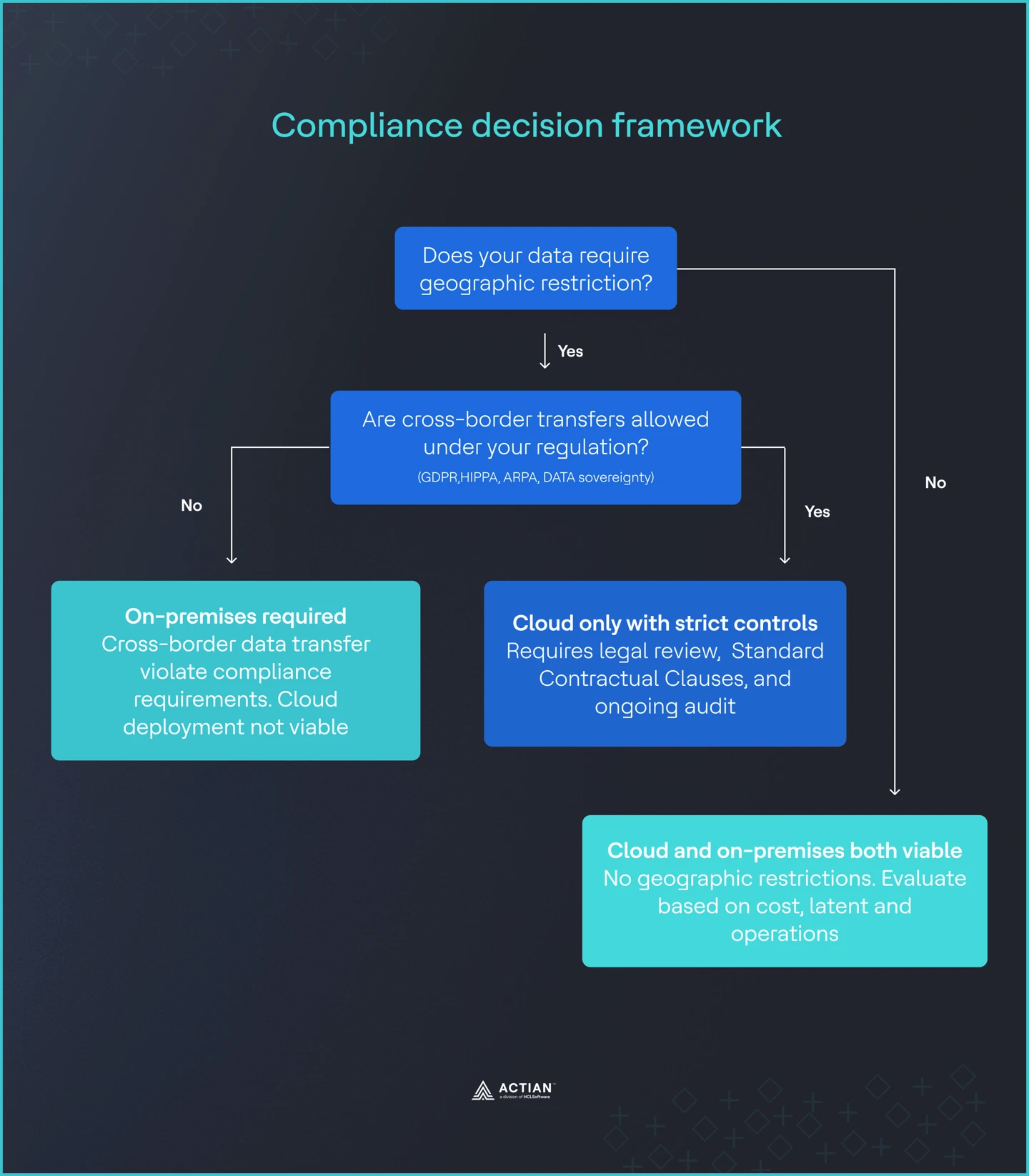
compliance decision framework

Image 3: Compliance framework

The Cost Breakdown Analysis

Cost is often the reason teams revisit the on-premises versus cloud decision. To make a defensible decision, teams need to understand where costs diverge and when self-hosting becomes economically rational.

Where self-hosting breaks even

Research from OpenMetal shows a consistent breakeven point for Pinecone vector databases at scale. Once workloads reach roughly 80 to 100 million queries per month, self-hosted deployments tend to be cheaper than managed cloud services. Below this range, cloud pricing is usually competitive. Above it, usage-based billing begins to dominate total cost.

This threshold matters because many enterprise RAG systems cross it quickly. Customer support, document search, fraud detection, and recommendation systems often serve tens or hundreds of millions of queries each month once deployed across business units or regions.

The hidden cost in cloud pricing

Cloud pricing is rarely just a per-query fee. Vector databases introduce several cost drivers that are easy to overlook during planning.

Egress fees are a major factor. Most cloud providers charge around $0.09 per GB for data leaving their network. Moving embeddings between regions, exporting data for analytics, or migrating to another system all incur these fees. Over time, they become a meaningful portion of total spend.

Finally, vector search does not scale linearly. As vector counts grow and dimensionality increases, query costs rise faster than expected. What looks affordable at 10 million vectors can become expensive at 500 million, even if query volume grows steadily.

On-premises costs are fixed and predictable

On-premises deployments have real costs, but they behave differently. Hardware is typically amortized over three to five years. Staffing requirements are stable once the system is running. Facilities and power costs are known in advance.

The key difference is predictability. Costs do not spike because of usage patterns or data movement. Once the system is sized correctly, monthly spend remains largely flat, even as query volume increases.

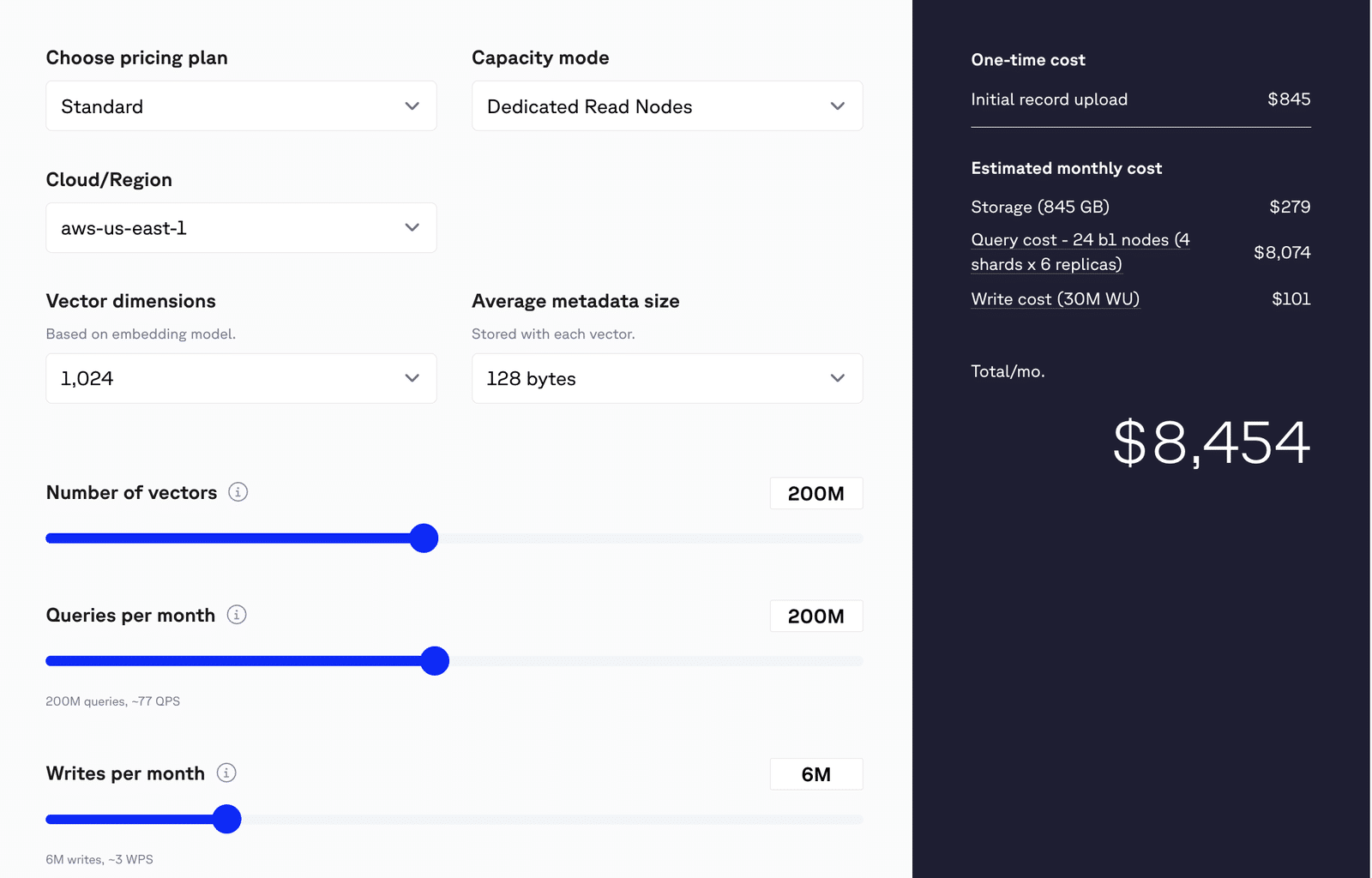
A real-world example

Consider a production e-commerce application with the following scale:

  • 500M vectors.
  • 200M queries every month.
  • 1024 vector dimensions.
  • 6M writes monthly.

At this scale, a typical managed Pinecone vector database costs around $8,500 per month once compute, storage, and rebuild overhead are included.

Estimated monthly cost

Total Estimated Cost: $8,454 / month

  1. Storage
  • Usage: 845 GB
  • Cost: $279
  1. Query Costs
  • Configuration:
    • 24 b1 nodes
    • 4 shards × 6 replicas
  • Assumption: 1% filter selectivity
  • Estimated Cost: $8,074
  • Note: Actual query cost may vary. Benchmark your workload on DRN for more accurate estimates.
  1. Write Costs
  • Write Volume: 30 million Write Units (WU)
  • Assumption: Each write request consumes 5 WU
  • Cost: $101

pinecone cost estimation

Image 4: Pinecone cost estimation

An equivalent on-premises deployment might cost approximately half of that after hardware amortization, assuming an 18-month payback period and one to two engineers supporting the system. After that payback period, costs drop further while capacity remains available. 

A study by Enterprise Storage Forum shows the cost projection of on-premises and cloud workloads.
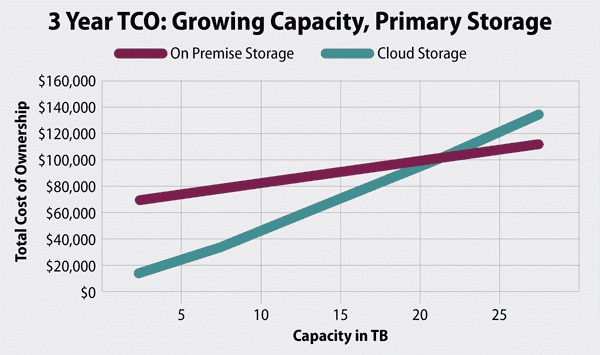
enterprise storage forum tco

Image 5: Enterprise storage forum TCO

Cost alone does not decide every deployment, but once vector workloads reach scale, the economics become difficult to ignore. Understanding where your system sits on this curve is essential before locking in a long-term vector database strategy.

When Latency and Connectivity Matter

Latency and connectivity are often treated as secondary concerns in architecture decisions. For many AI workloads, they are decisive. Once vector databases support real-time systems, network round-trips, and internet dependency can make cloud deployments impractical or unsafe.

Real-time response requirements

Some applications have strict response time limits. In healthcare, clinical decision support and diagnostic systems often require responses in under 50 milliseconds. This budget includes data retrieval, vector search, and model inference. Similarly, banks and financial institutions often require very low latency for maximum user experience.

Public cloud deployments add unavoidable network latency. Even within the same region, round-trip latency typically adds 20 to 80 milliseconds before any compute work begins. For applications with tight latency targets, this overhead alone can exceed the total allowed response time. On-premises deployments remove that network hop, allowing systems to meet real-time requirements consistently.

Systems that must work offline

Many environments cannot rely on constant connectivity. Retail point-of-sale systems must continue operating during network outages. Manufacturing facilities are often located in remote areas with unstable connections. Military and maritime deployments may operate in fully disconnected or classified environments.

In these scenarios, a cloud dependency is a single point of failure. If the network goes down, the AI system stops working. On-premises and edge deployments allow vector search and inference to run locally, ensuring the system continues to function even when external connectivity is unavailable.

The cost of downtime

It is no news that there has been an increase in downtime from cloud providers. On November 18, 2025, Cloudflare outage disrupted large portions of the internet, causing downtime across major platforms, including X, Amazon Web Services, Spotify, and so on. The impact of connectivity failures is not theoretical. In manufacturing, average downtime costs are estimated at $260,000 per hour. When AI systems support quality control, predictive maintenance, or process automation, any outage directly affects production.

A cloud-only architecture introduces risk that is hard to justify in these environments. Even short network disruptions can lead to significant financial loss. On-premises deployments reduce this risk by removing external dependencies from critical execution paths.

For workloads with strict latency targets or limited connectivity, the choice is often clear. Cloud-based vector databases may work during development, but they fail to meet operational requirements in production.

The Operational Complexity Question

The strongest argument for cloud vector databases is operational simplicity. Managed services remove the need to provision hardware, manage clusters, apply patches, or handle failures. For small teams or early-stage projects, this advantage is real and often decisive. Cloud deployments allow engineers to focus on application logic rather than infrastructure.

It is also important to recognize that modern on-premises deployments look very different from those of a decade ago. This is not the world of manual server provisioning and fragile scripts. Kubernetes, infrastructure-as-code, and automated deployment pipelines have reduced operational overhead significantly. Rolling upgrades, automated scaling, and monitoring are now standard practices in on-premises environments as well as in the cloud.

Many enterprises adopt hybrid approaches to balance speed and control. Development and experimentation happen in the cloud, where teams can move quickly and iterate. Production systems run on-premises, where costs are predictable, and compliance is easier to enforce. This pattern allows teams to get the best of both models without committing fully to either.

Decision Framework: Eight Questions

The fastest way to make a defensible deployment decision is to walk through a small set of yes or no questions with engineering, legal, finance, and operations.

  1. Does your data require geographic restrictions?

Regulations such as GDPR, HIPAA, and financial services rules may limit where data can be stored or processed.

If yes, on-premises should be strongly considered because it provides full control over data location. If no, cloud deployment remains viable.

  1. Do you have predictable, high-volume query patterns?

Cloud vector database costs scale with usage. A simple check is monthly queries multiplied by the unit cost.

If usage exceeds roughly 80 to 100 million queries per month, on-premises is often cheaper. Below that range, cloud pricing is usually more economical.

  1. Do you need offline capability?

Some systems must continue working without network access, such as in manufacturing, retail, or edge environments.

If yes, on-premises is required. If no, cloud remains an option.

  1. Can you tolerate additional latency?

Cloud deployments add network latency, often 50 to 100 milliseconds.

If your application cannot tolerate this, on-premises deployment is necessary. If it can, cloud performance may be acceptable.

  1. Do you have existing infrastructure teams?

Operational capacity matters.

If you already run on-premises systems, the added burden is limited. If not, cloud-managed services provide a clear operational advantage.

  1. Is cost predictability important?

Usage-based billing introduces cost variability.

If predictable costs matter, on-premises provides stability. If flexibility matters more, cloud pricing may be a better fit.

  1. Are you extending the existing IT infrastructure?

Deployment context affects the decision.

If you are extending existing systems, on-premises leverages current investments. If you are building something new, cloud may be faster to deploy.

  1. How large is your data footprint?

Data volume and access frequency influence long-term cost.

If you manage more than 10 TB with frequent access, on-premises becomes attractive. If your data is smaller, cloud is often sufficient.
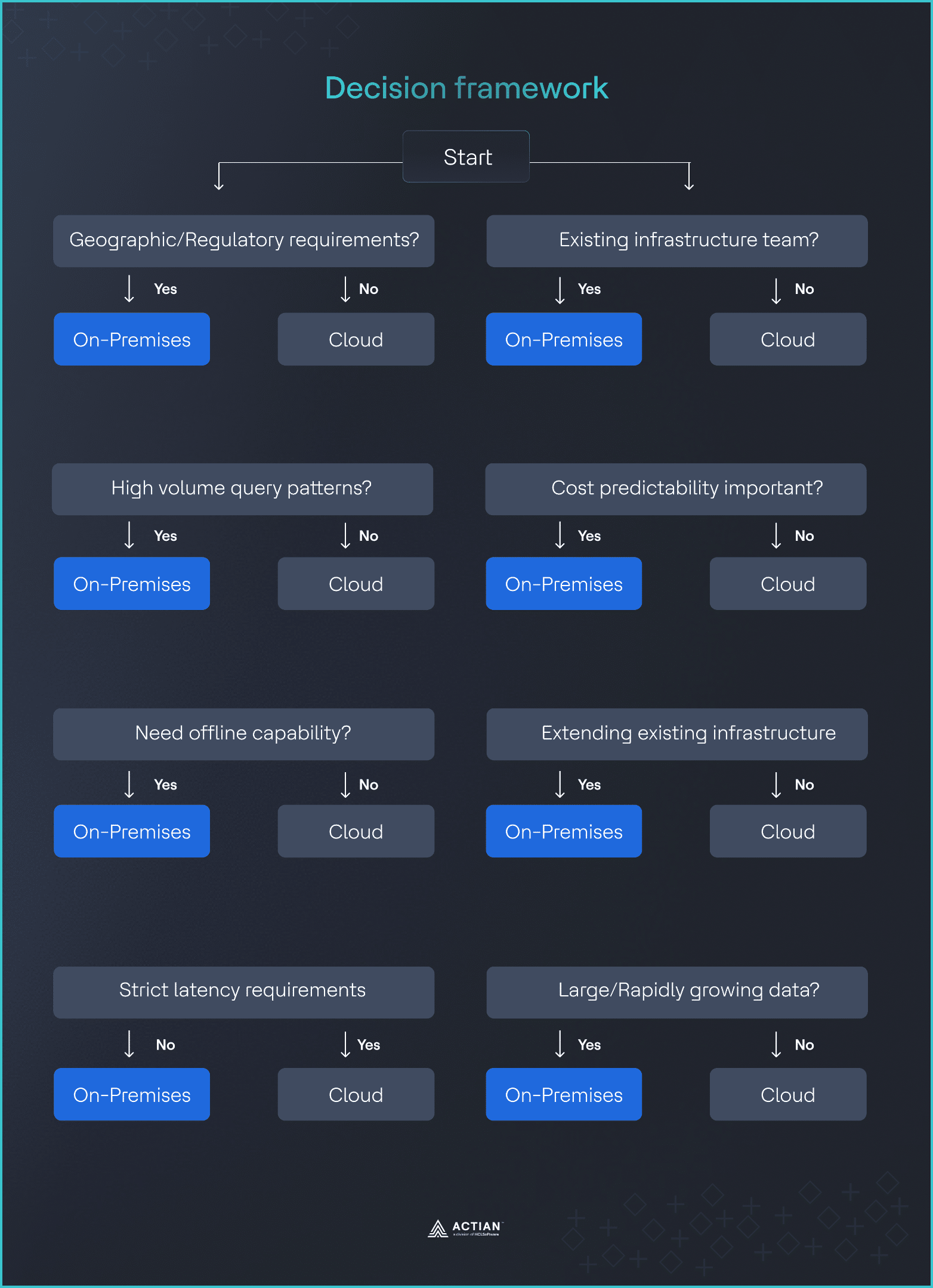
decision framework

Image 6: Decision framework

When several answers point in the same direction, the decision becomes easy to explain and defend across engineering, legal, finance, and operations teams.

When Cloud Makes Sense

On-premises deployment is not always the right answer. In many situations, cloud-based vector databases remain the better choice. Being clear about these cases helps avoid over-engineering.

  • Unpredictable scaling: Startups and new products often face uncertain growth. Cloud platforms allow rapid scaling without long-term infrastructure commitments, which reduces risk when demand is unclear.
  • Small data volumes: When total data is under 10 TB and query volume stays below about 50 million queries per month, cloud pricing usually works well and is simpler than self-hosting.
  • Rapid experimentation: Proofs-of-concept, research projects, and early prototypes benefit from fast setup and easy teardown. Cloud services support quick iteration with minimal operational effort.
  • No compliance constraints: If data residency, sovereignty, and regulatory requirements are not an issue, cloud deployment avoids legal complexity and speeds up delivery.
  • Limited infrastructure expertise: Teams focused on application logic rather than operations can rely on managed services instead of maintaining databases, clusters, and hardware.

In these cases, cloud is the most effective and practical option.

Hybrid Deployment Strategies

Hybrid deployments act as the middle ground for enterprises that need both speed and control. Rather than treating cloud and on-premises as mutually exclusive, teams place each part of the system where it performs best.

Cloud for iteration, on-prem for scale

A common pattern is to develop and test in the cloud, where managed services and elastic infrastructure enable rapid iteration. Once models, indexes, or pipelines are stable, they are promoted into on-premises production environments to meet compliance, latency, and operational requirements. This preserves developer velocity without compromising production guarantees.

Data segregation by risk and regulation

Hybrid architectures also allow organizations to separate workloads by risk profile. Sensitive or regulated data stays on-premises, while analytics, training, or search over derived data runs in the cloud. The same logic applies regionally: EU data may remain on-premises or in sovereign environments, while US workloads run in public cloud regions, avoiding global systems being constrained by the strictest jurisdiction.

Cost and migration flexibility

Cost optimization is another driver. Frequently accessed vectors or low-latency services can be cheaper and more predictable on-premises, while cold storage and bursty workloads benefit from cloud pricing. Many teams start cloud-first, then selectively move components on-premises as scale or compliance pressures grow. Hybrid makes this a controlled evolution rather than a disruptive rewrite.

Industry research shows this is a stable operating model. Google Distributed Cloud and similar platforms explicitly frame hybrid as a long-term strategy, recognizing that modern systems are designed to span environments, not collapse them into one.

Actian’s Approach To On-Premises Vector Databases

For teams that conclude that on-premises is the right deployment model, the next question is: which platform can actually meet these requirements? Actian’s approach is built specifically for this audience, without assuming the cloud is the default or the end state.

Actian delivers an enterprise-grade vector database that runs fully in your own data center or controlled environments. You retain full control over data placement, networking, and operations. There is no forced dependency on external cloud services, which simplifies audits and long-term system design.

Compliance requirements are treated as baseline constraints. By keeping data local and eliminating egress paths, Actian aligns with GDPR, HIPAA, FedRAMP, and similar regulatory frameworks. This reduces the need for compensating controls or complex legal workarounds.

Cost behavior is also predictable. Actian avoids usage-based pricing models that scale with queries or vector counts. This makes budgeting simpler and removes surprises as workloads grow.

Edge support is also taken into consideration. Actian’s architecture supports offline operation and local inference, making it suitable for manufacturing sites, retail locations, and other environments where connectivity is limited or unreliable. The system is designed to keep working even when the network does not.

Final Thoughts

Choosing between cloud and on-premises for vector databases is about understanding your priorities. Cloud works well for small workloads, rapid experimentation, and teams without deep infrastructure expertise. On-premises makes sense when compliance, latency, cost predictability, or scale are critical.

Many enterprises find a hybrid approach is the best balance, combining cloud flexibility with on-premises control. The key is making intentional decisions based on your data, workloads, and regulatory needs rather than following trends.

Actian empowers enterprises to confidently manage and govern data at scale. Organizations trust Actian data management and data intelligence solutions to streamline complex data environments and accelerate the delivery of AI-ready data. As the data and AI division of HCLSoftware, Actian helps enterprises manage and govern data at scale across on-premises, cloud, and hybrid environments. Learn more about Actian and how it fits into your on-premises AI strategy.


Blog | Product Launches | | 4 min read

Actian Zen v16.10: Modern Observability, Enhanced Security, and Python Power

actian zen

Summary

  • Actian Zen v16.10 adds Prometheus telemetry for real-time observability on Linux and Windows.
  • Native SQL data masking protects sensitive data and supports GDPR, HIPAA, and PCI-DSS.
  • Column-level masking enforces security without application code changes.
  • New SQLAlchemy support lets Python developers use Zen with modern ORM workflows.

We’re thrilled to announce the release of Actian Zen v16.10, a significant update designed to modernize observability, strengthen data security, and empower Python developers.

Building on the innovative foundation of Zen 16.0, this release introduces three game-changing capabilities:

  1. Prometheus-based telemetry.
  2. Native SQL data masking.
  3. SQLAlchemy dialect support.

These features are based directly on customer feedback to help your teams manage production deployments with greater visibility, protect sensitive information at the source, and build modern applications using standard Python tools.

Here is how Zen v16.10 helps you build smarter, safer, and more connected edge applications:

Modernize Observability With Prometheus Telemetry

For the first time, Actian Zen exposes a native/metrics endpoint, enabling standard Prometheus and Grafana workflows for monitoring engine health.

Previously, tracking performance on Linux deployments was a challenge, often requiring custom scripts or lacking the granular visibility available on Windows via PerfMon. With Zen v16.10, we leveled the playing field. You can now scrape real-time metrics—including cache hits/misses, I/O usage, lock contention, and transaction throughput—directly into Prometheus.

Why this matters:

  • Unified Monitoring: Use the same Grafana dashboards to monitor Zen across both Windows and Linux deployments.
  • Proactive Diagnosis: DBAs and SREs can set alerts for spikes in wait times or I/O, allowing them to resolve bottlenecks before they impact users.
  • Standard Integration: No proprietary tools are required. If you use standard enterprise monitoring stacks like Splunk or Elasticsearch, you can easily feed Zen metrics into them via Prometheus.

Strengthen Security With SQL Data Masking

Data privacy is no longer optional for businesses. It’s mandatory. To help you meet strict compliance requirements, like GDPR, HIPAA, and PCI-DSS, Zen v16.10 introduces native Table Column Masking directly within SQL.

This feature allows administrators to obscure sensitive data—such as credit card numbers, social security numbers, or email addresses—so it cannot be seen by users who do not have explicit permission to view it. When an unauthorized user queries the database, they see masked values—either “xxxx” for all string-type columns or zero values for all numeric types in the results, while the actual underlying data remains unchanged.

What this enables:

  • Granular Access Control: Define visibility at the column level. A customer support agent might see only the last four digits of a credit card, while a finance manager sees the full number.
  • Zero Application Changes: Implement security rules at the database layer. You don’t need to rewrite your application code to handle masking logic.
  • Non-Destructive Safety: The underlying data remains intact for authorized processes, ensuring that analytics and reporting jobs still run accurately, but the data is protected from human eyes that don’t have authorization.
  • Universal Enforcement: Because masking is applied at the engine level, it applies to third-party ad-hoc access as well. Anyone connecting via a SQL report writer, like Tableau or Excel, will see the same masked data, preventing users from bypassing security by switching tools. 

Build Faster With SQLAlchemy Support for Python

Python is the language of data, and Zen v16.10 now fits naturally into the Python ecosystem with official SQLAlchemy dialect support.

Developers can now use Zen as a backend for popular ORM-based applications. If you are hitting the concurrency limits of SQLite but don’t want to rewrite your entire application logic, Zen v16.10 is the perfect upgrade path. You can keep your SQLAlchemy models, queries, and migrations intact—just change the engine URL.

What this enables:

  • Drop-in Compatibility: Use standard tools like Pandas, Polaris, and Dask directly with Zen.
  • Higher Concurrency: Move beyond SQLite’s single-writer limitations to a robust, multi-user embedded database without managing a full server.
  • Developer Velocity: Focus on building features using Python objects rather than writing database-specific SQL queries.

Ready to Upgrade?

Actian Zen v16.10 is available now. Whether you need better visibility into your production engines, enhanced security controls for sensitive data, or a more powerful backend for your Python apps, this release delivers the tools you need to succeed at the edge.

Download Actian Zen v16.10 Today
Blog | Data Observability | | 5 min read

Build Agentic AI to Deliver ROI Without ‘Bad AI’ Surprises

agentic ai to deliver roi

Summary

  • Explains what agentic AI is and why it’s reshaping enterprise workflows.
  • Highlights risks driving agentic AI failure, including poor data and weak controls.
  • Outlines key steps to build trusted, production-ready agentic AI workflows.
  • Emphasizes data context, contracts, and observability as foundations for trust.
  • Positions Actian Data Observability as essential for reliable agentic AI at scale.

Agentic AI is having its moment, and for good reason. Instead of serving as a model that answers a question, an AI agent can actually complete a task. It has the ability to grab the right data, make an informed decision, and take action—such as updating a system, notifying a stakeholder, or answering a customer’s question—and keep the workflow going until the end goal is complete.

This type of AI agent is poised to play an increasingly greater role in businesses. Gartner predicts that 40% of enterprise applications will feature task-specific AI agents by the end of 2026, up from less than 5% in 2025.

But there’s also a flip side. Over 40% of agentic AI projects will be canceled by the end of 2027, due to escalating costs, unclear business value, or inadequate risk controls, according to Gartner.

This challenges business leaders to understand what separates a compelling proof of value from production-grade, ROI-driven, trusted agentic AI. The difference is not just the model. It’s the workflow foundation, especially the data foundation, and whether organizations can observe what’s happening with their data so bad or drifting inputs don’t fuel bad AI decisions.

Understand What Entails an Agentic Workflow

A helpful way to think about agentic workflows is to break them down into these processes:

  • The agent gathers information such as data, documents, tickets, events, and KPIs.
  • It plans steps, uses tools, and decides what action to take next.
  • It executes actions in systems, such as sending an email, updating a record, or triggering a job.
  • The agent uses feedback to continuously improve future decisions.

Unlike traditional automation, which is often rigid, agentic workflows are adaptive, meaning they can respond when a situation changes. That flexibility is why they’re so powerful, but also why the risk of using them increases quickly when the agent is operating on incomplete, stale, or poorly governed data.

7 Steps to Build Agentic AI Workflows

Organizations can create reliable and trusted agentic AI workflows by taking these steps:

  1. Define the end goal. Start with a workflow where success is measurable and manageable, such as improving revenue cycle performance, hitting on-time delivery targets, or speeding up month-end analysis reports. Then translate that goal into clear rules, like what inputs the agent can use, what systems it’s allowed and not allowed to touch, and what “good” looks like, such as accuracy thresholds.
  2. Set guardrails before enabling AI autonomy. Next, implement guardrails by tiering actions: what the agent can do automatically, what it can recommend but requires human approval, and what it must never do without explicit human interaction. Many AI projects stall or fail because teams deploy agents with no clear boundaries, unclear ownership, and no operational definition of “safe.” Without guardrails, even small data errors and overconfident outputs can have downstream consequences.
  3. Turn systems into auditable steps. In production, agentic systems work best when they’re viewed as small, single-responsibility steps. These steps can include retrieving, validating, classifying, deciding on, and acting on data. This makes AI agent behavior easier to test, monitor, and govern.
  4. Ensure data has trusted context. AI agents need more than rows and columns of data. They need context such as:
    • Business definitions. What counts as an active customer?
    • Relationships. How does Product A map to Service Line B?
    • Policies. What data is restricted, and what actions require approval?
    • Lineage. Where did this metric come from?

Having data context is the difference between an agent that sounds confident, even if an answer is wrong, and an agent that’s actually grounded in the current business reality.

  1. Make trust measurable and continuous. If an AI agent is making decisions, organizations need real-time visibility into how data behaves as it flows into and through AI systems. This is where data observability becomes critical. It allows data teams to catch drift, anomalies, and breakages before they become customer-facing or revenue-impacting errors.
  2. Ensure data reliability with contracts. One of the most practical ways to scale agentic workflows is to treat key datasets like products, with clear expectations. Data contracts support this approach by defining expected schema, quality thresholds, update frequency, ownership, and usage. That way, an AI agent isn’t guessing what “good data” looks like. It’s consuming a governed data product backed by enforceable guarantees.
  3. Implement monitoring, incident response, and governance. For an agent to act, it needs the operational muscle that’s applied to any production system. This includes having alerts that detect and resolve data quality issues, ensuring clear audit trails for visibility, and implementing access controls for approvals. Organizations should also have a plan to identify and correct any problems that could arise.

A Simple 5-Step Roadmap to Get Started

Organizations that want a practical roadmap to build agentic AI workflows can start with these steps:

  1. Pick one workflow with measurable value and clear boundaries.
  2. Map the decisions the agent will make, and the data needed for each decision.
  3. Standardize context with definitions, lineage, and policies so the agent isn’t improvising or hallucinating.
  4. Enable observability across freshness, volume, schema, distribution, and lineage.
  5. Provide guardrails with human-in-the-loop processes, then expand autonomy as trust becomes measurable.

Don’t Just Build Agentic AI. Build AI You Can Trust.

Agentic AI workflows are not “set it and forget it” automations. They’re living systems, fed by data that can change, break, and drift. That’s why Actian’s message is so important for this moment: don’t just build agentic AI. Build it on data that teams can discover, trust, and activate, and then continuously prove that trust with data observability.

This is how organizations prevent “bad AI” from becoming a reputational, regulatory, or financial issue. See how Actian Data Observability can proactively identify data quality issues, prevent them, and support agentic AI.


Blog | Data Governance | | 17 min read

The Hidden Cost of Vector Database Pricing Models

hidden-cost-of-vector-database-blog

Summary

  • Vector DB “usage-based” pricing now includes monthly minimums, turning steady workloads into sudden cost jumps.
  • Hidden costs—embeddings, reranking, backups, reindexing, and egress—can double real production spend.
  • Query costs often scale with index size, so the same search can cost 10x more as data grows from 10GB to 100GB.
  • At high, predictable query volume, self-hosting can cut costs 50–75% and improve spend predictability.
  • Choose pricing models early—billing mechanics should influence architecture, not surprise you after launch.

For a long time, usage-based pricing seemed like the safest way to run new infrastructure. The appeal was to start small, pay very little, and let costs rise only if the product proved itself. For teams experimenting with semantic search or early retrieval systems, that trade-off made sense, particularly when fixed infrastructure commitments felt riskier than uncertain usage patterns.

That sense of safety began to fade in 2025 as several vector database providers introduced pricing floors and minimums. Pinecone announced a $50/month minimum, Weaviate implemented a $25/month floor, and similar changes rippled across the managed vector database market.

Small, steady workloads suddenly experienced step changes in cost without any corresponding increase in activity, a pattern that reflected a broader shift across the SaaS landscape. Always-on vector database infrastructure no longer fits the economics of single-digit monthly pricing. SaaS subscription costs from several large vendors rose between 10% and 20% in 2025, outpacing IT budget growth projections of 2.8%, according to Gartner.

Today, vector databases power production systems at scale. They run semantic search, recommendations, copilots, and internal knowledge tools. Data volumes stay relatively stable, and traffic patterns follow predictable curves. Yet for many organizations, vector search infrastructure has become one of the most volatile cost centers in the stack. Not because usage swings wildly, but because vector database pricing models behave differently once systems mature.

TL;DR

  • Cloud native vector databases pricing advertises low minimums and usage-based flexibility, but production costs tell a different story.
  • Hidden fees (embeddings, reindexing, backups) can double your bill.
  • Query costs scale with dataset size, meaning the same query becomes 10x more expensive as you grow from 10GB to 100GB.
  • The October 2025 pricing shift introduced $50 minimums, forcing 400–500% cost increases for stable workloads.
  • At 60–100M queries/month, self-hosting becomes 50–75% cheaper than cloud.
  • Pricing model must be an architectural decision, not an afterthought.

What Pricing Pages Leave Out

Vector database pricing pages prioritize adoption over long-term cost modeling. Their job is to make adoption frictionless, not to walk you through how the bill is calculated after a system is live. Most pages spotlight a familiar set of numbers: storage per gigabyte, read and write units, and a low monthly minimum. Free tiers are marketed as enough to get started, which makes experimentation feel low-risk.

What these pages rarely explain is how those line items interact once usage stabilizes. They typically don’t model how query costs change as datasets grow, how write activity accumulates over time, or how meaningful parts of the workflow sit entirely outside the database. Pinecone’s pricing examples exclude initial data import, inference for embeddings and reranking, and assistant usage. Weaviate’s pricing calculator similarly omits backup costs and data egress fees. Qdrant’s estimates don’t account for reindexing overhead. The same vendors that dominate every comparison list now face questions about their pricing sustainability. These disclaimers are present but easy to skim past when you’re focused on shipping a proof of concept.

A predictable pattern repeats itself. Someone runs the calculator and sets a monthly budget. The system goes live. A few weeks later, the bill is two to four times higher than expected. Nothing broke, no traffic spike happened. The database is doing exactly what it was built to do. The pricing page simply didn’t describe the total cost of operating it.

How Usage-Based Pricing Works (And Why it Gets Expensive)

Usage-based pricing reduces risk during experimentation when traffic is unknown. The issue is that vector databases in production are rarely unpredictable.

Once a system is live, most engineering groups have a reasonable understanding of data size and baseline query volume. What they lack is a reliable way to predict next month’s bill, because managed vector databases charge across several dimensions simultaneously: storage, writes, and queries.

Each cost grows on its own curve, and none maps cleanly to user value. The part that catches development teams off guard is query pricing. In many models, query cost rises as the dataset grows, even when the query itself stays the same.

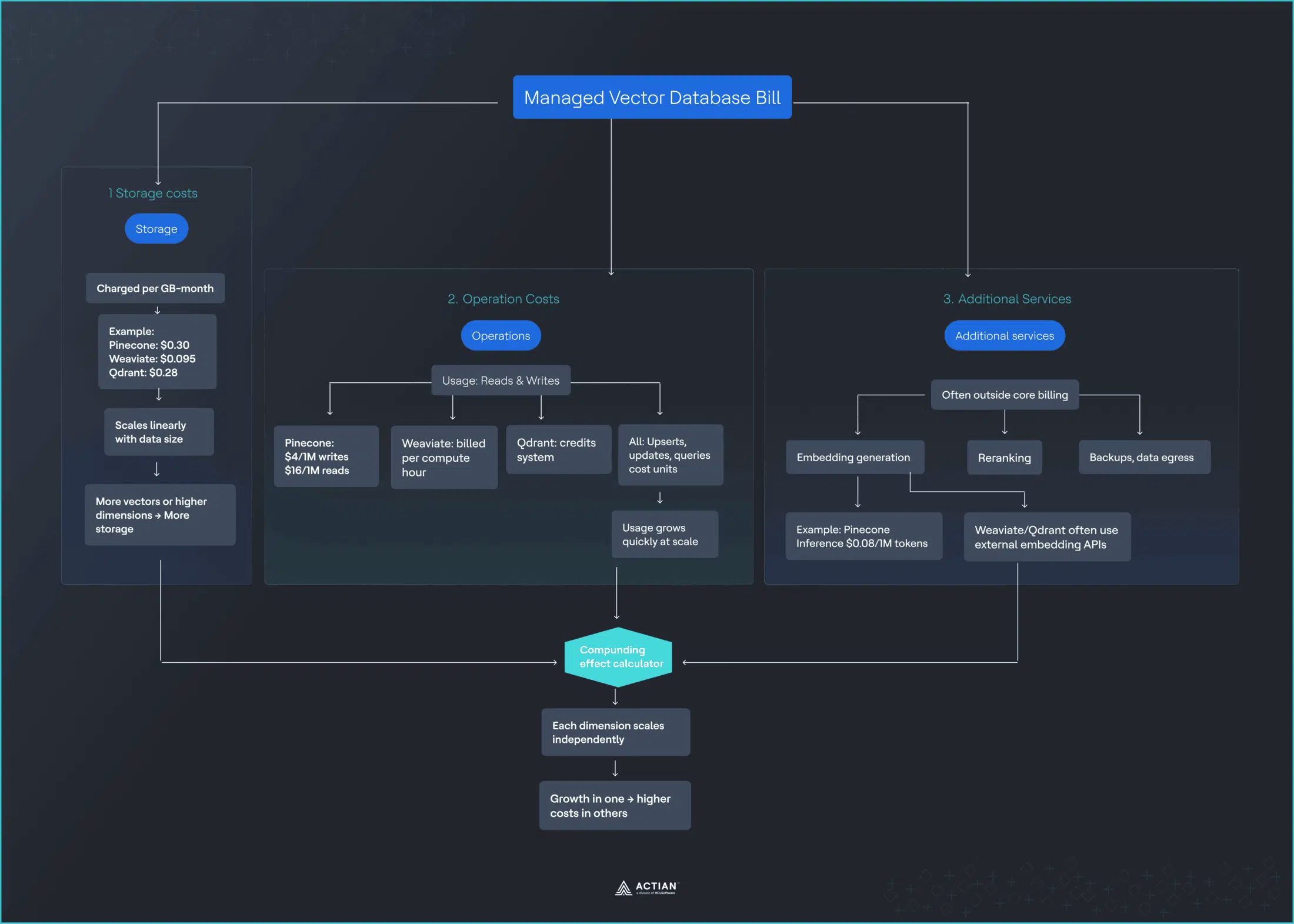
The Three Cost Drivers You’re Actually Paying For

Managed vector databases bill across three primary dimensions, though the exact rates vary by provider:

Storage

  • Pinecone: $0.30/GB/month.
  • Weaviate: $0.095/GB/month.
  • Qdrant: $0.28/GB/month.
  • Scales linearly as your dataset grows.
  • More vector dimensions = larger bill.

Operations

  • Pinecone: Write units ($4/million), Read units ($16/million).
  • Weaviate: Per compute unit hour (variable).
  • Qdrant: Credit-based system.
  • Every upsert, update, and query consumes units.
  • Vector search operations accumulate quickly at scale.

Additional services

  • Embedding generation: Pinecone Inference ($0.08/million tokens).
  • Weaviate/Qdrant: Require external services (OpenAI, Cohere).
  • Reranking, backups, data transfer are billed separately.
  • Adds another vendor relationship and cost stream.

Each cost dimension scales independently, and their interaction creates compounding effects that pricing calculators rarely capture. Understanding why these costs compound requires looking at how vector search actually works, specifically HNSW indexing.

managed vector database

Why Costs Compound as You Scale

The cost increases stem directly from how vector search works under the hood.

How HNSW works

Most production vector databases use approximate nearest neighbor (ANN) algorithms like HNSW (Hierarchical Navigable Small World) to make searches tractable at scale.

HNSW constructs a multi-layer graph in which each layer represents vectors at different levels of granularity, thereby organizing millions of vector dimensions into an efficient structure.

The cost impact

Pinecone’s documentation indicates that a query consumes 1 RU per 1 GB of namespace size, with a minimum of 0.25 RUs per query. As your dataset grows, so does the graph:

Dataset size RU per query Cost at $16/M RU Same query, different cost
10 GB 10 RU $0.00016 Baseline
100 GB 100 RU $0.0016 10x more expensive
1 TB 1,000 RU $0.016 100x more expensive

Result: Ten times the cost, for the same query, delivering the same result quality.

At $16 per million read units, costs scale linearly with data growth, but the functionality delivered to users stays the same. A search query returns the same number of results with the same accuracy whether your index is 10 GB or 100 GB. Your users see no difference, but you pay 10x more. This is the moment growth starts to feel like a penalty. The graph structure needs to traverse more vector dimensions as your index expands, and you pay for every additional operation.

The Free Tier That isn’t Really Free

The free tier enables early experimentation but doesn’t predict production economics. By the time you hit the limits, switching costs are no longer theoretical. Migration is perceived as expensive, and people accept pricing they would have questioned earlier.

Provider Free tier limits Production reality Time to exceed
Pinecone 2 GB, 1M reads, 2M writes (single region) 60+ GB, 5M+ reads typical 2–4 weeks
Weaviate 1M vectors, limited compute 10M+ vectors standard 1–3 weeks
Qdrant 1 GB storage 60+ GB storage common 1–2 weeks

The October 2025 Pricing Shift That Changed Everything

These structural issues became impossible to ignore when Pinecone made a significant pricing change. By late 2025, pricing changes across major vector database providers made it clear that the pay-as-you-go (PAYG) model did not always hold once systems reached steady production. The most visible signal came in October, when Pinecone implemented a $50 monthly minimum across paid Standard plans.

For organizations already spending well above that level, the change barely registered. For smaller but stable workloads, the situation was different. Some groups had intentionally designed their usage to stay under $10 per month.

These weren’t abandoned projects, but internal tools, early production features, and low-volume customer-facing systems that had already stabilized. Usage remained flat, but in some cases the introduction of pricing minimums led to five- to tenfold increases in monthly costs.

What made the moment important was not the dollar amount. It was the introduction of a fixed floor into a model marketed as consumption-based. Low usage no longer guaranteed low cost. Once that assumption broke, minimums stopped feeling like an edge case and started looking like structural risk.

Previous monthly cost New minimum Increase
$8 $50 525%
$12 $50 317%
$25 $50 100%

The Migration it Forced

For anyone below the new $50 minimum, migration was rarely planned. It was reactive. Platform owners had to evaluate alternatives, export data, rebuild indexes, and validate query behavior under time pressure. In some cases, the engineering effort required to migrate exceeded the annual savings from switching providers. Many still moved anyway, because the alternative was committing to pricing that no longer matched the workload.

The impact of the pricing change became visible across developer communities. One developer documented their migration experience publicly, noting they had managed to keep bills under $10 per month by storing only essential data in the vector database. The September 2025 announcement requiring a $50 monthly minimum regardless of actual usage prompted an immediate search for alternatives.

The migration calculus proved challenging. Moving to Chroma Cloud became the chosen path, but the process revealed deeper concerns about serverless pricing models. As the developer noted, they were seeking a truly serverless solution in which costs scale linearly with usage, starting at $0. The $50 minimum eliminated that possibility.

This pattern repeated across Reddit threads and developer forums. A discussion thread titled “Pinecone’s new $50/mo minimum just nuked my hobby project” captured the broader sentiment. Teams running stable, low-volume production workloads faced a choice: accept a 400–500% cost increase or invest engineering time in migration.

The issue wasn’t the absolute dollar amount. For many teams, $50 per month remained affordable. The problem was precedent. If a vendor could introduce a minimum that quintupled costs without warning, what prevented future increases? The pricing change transformed vendor selection from a technical decision into a risk management calculation.

A few patterns showed up repeatedly across these migrations. Pricing predictability started to matter more than managed convenience. Open source and self-hosted options re-entered discussions that had previously defaulted to cloud. Vendor pricing risk became a first-class architectural concern. These migrations were not driven by dissatisfaction with features or performance. They were driven by economics.

What it Reveals About Vendor Pricing Power

Once a vector database is deployed in production, vendors can adjust pricing in ways that materially affect customers, even if usage remains unchanged.

Usage-based pricing lowers the barrier to adoption, but it increases switching costs over time as APIs become embedded, data formats solidify, and migrations grow expensive.

For engineering leadership, the evaluation question shifts:

  • Was: “What does this cost today?”
  • Became: “How exposed are we to pricing changes once this is in production?”

Real-World Cost Scenarios (What You’ll Actually Pay)

Understanding these dynamics in the abstract is one thing. Seeing how they play out in actual production systems is another.

To see the full picture, let’s examine three common production scenarios and compare costs across major providers.

Scenario 1: Customer support RAG system

Imagine a customer support assistant built on historical tickets, internal documentation, and help articles. At this stage, you might be dealing with about 10 million vectors (typically 768 or 1536 vector dimensions) and around five million queries per month.

Previous monthly cost New minimum Increase
$8 $50 525%
$12 $50 317%
$25 $50 100%

Key finding: Even at small scale, actual costs are 3–5x higher than base calculator estimates due to minimums and complex pricing structures.

Scenario 2: E-commerce recommendation engine

As systems grow, the cost dynamics become more pronounced. With around 100 million vectors and tens of millions of queries per month, costs climb quickly. Product catalogs, user vector embeddings, and real-time personalization introduce sustained traffic and frequent updates.

Provider Storage Queries Writes Embeddings Overhead Total
Pinecone $180 $192 $8 $200–300 $50–80 $1,500–2,500
Weaviate $57 Compute: $800–1,000 Included $200–300 $40–60 $1,400–2,200
Qdrant $168 Credits: $600–900 Included $200–300 $40–60 $1,300–2,100

Key finding: At mid-scale, costs converge across providers. Embedding fees often exceed base database costs.

Scenario 3: Multi-tenant SaaS platform

The economics shift dramatically at the enterprise scale. At 500 million vectors and 100 million queries per month, usage-based pricing becomes structural. These large datasets contain high-dimensional vector embeddings across many customers.

Provider Storage Queries Writes Embeddings Support Total
Pinecone $921 $1,200 $100–150 $500–700 $300–500 $2,500–4,000+
Weaviate $292 Compute: $2,000–3,000 Included $500–800 $200–400 $3,000–4,500
Qdrant $860 Credits: $1,500–2,200 Included $500–800 $200–400 $2,900–4,200

Key finding: At enterprise scale, annual costs reach $30,000–$54,000. This is where self-hosting economics become compelling.

Side-by-Side Provider Comparison

To make the economics clearer, here’s how the major vector database providers stack up across the dimensions that matter most for production deployments:

Feature Pinecone Weaviate Qdrant PostgreSQL + pgvector
Pricing model Usage-based Usage-based Usage-based Self-hosted (fixed)
Monthly minimum $50 $25 None None
Storage cost $0.30/GB $0.095/GB $0.28/GB Hardware cost only
Query pricing Scales with data Compute-based Credit-based Free within capacity
Additional cost Many Moderate Some None
Cost predictability Low Low-Medium Medium High
Scenario 1 cost $350–500 $300–400 $280–380 ~$200–300
Scenario 2 cost $1,500–2,500 $1,400–2,200 $1,300–2,100 ~$800–1,200
Scenario 3 cost $2,500–4,000+ $3,000–4,500 $2,900–4,200 ~$1,500–2,000
Best for Fast prototyping Hybrid search K8s-native teams Stable, high-volume

The Hidden Fees That aren’t in the Calculator

These scenarios reveal a consistent pattern: the advertised pricing rarely captures the full cost. Production vector search systems incur costs that are rarely modeled comprehensively by calculators. Understanding these hidden costs is crucial for accurate budgeting.

Embedding and inference fees

Pinecone Inference charges $0.08 per million tokens for generating vector embeddings. Weaviate and Qdrant don’t provide native embedding services, requiring you to use external providers like OpenAI (starting at $0.10 per million tokens) or Cohere.

Converting documents to vectors costs extra beyond database operations across all platforms. Reranking adds additional per-request fees. Cohere-rerank-v3.5 has no free requests on any tier, meaning every reranking operation is billed.

These embedding and inference costs can match or exceed the database bill itself, depending on data churn and query patterns. Every time you generate new vector embeddings or update existing ones, you’re paying separately from your core vector storage costs.

Reindexing costs (the silent killer)

The cost impact becomes especially severe when you need to change your approach. When you change embedding models, you must re-vectorize all data. For a 100-million-vector dataset, this could mean:

  • Embedding costs: $8,000–$15,000 one-time.
  • Increased write units during migration.
  • Processing time and compute overhead.

Experimentation with models becomes prohibitively expensive, creating lock-in to initial embedding choices. The cost of generating vector embeddings at scale makes it risky to improve your system.

The support tax

Support tiers add meaningful costs across all managed providers. Pinecone’s support tiers run from free community forums to $499/month for 24/7 coverage. Weaviate charges $500/month for its Professional support tier. Qdrant’s enterprise support starts at similar levels.

Tier Pinecone Weaviate Qdrant
Free Community only Community only Community only
Developer $29/month N/A N/A
Pro/Enterprise $499/month $500/month Custom

Geographic distribution costs

Multi-region deployment for latency optimization adds data transfer costs, regional infrastructure overhead, and can increase base costs by 30–50% depending on configuration. Running vector search across multiple cloud provider regions compounds these expenses.

When Self-Hosting Becomes 75% Cheaper

Given these hidden costs and pricing volatility, many teams eventually reach a crossroads. There is a point where vector database pricing stops being a convenience question and becomes an economic one. That point usually arrives earlier than many people expect.

Timescale benchmarks show that PostgreSQL + pgvector is 75% cheaper than Pinecone, while also delivering 28x faster P95 latency compared to Pinecone’s storage-optimized tier. The tipping point at which self-hosting becomes materially cheaper typically occurs between 60 and 100 million queries per month.

The cost crossover point

  • Below 10M queries/month: Cloud is usually simpler. The operational overhead of self-hosting (DevOps time, monitoring, maintenance) outweighs potential savings. Managed services make sense here.
  • 10M–60M queries/month: Economics converge. Self-hosting costs stabilize, whereas cloud costs continue to rise with usage. This is where many teams begin to seriously evaluate alternatives. The gap narrows to the point at which the decision depends more on team capabilities than on pure economics.
  • 60M–100M+ queries/month: Self-hosting becomes 50–75% cheaper. PostgreSQL self-hosted costs approximately $835 per month on AWS EC2, compared to Pinecone’s $3,241 per month for the storage-optimized index at a comparable scale. At this volume, the math becomes hard to ignore.

What self-hosting actually costs

  • Server: $400–$800/month.
  • Setup: About 40 hours initial effort ($4,000–$8,000 one-time).
  • Ongoing maintenance: 10–15 hours/month ($1,500–$2,250/month in engineering time).
  • Monitoring stack: $50–$200/month.
  • Backup storage: $100–$300/month.

Total: About $2,050–$3,550/month versus Pinecone $5,000–$10,000+ at enterprise scale.

Net savings: $2,950–$6,450/month = $35,000–$77,000/year.

The math gets more compelling as you scale. With large datasets containing hundreds of millions of vector dimensions, the gap widens substantially.

Performance advantages beyond cost

The economic case is strong, but performance matters too. Timescale benchmarks demonstrate that PostgreSQL with pgvector achieves a P95 latency 28x lower than Pinecone’s storage tier: 63ms versus 1,763ms. Additionally, PostgreSQL achieves 16x higher query throughput at 99% recall.

Beyond performance, self-hosting provides:

  • Control: Tune for your specific workload and vector dimensions.
  • No throttling or rate limits.
  • Data sovereignty and compliance benefits.
  • Predictable scaling where costs are tied to capacity, not usage.
  • Hybrid search flexibility to combine vector search with traditional queries.

The Hidden Cost of Free and Serverless

Free tiers and serverless pricing are designed to feel safe. They lower friction, reduce upfront commitment, and make it easy to start building. In practice, they often delay cost visibility rather than eliminate it.

Serverless does not mean infrastructure is free. It means infrastructure is abstracted and billed indirectly through usage. For steady workloads, that abstraction usually comes at a premium. Every query, every stored vector, every embedding refresh, and every background operation is metered. Over time, convenience replaces predictability.

Free tiers follow a similar pattern. They are useful for experimentation, but they are not representative of production economics. By the time limits are reached, integration work is already done, APIs are embedded, and migration feels expensive. At that point, teams tend to accept pricing they would have challenged earlier.

A Practical Way to Choose

Once pricing volatility appears, the question is no longer which database is cheapest today. It becomes clear which pricing model still works once the system stabilizes.

Three factors matter most:

  • Scale: How many vectors you store, how many queries you run per month, and how quickly those numbers grow.
  • Predictability: Whether usage is bursty and uncertain, or steady and forecastable over the next six to twelve months.
  • Control: How much operational responsibility your team can realistically take on, and how sensitive the business is to budget variance.

Early on, managed cloud services usually make sense. They optimize for speed, experimentation, and unknown demand. As workloads stabilize and query volumes climb into the tens of millions per month, usage-based pricing begins to lose its advantage. Costs rise faster than value, and forecasting becomes harder, not easier.

Beyond roughly 60–100 million queries per month, many teams reach a crossover point. At that scale, self-hosted or on-premises deployments are often materially cheaper and far more predictable, even after accounting for infrastructure and operational overhead.

When Each Option Fits

Cloud-managed services work best when:

  • Traffic is unpredictable or highly bursty.
  • Speed of iteration matters more than long-term cost.
  • DevOps capacity is limited.
  • Workloads are still exploratory.

Self-hosted or on-premises deployments make sense when:

  • Query volume is high and stable.
  • Cost predictability is a business requirement.
  • Budgets must be defended in advance.
  • Compliance or data residency matters.
  • Performance targets are tight.

The right choice depends on matching your pricing model to your actual production behavior.

Decision Triggers That Help

Instead of debating architecture continuously, many teams define clear triggers:

  • If monthly vector database spend exceeds $1,500, re-evaluate deployment options.
  • If query volume exceeds 50 million per month, model total cost of ownership for owned infrastructure.
  • If pricing changes exceed 20%, reassess vendor risk.
  • If latency targets are consistently missed, evaluate alternatives.

These triggers turn pricing from a surprise into a planned decision point.

The Bottom Line

Vector database pricing looks simple at the start. Free tiers, low minimums, and usage-based billing suggest you only pay for what you use. In production, the economics change. Costs compound across storage, queries, embeddings, and background operations.

The same query gets more expensive as datasets grow, even when it delivers the same value. Predictability disappears at the stage where predictability matters most. For sustained workloads, there is a clear tipping point where ownership becomes cheaper and easier to justify. Teams that avoid bill shock are not the ones who negotiated better discounts; they are the ones who treated pricing as an architectural decision early.

For organizations that value fixed budgets, predictable spend, and long-term control, this is why on-premises vector databases are re-entering serious architectural discussions. Actian’s on-premises vector database, designed around transparent licensing rather than usage-based volatility, reflects that shift.

Do the cost math before you need to migrate. It is always cheaper that way.


Blog | Data Observability | | 7 min read

Unstructured Data: The Missing Ingredient in AI’s Next Era

unstructured data

Summary

  • Explains why unstructured data holds critical business context in the age of AI.
  • Defines unstructured data and how AI extracts meaning from text, audio, and visuals.
  • Shows how unstructured data fuels context-aware, agentic, and operational AI use cases.
  • Outlines steps to make unstructured data AI-ready through governance and metadata.
  • Positions trusted unstructured data as the foundation for scalable, reliable AI.

For years, enterprise data strategies focused on what information fit neatly into rows and columns. This includes fields like customer IDs, product orders, inventory counts, and financial ledgers. While this type of structured data is critical, AI has changed the rules for how data is valued.

The simple truth is that the most important business context rarely lives in a table. Instead, it’s scattered across day-to-day work that teams regularly engage with, such as emails, PDFs, contracts, slide decks, meeting notes, call recordings, and support tickets.

Analysts and researchers estimate that roughly 80% of enterprise data is unstructured, which means it lives outside of traditional databases. As a result, organizations are trying to build smart systems while ignoring much of their institutional knowledge.

In the age of AI, especially as Agentic AI use cases emerge, unstructured data becomes the difference between a model that sounds impressive and one that delivers contextual insights. This poses the question, “What exactly is the role of unstructured data in the age of AI?”

What is Unstructured Data and How is the Data Used by AI?

Unstructured data is information that doesn’t arrive in a predefined schema. There isn’t a specific “field” for customer sentiment, contract risk, or the reason a shipment was delayed. Instead, that meaning and context are embedded in language, visuals, or audio.

Think of the difference like this:

  • Structured data: “Order #48392 shipped on 12/18. Carrier: UPS. Status: Delivered.”
  • Semi-structured data: “Order #48392 tracking shows delivery on 12/18 at 2:47 pm.”
  • Unstructured data: “Customer says the package arrived damaged, wants a replacement, and is escalating on social.”

These examples are types of data, yet only one fits cleanly into a database. The others, the semi-structured and unstructured messages, don’t fit neatly, but offer more detail so the business can take appropriate action.

Unstructured data can be more than just plain text. It can include:

  • Voice calls and transcripts.
  • Images such as receipts, scans, and medical images.
  • Videos like site inspections and training recordings.
  • PDFs and slide decks that contain embedded tables, charts, or screenshots.
  • Spreadsheets that are technically structured, but ungoverned and context-heavy.

AI makes unstructured data usable by extracting information, sentiment, topics, and relationships from the raw text, images, audio, or video. It can search the data, summarize it, answer questions about it, and trigger next-best actions, such as opening a ticket or flagging risk. 

Why Unstructured Data is More Important Than Ever for AI

Unstructured data has always held a story behind the numbers, such as why a customer is upset, what a contract actually allows, what a clinician observed, or what went wrong in a shipment. The difference is that until recently, that data was costly and difficult to process at scale.

Traditional systems could store documents, emails, recordings, and PDFs, but they didn’t consistently interpret them. Instead, teams had to manually read, tag, summarize, and translate content into structured fields before it became usable.

Large language models (LLMs) changed the economics and the workflow. They can extract meaning, such as entities, intent, and sentiment, then generate summaries, classify content, and answer questions, often in natural business language.

However, that doesn’t give teams a green light to feed messy files into LLMs and expect trustworthy outcomes. LLMs are only as reliable as the data they can access and the way that information is organized, secured, and grounded in the organization’s business reality.

Prepping the data is exactly where many AI initiatives stall. If the latest company policy is buried in an unsearchable PDF, if product exceptions live in scattered email threads, or if five versions of the same standard operating procedure exist with no single source of truth, the model may use incomplete data that lacks context or sounds confident while producing an incorrect answer.

Making unstructured data AI-ready requires steps like preparing and de-duplicating content, adding metadata and ownership, enforcing access controls, creating clear versioning, and structuring content so AI can retrieve it. This enables teams to find, trust, and activate the data.

3 Ways Unstructured Data Fuels AI

Unstructured data plays a role in AI strategies in three ways:

  1. It provides context that structured systems don’t capture. Structured data tells the business what happened. Unstructured data often tells why it happened. For example, a dashboard shows that customer churn increased 8% in the last quarter. This is helpful, but the reasons for the churn may be buried in call transcripts, complaint emails, chat logs, and competitor comparisons. With the right pipeline, AI can synthesize this information into themes, like onboarding issues, pricing confusion, a feature the product is lacking, or a service issue.
  2. LLMs turn AI from chats into work. AI that can retrieve relevant documents, ground its answers in business operations, generate text, and complete tasks is valuable. AI is even more valuable when it offers a governed, searchable knowledge base and identifies which data assets are needed for a use case. For example, a customer support agent may ask, “Can we refund this product after 45 days?” AI can retrieve the current refund policy, the customer’s contract terms, and any region-specific exceptions, then answer the question with citations and next steps.
  3. Support the backbone of Agentic AI. Agentic AI can do more than deliver answers. It can take actions, such as querying systems, launching workflows, sending approvals, and updating records. For Agentic AI to perform reliably with unstructured data, the information must be aligned, contextualized, and trustworthy. For instance, Agentic AI can read vendor contracts and emailed amendments, flag a risky clause change, then automatically open an approval workflow, summarize the impact for the legal department, and only execute the renewal once the approvers sign off.

Make Unstructured Data AI-Ready

Many teams get a directive to make unstructured data AI-ready and assume it means “dump everything into a database.” That’s like tossing paper documents into a room and calling it a library.

AI-ready unstructured data usually requires a pipeline that follows these five steps:

  1. Discover and prioritize. Start with use cases tied to desired outcomes, such as faster resolution, fewer denials, or reduced risk.
  2. Classify and control access. Identify sensitive content, like personally identifiable information, contracts, and financial information, then define who can access it.
  3. Enrich the data with metadata. Add context that can include document type, owner, effective date, region, and product line.
  4. Extract the information that matters. Breakdown documents into smaller components, extract key entities such as dates and part numbers, and preserve provenance to trace answers back to their sources.
  5. Continuously monitor quality. Realize that unstructured data changes. Policies get updated, decks get modified, and knowledge becomes stale. AI needs reliable data, or it can sound smart while being wrong.

Address Data Reliability Problems

When people think about data quality issues, they often picture missing values in a table. That’s true with structured data, but unstructured content can be low quality in different ways:

  • A policy is updated, but an old PDF is still circulating.
  • Two decks say two different things.
  • Missing context. A document references a standard process without defining it.
  • Poor capture. Bad audio, low-resolution scans, or optical character recognition (OCR) errors.
  • No provenance. No one knows where the data came from or whether it’s approved for usage.

AI will “reason” with low-quality inputs. That doesn’t make the output reliable, but it can make mistakes harder to detect. 

The Payoff: AI That’s Grounded, Useful, and Scalable

When unstructured data is treated as a governed enterprise asset, businesses can advance their use cases. These can include:

  • Contract review assistants that surface risk clauses and missing terms.
  • Customer support copilots that cite policy and summarize case history.
  • Maintenance AI agents that combine manuals, work orders, and sensor alerts.
  • Supply chain workflows that reconcile emails, invoices, and shipment documents.

This is how AI becomes operational. It’s not because the model got smarter. It’s because the data foundation is reliable and trusted.

Where Actian Fits In

Actian helps organizations bring structure, governance, and trust to the data that powers AI. This includes the unstructured data where so much business context lives.

The Actian Data Observability solution proactively identifies data quality issues, mitigates them, and helps organizations optimize all data with confidence. It enables data teams to trust their data for agentic AI and other use cases.

Take a product tour of the Data Observability solution.


Blog | Data Observability | | 10 min read

AI Needs Autonomous-Ready Data: Building Trust into AI

autonomous-ready-data

Summary

  • Defines “autonomous-ready data” as the foundation for trusted, agentic AI workflows.
  • Explains why AI is limited by data readiness, not model performance.
  • Outlines requirements like context, reliability, traceability, and governance.
  • Shows how proactive observability prevents bad data from driving bad AI decisions.
  • Positions Actian as enabling safe, scalable, autonomous AI at scale.

AI can do impressive things, but only if the data feeding it doesn’t need constant babysitting.

“Autonomous-ready data” means your data can support AI agents and automated workflows without someone hovering over it. It’s the difference between AI systems that make trusted and reliable decisions and those that require constant human intervention to avoid costly mistakes.

The Technical Shift: From Dashboards to Dynamic Agents

Data teams are moving beyond static dashboards and scheduled reports into workflows where AI agents make decisions, trigger actions, and update systems with minimal human oversight.

These “agentic” workflows aren’t just automation scripts running predetermined steps. They’re systems that perceive inputs (like invoices or emails), reason through them using context and business logic, and take actions across multiple systems autonomously.

Real enterprise examples we’re seeing include:

  • Transactional Reconciliation Agents match invoices to ERP transactions without manual review.
  • Document Intelligence Automated parsing and record validation across unstructured sources.
  • Dynamic Reporting Personalized insights and downstream system updates triggered by data patterns.
  • Natural Language Workflows Non-technical subject matter experts interact with complex processes through conversation.

The critical challenge: How do you trust an agent to act safely when the underlying data might be incomplete, outdated, or simply wrong?

We’re at the point where AI isn’t held back by model performance, but by data readiness.

What Agentic Workflows Really Require

Autonomous systems place fundamentally different demands on your data infrastructure than traditional BI and analytics ever did.

Interoperability becomes essential as agentic systems scale. Tools and services that agents rely on, whether for data validation, access control, enrichment, or downstream actions need to be exposed as callable, verified building blocks. The Model Context Protocol (MCP) is emerging as a standard that enables agents to securely discover and invoke external services in real time, transforming isolated tools into trusted components within the agentic ecosystem.

Early validation matters more than ever. For most enterprise use cases, data constantly flows through streaming platforms and transformation layers before landing in storage systems. Validating data at this layer and checking for freshness, schema integrity, accuracy, and anomalies prevents bad data from ever reaching your data lakes or vector databases. Forward-thinking AI architects are increasingly embedding validation directly into streaming pipelines rather than discovering problems downstream.

Storage must support trustworthy snapshots. When data lands in a data lake, it needs to be versioned and consistent. Agents often make decisions based on precise data correctness at specific points in time, making time travel and auditability critical capabilities for autonomous operations.

Unstructured data needs validation before vectorization. As agents work more with documents, text, and images, vector databases enable semantic search and context-based understanding. But data should be validated before embedding. For example, when converting OCR-driven PDFs, critical data elements should first be checked for completeness and correctness to ensure agents’ reason on trusted, accurate inputs.

Action requires secure APIs. Beyond analysis, agents update records, create tasks, and send alerts. Secure, well-governed APIs are the channels through which agents move from insights to direct enterprise actions.

Unified governance is non-negotiable. For agents to safely access and manipulate data, they must know where it resides, who owns it, and what policies apply. Modern catalogs and governance frameworks ensure controlled, compliant, and explainable data access at every step.

Observability can’t be reactive. Real-time observability that validates data quality as it enters the system prevents failures before they happen. This transforms data quality from reactive patching into proactive assurance, building trust before any agent ever sees the data.

What We’re Seeing in Real Enterprise Use Cases

From our work with customers navigating this shift, several patterns have emerged:

Agent workflows require low-latency, trustworthy inputs. An invoice reconciliation agent can’t wait for overnight batch processing when it needs to match purchase orders, receipts, and invoices as they arrive throughout the day.

Validation must happen at the ingestion layer. In data lakes, before vectorization, not after data lands in the access layer, where agents consume it. 

Agents require unified, governed access across batch processing, streaming data, and vector layers. Fragmented access creates blind spots and security gaps.

If AI is going to operate with less human oversight, your data quality posture cannot remain reactive. The problems must be caught and fixed before agents ever interact with the data.

What “Autonomous-Ready Data” Really Means

Autonomous-ready data means your data knows what it is, where it came from, who owns it, and whether it’s in good shape. Critically, it can prove all of this without human intervention.

Most companies aren’t there yet, which is why AI projects stall, produce unreliable results, or are limited to use cases that avoid proprietary data entirely.

The gap isn’t technical capability; it’s architectural readiness. Organizations need platforms that provide context, ensure reliability, enable traceability, package data appropriately, and enforce access rules automatically.

This blog covers how the Actian Data Intelligence Platform helps enterprises close this gap.

Autonomous Data Needs Real Context

Why it matters: AI can’t guess what your data means. It needs clear definitions, relationships, and business context. Without it, AI answers get shaky, or worse, confidently wrong.

Large language models and retrieval-augmented generation (RAG) workflows are particularly vulnerable to context gaps. When agents lack semantic understanding of business terms, they hallucinate, misinterpret, or provide answers that are technically correct but practically useless.

How Actian helps:

  • Shared business glossary ensures everyone, humans and agents, refer to concepts the same way across the organization.
  • Knowledge graph shows how data is connected, who owns it, and what it represents, providing the semantic layer that AI needs to reason correctly.
  • Connected metadata is pulled together from across your environment, so AI isn’t working blind or making dangerous assumptions about data meaning.

Actian’s knowledge graph capabilities go beyond simple cataloging. They create a semantic fabric that helps agents understand not just what data exists, but how different pieces relate to each other and to your business processes.

Autonomous Data Has to be Reliable

Why it matters: AI fails quickly if data is late, missing, or just wrong. Models trained on bad data produce bad predictions. Agents acting on stale data make bad decisions. And unlike human analysts who might spot obvious problems, autonomous systems will confidently proceed with flawed inputs.

To run without humans constantly checking things, the data has to stay healthy on its own.

How Actian helps:

  • Continuous monitoring watches pipelines and datasets for issues before they impact downstream systems.
  • Anomaly detection flags quality problems early, catching issues like unexpected nulls, schema drift, or statistical outliers.
  • Root cause analysis shows where issues started so they can be fixed at the source, not just patched downstream.
  • Data quality frameworks build good habits around how data is created, used, and shared across teams.

Actian’s approach to data observability aligns with the principle that validation must happen at ingestion. By monitoring data as it moves through pipelines and lands in storage, problems are caught before agents ever see them.

Autonomous Data Needs Clear Traceability

Why it matters: When an AI agent makes a recommendation or takes an action, teams need to know what data it used and how that data was transformed. Traceability isn’t just nice to have; it’s essential for debugging, auditing, and meeting regulatory requirements.

In industries like financial services and healthcare, compliance isn’t optional. If your AI models use data with unclear lineage or improper access controls, you risk regulatory penalties and public trust.

How Actian helps:

  • End-to-end lineage shows every step of how data moves and changes from source systems through transformations to final consumption.
  • Impact analysis helps teams understand why an AI output looks the way it does by tracing backwards through the data supply chain.
  • Automated documentation supports regulatory and review needs without manual overhead or separate lineage tools.

When something goes wrong, and in complex data environments, something always does, comprehensive lineage turns what would be days of investigation into minutes of targeted troubleshooting.

Autonomous Data Needs to be Packaged, not Raw

Why it matters: AI agents perform better with clear, consistent inputs, not a messy collection of raw tables they need to figure out themselves. Just as APIs revolutionized application development by packaging functionality into reusable interfaces, data products revolutionize AI development by packaging data into trusted, governed assets.

Raw data dumps create ambiguity. Is this the right customer table? Which revenue figure is authoritative? What does this field actually mean? Agents forced to navigate these questions, waste cycles, and make mistakes.

How Actian helps:

  • Data products create clean, ready-to-use datasets with clear ownership and SLAs.
  • Data contracts define rules so consumers know exactly what the data includes, what quality standards apply, and what they can expect.
  • Clear accountability makes ownership and responsibilities explicit, eliminating the “who do I ask?” problem.
  • Unified access lets teams share the same governed data for both operational systems and analytical workloads.

Actian’s enterprise data marketplace capabilities make data products discoverable and consumable. Instead of agents hunting through schemas and tables, they access well-defined products with built-in context, quality guarantees, and appropriate access controls.

Autonomous Data Needs Safe Access Rules

Why it matters: When AI or agents pull data autonomously, you need guardrails to prevent accidental exposure or misuse. A human analyst might recognize that customer SSNs shouldn’t be in a marketing report. An autonomous agent will happily include whatever data it has access to unless policies explicitly prevent it.

Access rules should follow the data wherever it goes, whether it’s being used for model training, real-time inference, or operational actions.

How Actian helps:

  • Policy enforcement sets clear, centralized rules about who or what can use different types of data.
  • Automatic masking and sensitivity labels apply protection based on data classification without requiring manual intervention for each use case.
  • Consistent controls keep enforcement uniform across systems, so policies don’t get lost when data moves between platforms.
  • Principle of least privilege ensures AI systems only touch data they’re explicitly allowed to access.

Modern governance isn’t about saying “no”, it’s about enabling safe “yes” at scale. Actian’s approach lets teams democratize data access for both humans and agents while maintaining the controls that compliance and security require.

Why Autonomous Data is the Real Key to Reliable AI

AI only works well when the data behind it can stand on its own. You can have the most sophisticated models, the latest agentic frameworks, and cutting-edge architectures, but if your data foundation is fragile, your AI initiatives will be too.

Autonomous-ready data is about preventing problems upfront, not cleaning up after. It’s about building trust into your data infrastructure so that agents can operate with real confidence—and so can the teams responsible for them.

Actian Data Intelligence Platform provides enterprises with the foundation to enable AI and agents to operate safely at scale. By providing context through a knowledge graph architecture, ensuring reliability through continuous monitoring, enabling traceability through comprehensive lineage, packaging data through governed products, and enforcing access through automated policies, Actian helps organizations move from tentative AI pilots to confident production deployments.

The agentic era is here. The question isn’t whether your organization will adopt autonomous AI, it’s whether your data will be ready when you do.

Ready to make your data autonomous-ready? Learn how Actian Data Intelligence Platform can help you build the foundation for reliable, trustworthy AI at scale.


Blog | Insights | | 6 min read

AI Can Scale Marketing, But Can’t Replace a Handshake

AI can scale marketing

Summary

  • AI accelerates marketing research, personalization, and scale, but doesn’t replace human trust.
  • Field marketing remains centered on real conversations, empathy, and in-person connection.
  • AI works best before and after events through research, preparation, and follow-up.
  • Live experiences lose value when automation replaces genuine human interaction.
  • The strongest marketing blends AI efficiency with human expertise and judgment.

AI is everywhere in marketing right now. If you’re not experimenting, you’re already behind. But I keep coming back to a simple truth: Not every part of marketing is meant to be automated with AI.

I sit in field marketing. My job is to create opportunities for sellers to engage with customers and prospects, whether that happens virtually or in person. While AI is certainly changing how we plan, hyper-personalize, and scale marketing, the “field” part is still fundamentally human. This entails face-to-face conversations, real-time listening, and fostering the type of trust that you can’t generate with an AI prompt.

I’m the first to agree that AI is essential for modern marketing approaches. At the same time, it’s not a replacement for field marketing expertise, and it’s not going to replace human interactions. But it can improve almost everything that happens before and after the handshake. 

Where AI is Already Reshaping Marketing

The clearest AI use cases show up where marketing is already digital, data-rich, and built for repetition. Account-based marketing (ABM) is a great example. ABM platforms can ingest a variety of data from a diverse range of sources, then use AI to curate content, improve targeting efforts, and orchestrate multi-touch marketing campaigns.

AI makes these systems smarter and more adaptive by quickly analyzing the data for behaviors and intent signals. It automatically adjusts audiences, messaging, timing, and next-best actions to improve engagement and conversion. This helps ensure a person receives relevant content when they want it, and on their preferred channel, such as email or social media.

SEO and content operations are moving quickly with AI, too. For example, I recently saw a tool positioning itself as an “SEO and GEO agent” that helps with both search engine optimization and generative engine optimization. This is essentially an AI system that claims it can manage and inform everything from technical SEO and keyword research to content creation, conversion optimization, and reporting.

Similarly, in social media we’re seeing more AI support for targeting, content creation, and optimization. The core advantage is that AI helps teams test more ideas and scale execution quickly.

Why Field Marketing Remains Stubbornly Human

Contrast all of those essential marketing tasks that benefit from AI with a live event. When I think about how we can leverage AI in an onsite field marketing experience, it’s possible to offer AI-driven bot experiences in booths.

The issue is that people don’t go to live events to talk to a bot. They go to connect with other humans, build relationships, and have real conversations with people who understand their business.

Can AI play a role in a personalized product demo at a live event? Sure. But if the experience becomes “come watch this screen,” we’ve missed the point. The value of field marketing is the personal interaction that includes the ability to read a room, ask the right questions, and answer customer questions in real time.

As marketing and other business processes have become AI-driven and virtual meetings are now commonplace, the need for in-person connections becomes stronger. That’s why I don’t believe the personal connection in field marketing is going away.

The AI Bookends Approach: Delivering Value Before and After Human Moments

The framework I keep coming back to is that AI doesn’t sit in the middle of the field marketing experience. It sits on both ends:

  • Before the event: Do the homework that most teams skip. I’m a huge fan of social listening. AI can help me do this faster, more efficiently, and more consistently. For example, I can prompt an agent to scan what a person is discussing on LinkedIn or X, look at company context like quarterly earnings, and determine what the customer or prospect may be worried about. This way, I walk into meetings prepared.

I’ve done this process the manual way. It involved spending significant time reading someone’s LinkedIn page and looking for details to shape the tone of the first conversation. AI can compress that research and help scale it across accounts in seconds. AI doesn’t stop at people. If you’ve ever tried to digest a long annual report before a meeting, you know the pain. AI can summarize key points, such as challenges, successes, and goals, and help prepare relevant questions for a more successful meeting.

  • During the event: Protect human value. A live interaction should stay live. I use AI for what it’s good at during meetings, which is supporting the experience in the background. I keep the customer-facing moment rooted in listening, empathy, and a real conversation, knowing I can use AI after the meeting to summarize notes, support problem-solving, and determine how to best meet a specific customer’s needs.
  • After the event: Scale follow-up while keeping the personal touch. Post-event is where field marketing often breaks down. A meeting happens, notes get scattered, follow-up is uneven, and momentum fades.

This is an opening for AI. It can draft thoughtful follow-up communications, suggest relevant content based on what was discussed, and recommend next touches that feel organic. For lean teams especially, AI helps marketers be more efficient and more scalable without sacrificing quality.

Elevating Marketing While Keeping Experts in the Loop

The debate about AI in marketing often gets framed as “Will it replace jobs?” A better question is “Where does AI help us do our best work and how can it help us be more effective?”

In field marketing, the answer is clear. AI is a powerful engine for research, content, targeting, and follow-up. The core experience—building relationships, establishing trust, and making a personal connection—still belongs to people.

In a world that’s increasingly automated, the most differentiated thing marketers can offer isn’t another sequence of emails. It’s a real conversation. That’s how modern field marketing remains not just relevant, but also essential.

Regardless of how you’re leveraging AI, whether it’s for marketing or other use cases, reliable data is a must. As we say at Actian, your data is your AI strategy. Our data intelligence platform can help by making data discoverable, trusted, and actionable. Take a personalized demo to experience it firsthand.


Summary

  • Explains why data governance is essential as data volume, risk, and complexity grow.
  • Outlines the four core pillars: data quality, stewardship, security & compliance, and data management.
  • Shows how quality and stewardship build trust, accountability, and data literacy.
  • Highlights the role of governance in regulatory compliance, security, and risk reduction.
  • Positions strong data management as a foundation for analytics, AI, and innovation.

Data has become one of the most valuable assets in modern organizations, but its value depends entirely on how effectively it’s managed, protected, understood, and used. As enterprises accumulate enormous volumes of data across cloud services, on-premises repositories, SaaS applications, analytics platforms, and customer-facing systems, the challenge of maintaining data quality, compliance, and accessibility becomes exponentially more complex. This is where data governance software plays a crucial role.

Data governance software provides the framework, tools, automation, and controls needed to ensure that data is trustworthy, secure, consistent, and aligned with organizational policies. But how exactly does it work? What happens behind the scenes to turn raw enterprise data into a well-governed strategic asset?

What is Data Governance Software?

Data governance software is a specialized platform designed to manage the policies, processes, and rules that determine how data is created, stored, accessed, used, and maintained within an organization. Unlike data management tools that focus on storage or movement, governance software focuses on oversight, accountability, quality, and compliance.

These platforms help organizations:

  • Define and enforce data policies.
  • Understand where data lives and how it flows.
  • Improve data quality.
  • Protect sensitive information.
  • Support regulatory compliance such as GDPR, CCPA, HIPAA, and PCI DSS.
  • Create shared understanding and trust around data.
  • Provide clear data ownership and stewardship.

To accomplish this, data governance software integrates with data systems across the organization and provides a centralized “command center” for visibility, control, and collaboration.

7 Common Features of Data Governance Software

While features vary among vendors, most data governance platforms rely on a common set of components. Together, these components create a holistic governance ecosystem.

1. Data catalog

At the heart of almost every modern data governance platform is a data catalog. This is a searchable inventory of the organization’s data assets, including databases, tables, files, BI dashboards, and APIs.

A data catalog typically includes:

  • Technical metadata (schema, fields, formats).
  • Business metadata (definitions, owners, classifications).
  • Operational metadata (lineage, refresh times, usage patterns).
  • Contextual metadata (quality scores, tags, documentation).

By indexing and tagging data at scale, the catalog enables teams to quickly find, understand, and evaluate the data assets available to them.

2. Metadata management system

Metadata is data about datasets. Governance software organizes and structures it using a metadata management engine. This engine collects metadata from connected systems and standardizes it into a unified view.

Metadata management allows the system to:

  • Track changes and versions of data.
  • Identify duplicate or conflicting data.
  • Classify sensitive information.
  • Support search and discovery.
  • Maintain lineage maps.

Without strong metadata management, governance would not be scalable or automated.

3. Data lineage mapping

Data lineage tools show where data originates, how it moves through systems, who transforms it, and where it’s used. This traceability is essential for compliance, impact analysis, and trust.

Lineage maps often include:

  • Source-to-target mappings.
  • Transformation logic.
  • ETL/ELT pipelines.
  • BI dashboards and reports.
  • Data consumers and their dependencies.

Governance software builds lineage automatically by scanning systems, parsing SQL jobs, and monitoring data flows.

4. Data quality monitoring

Data governance platforms monitor and measure data quality across dimensions such as accuracy, completeness, timeliness, conformity, and consistency.

They use rules, machine learning, and anomaly detection to:

  • Identify outliers.
  • Flag missing or incorrect values.
  • Detect schema drift.
  • Alert stewards about data issues.
  • Track data quality scores over time.

Many platforms also provide data cleansing workflows and integrate with data quality tools.

5. Policy and rule engines

Policy engines are responsible for enforcing the rules that govern the organization’s data. These may include:

  • Data access control policies.
  • Data retention policies.
  • Classification and tagging rules.
  • Compliance requirements.
  • Quality thresholds.
  • Data lifecycle rules.

Policies can be triggered automatically based on metadata conditions, user behavior, or environmental changes.

6. Access control and permissions

Data governance software integrates with identity providers and data platforms to enforce secure access based on roles, attributes, and classifications.

Key capabilities include:

  • Role-based access control (RBAC).
  • Attribute-based access control (ABAC).
  • Data masking and tokenization.
  • Row-level and column-level security.

This ensures that the right people have the right access to the right data at the right time.

7. Stewardship and workflow automation

Governance software supports collaborative workflows that involve data stewards, IT teams, compliance officers, and analysts.

Examples include:

  • Approving new datasets.
  • Reviewing data quality alerts.
  • Managing metadata updates.
  • Handling access requests.
  • Resolving data incidents.

Workflow automation reduces manual efforts and speeds up processes.

How Data Governance Software Works: Step-by-Step

Now that we’ve covered the components, let’s walk through how these systems work in practice. Here’s a high-level look at the typical flow of data governance operations in an enterprise:

Step 1: Connecting to data sources

The first step involves connecting the platform to the organization’s data ecosystem, which may include:

  • Cloud data warehouses (Snowflake, BigQuery, Redshift).
  • On-premises databases (Oracle, SQL Server, Teradata).
  • Data lakes (S3, Azure Data Lake, Hadoop).
  • Integration tools (Informatica, dbt, Fivetran).
  • BI platforms (Power BI, Tableau, Looker).
  • SaaS systems (Salesforce, Workday, ServiceNow).

Once connected, the platform begins scanning and collecting metadata.

Step 2: Harvesting and cataloging metadata

Next, the software scans data sources to extract metadata. This includes:

  • Object names and schemas.
  • Table and field descriptions.
  • Data types and formats.
  • User access logs.
  • ETL/ELT scripts.
  • Data usage statistics.

This metadata is then stored in the centralized data catalog, where it becomes searchable and linkable.

Some platforms use AI/ML to automatically enrich metadata by:

  • Suggesting business definitions.
  • Inferring data relationships.
  • Classifying sensitive fields.
  • Mapping similar assets across systems.

This automated enrichment significantly accelerates governance adoption.

Step 3: Classifying and tagging data

Once metadata is harvested, the system automatically classifies sensitive data, such as:

  • Personal Identifiable Information (PII).
  • Protected Health Information (PHI).
  • Financial data (PCI, SOX).
  • Confidential business data.
  • Proprietary intellectual property.

Classification rules can be based on:

  • Pattern recognition.
  • Machine learning models.
  • Keyword detection.
  • Data flow context.
  • Custom business rules.

Automatic tagging enables consistent policy enforcement at scale.

Step 4: Building data lineage

Governance software then maps data lineage by analyzing:

  • SQL scripts.
  • ETL jobs.
  • BI semantic layers.
  • Data pipelines.
  • API calls.

This produces an interactive visual map that shows how data moves from system to system and how it changes along the way.

Lineage provides crucial visibility for:

  • Troubleshooting data issues.
  • Understanding dependencies.
  • Assessing the downstream impact of changes.
  • Ensuring regulatory compliance.

Step 5: Applying policies and controls

With metadata and lineage established, the system can automatically apply governance policies. This includes:

  • Enforcing access restrictions.
  • Masking or tokenizing sensitive fields.
  • Tagging data with retention requirements.
  • Validating data quality thresholds.
  • Monitoring compliance with regulations.

Policy engines work like a rules-based automation system, triggering actions based on metadata attributes and user behavior.

Step 6: Monitoring data quality in real time

Governance software continuously monitors data quality using:

  • Rules defined by data stewards.
  • Machine learning anomaly detection.
  • Statistical checks.
  • Schema comparison and drift detection.

Quality scores are updated automatically, and alerts are sent when thresholds are reached.

Dashboards show:

  • Trend analysis.
  • Root cause insights.
  • Quality metrics by system or domain.
  • Data issue remediation progress.

This transforms data quality management from reactive to proactive.

Step 7: Enabling data stewardship and collaboration

Stewardship workflows allow business users and IT teams to collaborate on governance tasks. Examples include:

  • Reviewing metadata changes.
  • Approving new definitions.
  • Certifying datasets as trusted.
  • Resolving quality issues.
  • Responding to access requests.

Audit trails track every action, providing transparency and accountability as part of a wider data observability initiative.

Step 8: Providing analytics and insights

Finally, governance platforms provide rich analytics that help stakeholders understand data maturity and risk.

Common insights include:

  • Compliance scores.
  • Data quality trends.
  • Sensitive data exposure reports.
  • Access control audit logs.
  • Data usage statistics.
  • Stewardship activity dashboards.

These insights help guide investment and improvement efforts across the data ecosystem.

Key Technologies Behind Data Governance Software

Data governance platforms use several advanced technologies to automate tasks and improve accuracy. These include:

Artificial intelligence and machine learning

AI/ML is used for:

  • Automated data classification.
  • Metadata enrichment.
  • Pattern recognition.
  • Anomaly detection in data quality.
  • Similar asset clustering.
  • Predictive governance for proactive issue detection.

Machine learning reduces manual effort and scales governance across large data estates.

Natural language processing (NLP)

NLP powers:

  • Semantic search in the data catalog.
  • Business term suggestions.
  • Automated documentation extraction.
  • Understanding human language in metadata.

This enables a more intuitive, self-service data discovery experience.

Graph databases

Many data governance platforms rely on graph engines to represent relationships between:

  • Data assets.
  • Metadata attributes.
  • Policies.
  • Users.
  • Lineage flows.

Graph models allow for flexible queries and visualizations. For example, the Actian Data Intelligence Platform is backed by federated knowledge graph technology.

APIs and integrations

APIs bring governance controls directly into data tools and workflows.

This allows:

  • Business intelligence tools to surface data catalog definitions.
  • Access controls to sync with identity providers.
  • Data quality metrics to integrate with monitoring tools.
  • Governance workflows to embed in DevOps pipelines.

APIs ensure that governance is not a siloed system but part of the broader data ecosystem.

Power Data Governance With Actian

Data governance software plays an essential role in modern organizations by ensuring that data is accurate, secure, compliant, and well-understood. It accomplishes this through a combination of metadata management, automated classification, lineage tracking, data quality monitoring, policy enforcement, and collaborative stewardship workflows.

Actian Data Intelligence Platform stands at the forefront of modern data observability, data intelligence, and data governance software. Get a personalized demonstration to see how its capabilities can transform the way organizations handle, discover, use, and manage data.