
How to Migrate From Qdrant to Actian VectorAI DB


Key Takeaways
- The guide explains when Qdrant users should consider migrating to VectorAI DB for higher throughput and lower latency.
- VectorAI DB performed better at 10 million vectors, while Qdrant delivered slightly higher recall.
- Migration makes sense when QPS limits, p99 latency, or rapid dataset growth become the main production constraints.
- Teams should stay on Qdrant when retrieval precision, existing tooling, or smaller-scale workloads matter more than speed.
- The migration process covers export, collection setup, batched transfer, and validation of counts, vectors, and payloads.
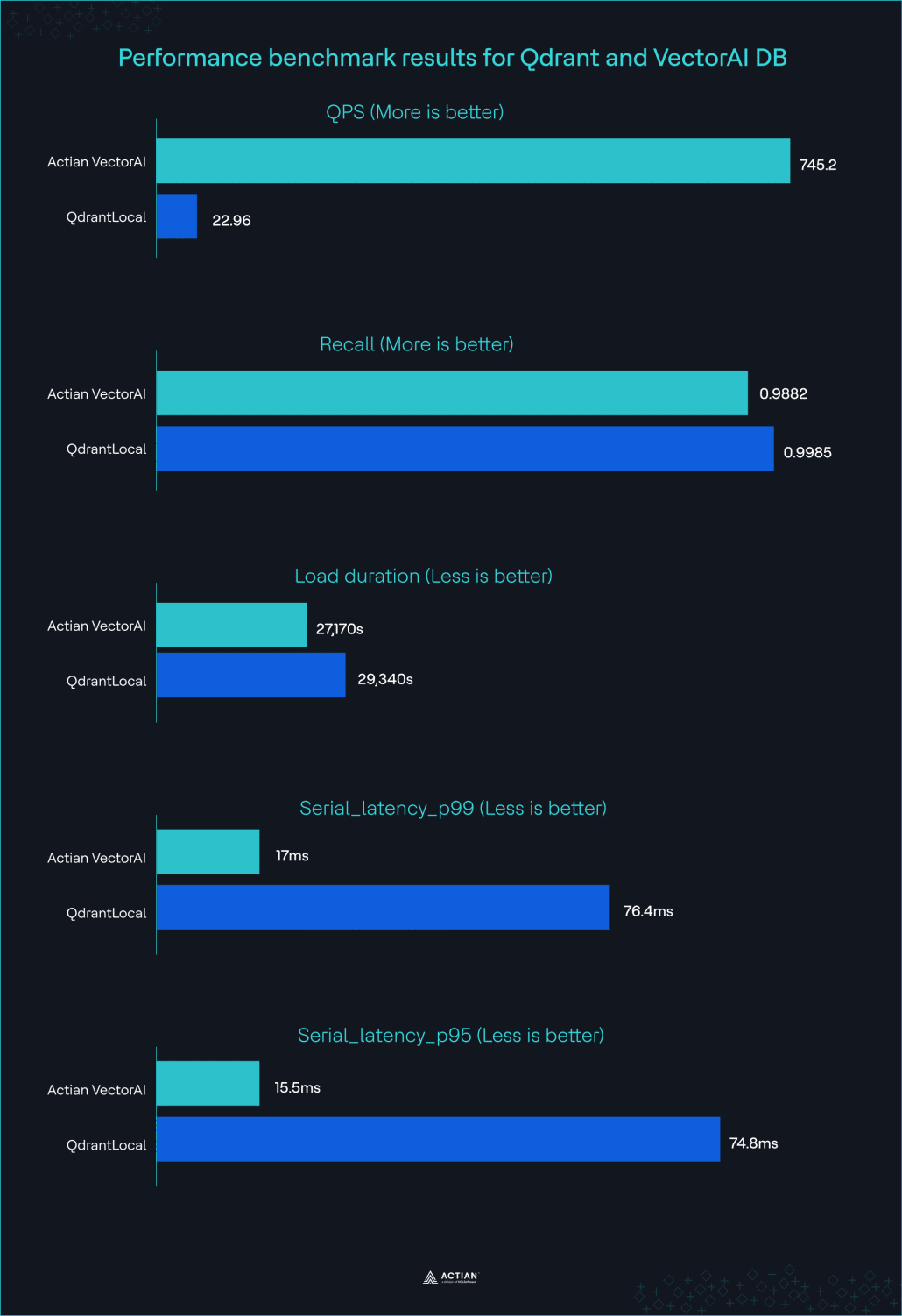
If your vector database workload has grown to 10 million vectors or more, and query performance has become the bottleneck, migrating from Qdrant to Actian VectorAI DB is worth consideration. In a published benchmark using 10 million vectors with 768-dimensional embeddings on identical hardware, VectorAI DB delivered 745.2 Queries Per Second (QPS), 32x faster than Qdrant and 22x faster than Milvus. For teams constrained by throughput and latency at production scale, those differences are significant.
That does not mean every Qdrant deployment should migrate. Qdrant remains a strong default for many self-hosted Retrieval-Augmented Generation (RAG) workloads. Qdrant can support millions of vectors, and community practitioners continue to regard Qdrant as one of the simplest production-ready vector databases to operate. If your dataset remains under 10 million vectors, your latency requirements are already met, and retrieval precision is your primary concern, there may be little reason to switch.
This article is for teams that have reached the opposite situation. If your dataset is approaching 10 million vectors, your Queries Per Second (QPS) ceiling has become a constraint, or your p99 latency no longer meets service-level objectives, this guide walks you through the trade-offs and the migration process. You will see exactly where Qdrant still performs better, and how to move a collection from Qdrant to VectorAI DB with minimal disruption to your application.
Comparison Table
The comparison table compares the results of VectorAI DB and Qdrant under specified conditions:
| Metric | VectorAI DB | Qdrant Local |
| Queries Per Second (QPS) | 745.2 | 22.96 |
| p99 latency | 17 ms | 76.4 ms |
| p95 latency | 15.5 ms | 74.8 ms |
| Recall | 0.9882 | 0.9985 |
| Load duration | 27,168.55 s | 29,337.74 s |
| Deployment model | Self-hosted vector database | Self-hosted vector database |
VectorAI DB and Qdrant benchmark results
Performance benchmarks
Benchmark configuration
- Dataset: 10 million vectors, 768 dimensions.
- Batch size: 500.
- Hardware: 8-core, 64 GB RAM server and 8-core, 32 GB RAM client.
- Index configuration: Default Hierarchical Navigable Small World (HNSW) settings for both products.
- Query workload: Serial latency benchmark, full-load QPS benchmark, and recall measurement against ground truth.
The benchmark shows a clear performance advantage for VectorAI DB at 10 million vectors. VectorAI DB delivers approximately 32 times higher throughput, more than five times lower p99 latency, and faster dataset loading. Qdrant Local achieves higher recall, making it the stronger option when retrieval precision outweighs throughput and latency requirements.
Methodology
The benchmark applies directly to your workload if you run large-scale vector search on a single node and care about query throughput, latency, and retrieval quality. If your environment differs significantly from the test conditions, treat the results as directional rather than predictive.
The benchmark used a dataset containing 10 million vectors, each with 768 dimensions. Both VectorAI DB and Qdrant Local processed the same dataset on identical hardware. The test environment consisted of an 8-core server with 64 GB of RAM hosting the database and an 8-core client machine with 32 GB of RAM generating the query workload. The test also used a 500-batch size.
To ensure a fair comparison, both products used their default Hierarchical Navigable Small World (HNSW) index configuration. No custom tuning, parameter optimization, or vendor-specific performance adjustments were applied. The objective was to compare out-of-the-box behavior rather than measure the limits of either system after extensive tuning.
The benchmark evaluated four metrics:
- Queries Per Second (QPS) under full query load.
- p95 serial query latency.
- p99 serial query latency.
- Recall measured against a ground-truth dataset.
The benchmark also measured dataset load duration, which represents the time required to ingest the full dataset and reach a production-ready state.
What this methodology does not cover
Before applying the results to your infrastructure, note three important limitations:
- The benchmark does not measure concurrent write throughput.
- The benchmark does not evaluate distributed or multi-node deployments.
- The benchmark does not evaluate workloads below 10 million vectors.
These limitations matter because many production Retrieval-Augmented Generation (RAG) systems operate below the 10 million vector scale tested here. Relatively small deployments can support millions of vectors efficiently on modest hardware. If your workload falls into that category, the benchmark may overstate the practical benefit of migration. If your dataset is already approaching 10 million vectors and continues to grow, the results provide a much closer approximation of real-world behavior.
The Recall Trade-Off
If retrieval quality is your primary requirement, Qdrant Local performs better in this benchmark. At 10 million vectors and 768 dimensions, Qdrant Local achieved a recall score of 0.9985, compared to 0.9882 for VectorAI DB.
This difference matters because recall measures how often a vector database returns the correct neighbors compared to a ground-truth result set. Higher recall means fewer relevant results are missed during retrieval. In applications where missing a document has material consequences, even a relatively small difference in recall can influence the database selection process.
Examples include:
- Medical record retrieval systems, where incomplete context can affect downstream decisions.
- Legal discovery platforms where omitted documents create compliance and risk concerns.
- Enterprise knowledge systems where accuracy is more important than response volume.
- Research and scientific search applications that prioritize comprehensive retrieval.
The correct choice depends on which constraint limits your system. If your users experience slow retrieval, missed service-level objectives, or throughput bottlenecks at scale, the performance gains may outweigh the reduction in recall. If recall is the primary requirement and your current query volume remains manageable, Qdrant Local’s higher recall may justify staying on the platform.
When to Migrate
You should migrate from Qdrant to VectorAI DB when throughput and latency have become the primary constraints in your vector search infrastructure. If metrics like QPS and latency directly affect your user experience or service-level objectives, migration becomes a practical option.
Consider migrating if one or more of the following conditions apply:
- Your application has reached Qdrant’s QPS ceiling under production load.
- Your p99 latency exceeds your service-level agreement (SLA) requirements.
- Your dataset is approaching or has exceeded 10 million vectors.
- Your projected growth will push the dataset into the tens of millions of vectors within the next 12 to 24 months.
- Query throughput and response time matter more than achieving the highest possible recall score.
You should consider staying on Qdrant if:
- Recall precision is your primary requirement.
- Your dataset remains below 10 million vectors with no significant growth expected.
- Your current latency already meets business requirements.
- Your team has invested heavily in Qdrant-specific tooling, workflows, and operational processes.
- The engineering effort required for migration outweighs the expected performance gains.
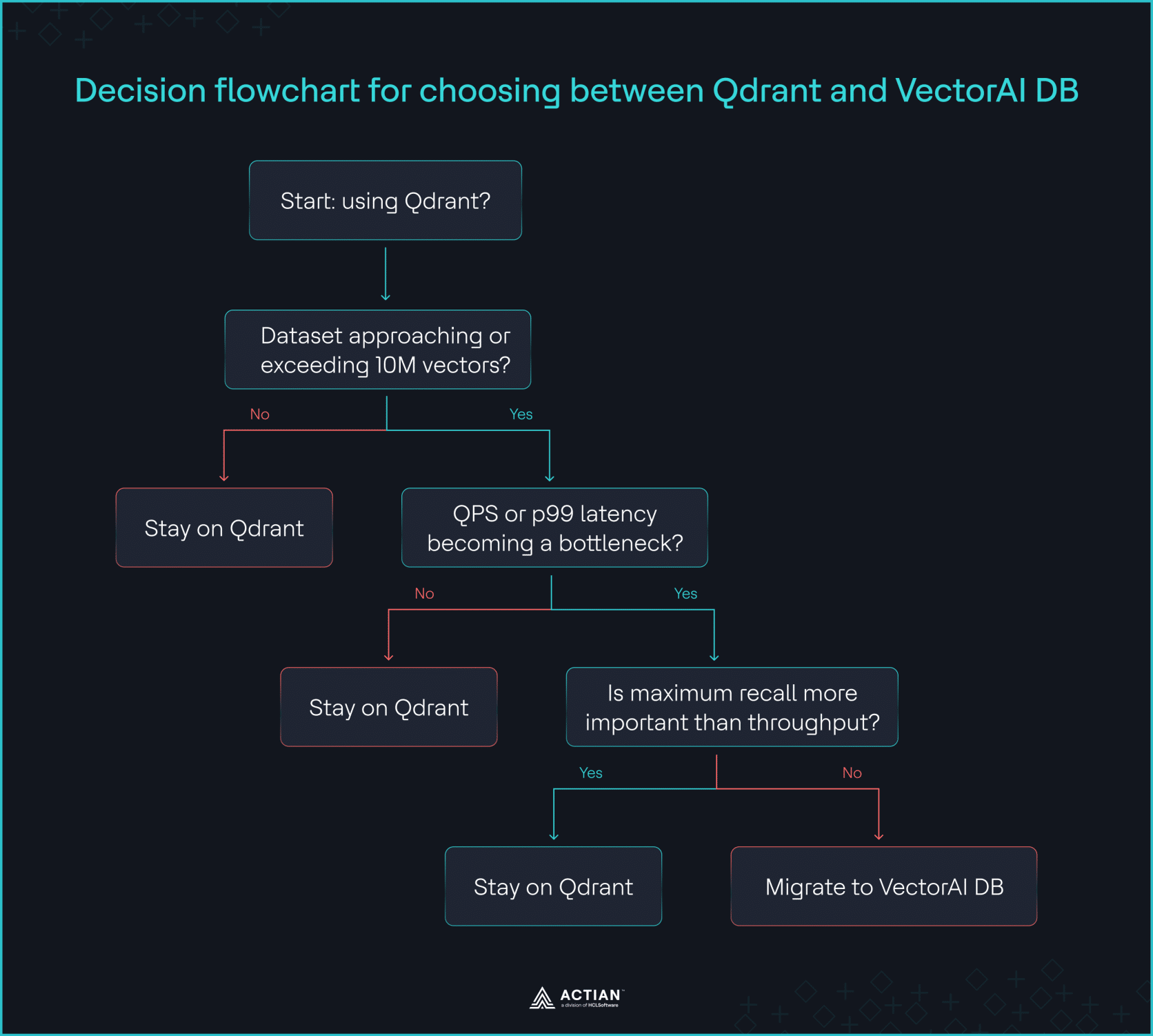
Decision flowchart
How to Migrate
Migration from Qdrant to VectorAI DB follows a straightforward pipeline:
- Ingest to Qdrant.
- Export from Qdrant.
- Create a VectorAI DB collection.
- Create a migration script.
- Validate migration.
The goal is to move your vectors and payloads without changing your application semantics while improving query performance at scale.
Step 1: Ingest to Qdrant
Before migration begins, you first need a populated Qdrant collection. This stage sets up a local environment with both Qdrant and VectorAI DB running using Docker Compose.
Create a docker-compose.yml file to install both vector databases:
services:

 vectorai:

   image: actian/vectorai:latest

   platform: linux/amd64

   container_name: vectorai_db

   ports:

    - "6573:6573" # REST

    - "6574:6574" # gRPC

   volumes:

     # vector data persists across restarts

    - ./data:/var/lib/actian-vectorai

   environment:

    - VECTORAI_LOG_LEVEL=info

    - ACTIAN_VECTORAI_ACCEPT_EULA=YES

   restart: unless-stopped

 qdrant:

   image: qdrant/qdrant

   platform: linux/arm64

   container_name: qdrant

   ports:

    - "6333:6333"

   volumes:

    - ./qdrant_data:/qdrant/storage
Start both containers by running the command:
docker-compose up -d
Confirm both services are healthy before proceeding:
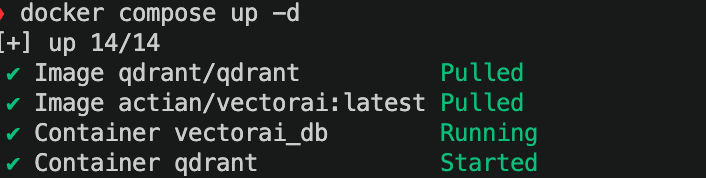
Starting the containers
Next, initialize your Python environment using UV:
uv init .Install the dependencies by running the command:
uv add actian-vectorai-client requests qdrant-clientCreate a file ingest_to_qdrant.py:
import numpy as np

from qdrant_client import QdrantClient

from qdrant_client.models import Distance, VectorParams, PointStruct

QDRANT_HOST  = "localhost"

QDRANT_PORT  = 6333

COLLECTION   = "qdrant_actian_migration_collection"

DIMENSION    = 768

BATCH_SIZE   = 256

NUM_VECTORS  = 1_000

def generate_data(num: int, dim: int):

np.random.seed(42)

ids      = list(range(num))

vectors  = np.random.randn(num, dim).astype(np.float32).tolist()

payloads = [

{

"source":   f"doc_{i:06d}",

"category": ["electronics", "clothing", "food"][i % 3],

"in_stock": i % 2 == 0,

}

for i in range(num)

]

return ids, vectors, payloads

def batch(lst, size):

for i in range(0, len(lst), size):

yield lst[i : i + size]

def main():

client = QdrantClient(host=QDRANT_HOST, port=QDRANT_PORT)

existing = [c.name for c in client.get_collections().collections]

if COLLECTION in existing:

print(f"Collection '{COLLECTION}' already exists — skipping creation.")

else:

client.create_collection(

collection_name=COLLECTION,

vectors_config=VectorParams(size=DIMENSION, distance=Distance.COSINE),

)

print(f"Collection '{COLLECTION}' created (dim={DIMENSION}, distance=COSINE).")

ids, vectors, payloads = generate_data(NUM_VECTORS, DIMENSION)

print(f"Prepared {len(ids)} vectors for ingestion.")

total = 0

for id_batch, vec_batch, pay_batch in zip(

batch(ids, BATCH_SIZE),

batch(vectors, BATCH_SIZE),

batch(payloads, BATCH_SIZE),

):

points = [

PointStruct(id=i, vector=v, payload=p)

for i, v, p in zip(id_batch, vec_batch, pay_batch)

]

client.upsert(

collection_name=COLLECTION,

points=points,

wait=True,

)

total += len(points)

print(f"  Upserted {total}/{len(ids)} vectors…")

count = client.count(COLLECTION).count

print(f"\nDone. Qdrant reports {count} vectors in '{COLLECTION}'.")

if __name__ == "__main__":

main()
This file creates a collection named qdrant_actian_migration_collection if it does not already exist, generates 1,000 synthetic 768-dimensional vectors along with associated metadata, and uploads them to Qdrant in batches of 256 using upsert operations. Throughout the process, it displays ingestion progress and, once all vectors have been loaded, verifies the operation by querying and printing the total number of vectors stored in the collection.
Run the script by:
uv run ingest_to_qdrant.pyYou get the result:

Ingest data to Qdrant collection
Step 2: Export data from Qdrant
After ingestion, the next step is to extract a consistent snapshot of your dataset from Qdrant.
Create a file export_from_qdrant.py:
import json

from qdrant_client import QdrantClient

QDRANT_HOST = "localhost"

QDRANT_PORT = 6333

COLLECTION  = "qdrant_actian_migration_collection"

OUTPUT_FILE = "qdrant_export.json"

BATCH_SIZE  = 256

client = QdrantClient(host=QDRANT_HOST, port=QDRANT_PORT)

records = []

offset  = None

while True:

batch, next_offset = client.scroll(

collection_name=COLLECTION,

limit=BATCH_SIZE,

offset=offset,

with_vectors=True,

with_payload=True,

)

for record in batch:

records.append({

"id":      record.id,

"vector":  record.vector,

"payload": record.payload,

})

print(f"Exported {len(records)} vectors…")

if next_offset is None:

break

offset = next_offset

with open(OUTPUT_FILE, "w") as f:

json.dump(records, f)

print(f"Done. {len(records)} records written to {OUTPUT_FILE}")
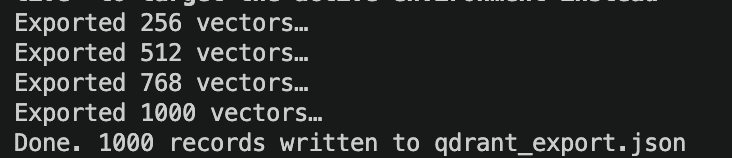
This script performs a full export of data from a Qdrant vector database collection. It connects to the database, reads all stored records in manageable batches, gathers each record’s identifier, vector embedding, and metadata, and accumulates them in memory.
Run the script by:
uv run export_from_qdrant.pyYou get the output as shown in the image:
Export data from Qdrant
After processing the entire collection, it saves the exported data to a JSON file (qdrant_export.json) in your current working directory.
Step 3: Create a VectorAI DB collection
Before importing data, you must prepare the destination system.
Create a file create_collection.py:
from actian_vectorai import VectorAIClient, VectorParams, Distance

VECTORAI_HOST = "localhost:6574"

COLLECTION    = "qdrant_actian_migration_collection"

DIMENSION     = 768

with VectorAIClient(VECTORAI_HOST) as client:

info = client.health_check()

print(f"Connected to {info['title']} v{info['version']}")

client.collections.create(

"qdrant_actian_migration_collection",

vectors_config=VectorParams(size=DIMENSION, distance=Distance.Cosine)

)

print("Collection 'qdrant_actian_migration_collection' created successfully")


This code connects to a local VectorAI DB server, verifies the connection with a health check, and then creates a new vector collection named qdrant_actian_migration_collection configured to store 768-dimensional vectors using cosine similarity for searches.
Run the script by:
uv run create_collection.pyYou should see the result:

Create VectorAI DB collection
Step 4: Create the migration script
Once both systems are ready, you build a migration script that bridges the two formats.
Create a file migrate.py:
import json

from qdrant_client import QdrantClient

from actian_vectorai import VectorAIClient, VectorParams, Distance, PointStruct, exceptions

QDRANT_HOST   = "localhost"

QDRANT_PORT   = 6333

VECTORAI_HOST = "localhost:6574"

COLLECTION    = "qdrant_actian_migration_collection"

DIMENSION     = 768

BATCH_SIZE    = 256

qdrant = QdrantClient(host=QDRANT_HOST, port=QDRANT_PORT)

with VectorAIClient(VECTORAI_HOST) as vectorai:

# Create collection, skip if it already exists

try:

vectorai.collections.create(

COLLECTION,

vectors_config=VectorParams(size=DIMENSION, distance=Distance.Cosine)

)

print(f"Collection '{COLLECTION}' created in VectorAI DB")

except exceptions.CollectionExistsError:

print(f"Collection '{COLLECTION}' already exists — skipping creation.")

# Stream all points from Qdrant and insert in batches

offset = None

total  = 0

while True:

records, next_offset = qdrant.scroll(

collection_name=COLLECTION,

limit=BATCH_SIZE,

offset=offset,

with_vectors=True,

with_payload=True,

)

if not records:

break

points = [

PointStruct(id=r.id, vector=r.vector, payload=r.payload)

for r in records

]

vectorai.points.upsert(COLLECTION, points)

total  += len(points)

offset  = next_offset

print(f"Migrated {total} vectors…")

if next_offset is None:

break

count = vectorai.points.count(COLLECTION)

print(f"Migration complete. VectorAI DB count: {count} (Qdrant exported: {total})")
This script performs a bulk migration of vector data from a Qdrant collection to an Actian VectorAI collection. It does the following:
- Connects to both Qdrant and Actian VectorAI: Ensures the target collection exists in VectorAI, creating it if necessary.
- Reads vectors, IDs, and associated metadata from Qdrant in batches.
- Inserts each batch of data into the VectorAI collection.
- Tracks and displays migration progress as records are transferred.
- Continues until all data has been copied from Qdrant.
- Verifies the migration by counting the vectors stored in VectorAI.
- Displays a final summary comparing the number of records exported from Qdrant with the number stored in VectorAI.
Run the script by:
uv run migrate.py
Migrate data from Qdrant to VectorAI DB
Step 5: Verify migration
After data transfer, verify the data in your VectorAI DB matches your data in Qdrant. At this stage, you verify two critical properties:
- Data completeness (vector counts match across systems)
- Basic ingestion correctness (no missing or partial writes)
The validation script compares both databases directly by querying their stored vector counts.
Create a file verify_migration.py:
"""
verify_migration.py

Verifies migration completeness between Qdrant and VectorAI DB by:

1. Comparing total vector counts
2. Sample-checking vector values and payloads for a subset of IDs
3. Flagging any mismatches in values, payloads, or missing records

Prerequisites:

pip install qdrant-client actian-vectorai numpy

Usage:

python verify_migration.py

"""

import random

import numpy as np

from qdrant_client import QdrantClient

from actian_vectorai import VectorAIClient

QDRANT_HOST   = "localhost"

QDRANT_PORT   = 6333

VECTORAI_HOST = "localhost:6574"

COLLECTION    = "qdrant_actian_migration_collection"

SAMPLE_SIZE   = 200      # number of random IDs to spot-check

TOLERANCE     = 1e-6     # floating point tolerance for vector value comparison

print("=" * 60)

print("Migration Verification")

print("=" * 60)

qdrant = QdrantClient(host=QDRANT_HOST, port=QDRANT_PORT)

# ── 1. Count comparison ───────────────────────────────────────

qdrant_count = qdrant.count(COLLECTION).count

print(f"\n[1] Vector counts")

print(f"    Qdrant   → {qdrant_count:,} vectors")

with VectorAIClient(VECTORAI_HOST) as vectorai:

    vectorai_count = vectorai.points.count(COLLECTION)

    print(f"    VectorAI → {vectorai_count:,} vectors")

    if qdrant_count == vectorai_count:

        print(f"    ✓ Counts match ({qdrant_count:,})")

        print(f"    Note: matching counts confirm no vectors were lost or")

        print(f"    duplicated, but do not verify vector values or payloads.")

    else:

        diff = abs(qdrant_count - vectorai_count)

        print(f"    ✗ Count mismatch — {diff:,} vectors missing or duplicated.")

        print(f"    Re-run migrate.py before proceeding with sample checks.")

    # ── 2. Sample vector and payload check ───────────────────────

    print(f"\n[2] Sample check ({SAMPLE_SIZE} random IDs)")

    print(f"    Scrolling Qdrant to collect candidate IDs...")

    # Collect IDs only — memory-safe at 10M+ vectors

    all_ids = []

    offset  = None

    BATCH   = 1000

    while True:

        records, next_offset = qdrant.scroll(

            collection_name=COLLECTION,

            limit=BATCH,

            offset=offset,

            with_vectors=False,

            with_payload=False,

        )

        all_ids.extend(r.id for r in records)

        if next_offset is None:

            break

        offset = next_offset

    print(f"    Collected {len(all_ids):,} IDs from Qdrant.")

    sample_ids = random.sample(all_ids, min(SAMPLE_SIZE, len(all_ids)))

    # Fetch sampled records from both sides

    qdrant_records = qdrant.retrieve(

        collection_name=COLLECTION,

        ids=sample_ids,

        with_vectors=True,

        with_payload=True,

    )

    qdrant_map = {r.id: r for r in qdrant_records}

    # with_vectors=True required — VectorAI DB returns vectors=None by default

    vectorai_records = vectorai.points.get(COLLECTION, sample_ids, with_vectors=True)

    vectorai_map     = {r.id: r for r in vectorai_records}

    # Compare

    missing_in_vectorai = []

    payload_mismatches  = []

    vector_mismatches   = []

    for rid in sample_ids:

        if rid not in vectorai_map:

            missing_in_vectorai.append(rid)

            continue

        q = qdrant_map[rid]

        v = vectorai_map[rid]

        # Payload check

        if q.payload != v.payload:

            payload_mismatches.append(rid)

        # Vector value check — Qdrant uses .vector, VectorAI DB uses .vectors

        q_vec = np.array(q.vector,  dtype=np.float32)

        v_vec = np.array(v.vectors, dtype=np.float32)

        if not np.allclose(q_vec, v_vec, atol=TOLERANCE):

            vector_mismatches.append(rid)

    print(f"\n    Results across {len(sample_ids)} sampled vectors:")

    if not missing_in_vectorai:

        print(f"    ✓ All {len(sample_ids)} sampled IDs present in VectorAI DB")

    else:

        print(f"    ✗ {len(missing_in_vectorai)} IDs missing in VectorAI DB: "

              f"{missing_in_vectorai[:10]}")

    if not vector_mismatches:

        print(f"    ✓ All {len(sample_ids)} sampled vectors match "

              f"within tolerance ({TOLERANCE})")

    else:

        print(f"    ✗ {len(vector_mismatches)} vector value mismatches: "

              f"{vector_mismatches[:10]}")

    if not payload_mismatches:

        print(f"    ✓ All {len(sample_ids)} sampled payloads match")

    else:

        print(f"    ✗ {len(payload_mismatches)} payload mismatches: "

              f"{payload_mismatches[:10]}")

    # ── 3. Final verdict ──────────────────────────────────────────

    print("\n" + "=" * 60)

    all_clear = (

        qdrant_count == vectorai_count

        and not missing_in_vectorai

        and not vector_mismatches

        and not payload_mismatches

    )

    if all_clear:

        print(f"✓ Migration verified. Counts match, vectors and payloads")

        print(f"  are consistent across {SAMPLE_SIZE} sampled records.")

        print(f"  Note: this is a statistical check, not an exhaustive scan.")

        print(f"  Increase SAMPLE_SIZE for higher confidence on large datasets.")

    else:

        print(f"✗ Verification failed. Re-run migrate.py to fix missing or")

        print(f"  mismatched vectors before switching production traffic.")

    print("=" * 60)
This script performs a multi-layer verification between Qdrant and VectorAI DB:
- It compares total vector counts to confirm structural completeness.
- It randomly samples IDs and checks that all records exist in both systems.
- It compares vector values using a numerical tolerance to detect embedding drift.
- It verifies payload consistency across both databases.
If counts match and sampled records are consistent, the migration is statistically validated. If any mismatch is detected, the script flags missing vectors, payload inconsistencies, or vector divergence before production cutover.
If the counts do not match, the script reports the exact difference. In that case, you should re-run the migration process for the missing batch range before proceeding.
Run the script by:
uv run verify_migration.py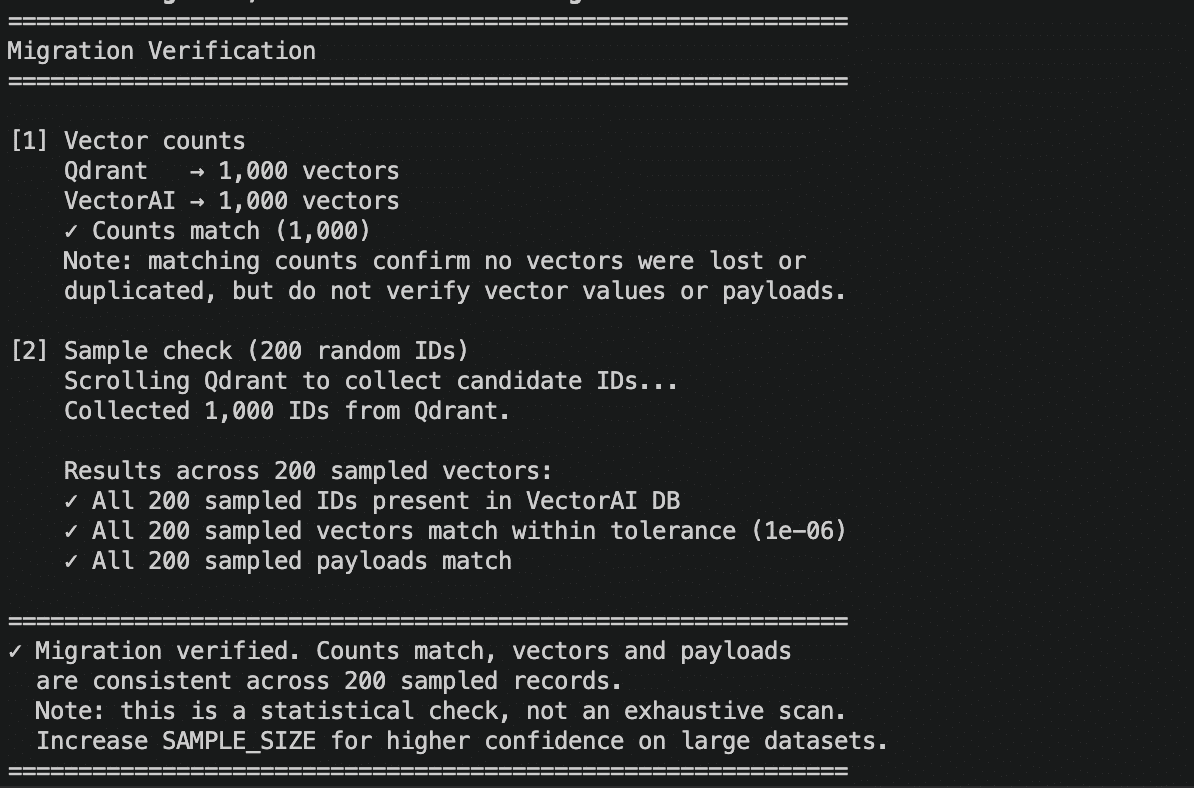
Verify data migration
When Not to Migrate
Qdrant is the better choice when retrieval quality matters more than throughput, and your system has not reached scale pressure. You should not migrate if your dataset remains under 10 million vectors and your query load stays within Qdrant’s operational envelope. In these conditions, Qdrant’s higher recall score provides more accurate nearest-neighbor retrieval than VectorAI DB’s, which is critical for workloads where missing relevant context is not acceptable.
Stay on Qdrant if your application prioritizes precision over speed, especially in domains such as legal search, medical retrieval, or compliance-heavy systems. You should also avoid migration if your team is already deeply integrated into Qdrant’s SDK, operational tooling, and deployment workflows, and the engineering cost of migration outweighs performance gains.
VectorAI DB becomes the better option when your system hits sustained QPS limits, p99 latency breaches SLA requirements, or your dataset approaches 10 million vectors with continued growth. The decision is not about capability, but about which constraint dominates your workload.
Wrapping Up
In this article, we have compared Qdrant and VectorAI DB under large-scale vector workloads. We reviewed how both systems behave under identical conditions, where each performs well, and where their trade-offs become important in production environments.
We also walked through a full migration process from Qdrant to VectorAI DB, from initial ingestion and export to validation of a completed migration. The goal was to show not just when a switch makes sense, but how to execute it safely when performance becomes the primary constraint.
The decision ultimately depends on your workload requirements, particularly at scale, and how you balance retrieval accuracy against system performance.
Get started with Actian VectorAI DB Community Edition by signing up today. Check the documentation for deployment and usage instructions, and join the Discord community for support and discussion.

Stay connected
Data insights delivered to you.
(i.e. sales@..., support@...)
