
Securing Your Data With Actian Vector, Part 7



Summary
- Encrypted databases allow rotating table-level encryption keys independently of passphrases or main keys.
- ALTER KEYS enables DBAs to rotate keys for all tables or selected tables as needed.
- Table key rotation re-encrypts data, improving security but may be resource-intensive.
- Staggering table key changes helps reduce performance impact during peak workloads.
Action Vector 7.0 is renamed to Actian Analytics Engine beginning with version 8.0
Besides just changing the passphrase and optionally also the main key, as explained in the previous blog posts in this series, it is also possible to change the encryption keys for the individual tables in the encrypted database. The collection of these commands gives the DBA full control over changing keys in the Actian Vector encrypted database.
Managing Encryption Keys for Encryption at Rest
Rotating Table Keys
“Table keys” can be changed only in encrypted databases because there are no table keys in non-encrypted databases. Table keys are changed independently from the passphrase and the “main key.” For this, the SQL statement ALTER KEYS is used.
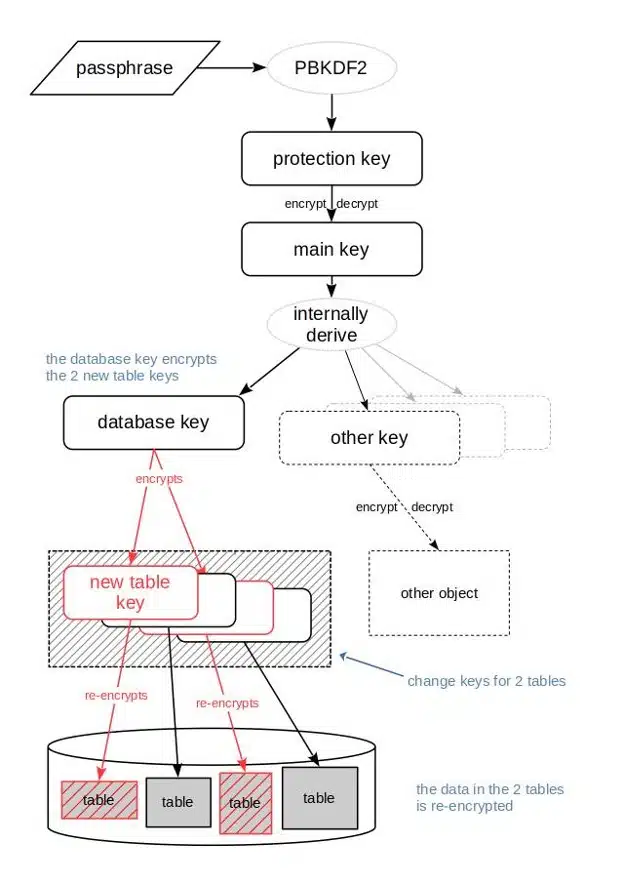
When a table key is changed, a new table key is generated randomly. The old table key is used to decrypt the data of the table, then the data is re-encrypted with the new table key. The new table key is encrypted with the “database key” and stored in the container.
Depending on the amount of data in the table, changing the table key can be a computationally expensive operation that takes considerable time. While it is possible to change all table keys in a database with a single SQL command, i.e. “at the same time,” table keys can also be changed for individual tables only. The latter allows an administrator to spread the workload by running separate SQL statements for different tables at different times, e.g. when the general workload from database users is low.
- Changing the keys for all tables in a database:
ALTER KEYS ON DATABASE;
- Changing keys of individual tables:
ALTER KEYS ON TABLE <table1>, <table2>, … ;
The effect of changing table keys for two individual tables is shown in the following graphic:
Explore Other Blogs on Securing Your Data With Actian Vector:
- Using database encryption in Actian Vector
- Managing encryption keys for encryption at rest.
- Changing only the passphrase for an encrypted database.
- Upgrading an existing encrypted database to Actian Vector 7.0.
- Understanding different encryption keys.
- Leveraging Actian Vector functional encryption capabilities.

Stay connected
Data insights delivered to you.
(i.e. sales@..., support@...)
