
¿Es Actian VectorAI DB la mejor alternativa a pgvector para sistemas embebidos?


Principales conclusiones
- Elige pgvector si tu aplicación ya se ejecuta en Postgres y quieres realizar búsquedas vectoriales dentro de la misma base de datos.
- Elige VectorAI DB cuando necesites una búsqueda vectorial autónoma sin el consumo de memoria ni la sobrecarga operativa de Postgres.
- La mayor diferencia radica en la implementación: pgvector depende de Postgres, mientras que VectorAI DB se ejecuta como un servicio local independiente.
- Esto hace que VectorAI DB sea una opción más adecuada para entornos periféricos, embebidos y con recursos limitados.
- La disyuntiva principal es elegir entre la integración con una pila SQL ya existente y una implementación autónoma más sencilla para las cargas de trabajo de IA locales.
La dependencia de PostgreSQL determina esta comparación antes incluso de que se realice cualquier prueba de rendimiento. Si una aplicación ya se conecta a un backend de Postgres, pgvector es la opción más práctica para la búsqueda vectorial. El equipo evita así una migración a una base de datos vectorial, nuevos manuales de operaciones, lagunas en la monitorización y modos de fallo desconocidos.
Esa relación se ve alterada en las implementaciones con recursos limitados y sin infraestructura preexistente. Configurar una base de datos relacional exclusivamente para la búsqueda vectorial supone una sobrecarga de memoria y operativa que el hardware periférico y las aplicaciones de IA integradas no siempre pueden asumir.
Comparamos ambas opciones y mostramos exactamente cuándo Actian VectorAI DB resulta ser la mejor opción frente a pgvector.
TL;DR
A continuación se muestra una comparación entre pgvector y VectorAI DB en cuanto a implementación, rendimiento y coste.
| Capacidad | pgvector | VectorAI DB |
| Modelo de implementación | Ejecutar una instancia de Postgres o un servicio gestionado de Postgres | Instancia local de Docker |
| Dependencia de PostgreSQL | Sí | No |
| Instalación independiente | No, es necesario instalar la extensión en cada base de datos. | Sí, mediante un contenedor de Docker |
| Compatible con dispositivos periféricos/integrados | No, requiere una configuración de memoria adicional | Sí, el nivel Starter (1 millón de vectores) funciona dentro de las limitaciones del hardware periférico. |
| Sin conexión/sincronizar al conectarse | No, requiere una replicación a nivel de aplicación o una capa de conciliación. | Sí |
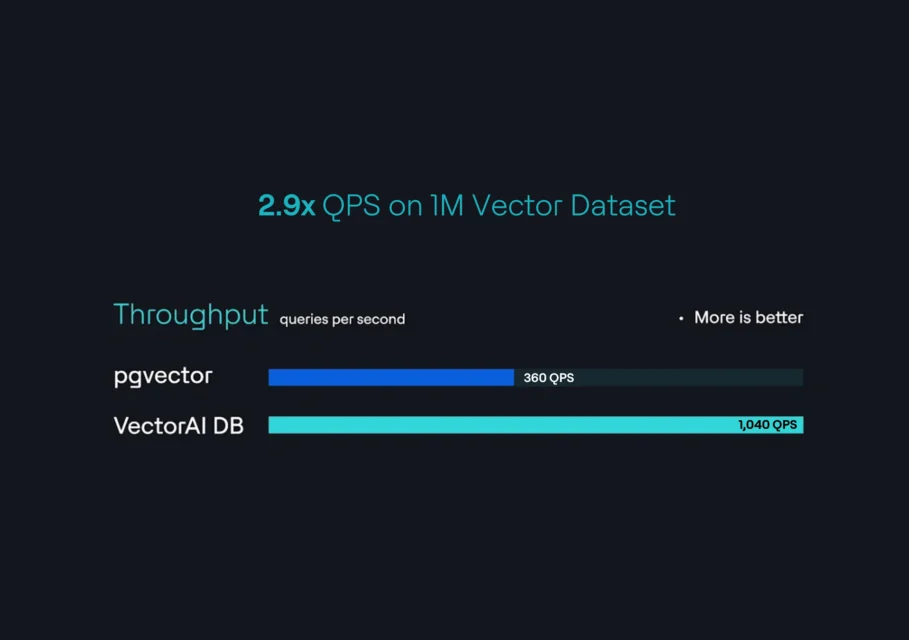
| QPS con 1 millón de vectores | 360 | 1,040 |
| Latencia de p99 con 1 millón de vectores | 124 ms | 12,7 ms |
| Tipos de índices | HNSW, IVFFlat | HNSW |
| Coste de la licencia | Licencia de código abierto de Postgres; el coste de la infraestructura se factura por separado | Licencia comercial exclusiva a partir de 417 dólares al mes por 1 millón de vectores |
| Interfaz de consultas SQL | Sí | No |
| Opciones de nube gestionada | Servicios gestionados de los principales proveedores de nube, como AWS, Azure y Google Cloud, y de proveedores especializados, como Neon, Supabase y Heroku | No |
Requisitos para ejecutar pgvector
pgvector añade la búsqueda vectorial a una base de datos relacional de PostgreSQL mediante una extensión que registra tipos de datos vectoriales y operadores de similitud. No funciona como una base de datos vectorial independiente.
Implementar pgvector para la búsqueda semántica implica poner en marcha Postgres, instalar la extensión a nivel del sistema operativo —ya sea compilándola desde el código fuente o mediante un gestor de paquetes—, ejecutar el comando CREATE EXTENSION vector dentro de cada base de datos y crear tablas con columnas vectoriales para almacenar las representaciones. Los equipos que ya cuentan con una instancia de Postgres en funcionamiento se saltan la mayoría de estos pasos. La extensión vectorial se instala en cuestión de minutos y la base de datos existente absorbe la nueva carga de trabajo.
Los equipos que no utilizan Postgres asumen toda la carga operativa. PostgreSQL incorpora de serie la gestión de memoria, la durabilidad del registro por adelantado (WAL) y la recuperación tras fallos como parte de su motor. Cada implementación soporta esa carga antes incluso de que la aplicación escriba una sola inserción. En hardware periférico con recursos limitados y en los sistemas de IA integrados, esa huella es el factor decisivo.
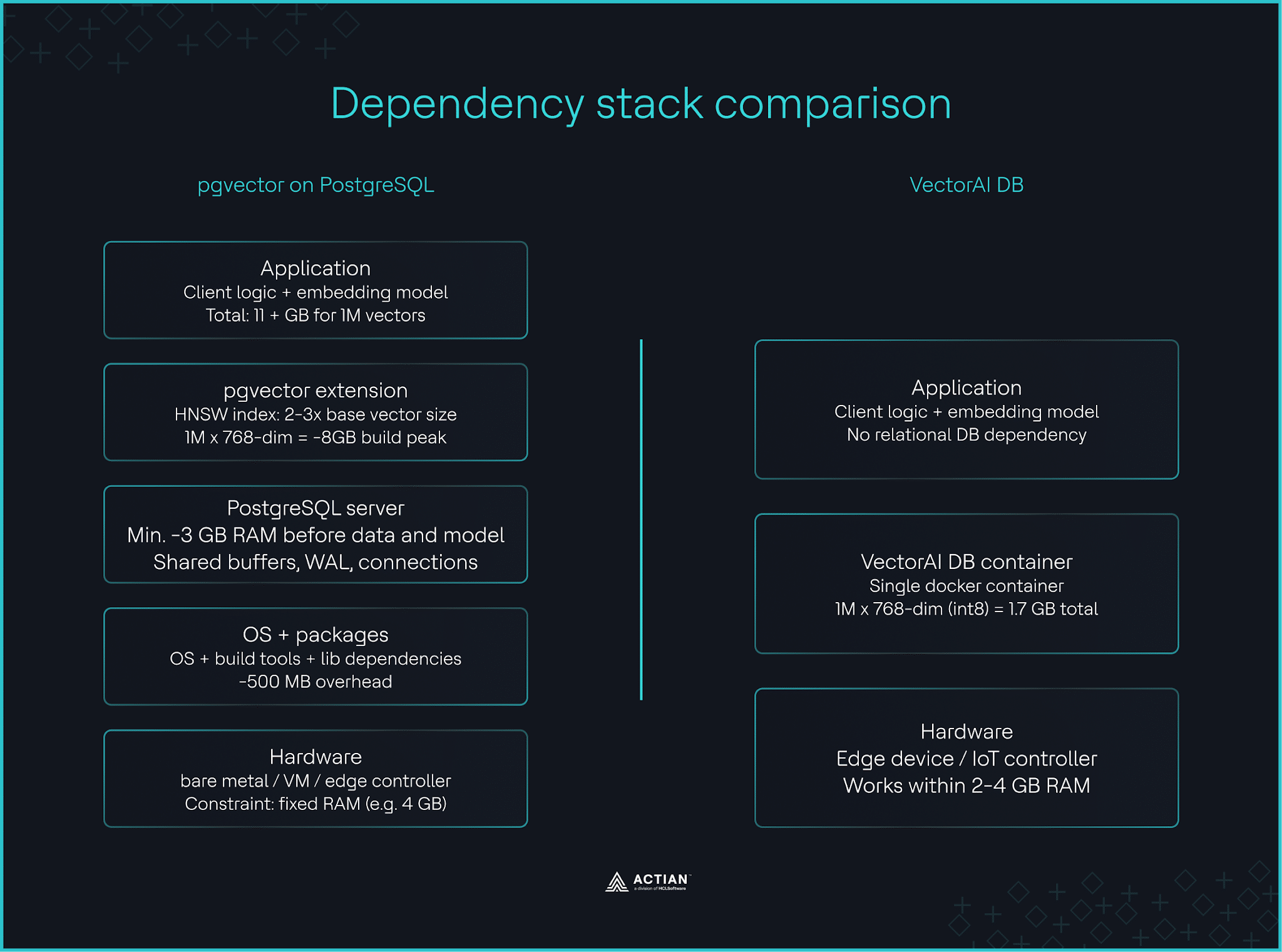
Postgres consume aproximadamente 3 GB de RAM sin tener en cuenta el sistema operativo, el modelo de IA ni los datos vectoriales. Los índices HNSW añaden entre entre 2 y 3 veces el tamaño del vector base durante la creación de los índices. Para un millón de vectores de 768 dimensiones, se necesitan máquina con 11 GB de RAM es el punto de partida realista. Ejecuta esa carga de trabajo en un controlador industrial de borde con 4 GB de RAM que gestione la inferencia de datos de sensores, y el hardware no podrá soportarla. Hay cuatro parámetros de Postgres que determinan este consumo de recursos.
Documentación de Postgres recomienda shared_buffers al 25 % de la RAM, work_mem tiene un valor predeterminado de 4 MB por operación de consulta, maintenance_work_mem reserva 64 MB para la creación de índices, y effective_cache_size tiene un valor predeterminado de 4 GB, con una configuración recomendada del 50-75 % de la RAM total. Ajustar cada parámetro para optimizar el rendimiento de la búsqueda vectorial en implementaciones autohospedadas es una tarea rutinaria para un equipo de Postgres. Para los equipos sin experiencia en Postgres, la curva de aprendizaje no tiene nada que ver con la búsqueda vectorial. Están aprendiendo a manejar una base de datos relacional solo para habilitar una única función.
Comparación de la pila de dependencias entre pgvector y VectorAI DB
VectorAI DB se instala como un único contenedor de Docker sin ninguna base de datos relacional subyacente. El nivel «Starter» admite 1 millón de vectores de 768 dimensiones con precisión int8 en 1,7 GB de memoria total, aproximadamente seis veces menos que la ruta de pgvector con la misma carga de trabajo. En un controlador periférico de 4 GB, esa diferencia en el consumo de memoria deja margen para que se ejecuten el modelo de IA, la aplicación y el sistema operativo. Una vez en marcha la implementación, la siguiente pregunta es: ¿qué velocidad de respuesta ofrece?
Rendimiento con 1 millón de vectores
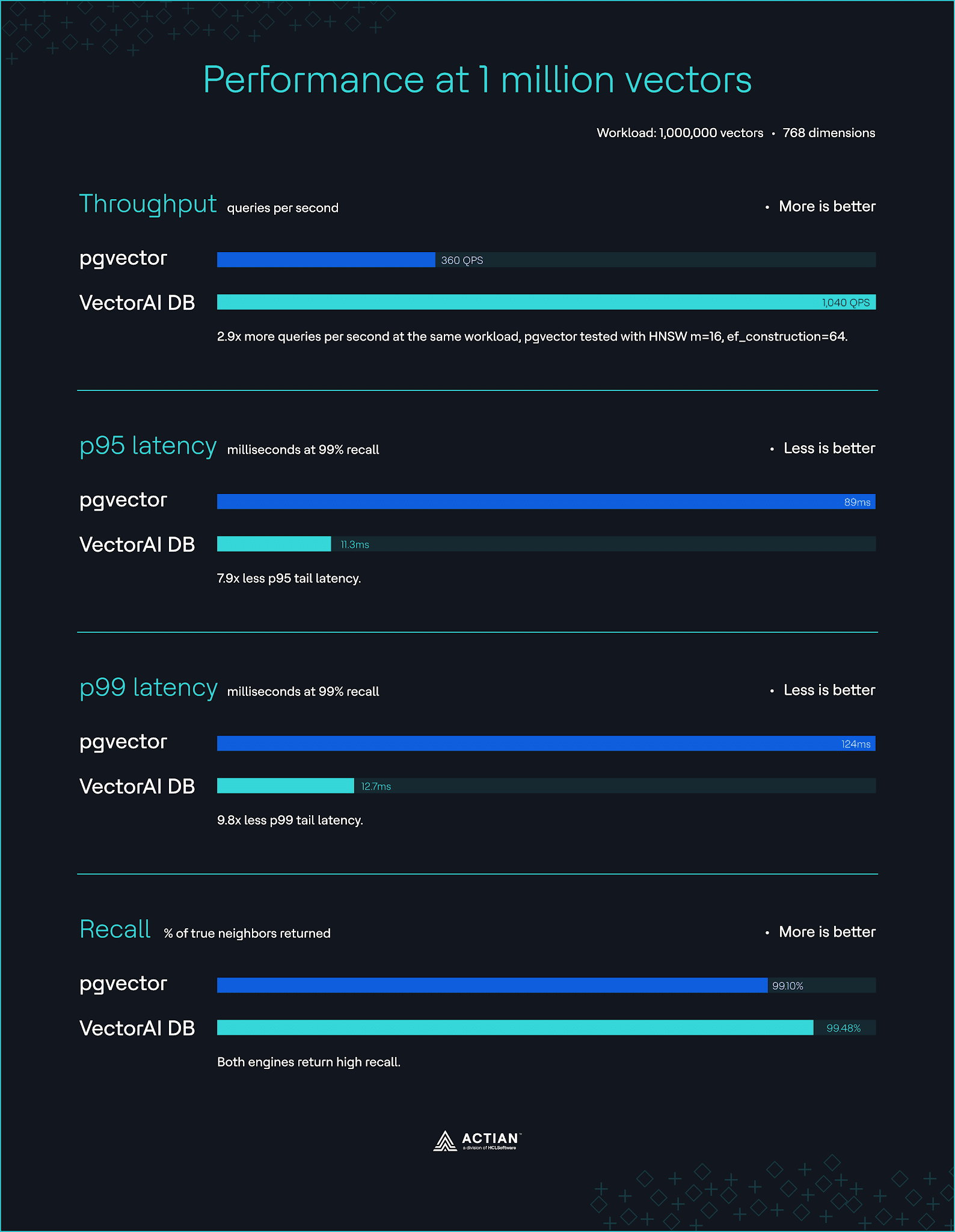
Los resultados de las pruebas de rendimiento de pgvector varían según los estudios publicados, ya que dependen de los parámetros de HNSW y de la configuración de PostgreSQL. Una prueba realizada en abril de 2026 realizada en instancias AWS r6i.2xlarge (8 vCPU, 64 GB de RAM) con 1 millón de vectores y 768 dimensiones arrojó una latencia p95 de 89 ms y una latencia p99 de 124 ms con una recuperación del 99,1 %. Una prueba independiente que utilizó un índice HNSW con m=16 y ef_construction=64 arrojó 360 QPS con una latencia p95 de 48 ms. Esta fluctuación en la latencia pone de manifiesto cuál es el lugar que ocupa pgvector.
Con un p99 de 124 ms, pgvector resulta adecuado para bases de conocimiento, sistemas de recomendación y catálogos de productos de comercio electrónico, en los que los usuarios pueden tolerar latencias ocasionales en la cola superiores a 100 ms. La inferencia en el propio dispositivo en entornos sin conexión, los sistemas de seguridad y las aplicaciones locales de generación aumentada por recuperación (RAG) requieren una latencia p99 de entre menos de 20 ms y 50 ms. Una aplicación de sensores de fabricación que clasifica defectos en un nodo periférico de 4 GB no puede permitirse esperar 124 ms por consulta.
VectorAI DB alcanza 1.040 QPS con un recall del 99,48 % en la misma carga de trabajo de 1 millón de vectores y 768 dimensiones, con una latencia p95 de 11,3 ms y una p99 de 12,7 ms. La prueba de rendimiento se ejecutó en un equipo con 64 GB de RAM y los parámetros HNSW m=32, ef_construction=512 y ef_search=512.
Una latencia de consulta p99 de 12,7 ms significa que el nivel «Starter» de VectorAI DB, ejecutado en un dispositivo periférico, realiza una inspección visual en una línea en movimiento con restricciones de inferencia inferiores a 50 ms puede realizar búsquedas de similitud vectorial de forma local y señalar una pieza defectuosa antes de que salga de la estación de inspección.
Rendimiento con 1 millón de vectores
Consulta el artículo sobre la prueba de rendimiento de VectorAI DB para conocer todos los detalles sobre la metodología y la reproducibilidad.
El coste de poner pgvector en producción
pgvector es un programa de código abierto y de uso gratuito bajo la licencia de PostgreSQL. Sin embargo, la infraestructura en la que se ejecuta no lo es.
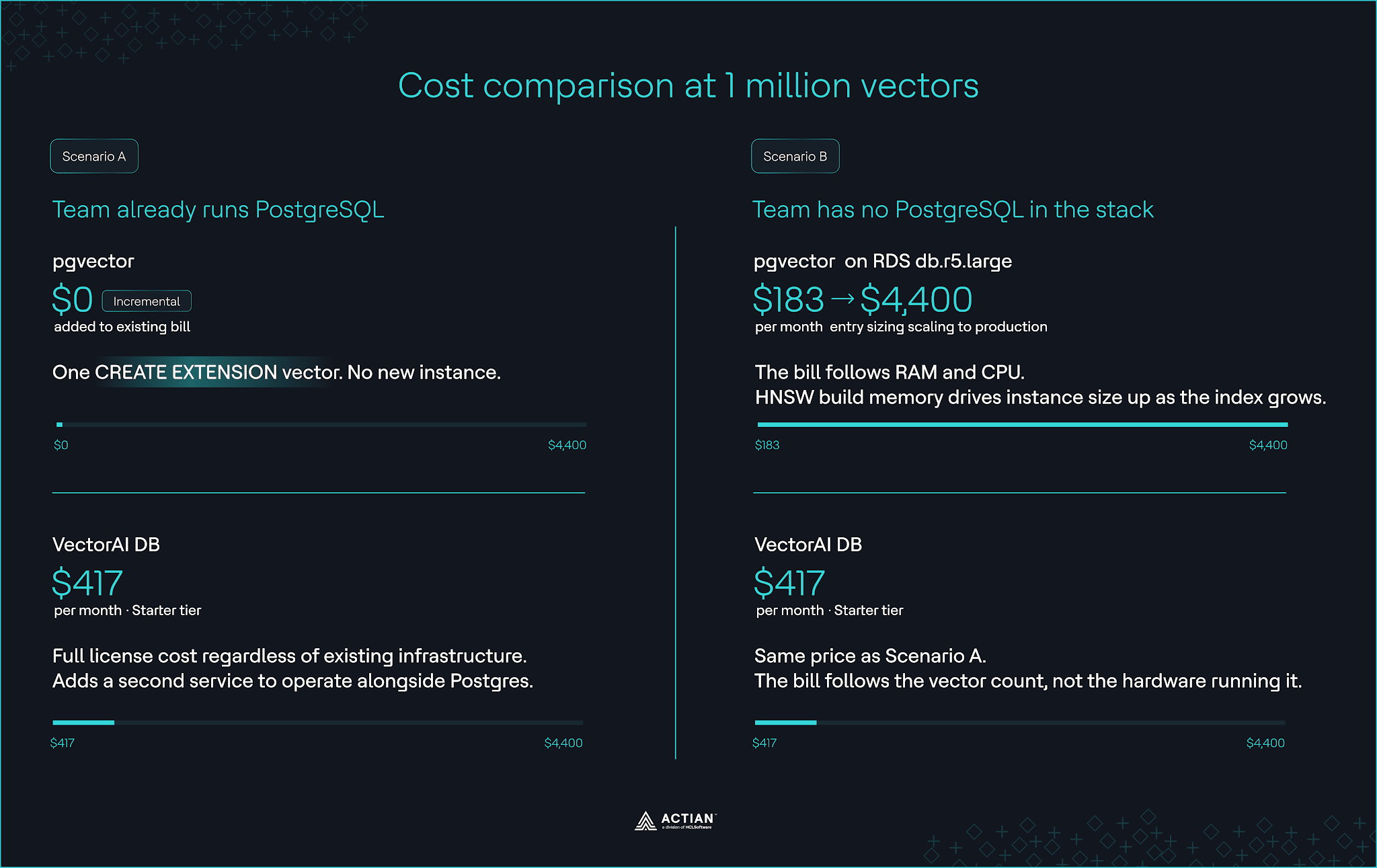
Ampliar una base de datos Postgres ya existente con pgvector no supone ningún coste adicional en la factura de la base de datos. Los datos vectoriales comparten la instancia, la supervisión y el sistema de copias de seguridad ya existentes.
Para los equipos que no disponen de Postgres, el coste lo supone la propia base de datos. El autoalojamiento implica aprovisionar un servidor, dimensionarlo para cargas de trabajo vectoriales y gestionar el ajuste continuo que requiere una base de datos relacional para este tipo de cargas de trabajo.
Los servicios gestionados de Postgres en AWS RDS, Google Cloud SQL, Azure Database, Neon o Supabase eliminan la gestión de la infraestructura, sustituyéndola por una dependencia del proveedor y modelos de precios que quizá no se ajusten a tus patrones de uso. Una instancia db.r5.large en la región us-east-1 cuesta unos 183 dólares al mes en AWS RDS con la configuración básica y puede llegar a costar aproximadamente 4.400 dólares a medida que aumentan los requisitos de memoria y CPU debido al volumen de consultas.
La factura aumenta de forma no lineal con el número de vectores. Un equipo de ingeniería que utilizaba Postgres documentó que la latencia de las búsquedas en su plataforma de comercio electrónico aumentó de 50 ms a 800 ms cuando las representaciones de los productos superaron los 10 millones. Su implementación final en producción, con 50 millones de vectores, requirió una instancia con 1 TB de RAM, y solo el índice HNSW ocupaba 450 GB. En AWS RDS, el motor de base de datos para esa carga de trabajo costará aproximadamente 8.700 dólares al mes en modo bajo demanda.
VectorAI DB establece el precio de la carga de trabajo directamente. El nivel «Starter» permite procesar 1 millón de vectores por 417 dólares al mes; 5 millones de vectores cuestan 1.250 dólares, y las cargas de trabajo superiores a 10 millones rondan los 2.500 dólares. El coste depende del número de vectores, no del tamaño de la máquina que ejecuta la carga de trabajo.
Comparación de costes con 1 millón de vectores
Con 1 millón de vectores y un Postgres ya existente, pgvector es la opción más económica para empezar a utilizarlo en producción. Para los equipos que estén configurando una nueva infraestructura dedicada exclusivamente a la búsqueda vectorial, los precios de VectorAI DB son predecibles y no hay que pagar una factura aparte por Postgres.
Cuándo pgvector es la opción más adecuada
pgvector es la mejor opción para cualquier equipo que ya utilice Postgres en producción.
La búsqueda vectorial se instala mediante un único comando CREATE EXTENSION vector;, y tanto las representaciones como los datos de la aplicación comparten la misma instancia. Una consulta clasifica una columna vectorial por similitud y utiliza SQL JOIN para combinar datos estructurados de tablas relacionadas sin necesidad de una lógica de sincronización.
La superficie operativa no sufre cambios. PostgreSQL realiza copias de seguridad de los vectores mediante el flujo de trabajo de pg_dump y los supervisa a través de las mismas métricas de consultas y conexiones. Para un equipo de PostgreSQL, la búsqueda vectorial supone una carga de trabajo más en un sistema que ya gestionan.
AWS RDS, Google Cloud SQL y Azure Database incluyen pgvector como extensión compatible. Los sistemas de recomendación, las bases de conocimientos internas y las aplicaciones de búsqueda semántica se ejecutan en Postgres con pgvector a escalas de vectores que van de 1 millón a 100 millones en cada proveedor. Estas implementaciones se benefician de las cuatro décadas de experiencia en ingeniería de bases de datos de Postgres, que pgvector no ha tenido que reconstruir desde cero.
Elegir una base de datos vectorial específica cuando Postgres aloja tu aplicación supone gestionar un segundo servicio para satisfacer un requisito que Postgres ya cumple.
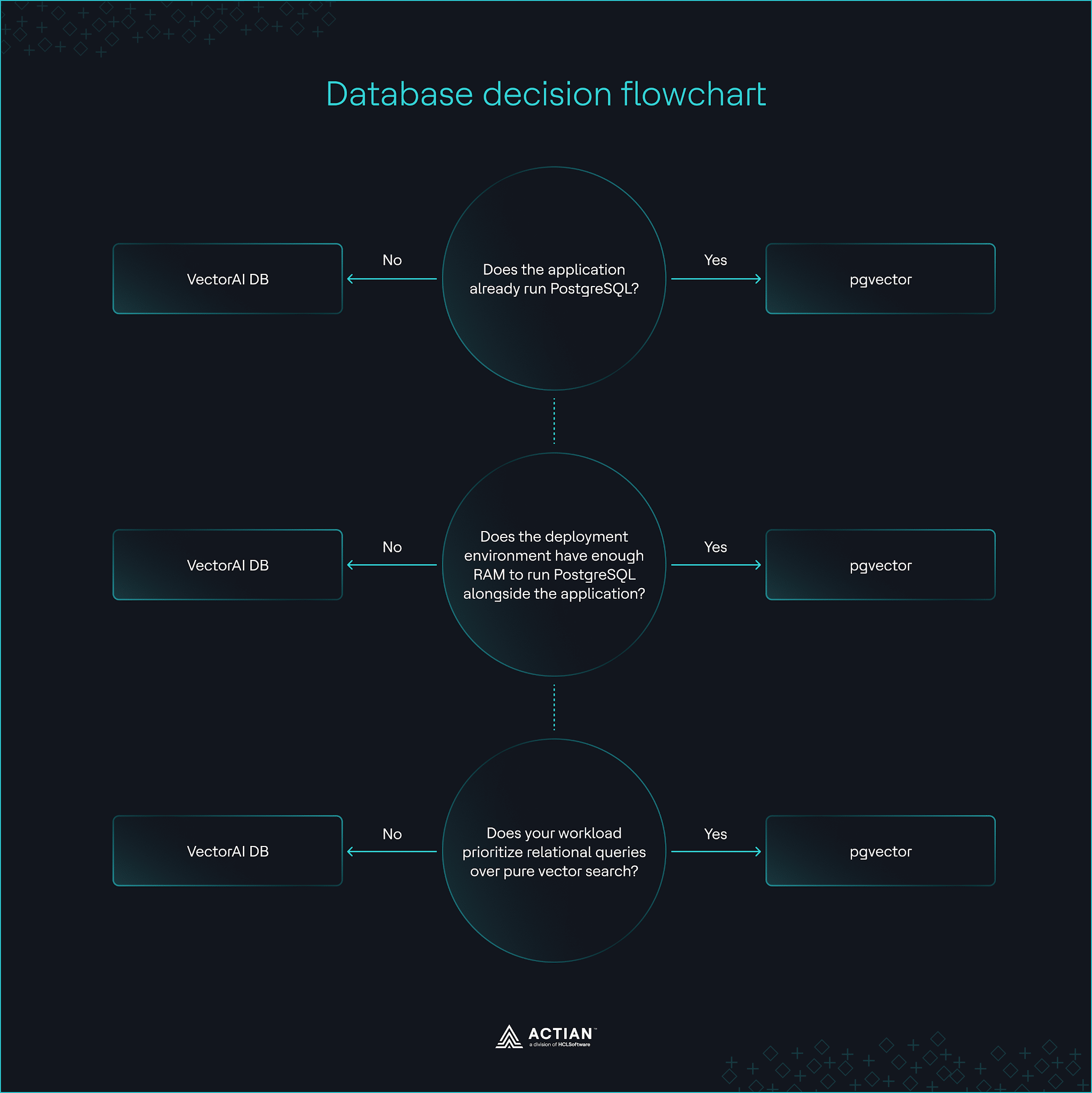
Diagrama de flujo de decisiones de la base de datos
Experiencia del desarrollador e integración
pgvector permite realizar operaciones vectoriales, como la similitud coseno, la distancia L2 y el producto escalar, mediante operadores SQL estándar. Una sola consulta puede combinar la búsqueda de similitud IVFFlat o HNSW con una cláusula WHERE para realizar una búsqueda híbrida. Esa misma consulta también puede aprovechar las capacidades de búsqueda de texto completo de tsvector y tsquery de PostgreSQL.
Las consultas a la base de datos de VectorAI se realizan a través de un SDK de Python o JavaScript, o directamente mediante las API gRPC y REST. El filtrado de metadatos mediante FilterBuilder limita el conjunto de resultados candidatos utilizando campos como etiquetas, marcas de tiempo o identificadores de inquilino, y la búsqueda por similitud vectorial mediante HNSW recupera resultados semánticamente relacionados dentro de ese límite.
Los bloques de código que aparecen a continuación muestran cómo pgvector y VectorAI DB gestionan la búsqueda híbrida para aplicaciones de IA que requieren tanto similitud semántica como búsqueda exacta del vecino más cercano. En cada ejemplo se crea un catálogo de venta al por menor y se ejecuta una búsqueda híbrida que clasifica las tres mejores coincidencias según la similitud vectorial, al tiempo que se filtran las prendas disponibles en stock.
Búsqueda híbrida con pgvector:
import random
import psycopg2
DIMENSION = 128
products = [
    (i, [random.gauss(0, 1) for _ in range(DIMENSION)], cat, True, f"2024-0{(i % 3) + 1}-01")
    for i, cat in enumerate(["apparel", "footwear", "accessories"] * 30)
]
with psycopg2.connect("postgresql://postgres:postgres@localhost:5432/retail_db") as conn:
    with conn.cursor() as cur:
        cur.execute("""
            CREATE TABLE IF NOT EXISTS products (
                id INTEGER PRIMARY KEY,
                embedding VECTOR(%s),
                category TEXT,
                in_stock BOOLEAN,
                added_at DATE
            )
        """, (DIMENSION,))
        cur.executemany(
            "INSERT INTO products (id, embedding, category, in_stock, added_at) VALUES (%s, %s, %s, %s, %s)",
            [(p[0], str(p[1]), p[2], p[3], p[4]) for p in products]
        )
        conn.commit()
        # Random stand-in for a real embedding. In production, generate this from an embedding model
        query_vector = [random.gauss(0, 1) for _ in range(DIMENSION)]
        cur.execute("""
            SELECT id, category, added_at, 1 - (embedding <=> %s::vector) AS score
            FROM products
            WHERE category = 'apparel' AND in_stock = TRUE
            ORDER BY score DESC
            LIMIT 3
        """, (str(query_vector),))
        for row in cur.fetchall():
            print(f"Score: {row[3]:.4f} | {row[1]} | added: {row[2]}")
Búsqueda híbrida de VectorAI DB:
import random
from actian_vectorai import VectorAIClient, VectorParams, Distance, PointStruct, Field, FilterBuilder

DIMENSION = 128
COLLECTION = "products"
products = [
    PointStruct(
        id=i,
        vector=[random.gauss(0, 1) for _ in range(DIMENSION)],
        payload={
            "category": cat,
            "in_stock": True,
            "added_at": f"2024-0{(i % 3) + 1}-01",
        }
    )
    for i, cat in enumerate(["apparel", "footwear", "accessories"] * 30)
]
filter_ = (
    FilterBuilder()
    .must(Field("category").eq("apparel"))
    .must(Field("in_stock").eq(True))
    .build()
)

with VectorAIClient("localhost:6574") as client:
    client.collections.create(COLLECTION, vectors_config=VectorParams(size=DIMENSION, distance=Distance.Cosine))
    client.points.upsert(COLLECTION, products)
    # Random stand-in for a real embedding. In production, generate this from an embedding model
    query_vector = [random.gauss(0, 1) for _ in range(DIMENSION)]
    results = client.points.search(COLLECTION, vector=query_vector, limit=3, filter=filter_)
    for r in results:
        payload = client.points.get(COLLECTION, ids=[r.id])[0].payload
        print(f"Score: {r.score:.4f} | {payload['category']} | added: {payload['added_at']}")
pgvector es compatible con los controladores, los ORM, las herramientas de análisis y las bibliotecas de gestión de Postgres. Esta compatibilidad permite que la búsqueda vectorial se integre en los patrones de acceso a datos existentes para los equipos que ya utilizan Postgres. En entornos de Postgres gestionados, pgvector también se integra con las extensiones específicas de cada proveedor.
Por el contrario, VectorAI DB carece de la amplitud de bibliotecas e integraciones de terceros que ha acumulado Postgres. Se conecta directamente a LangChain y LlamaIndex y admite modelos de incrustación de proveedores como HuggingFace, OpenAI, Cohere y Anthropic. Además, el contenedor Docker incluye una interfaz de usuario local para la gestión de colecciones, la supervisión del rendimiento y la ejecución de consultas, sin necesidad de escribir código.
pgvector adopta la garantía ACID de PostgreSQL. Postgres escribe las representaciones vectoriales y los datos de la aplicación en una única transacción atómica, respaldada por el WAL y la recuperación en un momento determinado (PITR). Esta consistencia transaccional es importante para los sistemas que escriben representaciones vectoriales junto con registros financieros, registros de auditoría o actualizaciones de inventario que deben revertirse de forma conjunta.
La contrapartida es que pgvector da por hecho que se dispone de conocimientos operativos de PostgreSQL. Los desarrolladores deben gestionar la configuración de la base de datos y las estrategias de creación de índices —como la cuantificación binaria—, además de la lógica de la aplicación. VectorAI DB elimina esa dependencia y la complejidad operativa. No es necesario configurar ninguna instancia de PostgreSQL ni realizar ajustes de SQL, ya que la interacción se limita al SDK o a la interfaz de la API.
Comparación con otras bases de datos vectoriales en la nube y de código abierto
Cada una de las bases de datos vectoriales especializadas que se indican a continuación gestiona la búsqueda vectorial como un sistema independiente. Las diferencias residen en la cantidad de infraestructura que requieren y en su grado de adaptación a entornos con limitaciones.
Pinecone funciona como un servicio gestionado en la nube sin necesidad de gestionar infraestructura. Elimina los costes de implementación, pero requiere una conexión de red permanente e introduce una estructura de precios basada en el uso que parte de 50 dólares al mes y puede llegar hasta aproximadamente 4.000 dólares a medida que aumenta el volumen de consultas.
Milvus admite más de 100 millones de cargas de trabajo vectoriales gracias a una arquitectura distribuida que separa la computación, el almacenamiento y los metadatos en capas independientes. Ofrece aceleración por GPU, escalabilidad horizontal y múltiples tipos de índices más allá de HNSW e IVFFlat, pero depende de Kubernetes para su implementación distribuida. Por debajo de los 100 millones de vectores, el coste operativo del entorno de ejecución multicomponente de Milvus es superior a los beneficios que aporta la escalabilidad.
Qdrant ofrece un motor vectorial independiente, implementado en Rust, optimizado para la búsqueda híbrida mediante la indexación de la carga útil y el aislamiento de la carga de trabajo a través de la multitenencia. Se ejecuta como un único servicio en las instalaciones, pero a medida que aumentan el volumen de datos, el rendimiento y los requisitos de disponibilidad, se hace necesario recurrir a la fragmentación, la replicación y la planificación de la capacidad.
Weaviate combina la búsqueda vectorial con un modelo basado en esquemas que trata los registros almacenados como nodos. Las consultas se ejecutan a través de una interfaz basada en GraphQL que admite la similitud vectorial, la búsqueda híbrida y el recorrido de referencias cruzadas en una misma consulta, y las integraciones incorporadas se encargan de la generación de incrustaciones. Sin embargo, el esquema de Weaviate requiere un diseño previo antes de cargar cualquier dato, y su consumo de memoria HNSW aumenta proporcionalmente al tamaño del conjunto de datos, lo que lo hace inadecuado para su implementación en hardware periférico.
ChromaDB funciona como una biblioteca ligera de Python que almacena y consulta vectores sin necesidad de un servidor de base de datos específico. Es ideal para el desarrollo local, los experimentos con RAG y las pruebas de concepto, pero carece de las garantías de alta disponibilidad y durabilidad que se esperan en los sistemas de producción.
Esta tabla ofrece una visión general de cómo se compara pgvector con cada una de las bases de datos vectoriales.
| Capacidad | pgvector | VectorAI DB | Pinecone | Milvus | Qdrant | Weaviate | ChromaDB |
| Dependencia de PostgreSQL | Sí | No | No | No | No | No | No |
| Implementación autónoma | No | Sí | Sí | Sí | Sí | Sí | Sí |
| Modelo de implementación | Postgres autohospedado o servicios gestionados | Instancia local de Docker autohospedada | Servicio gestionado en la nube | Autohospedado, clúster distribuido o Zilliz Cloud | Autohospedado o Qdrant Cloud | Autohospedado o Weaviate Cloud | Autohospedado o Chroma Cloud |
| Interfaz de consultas SQL | Sí | No | No | No | No | No | No |
| Código abierto | Sí (licencia de PostgreSQL) | No (licencia comercial exclusiva) | No (licencia comercial exclusiva) | Sí (Apache 2.0) | Sí (Apache 2.0) | Sí (BSD de 3 cláusulas) | Sí (Apache 2.0) |
| Coste mínimo | Gratis, si lo alojas tú mismo; ~183 $ al mes por los servicios gestionados | Gorra vectorial gratuita de 5K,
417 dólares al mes por 1 millón de vectores |
50 dólares al mes o
0,33 $/GB por almacenamiento + operaciones de lectura/escritura en el modelo de pago por uso |
0,3 $/GB al mes de almacenamiento y clústeres dedicados a partir de unos 99 $ al mes | ~0,014 dólares por hora de CPU para clústeres híbridos | 25 dólares al mes y unos 0,095 dólares por cada millón de vectores | 2,50 $ por GiB,
0,33 dólares por almacenamiento, 0,0075 dólares por consulta y 0,09 dólares por red |
| Ideal para | Búsqueda vectorial dentro de una pila de Postgres ya existente, capacidades de búsqueda híbrida | Cargas de trabajo de IA con prioridad local, incluida la implementación del nivel «Starter» en hardware periférico | Búsqueda vectorial gestionada para RAG en producción, búsqueda semántica y sistemas de recomendación | Búsquedas de similitud a gran escala y cargas de trabajo de IA de alto rendimiento | Canales RAG que requieren filtrado de la carga útil | Búsqueda multimodal, gráfico de conocimiento | Prototipos de IA y experimentos RAG ligeros en flujos de trabajo basados principalmente en Python |
Conclusión
Si Postgres ya da servicio a la aplicación, elige pgvector. Con un solo comando SQL se habilita la búsqueda vectorial; las representaciones vectoriales heredan las mismas copias de seguridad y garantías ACID que los datos relacionales, y el equipo gestiona una única base de datos. Si Postgres no forma parte de la pila, VectorAI DB se convierte en la base de datos vectorial más adecuada.
VectorAI DB elimina la necesidad de instalar Postgres para la búsqueda vectorial, el requisito mínimo de 11 GB de memoria y la optimización continua de la base de datos. El resultado es una búsqueda vectorial que se adapta al presupuesto de hardware con el que ya opera la aplicación en el borde.
Regístrate en el plan Starter de VectorAI DB y lleva la búsqueda vectorial a tu hardware periférico.
Únete a la comunidad de Actian en Discord para conectar con desarrolladores que utilizan la búsqueda vectorial en dispositivos periféricos.

Mantente conectado
Te ofrecemos información detallada sobre los datos.
(por ejemplo, sales@..., support@...)
