
¿Es Actian VectorAI DB la mejor alternativa a Pinecone para instalaciones locales?


Principales conclusiones
- La decisión principal a la hora de elegir entre Pinecone y VectorAI DB es dónde debe ejecutarse la base de datos vectorial.
- Pinecone es la mejor opción para los equipos nativos de la nube que buscan un servicio gestionado consolidado con un amplio soporte para SDK y un ecosistema completo.
- VectorAI DB está diseñada para entornos autohospedados, con aislamiento físico y totalmente aislados, sin dependencias externas.
- La disyuntiva radica en elegir entre la simplicidad gestionada y la profundidad del ecosistema, por un lado, y el control sobre la implementación y la propiedad de la infraestructura local, por otro.
- En caso de que se apliquen normas estrictas de residencia, cumplimiento o conectividad nula, el artículo considera que VectorAI DB es la opción viable.
La elección entre Pinecone y Actian VectorAI DB se reduce a una pregunta: ¿dónde debe ejecutarse tu base de datos vectorial? Pinecone es un servicio exclusivamente en la nube. Su opción «Bring Your Own Cloud» (BYOC) mantiene los datos vectoriales dentro de tu nube privada virtual (VPC), pero su plano de control sigue ejecutándose en la infraestructura de Pinecone y requiere conectividad de salida. Esto lo hace inadecuado para entornos verdaderamente aislados físicamente o totalmente aislados. VectorAI DB adopta el enfoque contrario, ya que se ejecuta íntegramente en tu propio hardware sin ninguna dependencia de la nube.
No se trata de una comparación característica por característica en el sentido tradicional. Si tu entorno de implementación requiere una residencia de datos estricta, un funcionamiento aislado físicamente o un acceso a Internet saliente nulo, Pinecone queda descartado por su propia estructura. Ningún cambio en la configuración ni en los niveles de precios puede superar esa limitación.
VectorAI DB se ha creado precisamente para dar respuesta a este tipo concreto de implementaciones en entornos aislados.
Para los equipos que desarrollan aplicaciones nativas en la nube sin restricciones en materia de soberanía o cumplimiento normativo, Pinecone sigue siendo, a día de hoy, el servicio gestionado más maduro y contrastado. Ofrece un ecosistema más amplio, herramientas operativas consolidadas y una trayectoria demostrada en entornos de producción.
Este artículo compara ambos sistemas en cuanto a modelo de implementación, rendimiento, coste y madurez del ecosistema, para que puedas tomar una decisión en función de tus limitaciones concretas.
Tabla resumen comparativa entre Pinecone y VectorAI DB
En esta tabla se comparan Pinecone y VectorAI DB en aspectos clave:
| Capacidad | Pinecone | VectorAI DB |
| Modelo de implementación | Solo en la nube, con opción «BYOC» | Totalmente alojado en tu propia infraestructura |
| Compatible con espacio de aire | No, requiere conectividad de salida hacia el plano de control | Sí, funciona sin conexión externa alguna. |
| QPS con 1 millón de vectores | No se ha especificado públicamente. El SLA de Pinecone no ofrece garantía de QPS; a partir de enero de 2026 se aplicará un límite de 100 solicitudes por segundo por espacio de nombres. | 1,040 QPS |
| latencia p99 | No se ha especificado públicamente | 12,7 ms |
| Coste mínimo mensual | 50 $ (mínimo del plan estándar) | Según los niveles de recuento de vectores (5 000, 1 millón, 5 millones, 10 millones) |
| Modelo de precios | Basado en el consumo (unidades de lectura + almacenamiento) | Basado en el uso según el número de vectores |
| Lenguajes del SDK | Python, Node.js, Java, Go, .NET, Rust | Python, JavaScript |
| Certificaciones de conformidad | SOC 2, HIPAA (entorno de servicios gestionados) | No cuenta con certificaciones en el momento del lanzamiento; su arquitectura permite su implementación en entornos que cumplen con el RGPD, la HIPAA y la norma ISO 27001. |
¿Por qué es la implementación la que determina esta comparación?
En entornos regulados, las decisiones relativas a la infraestructura suelen venir determinadas por los controles de cumplimiento relacionados con los límites de la red, las dependencias externas y la titularidad de los sistemas.
El modelo BYOC (Bring Your Own Cloud) de Pinecone reduce la exposición de los datos al mantener los datos vectoriales dentro de tu VPC, pero el control operativo sigue dependiendo de los servicios gestionados por Pinecone. Las funciones básicas de orquestación y gestión siguen vinculadas al plano de control de Pinecone, al que debe poder accederse desde el entorno de implementación.
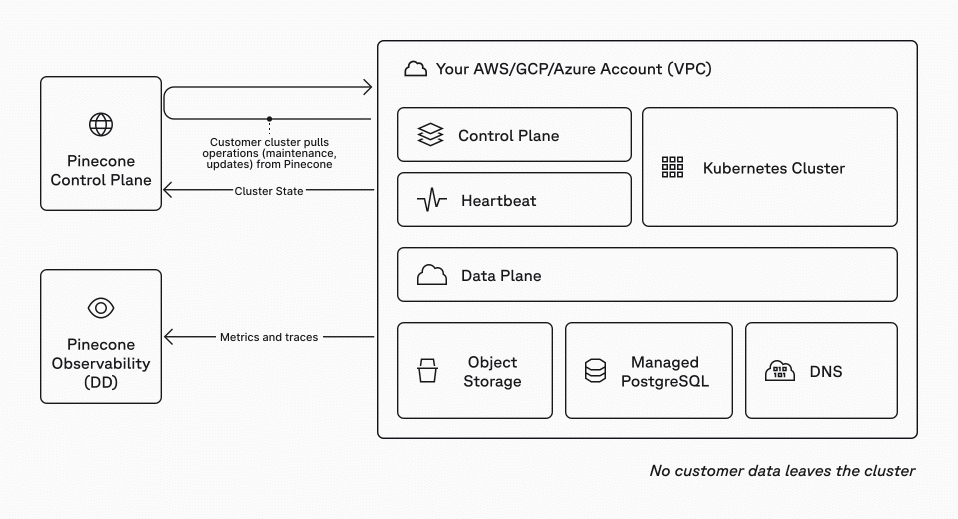
Diagrama de la arquitectura BYOC de Pinecone
Esto se convierte en un problema en entornos en los que la comunicación externa está prohibida o muy restringida. Entre ellos se incluyen los sistemas aislados físicamente, las redes clasificadas y determinadas implementaciones reguladas en los sectores sanitario, de defensa e industrial. En esos casos, incluso una dependencia mínima de una capa de control gestionada externamente puede suponer un obstáculo para la implementación durante la revisión de seguridad o la validación del cumplimiento normativo.
VectorAI DB elimina por completo esta dependencia. Funciona como un sistema autónomo dentro de tu infraestructura. No hay ningún plano de control externo ni se requiere conectividad de salida.
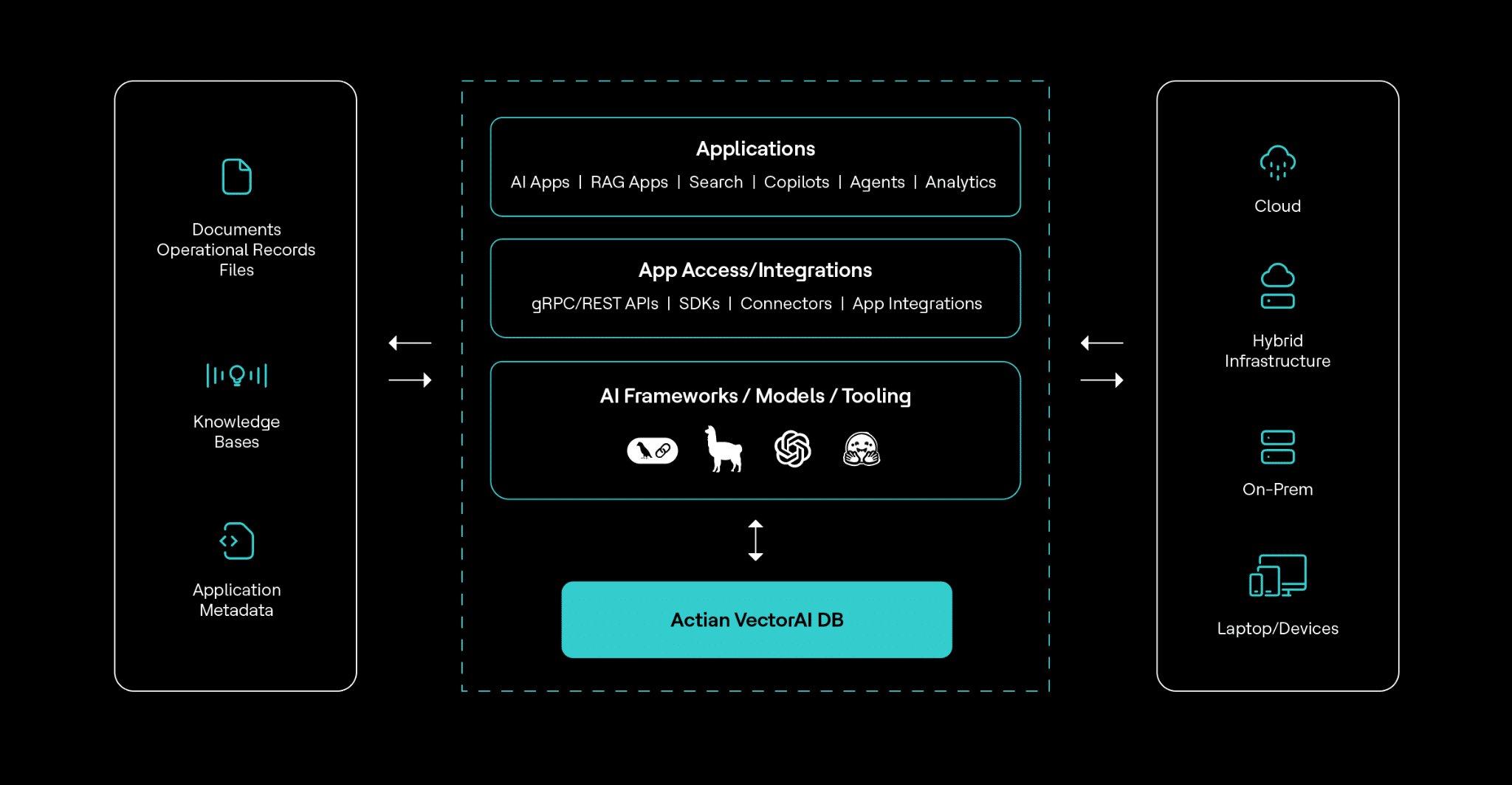
Arquitectura de la base de datos Actian VectorAI
Todas las operaciones vectoriales, la indexación y la ejecución de consultas se llevan a cabo dentro de los límites de la red que hayas definido. Esto lo hace adecuado para entornos en los que la normativa restringe o prohíbe la comunicación externa.
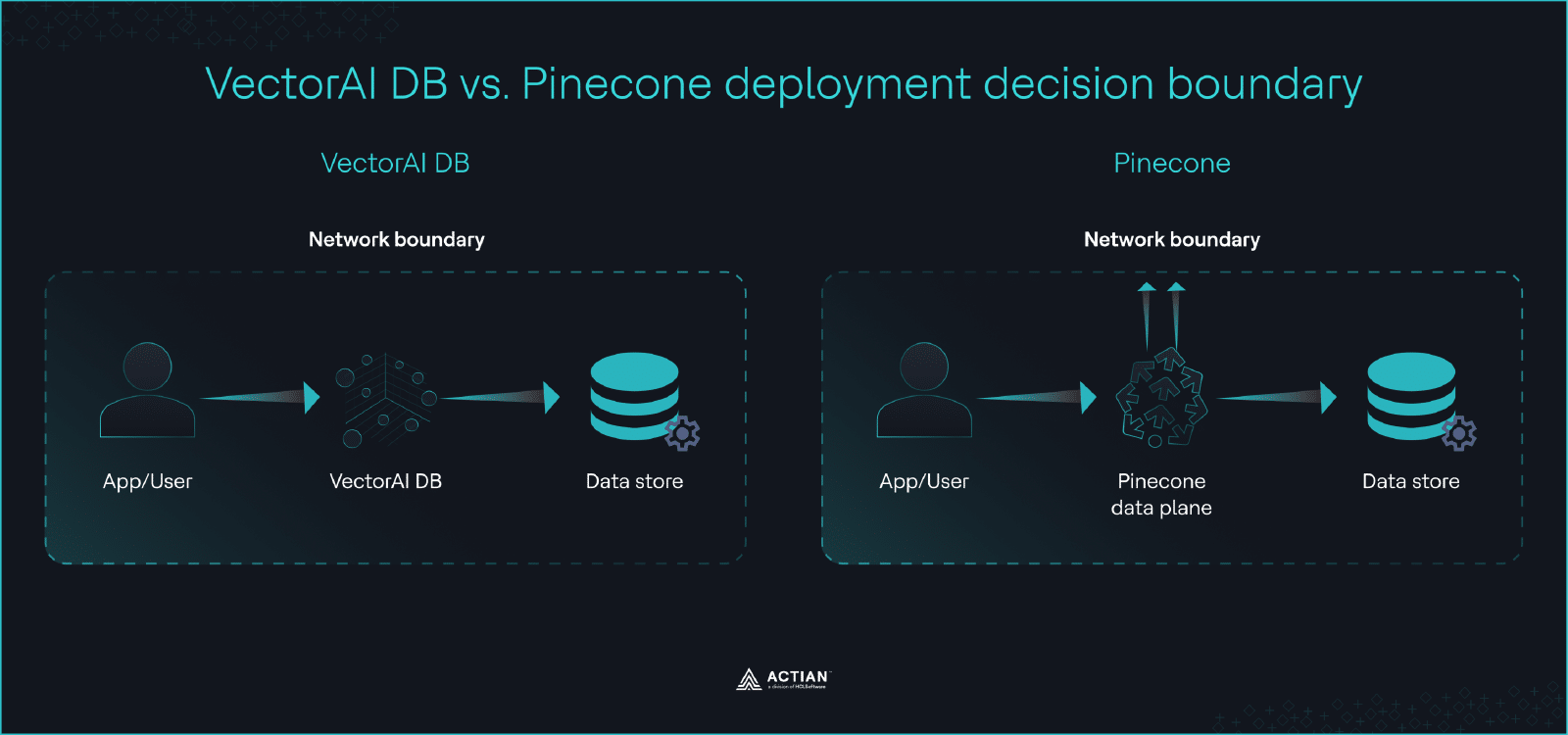
Límite de decisión entre VectorAI DB y Pinecone para la implementación
El resultado es una decisión binaria. Si tu entorno de implementación no requiere ninguna conectividad externa o exige un control total de la infraestructura, VectorAI DB es la única opción viable de las dos. Si tu entorno permite servicios gestionados y conexiones salientes, entonces Pinecone sigue siendo una opción a tener en cuenta y otros factores, como la madurez del ecosistema y los costes operativos, cobran relevancia.
Rendimiento con 1 millón de vectores
El rendimiento es uno de los aspectos más difíciles de comparar directamente entre Pinecone y VectorAI DB, ya que ambos sistemas publican los resultados de forma diferente. Pinecone no publica garantías fijas de consultas por segundo ni de latencia en su acuerdo de nivel de servicio, y tampoco proporciona pruebas de rendimiento estandarizadas con conjuntos de datos de tamaño fijo, como un millón de vectores, en condiciones controladas. En su lugar, Pinecone documenta el rendimiento en términos de comportamiento de escalabilidad, configuraciones de índices y ajustes en función de la carga de trabajo.
En sus propias directrices de pruebas, Pinecone destaca que el rendimiento depende de factores como el tipo de pod, las réplicas y los patrones de consulta, más que de una única cifra de referencia. Esto significa que no existe una prueba de rendimiento oficial de Pinecone que pueda compararse directamente con una configuración fija autohospedada sin hacer suposiciones sobre el tamaño, el coste o la configuración de la infraestructura. Cualquier comparación directa de QPS o latencia sería especulativa.
VectorAI DB, por el contrario, publica resultados concretos de pruebas comparativas en condiciones definidas. En la prueba realizada en abril de 2026, en la que se utilizaron un millón de vectores de 768 dimensiones, VectorAI DB alcanzó las 1.040 consultas por segundo con una latencia p99 de 12 , 7 milisegundos. La duración de la carga fue de 1.242 segundos y la recuperación alcanzó el 0,9948. El equipo obtuvo estos resultados sin realizar ajustes específicos del proveedor, lo que ofrece una referencia del rendimiento esperado en hardware autohospedado.
La conclusión clave no es que un sistema sea definitivamente más rápido que el otro, sino que VectorAI DB ofrece características de rendimiento predecibles y reproducibles vinculadas a tu hardware, mientras que Pinecone abstrae el rendimiento tras una infraestructura gestionada que se adapta en función de la configuración y el gasto.
Coste a escala de producción
El coste es el aspecto en el que las diferencias entre Pinecone y VectorAI DB se hacen más evidentes con el tiempo. Pinecone emplea un modelo de precios basado en el uso, que gira en torno a las unidades de almacenamiento y de lectura. Su plan Estándar parte de un mínimo de 50 dólares al mes, pero ese punto de entrada no refleja las cargas de trabajo reales en producción. Las unidades de lectura, cuyo precio se calcula por cada millón de operaciones, se convierten en el principal factor de coste a medida que aumenta el volumen de consultas. Esto crea una relación directa entre el tráfico y el gasto, lo que puede resultar difícil de predecir en el caso de cargas de trabajo variables.
Los datos de referencia de la comunidad ponen de manifiesto la rapidez con la que estos costes pueden aumentar. Según un análisis técnico de PE Collective, las implementaciones de Pinecone oscilan entre 50 y 200 dólares al mes para entre 1 y 10 millones de vectores, aunque algunos equipos superan los 500 dólares al mes con conjuntos de datos relativamente modestos. Esta variabilidad se debe a los patrones de consulta, la configuración de los índices y la estrategia de replicación. A medida que aumenta el uso, el coste crece tanto con el tamaño de los datos como con la frecuencia de las consultas, lo que hace que la planificación presupuestaria a largo plazo dependa de la estabilidad de la carga de trabajo.
VectorAI DB adopta un enfoque diferente. Su modelo de precios se basa en niveles de recuento de vectores —como 5 000, 1 millón, 5 millones y 10 millones de vectores— en lugar de en el uso por consulta. Puedes utilizar la calculadora de precios para obtener una estimación precisa de tus cargas de trabajo. Esta estructura hace que el coste sea más predecible, ya que está vinculado al tamaño del conjunto de datos en lugar de al volumen de consultas. Una vez implementado en tu infraestructura, el rendimiento de las consultas no incrementa directamente el coste de la licencia. Para cargas de trabajo con una alta frecuencia de consultas, la tarificación por niveles de vectores puede mantener los costes más predecibles que los modelos basados en el uso.
La contrapartida es de carácter operativo. Con VectorAI DB, eres responsable de la infraestructura subyacente, incluyendo la potencia de cálculo, el almacenamiento y el escalado. Pinecone integra todo esto en un servicio gestionado, lo que simplifica las operaciones pero traslada el coste a unas tarifas de uso continuadas. Para los equipos que ya operan de forma local o gestionan su propia infraestructura, VectorAI DB adapta el coste a la planificación de recursos existente. Para los equipos que prefieren servicios totalmente gestionados y se sienten cómodos con un gasto variable vinculado al uso, Pinecone sigue siendo una opción viable.
Madurez del ecosistema y de la integración
Pinecone lleva años desarrollando un amplio conjunto de SDK, integraciones y documentación que permiten su uso en entornos de producción con múltiples lenguajes de programación y flujos de trabajo de IA. Ofrece SDK oficiales para Python, Node.js, Java, Go, .NET y Rust, además de API REST y gRPC. Esto facilita su integración en las pilas tecnológicas existentes, tanto si se están creando flujos de trabajo de generación aumentada por recuperación, sistemas de recomendación o aplicaciones de búsqueda semántica.
VectorAI DB se estrena en este sector con un ecosistema más limitado en su lanzamiento. Es compatible con los SDK de Python y JavaScript, además de con las API REST y gRPC para una integración directa.
Pinecone ofrece una gama más amplia de idiomas con soporte oficial y cuenta actualmente con más integraciones probadas en entornos de producción. VectorAI DB cubre las integraciones esenciales necesarias para empezar a trabajar. Para los equipos que operan en entornos con limitaciones, esta compensación suele ser aceptable. Para los equipos que dan prioridad al desarrollo rápido y a un esfuerzo de integración mínimo, Pinecone sigue siendo la opción más madura.
Explicación detallada del código
Este código se conecta a una base de datos vectorial de Pinecone, selecciona un índice y realiza una búsqueda por similitud utilizando un vector de 768 dimensiones. El método `query()` devuelve las cinco coincidencias más cercanas según la similitud vectorial. La búsqueda semántica, los sistemas de recomendación y las aplicaciones de «Generación Aumentada por Recuperación» (RAG) se basan en este patrón.
# Pinecone: initialize client and run a query

from pinecone import Pinecone


pc = Pinecone(api_key="YOUR_API_KEY")

index = pc.Index("example-index")

query_vector = [0.1] * 768

response = index.query(

    vector=query_vector,

    top_k=5

)

print(response)
Fragmento de código para Pinecone
El siguiente ejemplo muestra cómo utilizar VectorAI DB para crear una colección de vectores, insertar datos vectoriales con metadatos y realizar una búsqueda por similitud. VectorAI DB compara vectores mediante la similitud coseno, y la búsqueda devuelve los puntos más cercanos, junto con sus puntuaciones y la información de la carga útil. Este flujo de trabajo resulta útil para tareas de búsqueda basada en IA, almacenamiento de representaciones y recuperación del vecino más cercano.
from actian_vectorai import VectorAIClient, VectorParams, Distance, PointStruct

with VectorAIClient("localhost:50051") as client:

    # Health check

    info = client.health_check()

    print(f"Connected to {info['title']} v{info['version']}")

    # Create collection

    client.collections.create(

        "demo_collection",

        vectors_config=VectorParams(size=128, distance=Distance.Cosine),

    )

    # Insert points

    client.points.upsert("demo_collection", [

        PointStruct(id=1, vector=[0.1] * 128, payload={"name": "Widget"}),

        PointStruct(id=2, vector=[0.2] * 128, payload={"name": "Gadget"}),

        PointStruct(id=3, vector=[0.3] * 128, payload={"name": "Gizmo"}),

    ])
    # Search

    results = client.points.search("demo_collection", vector=[0.15] * 128, limit=5)

    for r in results:

        print(f"  id={r.id}  score={r.score:.4f}  payload={r.payload}")
Fragmento de código para VectorAI DB
Cuándo elegir Pinecone
Hay un caso claro en el que Pinecone es la mejor opción. Si tu entorno de implementación no tiene restricciones en cuanto a la conectividad saliente y prefieres un servicio totalmente gestionado, Pinecone es la opción más madura y sencilla desde el punto de vista operativo. No es necesario gestionar la infraestructura, ocuparse del escalado ni ajustar el rendimiento a nivel de hardware. Esto reduce la carga operativa y permite a los equipos centrarse en desarrollar aplicaciones de IA en lugar de en el mantenimiento de los sistemas de bases de datos.
Pinecone es también la opción más sólida cuando la profundidad del ecosistema y la madurez de la producción son más importantes que el control de la implementación. Su amplia compatibilidad con SDK en Python, Node.js, Java, Go, .NET y Rust facilita su integración en diversas pilas tecnológicas. Las herramientas consolidadas, la documentación y el apoyo de la comunidad de Pinecone reducen el tiempo de desarrollo de los equipos que crean sistemas de búsqueda semántica, sistemas de recomendación o flujos de trabajo de generación aumentada por recuperación en entornos nativos de la nube.
Las compensaciones entre coste y rendimiento también influyen. Para cargas de trabajo más pequeñas o proyectos en fase inicial, el modelo gestionado de Pinecone puede resultar más eficiente, ya que evita la inversión inicial en infraestructura. Se puede ampliar el uso de forma gradual y pagar en función de la demanda. Esto resulta especialmente útil para equipos que prevén patrones de tráfico variables o que aún no tienen cargas de trabajo de consultas estables.
Elige Pinecone cuando:
- Quieres una base de datos vectorial totalmente gestionada y prefieres no tener que gestionar tú mismo la infraestructura.
- Estás desarrollando aplicaciones nativas de la nube en las que la conectividad saliente y los planos de control gestionados son aceptables.
- Das prioridad a la madurez del ecosistema, lo que incluye una amplia cobertura de SDK e integraciones bien consolidadas con marcos de IA.
- Te basas en documentación probada en entornos de producción, patrones de la comunidad y un comportamiento operativo estable a gran escala.
No todos los casos de uso requieren una base de datos vectorial específica. Para los equipos que sí necesitan una base de datos vectorial específica y no tienen limitaciones de implementación, Pinecone sigue siendo, a día de hoy, la opción más contrastada y madura.
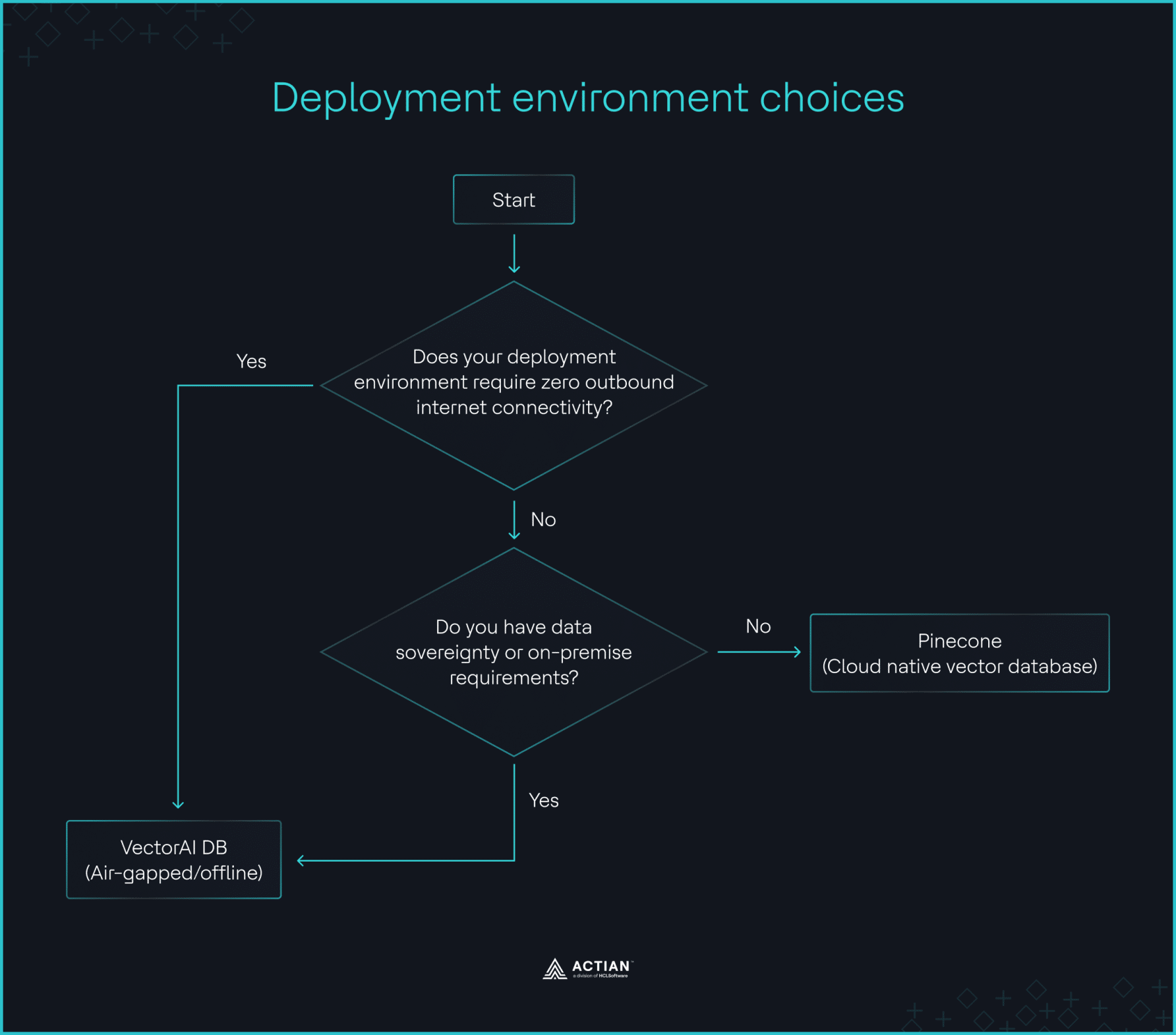
Diagrama de flujo para decidir entre Pinecone y VectorAI DB
Comparación con otras alternativas a Pinecone
Las bases de datos vectoriales de código abierto, como Milvus y Qdrant, ofrecen un autoalojamiento completo sin dependencias de la nube. Admiten la búsqueda vectorial en espacios de alta dimensión, la indexación por «vecino más cercano aproximado» y la integración con marcos de IA habituales. Estos sistemas son idóneos para equipos que desean tener control sobre su infraestructura sin comprometerse con una plataforma propietaria. La contrapartida es la sobrecarga operativa. Eres responsable de la implementación, el escalado, el ajuste del rendimiento y la gestión de clústeres, lo que puede resultar complejo a escala de producción.
Weaviate adopta un enfoque híbrido. Ofrece tanto un servicio gestionado en la nube como una opción de autoalojamiento. Esto lo hace atractivo para los equipos que buscan flexibilidad entre entornos. También incluye módulos integrados para la búsqueda híbrida y la integración de modelos de aprendizaje automático. Sin embargo, incluso en el modo de autoalojamiento, los equipos deben gestionar la infraestructura y garantizar la estabilidad operativa, lo que plantea retos similares a los de otras bases de datos vectoriales de código abierto.
Otra categoría incluye las bases de datos de uso general a las que se les han añadido capacidades de búsqueda vectorial. PostgreSQL con la extensión pgvector es el ejemplo más común. Permite a los equipos almacenar representaciones vectoriales junto con datos relacionales y ejecutar consultas de búsqueda de similitud dentro del mismo sistema. Para cargas de trabajo de menos de unos 50 millones de vectores, esta puede ser una opción práctica y rentable. Reduce la proliferación de la infraestructura y simplifica la integración con las aplicaciones existentes. La limitación radica en el rendimiento a gran escala, ámbito en el que las bases de datos vectoriales especializadas superan a los sistemas de uso general.
VectorAI DB se diferencia de estas alternativas. Se centra en la simplicidad operativa en entornos autohospedados. En lugar de tener que montar y ajustar múltiples componentes, funciona como un único sistema con características de rendimiento predecibles. Esto lo hace atractivo para implementaciones aisladas físicamente, locales y en el perímetro, en las que tanto el control como la simplicidad son importantes. En comparación con las soluciones de código abierto, reduce la carga operativa. En comparación con Pinecone, elimina por completo la dependencia de la nube.
| Capacidad | Pinecone | VectorAI DB | Weaviate | Milvus | Qdrant | pgvector |
| Modelo de implementación | Exclusivamente en la nube con BYOC (plano de datos en VPC, plano de control gestionado externamente) | Totalmente autohospedado | En la nube y autohospedado | Autohospedado | Autohospedado | Autohospedado |
| Compatible con espacio de aire | No | Sí | Sí (autohospedado) | Sí | Sí | Sí |
| Modelo de rendimiento | Escalabilidad gestionada basada en pods y réplicas | Rendimiento fijo, limitado por el hardware | Depende del modo de implementación | Depende de la configuración del clúster | Depende de la configuración | Limitado por el motor relacional |
| Modelo de precios | Basado en el consumo (unidades de lectura + almacenamiento) | Niveles de recuento de vectores | Código abierto + precios gestionados | Código abierto | Código abierto | Código abierto |
| Lenguajes del SDK | Python, Node.js, Java, Go, .NET, Rust | Python, JavaScript | Python, JavaScript, Go, Java | Python, Go, Java | Python, JavaScript, Rust, Go | Cualquier cliente de PostgreSQL |
| APIs | REST, gRPC | REST, gRPC | REST, GraphQL | REST, gRPC | REST, gRPC | SQL |
| Madurez del ecosistema | Alta | Fase inicial | Para adultos | Para adultos | Para adultos | Muy maduro |
| Gastos generales de explotación | Bajo (servicio gestionado) | Medio (infraestructura autogestionada) | De medio a alto | Alta | Medio | De baja a media |
| El más adecuado | Cargas de trabajo de IA nativas de la nube | Implementaciones en perímetro, en las propias instalaciones y con aislamiento físico | Implementaciones híbridas flexibles | Sistemas autohospedados a gran escala | Configuraciones ligeras y autohospedadas | Cargas de trabajo de pequeña y mediana envergadura con menos de ~50 millones de vectores |
Conclusión
La elección entre Pinecone y VectorAI DB depende de una serie de limitaciones. Si tu entorno requiere una conectividad de salida nula, una residencia de datos estricta o un control total de la infraestructura, Pinecone no es una opción. VectorAI DB está pensado precisamente para este escenario y ofrece una opción de autoalojamiento con un rendimiento y unos costes predecibles.
Si esas limitaciones no son aplicables, Pinecone sigue siendo, a día de hoy, la opción más madura y sencilla desde el punto de vista operativo. Ofrece un ecosistema más amplio, escalabilidad gestionada y un tiempo de puesta en producción más rápido para las cargas de trabajo nativas de la nube.
Si tu equipo entra en la primera categoría, regístrate en la edición Community de Actian VectorAI DB y empieza a desarrollar hoy mismo. Encontrarás los detalles de implementación en la documentación de VectorAI DB y podrás unirte a la comunidad en Discord para obtener más información y recibir asistencia.

Mantente conectado
Te ofrecemos información detallada sobre los datos.
(por ejemplo, sales@..., support@...)
