
Verwandeln Sie Ihre internen Dokumente in eine KI-gestützte Wissensdatenbank



Wichtigste Erkenntnisse
- RAG macht Dokumentationen durchsuchbar, indem es semantisches Retrieval mit einem LLM kombiniert, das seine Antworten ausschließlich auf der Grundlage des Kontexts der abgerufenen Dokumente liefert.
- Der Prozess umfasst drei Hauptschritte: Dokumente in Abschnitte unterteilen und indexieren, die relevantesten Abschnitte mittels Vektorsuche abrufen und anschließend aus diesen Abschnitten eine fundierte Antwort generieren.
- Bei der Dense-Vector-Suche wird Text in Einbettungen umgewandelt, sodass semantisch ähnliche Inhalte auch dann gefunden werden können, wenn der Wortlaut unterschiedlich ist.
- Dieser Ansatz eignet sich für technische Dokumentationen, Support-Wissensdatenbanken, die Suche nach Compliance-Informationen, Onboarding, die Suche in Transkripten und Produktkataloge.
- Der Nutzen schnelle, fundierte Antworten auf der Grundlage Ihrer eigenen Inhalte, insbesondere wenn die gesamte Pipeline aus Datenschutz- und Kontrollgründen auf Ihrer eigenen Infrastruktur läuft.
Das Dokumentationsproblem
Jedes Unternehmen, das ein Produkt, einen Prozess oder Compliance-Anforderungen hat, steht vor derselben Herausforderung: Das Wissen ist vorhanden, aber nicht zugänglich. Ein Support-Mitarbeiter kann während eines Telefonats nicht in Echtzeit 400 Seiten Dokumentation durchforsten. Ein neuer Mitarbeiter kann in seiner ersten Woche nicht drei Jahre an internen Leitfäden verinnerlichen. Ein Kunde kann die spezifische Konfigurationseinstellung nicht finden, die auf Seite 247 eines PDF-Dokuments versteckt ist.
Die herkömmliche Suche ist hilfreich – erfordert jedoch exakte Suchbegriffe. Geben Sie „Wie behebe ich Fehler 12?“ ein, wenn im Dokument steht: „Statuscode 12: MicroKernel kann die angegebene Datei nicht finden“, und die Stichwortsuche schlägt fehl. Sie benötigen eine semantische Suche – eine Suche, die den Sinn versteht, nicht nur die Wörter.
Wichtige Erkenntnis: Die Antwort findet sich bereits in Ihrer Dokumentation. Die Herausforderung besteht darin, sie auffindbar zu machen – sofort, präzise und ohne Irreführungen.
So funktioniert RAG
Retrieval-Augmented Generation (RAG) trennt zwei Probleme, mit deren Lösung LLMs Schwierigkeiten haben: die Kenntnis spezifischer Inhalte und das Schlussfolgern daraus. RAG löst das Wissensproblem durch das Abrufen von Informationen. Das LLM löst das Problem des Schlussfolgerns durch die Generierung von Inhalten.
Die dreistufige Pipeline:
- Indizieren Sie Ihre Dokumente. Die Dokumente werden in Abschnitte unterteilt. Jeder Abschnitt wird durch ein Sprachmodell in eine Vektoreinbettung umgewandelt, und sowohl der Vektor als auch der Originaltext werden in einer Vektordatenbank gespeichert.
- Relevanten Kontext abrufen. Wenn ein Nutzer eine Frage Nutzer , wird diese eingebettet desselben Modells eingebettet . Die Vektordatenbank findet die semantisch ähnlichsten Dokumentausschnitte, unabhängig vom genauen Wortlaut.
- Erstellen Sie eine fundierte Antwort. Die am besten passenden Textbausteine werden als Kontext an ein LLM weitergeleitet. Das Modell liest sie und antwortet ausschließlich auf der Grundlage der bereitgestellten Informationen. Keine Halluzinationen – nur Schlussfolgerungen auf der Grundlage Ihrer tatsächlichen Dokumente.
Datenschutzvorteil: Mit Actian VectorAI und Ollama läuft die gesamte Pipeline auf Ihren eigenen Servern. Ihre Dokumente, Abfragen und Antworten verlassen niemals Ihre Infrastruktur.
Was ist die Suche in dichten Vektoren?
Wenn ein Einbettungsmodell Text verarbeitet, wandelt es diesen in eine Zahlenliste – einen Vektor – um, wobei die Position im hochdimensionalen Raum die semantische Bedeutung kodiert. Texte mit ähnlicher Bedeutung landen an ähnlichen Positionen. Dies ist die Grundlage der Dense-Search-Methode.
Daseinbetten, das in diesem Leitfaden verwendet wird, wandelt beliebigen Text in 768 Zahlen um. Diese Werte sind für Menschen nicht lesbar. Es handelt sich um erlernte Darstellungen, die aus Training Milliarden von Textbeispielen hervorgehen. Das Modell lernt, dass „Datei nicht gefunden“ und „Datei nicht auffindbar“ ähnliche Vektoren ergeben sollten, obwohl sie kein einziges gemeinsames Wort enthalten.
Bei der Suche wird der abfragen anhand der Kosinusähnlichkeit – einem Maß für den Winkel zwischen zwei Vektoren – mit jedem gespeicherten Dokumentvektor verglichen. Je kleiner der Winkel, desto höher die Ähnlichkeit und desto relevanter das Ergebnis. Der HNSW-Index sorgt dafür, dass dieser Vergleich schnell erfolgt, selbst bei Millionen von Vektoren.
| Eingabe | Ähnlichkeit |
| Abfrage: „Status 12 beheben“ | — (abfragen ) |
| Doc: „12: MicroKernel kann nicht finden …“ | 0,94 – sehr relevant |
| Doc: „Crystal Reports für Zen…“ | 0,12 – nicht relevant |
Systemarchitektur
Die kompakte RAG-Pipeline besteht aus zwei Phasen. Die Indizierungsphase wird einmalig oder nach einem festgelegten Zeitplan ausgeführt, sobald sich Dokumente ändern. Die abfragen wird bei jeder Nutzer ausgeführt und ist in der Regel in weniger als 200 ms abgeschlossen.
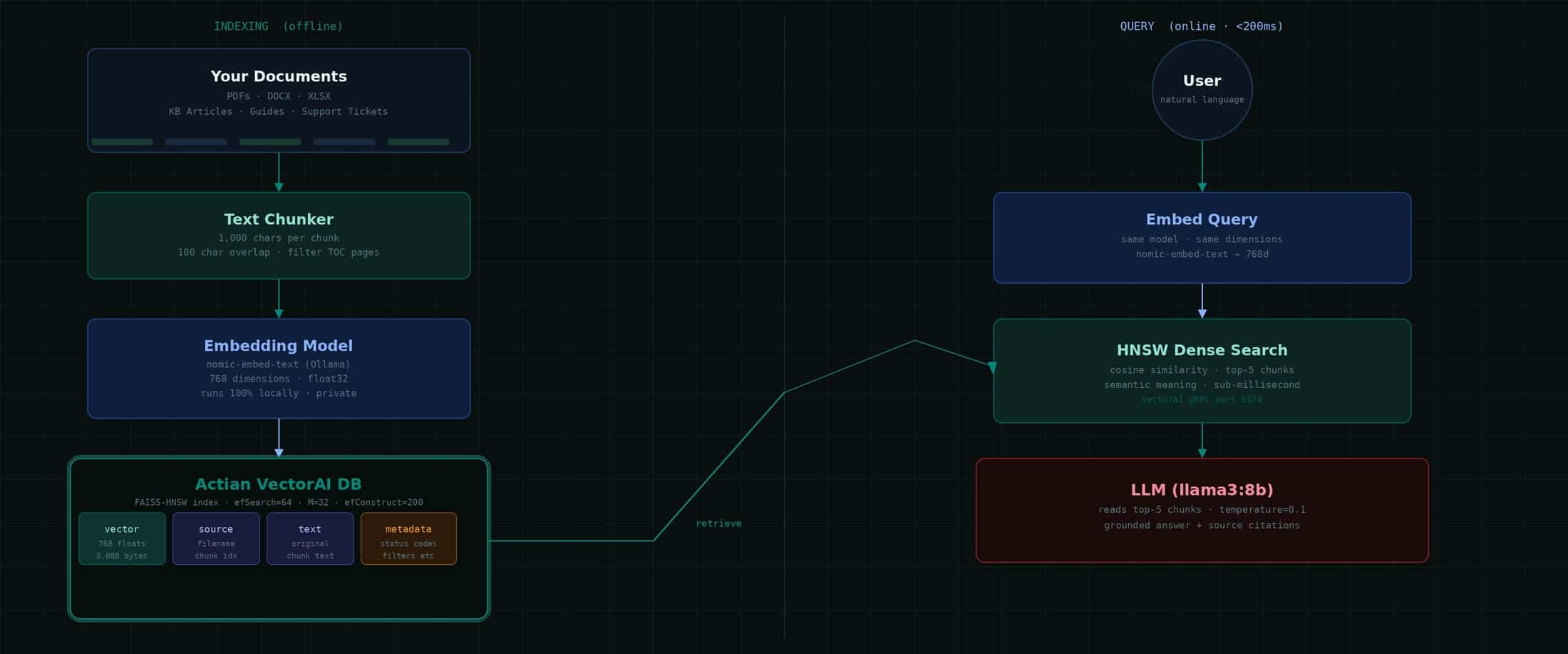
Beachten Sie dieses wichtige Detail: Für die Indizierung und die Abfrage wird dasselbe Einbettungsmodell verwendet. Wenn Sie miteinbetten indizieren, müssen Sie auch abfragen einbetten abfragen . Die Vektoren sind nur im Zusammenhang mit dem Modell sinnvoll, das sie erzeugt hat. Ein Modellwechsel erfordert eine vollständige Neuindizierung.
Wie VectorAI Ihre Daten speichert
Die Actian VectorAI DB speichert Vektoren in einerVertikale Speicherung , die FAISS zur Indizierung nutzt. Jeder Vektor wird als 32-Bit-Gleitkommazahl gespeichert – dem Industriestandard für ML-Einbettungen. Bei 768 Dimensionen sind das genau 3.088 Byte pro Vektor, wie aus dem Engine-Protokoll hervorgeht:
# Confirmed from vde.log on a production deployment
[VectorStore::CreateFile] Created file: vectors.db
(dim=768, record_len=3088)

# The math:
768 dimensions x 4 bytes (float32) = 3,072 bytes
+ 16 bytes overhead
= 3,088 bytes per vector  (confirmed)
Fakten zur Speicherung – anhand von Produktionsprotokollen überprüft:
| Parameter | Wert | Anmerkungen |
| Indexalgorithmus | FAISS HNSW | Facebook-KI-Ähnlichkeitssuche |
| Speicher-Backend | Vektor-DB-Dateien | Bewährte Speichersysteme für Unternehmen |
| Vektorformat | float32 (4 Byte) | Branchenstandard für ML |
| Aufzeichnung (Auflösung=768) | 3.088 Byte | 768 × 4 + 16 Gemeinkosten |
| Aufzeichnung (dim=384) | 1.552 Byte | 384 × 4 + 16 Aufschlag |
| Segmentgrenze | 2 GB pro Segment | Erweitert sich automatisch auf neue Segmente |
| Maximale Dateigröße | Keine | Nur durch den verfügbaren Speicherplatz begrenzt |
| HNSW efSearch | 64 | Pro abfragen geprüfte Kandidaten |
| HNSW efConstruct | 200 | Kandidaten während der Indexerstellung |
| HNSW M | 32 | Verbindungen pro Knoten |
Die Speicher-Engine teilt Dateien automatisch in 2-GB-Segmente auf, sodass es praktisch keine Begrenzung der Vektoranzahl gibt. Die Speicherkapazität hängt ausschließlich vom verfügbaren Festplattenspeicher ab. Bei einer Größe von 3.088 Byte pro Vektor fasst ein Terabyte Speicherplatz etwa 340 Millionen Vektoren.
Anwendungsbeispiele aus der Praxis
Suche in der technischen Dokumentation. Indizieren Sie Produkthandbücher, API-Referenzen und Konfigurationsanleitungen. Benutzer stellen Fragen in einfacher Sprache und erhalten Antworten mit genauen Dokumentangaben und Seitenverweisen.
Support-Wissensdatenbank. Erstellen Sie einen Index historischer Support-Tickets und Lösungen. Wenn ein neuer Fall eingeht, werden automatisch ähnliche Fälle aus der Vergangenheit und deren Lösungen angezeigt, wodurch sich die Bearbeitungszeit erheblich verkürzt.
Suche nach Compliance- und Richtlinieninformationen. Machen Sie Rechtsdokumente und Compliance-Richtlinien sofort durchsuchbar. Verweisen Sie stets auf die konkrete Klausel oder den Abschnitt, der für die Frage Nutzerrelevant ist.
Einarbeitung neuer Mitarbeiter. Neue Mitarbeiter stellen Fragen zu Personalrichtlinien, -prozessen und -tools. Das System liefert Antworten auf Basis Ihrer aktuellen internen Dokumentation – personalisiert, präzise und stets auf dem neuesten Stand.
Video- und Audiosuche. Transkribieren Sie Training und Besprechungen mit Whisper, indizieren Sie die Transkripte und durchsuchen Sie gesprochene Inhalte nach ihrer Bedeutung, mit Deep Links zum genauen Zeitstempel.
Produktkatalog. Produktdatenblätter, Kompatibilitätslisten und Versionshinweise. Vertriebsmitarbeiter erhalten bei Kundengesprächen sofort präzise Antworten, ohne das Gespräch unterbrechen zu müssen.
Aufbau der Pipeline
Schritt 1 – Unterteilen Sie Ihre Dokumente
Eine zeichenbasierte Blockbildung mit 1.000 Zeichen und einer Überlappung von 100 Zeichen eignet sich gut für technische Dokumentationen. Die Überlappung stellt sicher, dass Sätze niemals an einer Grenze abgeschnitten werden:
def chunk_text(text: str, chunk_size=1000, overlap=100) -> list:
"""Split text into overlapping character-based chunks."""
chunks, i = [], 0
while i < len(text):
chunk = text[i : i + chunk_size].strip()
if len(chunk) > 80:     # skip near-empty chunks
chunks.append(chunk)
i += chunk_size - overlap
return chunks
Schritt 2 – Erstellen einer Sammlung und eines Index
from actian_vectorai import VectorAIClient, VectorParams, Distance, PointStruct
import requests
def embed(text: str) -> list:
r = requests.post("https://localhost:11434/api/embeddings",
json={"model": "nomic-embed-text", "prompt": text})
return r.json()["embedding"]
with VectorAIClient("192.168.x.x:6574") as client:
client.collections.create(
"my_docs",
vectors_config=VectorParams(size=768, distance=Distance.Cosine)
)
for i, chunk in enumerate(chunks):
client.points.upsert("my_docs", [PointStruct(
id     = i,
vector = embed(chunk),
payload = {"source": "doc.pdf", "chunk": i, "text": chunk}
)])
Die vollständige RAG-Abfragefunktion
import requests
from actian_vectorai import VectorAIClient

VECTOR_SERVER = "192.168.x.x:6574"
OLLAMA        = "https://localhost:11434"
COLLECTION    = "my_docs"

def rag_query(question: str, top_n: int = 5) -> dict:
# Step 1: Embed the question
query_vec = embed(question)

# Step 2: Search VectorAI DB
with VectorAIClient(VECTOR_SERVER) as c:
results = c.points.search(
COLLECTION, vector=query_vec,
limit=top_n, with_payload=True,
)

# Step 3: Build context from retrieved chunks
context = "\n\n---\n\n".join(
r.payload["text"] for r in results)

# Step 4: Ask the LLM with grounded context
prompt = f"""You are a knowledgeable assistant.
Answer using ONLY the documentation excerpts below.
Documentation: {context}
Question: {question}
Answer:"""

resp = requests.post(f"{OLLAMA}/api/chat", json={
"model": "llama3:8b", "stream": False,
"options": {"temperature": 0.1, "num_predict": 1024},
"messages": [{"role": "user", "content": prompt}]
})
answer = resp.json()["message"]["content"].strip()

# Step 5: Return answer + citations
sources = list({r.payload["source"] for r in results})
return {"answer": answer, "sources": sources}
Warum Temperatur=0,1? Bei sachlichen Fragen und Antworten sind deterministische, präzise Antworten gefragt. Eine niedrige Temperatur sorgt dafür, dass sich das LLM auf den tatsächlichen Wortlaut der Dokumentation konzentriert, anstatt zu extrapolieren oder auszuschmücken.
Wichtige Kennzahlen – Deployment
| Metrisch | Wert |
| Einbettungsdimensionen | 768 |
| Bytes pro Vektor | 3,088 |
| Indexalgorithmus | HNSW (FAISS) |
| Einbettungsmodell | einbetten(Ollama) |
| LLM | llama3:8b (Ollama) |
| gRPC-Port | 6574 |
| Infrastruktur | 100 % vor Ort |
Antworten, die auf Ihren Inhalten basieren
Dense Vector RAG in Verbindung mit der Actian VectorAI-Datenbank verwandelt statische Dokumentation in eine sofort abfragbare Wissensdatenbank. Der Ablauf ist einfach: Teilen Sie Ihre Dokumente in Abschnitte auf, einbetten miteinbetten einbetten , speichern Sie sie im FAISS-HNSW-Index von VectorAI und lassen Sie das LLM aus dem jeweiligen Kontext antworten, den die Suche liefert.
Da alles auf Ihrer eigenen Infrastruktur läuft, verlassen Ihre Dokumente niemals Ihr Netzwerk. Jede Antwort basiert auf Ihren tatsächlichen Inhalten und nicht auf dem, was ein Modell während Training gelernt hat.
Erfahren Sie mehr über Actian VectorAI DB.
Aufgebaut mit Actian VectorAI DB · FAISS-HNSW · High-Performance · Ollama · llama3:8b
Alle Abfragen werden zu 100 % On-Premises ausgeführt. Weder Dokumente noch abfragen oder Antworten verlassen Ihre Infrastruktur.

Bleiben Sie in Verbindung
Datenanalysen direkt bei Ihnen.
(z. B. sales@..., support@...)
