
Buscar en vídeos de formación sin tener que verlos



Principales conclusiones
- Convierte los vídeos formativos en conocimientos consultables transcribiendo el audio, dividiendo las transcripciones en fragmentos e indexándolas como vectores.
- El sistema localiza el momento adecuado del vídeo basándose en el significado, no en palabras clave exactas, y enlaza directamente con la marca de tiempo.
- Utiliza Whisper para la transcripción, incrustaciones locales, VectorAI DB para la búsqueda y un modelo de lenguaje grande (LLM) local para ofrecer respuestas contextualizadas.
- Esto permite utilizar las bibliotecas de vídeos de larga duración para la formación inicial, el cumplimiento normativo y la consulta de procedimientos sin necesidad de avanzar manualmente por el vídeo.
- Su principal ventaja es la búsqueda rápida y semántica de vídeos en las propias instalaciones, con respuestas citadas y la posibilidad de saltar directamente a momentos concretos.
Tenemos una carpeta con vídeos formativos: tutoriales de incorporación, sesiones informativas sobre cumplimiento normativo, demostraciones de procedimientos clínicos y sesiones grabadas de preguntas y respuestas. Contenido útil que nadie ve porque nadie tiene tiempo de rebuscar en una grabación de 45 minutos para encontrar los dos minutos que realmente necesita.
La solución está en la búsqueda. Pero los archivos de vídeo son opacos para una base de datos; no se pueden indexar píxeles ni formas de onda de audio del mismo modo que se indexa el texto. Lo que puedes indexar es lo que se se dijo. Transcribe el audio, divídelo en segmentos con marcas de tiempo, incrusta cada segmento y guárdalo en la base de datos Actian VectorAI. Ahora la biblioteca de vídeos se puede consultar por significado, no por nombre de archivo.
La captura de pantalla que aparece a continuación muestra cómo funciona con una colección real de 678 fragmentos de transcripción. Una enfermera pregunta sobre el protocolo de higiene de manos. El sistema localiza el segmento exacto de 35 segundos en el vídeo de formación adecuado y enlaza directamente a él.
El sistema en acción
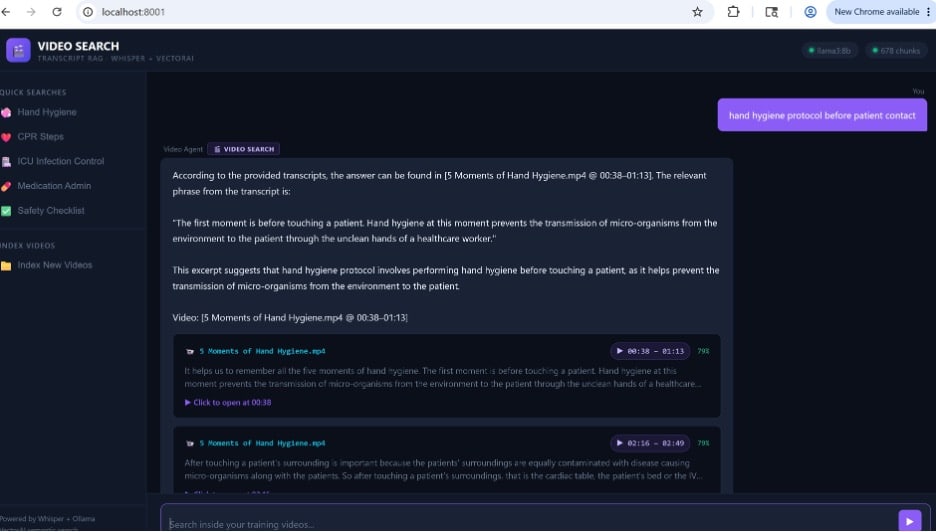
Interfaz de búsqueda de vídeos — consulta: «protocolo de higiene de manos antes del contacto con el paciente» — 678 fragmentos, 2 resultados mostrados
El proceso completo
La arquitectura se divide en dos vías. La vía izquierda funciona sin conexión: los vídeos se transcriben con Whisper, se dividen en segmentos de 30 segundos, se incrustan con mxbai-embed-large y se almacenan una sola vez en la base de datos de VectorAI. La vía de la derecha se ejecuta en el momento de la consulta; la pregunta del usuario se procesa con el mismo modelo, se compara con los fragmentos almacenados mediante similitud coseno utilizando el índice HNSW, y los resultados principales se envían a llama3:8b para obtener una respuesta fundamentada y con marca de tiempo.
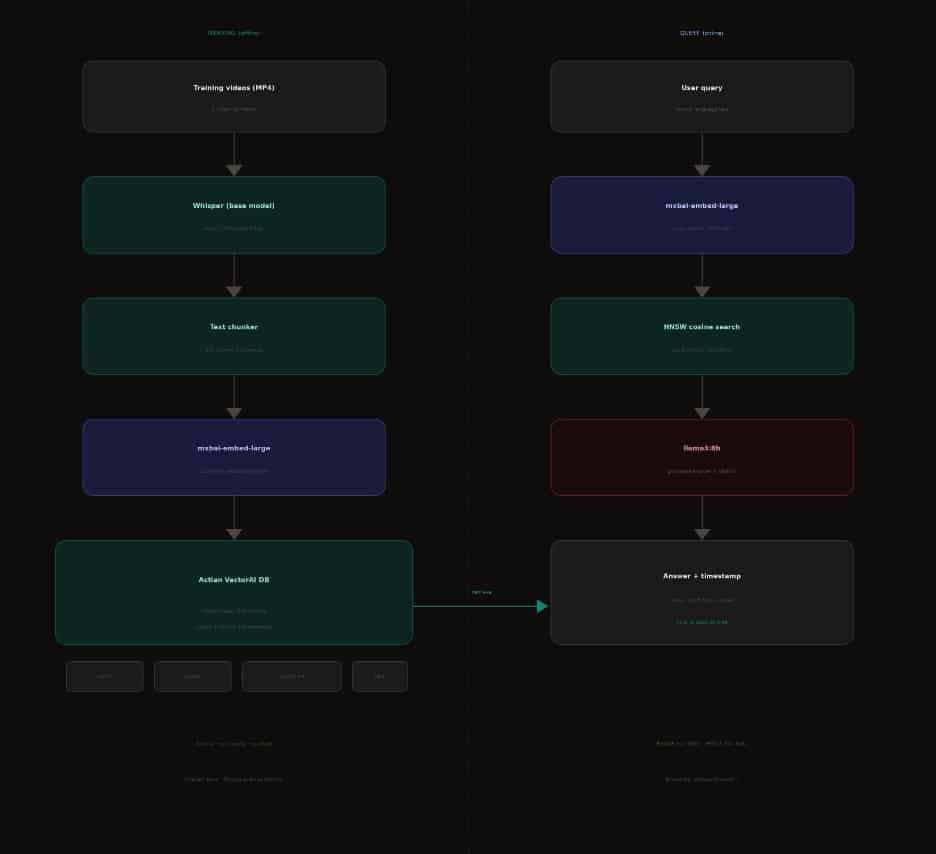
Arquitectura de búsqueda de vídeos: proceso de indexación (izquierda) y proceso de consulta (derecha)
Lo que estás viendo
Cada elemento de esta captura de pantalla es el resultado directo del proceso de búsqueda semántica. A continuación se explica el significado de cada parte:
| Elemento de la interfaz de usuario | Etiqueta | Qué significa |
| Barra superior | 678 fragmentos | Total de segmentos de transcripción indexados en todos los vídeos de formación. Cada segmento corresponde a un «PointStruct» en la base de datos de VectorAI. |
| Barra superior | llama3:8b | El modelo LLM que sintetiza la respuesta a partir de los fragmentos recuperados. Se ejecuta localmente a través de Ollama. |
| Barra lateral | Búsquedas rápidas | Consultas predefinidas almacenadas en la configuración de la interfaz de usuario. Al hacer clic en una de ellas, se ejecuta una búsqueda vectorial al instante. |
| Burbujeo de consulta | Protocolo de higiene de manos antes del contacto con el paciente | La consulta del usuario sin procesar. Este texto exacto es incrustado por mxbai-embed-large en un vector de 1024 dimensiones. |
| Encabezado de resultados | Insignia de «BÚSQUEDA DE VÍDEOS» | Confirma que esta respuesta procede de la ruta de recuperación de transcripciones, y no de una solución alternativa. |
| Texto de la respuesta | Respuesta fundamentada | La respuesta del modelo de lenguaje (LLM), generada a partir del texto de la transcripción recuperada, y no a partir de sus parámetros de entrenamiento. |
| Referencia | «5 momentos clave para la higiene de manos.mp4» @ 00:38–01:13 | Nombre exacto del archivo e intervalo de marcas de tiempo extraídos de la carga útil almacenada junto con el vector. |
| Tarjeta de resultados | 00:38 – 01:13 | 79 % | Intervalo de marcas de tiempo (start_time / end_time de la carga útil) y puntuación de similitud coseno (0,79). |
| Fragmento de la transcripción | Nos ayuda a recordar… | El texto sin formato almacenado en la carga útil, que se muestra como vista previa para que los usuarios puedan comprobar su relevancia antes de hacer clic. |
| Haz clic para abrir | Haz clic para abrir a las 00:38 | Enlace directo mediante el fragmento de URL #t=38 de HTML5. Abre el vídeo en el segundo exacto. |
| Segunda tarjeta | 02:16 – 02:49 | 79 % | Un segundo fragmento relevante del mismo vídeo: un momento diferente que aborda una parte relacionada con el tema. |
Cómo se obtuvo este resultado
La respuesta que aparece en la captura de pantalla no procedía de un índice de palabras clave ni de una lista de preguntas frecuentes. Se obtuvo siguiendo cuatro pasos distintos.
Paso 1 — La consulta se convierte en un vector
Cuando el usuario escribe «protocolo de higiene de manos antes del contacto con el paciente», ese texto se envía a mxbai-embed-large, que se ejecuta localmente a través de Ollama. El modelo genera una lista de 1.024 números de coma flotante, un vector que codifica el significado semántico de la consulta:
query = "hand hygiene protocol before patient contact"
r = requests.post('http://localhost:11434/api/embeddings',
    json={"model": "mxbai-embed-large", "prompt": query})
query_vector = r.json()["embedding"]  # 1024 floats
# e.g. [0.142, -0.831, 0.623, ..., -0.044]
El modelo no sabe qué es la higiene de manos. Sabe que esa expresión se encuentra cerca de otras expresiones relacionadas con la seguridad clínica en el espacio de alta dimensión con el que se le ha entrenado. Esa relación de proximidad es la que utiliza el sistema de búsqueda.
Paso 2 — VectorAI DB busca los fragmentos más cercanos
El vector de consulta se envía a Actian VectorAI DB a través del cliente de Python. El índice HNSW lo compara con los 678 vectores de fragmentos de transcripción almacenados utilizando la similitud coseno y devuelve las coincidencias más relevantes:
results = client.points.search(

collection_name="video_transcripts",

query_vector=query_vector,

limit=5,

with_payload=True  # return text, filename, timestamps

)

# Result #1:

# id=87  score=0.79

# payload: {

#   "source":     "5 Moments of Hand Hygiene.mp4"

#   "start_time": 38.2,   "end_time": 73.6

#   "start_fmt":  "0:38"

#   "text":       "It helps us to remember all the five moments..."

# }
La puntuación del 79 % que aparece en la ficha de resultados es este valor de similitud coseno. Significa que el vector de consulta y el vector del fragmento apuntan prácticamente en la misma dirección en el espacio de 1024 dimensiones; son semánticamente cercanos. No se produjo ninguna coincidencia de palabras clave. El texto del fragmento no contiene la expresión «protocolo de higiene de manos», sino que habla de «los cinco momentos» y de «antes de tocar a un paciente». El modelo entendió que ambos conceptos significan lo mismo.
Paso 3 — El LLM sintetiza una respuesta
El fragmento de texto recuperado se envía a llama3:8b como contexto. Se indica al modelo de lenguaje grande (LLM) que responda únicamente a partir de la transcripción facilitada, que cite la fuente y que no invente nada más allá de lo que se dijo:
prompt = f"""

You are a helpful assistant. Answer using ONLY the transcript below.

Cite the video and timestamp in your answer.

Transcript:

[5 Moments of Hand Hygiene.mp4 @ 00:38-01:13]

{results[0].payload['text']}

Question: {query}

"""

response = ollama.chat(model="llama3:8b", messages=[{"role": "user", "content": prompt}])
La respuesta que aparece en la captura de pantalla —«El primer momento es antes de tocar a un paciente. La higiene de manos en este momento evita la transmisión de microorganismos del entorno al paciente a través de las manos sucias de un profesional sanitario»—es una cita textual del fragmento de la transcripción .El modelo de lenguaje grande (LLM) la seleccionó y le dio formato; no se la inventó.
Paso 4 — La interfaz de usuario genera el enlace con la marca de tiempo en el que se puede hacer clic
El nombre del archivo y las marcas de tiempo se incluyen en la carga útil almacenada con cada vector. La interfaz de usuario utiliza el valor «start_time» para crear un enlace profundo HTML utilizando el fragmento «#t=segundos»:
p = results[0].payload

url = f"http://localhost:8001/videos/{p['source']}#t={int(p['start_time'])}"

# http://localhost:8001/videos/5 Moments of Hand Hygiene.mp4#t=38

# Browser opens the video and jumps directly to 0:38

# No scrubbing. No searching the timeline.
Es el enlace «Haz clic para abrir a las 00:38» que aparece en la ficha de resultados. Un clic, en el momento justo.
La consulta decía «protocolo de higiene de manos antes del contacto con el paciente». El fragmento coincidente decía «los cinco momentos de la higiene de manos» y «antes de tocar a un paciente». No se encontraron palabras clave coincidentes. El modelo entendió que ambos significaban lo mismo.
Qué contiene realmente el índice
Cada uno de los 678 fragmentos de la colección corresponde a un segmento de 30 segundos de un vídeo de formación. La carga útil almacenada junto a cada vector contiene exactamente lo que necesita la interfaz de usuario:
| Campo «Carga útil» | Valor de ejemplo | Propósito |
| fuente | 5 momentos clave para la higiene de manos.mp4 | Selecciona el archivo de vídeo que deseas abrir |
| texto | Nos ayuda a recordar los cinco momentos… | Aparece como fragmento de la transcripción en la ficha de resultados |
| hora_de_inicio | 38.2 | Se utiliza para crear el fragmento de URL #t= para enlaces profundos |
| hora_de_fin | 73.6 | Define la marca de fecha y hora de fin de la tarjeta de resultados |
| start_fmt | 0:38 | Marca de tiempo legible para el usuario que aparece en el encabezado de la ficha de resultados |
Por qué la búsqueda por palabras clave habría fallado en este caso
La consulta fue «protocolo de higiene de manos antes del contacto con el paciente». El fragmento de transcripción que coincide no contiene ninguna de esas palabras exactas en combinación. Un índice de palabras clave, incluso uno bueno con derivación y eliminación de palabras vacías, no habría encontrado ninguna coincidencia o habría devuelto una de baja calidad.
| Búsqueda por palabra clave | Búsqueda semántica |
| Busca palabras exactas o raíces | Busca un significado similar |
| «protocolo» no aparece en el fragmento → no hay coincidencia | «cinco momentos» ≈ «protocolo» en cuanto al significado → coinciden |
| No devuelve ningún resultado para «antes de tocar al paciente» | Devuelve el segmento exacto que lo explica |
| Requiere listas de sinónimos manuales | Sinónimos aprendidos automáticamente a partir de los datos de entrenamiento |
| Errores en la paráfrasis y en la taquigrafía clínica | Gestiona las paráfrasis, las abreviaturas y el contexto |
El usuario escribe una consulta. mxbai-embed-large la convierte en un vector de 1024 dimensiones. El índice HNSW de VectorAI DB encuentra los 5 fragmentos de transcripción más cercanos según la similitud coseno. La carga útil de cada fragmento contiene el nombre del archivo de vídeo y la marca de tiempo. El LLM lee el texto del fragmento y genera una respuesta fundamentada citando la fuente. La interfaz de usuario crea un enlace directo #t=segundos para que el usuario pueda saltar directamente al momento adecuado. 678 fragmentos, recuperación en menos de 50 ms, se ejecuta íntegramente en las propias instalaciones.
Todos los resultados que se muestran son datos reales extraídos de la colección de transcripciones de vídeo (678 fragmentos). mxbai-embed-large a través de Ollama 0.24.0, modelo base de Whisper, llama3:8b y la base de datos Actian VectorAI.

Mantente conectado
Te ofrecemos información detallada sobre los datos.
(por ejemplo, sales@..., support@...)
