
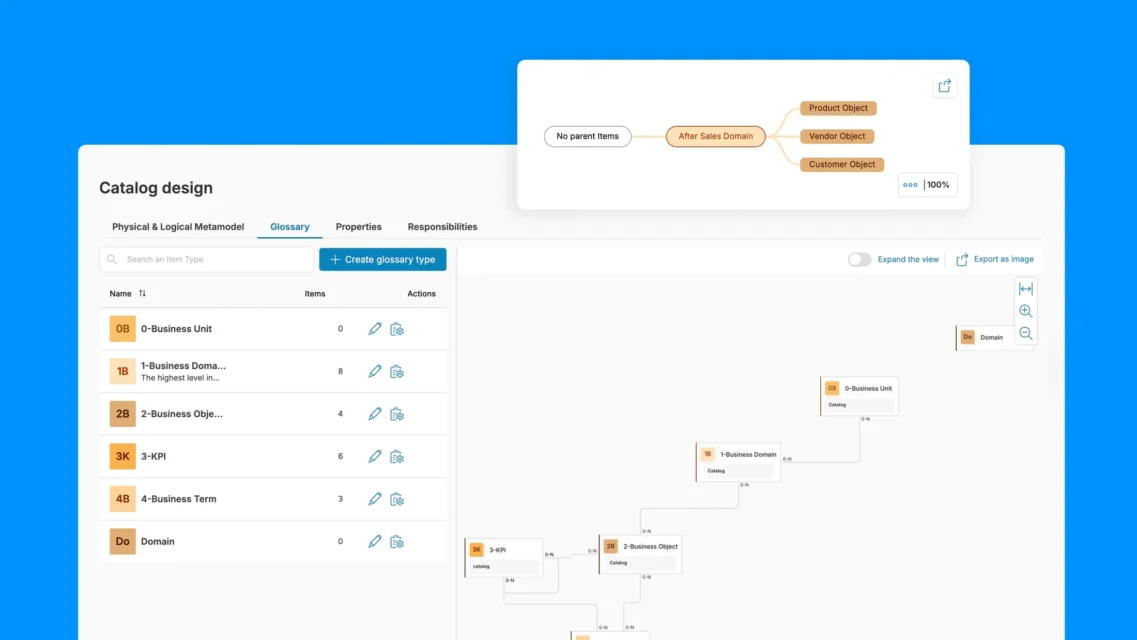
Un glosario empresarial es el registro oficial que recoge el significado de los datos dentro de una organización. Define los términos empresariales, asigna la responsabilidad de dichas definiciones, documenta las reglas de cálculo y vincula el significado a los activos de datos que lo implementan.
Para los equipos de gobernanza, un glosario empresarial es el punto de partida para el cumplimiento normativo, la preparación para las auditorías y la armonización de los informes entre departamentos. Para los equipos de IA, constituye la base semántica que evita que los modelos lingüísticos malinterpreten los términos empresariales, confundan sinónimos o generen resultados basados en definiciones que varían según el departamento.
¿Qué es un glosario empresarial?
Un glosario empresarial es tanto un recurso de referencia como un mecanismo de gobernanza. Proporciona a los usuarios empresariales, analistas, responsables de datos, equipos de cumplimiento normativo y equipos técnicos un vocabulario común para interpretar los datos.
El glosario debe reflejar el significado oficial de la organización, no las abreviaturas informales de los departamentos. Por ejemplo, el término «cliente» puede referirse a un comprador individual, una cuenta, un hogar o una organización, dependiendo del contexto. Un glosario empresarial aclara qué definición es la aplicable, si se permiten variantes y qué equipos son responsables de dichas definiciones.
Lo mismo ocurre con las métricas. El término «ingresos» puede referirse a los ingresos brutos, los ingresos netos, los ingresos reconocidos, los ingresos recurrentes o los ingresos contabilizados. El término «cuenta activa» puede depender de la actividad de inicio de sesión, la actividad transaccional, el estado de la suscripción o la situación contractual. Sin definiciones consensuadas, los equipos pueden presentar cifras diferentes creyendo que están informando sobre la misma métrica.
Un glosario empresarial debería responder a las siguientes preguntas:
- ¿Qué significa este término?
- ¿A quién le corresponde la definición?
- ¿Cómo se calcula o se aplica?
- ¿Qué políticas o normas lo regulan?
- ¿Qué sistemas, informes, paneles de control o productos de datos lo utilizan?
- ¿Qué términos relacionados deben conocer los usuarios?
En el ámbito de la gobernanza de datos, esto es importante porque las definiciones determinan las decisiones. Si el término «ingresos netos» se utiliza en los informes para la dirección, la planificación financiera, las remuneraciones y los materiales destinados a los inversores, la organización necesita un significado único y aprobado, con exclusiones claras, una lógica de cálculo definida y una gestión adecuada.
Glosario empresarial, diccionario de datos y catálogo de datos: en qué se diferencian
Un glosario empresarial, un diccionario de datos y un catálogo de datos están relacionados, pero no son intercambiables. Funcionan conjuntamente en un entorno de datos regulado: el glosario explica el significado empresarial, el diccionario documenta la estructura técnica y el catálogo ayuda a los usuarios a descubrir los activos de datos y a confiar en ellos.
| Concepto | Objetivo principal | Público principal | Ejemplo |
|---|---|---|---|
| Glosario empresarial | Define términos empresariales, indicadores y normas en un lenguaje sencillo | Usuarios empresariales, analistas, responsables de datos, equipos de cumplimiento normativo | «Por «ingresos netos» se entiende el total de ingresos reconocidos menos las devoluciones, los descuentos y las bonificaciones». |
| Diccionario de datos | Documenta los elementos de datos técnicos, los campos, las tablas, los tipos de datos y las restricciones | Ingenieros de datos, desarrolladores, administradores de bases de datos | net_revenue_amount DECIMAL(18,2) en una tabla financiera |
| Catálogo de datos | Crea un inventario de activos de datos en el que se pueden realizar búsquedas, con metadatos, información sobre la titularidad, el historial y el contexto. | Usuarios de datos, analistas, ingenieros, equipos de gobernanza | Un listado con función de búsqueda de tablas financieras, paneles de control, informes y responsables |
Por ejemplo, un glosario empresarial podría definir el término «cliente activo». Un diccionario de datos podría documentar el campo active_customer_flag, incluyendo su tipo de datos y la tabla de origen. Un catálogo de datos podría incluir el «Cuadro de mando de retención de clientes», indicar quién es su propietario y vincularlo al término del glosario y a las tablas subyacentes.
Estos tres elementos cobran mayor valor cuando se conectan entre sí. Un usuario que busque un KPI debería poder ver la definición empresarial aprobada, los campos técnicos que la implementan, los paneles de control que la utilizan y el linaje que muestra de dónde proceden los datos.
¿Qué debe incluir un glosario empresarial?
La utilidad de un glosario empresarial depende directamente de la calidad de sus entradas. Una entrada mínima —el nombre del término más una definición de una sola línea— no evita las discrepancias sobre las definiciones ni las inconsistencias en los informes, que es precisamente lo que un glosario pretende resolver. Una entrada completa incluye:
| Campo | Propósito | Ejemplo |
|---|---|---|
| Nombre del término | La etiqueta aprobada para el concepto | Ingresos netos |
| Definición | Explicación del significado en lenguaje sencillo | Ingresos totales contabilizados, menos devoluciones, descuentos y bonificaciones en el periodo de referencia |
| Empresario | Persona o equipo responsable de la definición | Finanzas — Presentación de informes sobre ingresos |
| Dominio | Área de negocio o categoría temática | Finanzas / Ingresos |
| Sinónimos | Nombres alternativos bajo los que puede aparecer el mismo concepto | Ventas netas, ingresos netos reconocidos |
| Términos relacionados | Conceptos relacionados que los usuarios también deberían conocer | Ingresos brutos, ingresos diferidos, ARR |
| Regla de cálculo | Cómo se calcula el indicador, si procede | Ingresos brutos − Devoluciones − Descuentos − Descuentos por merma |
| Políticas/normas | Normas de gestión que regulan el uso | Se debe utilizar el concepto de ingresos reconocido según la norma ASC 606; se excluyen las transacciones entre empresas del mismo grupo. |
| Recursos de datos enlazados | Tablas, informes, paneles de control o flujos de datos que utilicen este término | finance.net_revenue_daily, Panel de control de ingresos, Informe para inversores |
| Estado | Estado de aprobación en el flujo de trabajo de gobernanza | Aprobado / Borrador / En revisión / Obsoleto |
| Última revisión | Fecha de la última revisión por parte del delegado sindical | 15 de abril de 2026 |
Información sobre los términos fundamentales
La información básica explica el significado del término en un lenguaje sencillo. Debe incluir el nombre del término, una definición concisa, el contexto empresarial, sinónimos, acrónimos, nombres alternativos y ejemplos de uso.
En el caso de «Cliente», algunos sinónimos podrían ser «usuario», «titular de la cuenta» o «suscriptor». En cuanto a «Ingresos recurrentes mensuales», el glosario debería incluir «MRR» como abreviatura. Un ejemplo de uso ayuda a los usuarios a comprender el término en su contexto: «El MRR se revisa en el panel de control mensual de operaciones de ingresos».
Las buenas definiciones evitan las formulaciones circulares. En lugar de «Un cliente es un registro de cliente», escribe: «Un cliente es una persona u organización que mantiene una relación comercial activa o pasada con la empresa».
Metadatos sobre propiedad y gobernanza
Cada término del glosario debe tener una responsabilidad asignada. Los metadatos de responsabilidad suelen incluir al responsable del negocio, al gestor de datos, el estado de aprobación, el historial de versiones, la frecuencia de revisión y el ámbito o área de negocio.
Por ejemplo, el departamento de Operaciones Financieras puede ser responsable de la «Ingresos netos», mientras que el departamento de Operaciones de Éxito del Cliente puede serlo de la «Cuenta activa». El responsable de negocio se encarga del significado y las reglas; el gestor de datos se encarga de mantener la calidad de las definiciones y los metadatos de gobernanza.
La periodicidad de las revisiones debe ajustarse al nivel de riesgo. Los términos relacionados con las finanzas, la normativa, los indicadores clave de rendimiento (KPI) de la dirección y la inteligencia artificial pueden requerir una revisión trimestral. Los términos operativos de menor riesgo pueden revisarse anualmente.
Normas, políticas y lógica de cálculo
Las entradas del glosario deben documentar las reglas que determinan cómo se aplica un término. En el caso de las métricas, esto incluye fórmulas, inclusiones, exclusiones, intervalos de tiempo y lógica de cálculo.
Ejemplos:
- «Los ingresos netos no incluyen devoluciones, descuentos, bonificaciones ni impuestos».
- «Las cuentas activas no incluyen las cuentas de prueba, las cuentas de pruebas internas, las cuentas suspendidas ni los contratos caducados».
- «Los datos de los clientes pueden clasificarse como confidenciales o de acceso restringido en función de sus características».
Esta sección también puede incluir normas de cumplimiento, clasificaciones de privacidad, expectativas en materia de calidad de los datos y directrices de uso aceptable.
Relaciones con otros términos y activos de datos
Los términos rara vez existen de forma aislada. Las entradas del glosario deben incluir enlaces a términos relacionados, relaciones de jerarquía, paneles de control, informes, tablas, columnas, productos de datos, políticas y linaje, siempre que estén disponibles.
Por ejemplo:
- Los «ingresos netos» incluyen los «ingresos brutos», los «reembolsos», los «descuentos» y los «ingresos contabilizados».
- El término «cliente» hace referencia a «cuenta», «contacto», «hogar» y «suscripción».
- «Active Account» puede conectarse con sistemas de CRM, facturación y uso de productos.
Estas relaciones hacen que el glosario resulte útil en los flujos de trabajo diarios de análisis y gobernanza.
Ejemplos de glosario empresarial: términos y definiciones de muestra
Los siguientes ejemplos del glosario empresarial muestran cómo se pueden documentar los términos en un formato práctico y independiente del sector.
Ejemplo 1: Cliente
| Campo | Ejemplo |
|---|---|
| Término | Cliente |
| Definición | Una persona u organización que mantenga una relación comercial actual o pasada con la empresa, incluidos compradores, suscriptores o cuentas contratadas. |
| Propietario | Operaciones de atención al cliente o Operaciones de ventas |
| Dominio | Cliente, CRM, Ventas |
| Sinónimos | Cliente, comprador, cuenta, suscriptor |
| Términos relacionados | Cuenta, contacto, unidad familiar, cliente activo, segmento de clientes |
| Normas | Las cuentas de prueba internas y los registros duplicados en el CRM no deben contabilizarse como clientes únicos. |
| Activos vinculados | Tabla de cuentas del CRM, registro maestro de clientes, panel de análisis de clientes |
Esta entrada resulta útil porque aclara si se incluyen antiguos clientes, suscriptores y registros duplicados.
Ejemplo 2: Cuenta activa
| Campo | Ejemplo |
|---|---|
| Término | Cuenta activa |
| Definición | Una cuenta con un contrato o una suscripción activos y al menos una transacción, un inicio de sesión o un uso del producto que cumpla los requisitos en los últimos 30 días. |
| Propietario | Operaciones de éxito del cliente u operaciones de ingresos |
| Dominio | Éxito de los clientes, Análisis de productos |
| Sinónimos | Cuenta de cliente activa, cuenta activa, suscriptor activo |
| Términos relacionados | Cuenta, suscripción, usuario activo, pérdida de clientes, renovación |
| Normas | Quedan excluidas las cuentas de prueba, las cuentas suspendidas, los contratos caducados y las cuentas de prueba internas. |
| Activos vinculados | Sistema de facturación de suscripciones, registros de uso de productos, panel de control de retención |
Esta definición combina la situación comercial y la actividad de comportamiento, lo que ayuda a evitar conflictos entre los equipos de finanzas, de producto y de éxito del cliente.
Ejemplo 3: Ingresos netos
| Campo | Ejemplo |
|---|---|
| Término | Ingresos netos |
| Definición | Ingresos totales reconocidos en un periodo de referencia, una vez deducidos los reembolsos, descuentos, abonos, bonificaciones y otras deducciones autorizadas. |
| Propietario | Contabilidad financiera o contabilidad de ingresos |
| Dominio | Finanzas, Ingresos, Informes ejecutivos |
| Sinónimos | Ingresos tras deducciones, ingresos netos contabilizados |
| Términos relacionados | Ingresos brutos, ingresos reconocidos, reembolsos, descuentos, ARR, MRR |
| Normas | No incluye los ingresos diferidos que aún no se hayan contabilizado de acuerdo con la normativa contable aplicable. |
| Activos vinculados | Data mart financiero, sistema de reconocimiento de ingresos, cuadro de mando de indicadores clave de rendimiento (KPI) para directivos |
Esta partida debe revisarse con frecuencia, ya que influye en la presentación de informes a la dirección y en la toma de decisiones financieras.
Ejemplo 4: Tasa de abandono
| Campo | Ejemplo |
|---|---|
| Término | Tasa de abandono |
| Definición | El porcentaje de clientes o cuentas que dan de baja el servicio durante un periodo determinado. |
| Propietario | Operaciones de ingresos o Éxito del cliente |
| Dominio | Retención de clientes |
| Sinónimos | Tasa de abandono, tasa de pérdida de clientes |
| Términos relacionados | Tasa de retención, tasa de renovación, cuentas activas, bajas |
| Normas | Especifica si la pérdida de clientes se basa en el logotipo, en los ingresos, es voluntaria o involuntaria. |
| Activos vinculados | Panel de control de renovaciones, sistema de suscripciones, modelo de puntuación del estado de los clientes |
Es importante contar con una definición precisa de la pérdida de clientes, ya que la pérdida de clientes, la pérdida de ingresos y la pérdida involuntaria pueden dar lugar a cifras muy diferentes.
Ejemplo de glosario empresarial
A continuación se muestra un ejemplo de una entrada de glosario empresarial completamente documentada correspondiente a un indicador financiero habitual.
Término:Valor del ciclo de vida del cliente (CLV)
Definición:Los ingresos netos totales que una empresa espera obtener de la cuenta de un cliente a lo largo de toda la duración de la relación, actualizados a su valor actual.
Empresario:Análisis de ingresos — Growth Finance
Ámbito:Clientes / Ingresos
Sinónimos:LTV, valor de por vida, LTV del cliente
Términos relacionados:Coste de captación de clientes (CAC), tasa de abandono, retención neta de ingresos (NRR), valor anual del contrato (ACV)
Regla de cálculo: CLV = (Average Purchase Value × Purchase Frequency × Average Customer Lifespan) − CAC Para empresas que ofrecen servicios de suscripción: CLV = (MRR per Customer × Gross Margin %) ÷ Monthly Churn Rate
Políticas/normas:
- En el cálculo se deben utilizar los ingresos netos (una vez deducidos los reembolsos)
- La vida útil del cliente se limita a 5 años en los escenarios de planificación conservadores
- Los cálculos del CLV específicos de cada segmento deben documentarse por separado y vincularse a esta entrada maestra.
Recursos de datos enlazados:
analytics.customer_ltv_monthly(tabla de fuentes primarias)- Cuadro de mando de salud del cliente
- Modelo de planificación anual
Estado:Aprobado
Última revisión:1 de marzo de 2026 — revisado por el departamento de Análisis de Ingresos y aprobado por la oficina del director financiero
Este es el nivel de documentación que hace que un glosario empresarial sea fiable para las revisiones de gobernanza, la validación de modelos de IA y la armonización de los informes entre departamentos.
Por qué son importantes los glosarios empresariales
Los glosarios empresariales son importantes porque las definiciones ambiguas generan fricciones operativas. Cuando los equipos no se ponen de acuerdo sobre el significado de una métrica, dedican tiempo a conciliar cifras en lugar de actuar en función de los datos obtenidos.
Favorecen la coordinación entre equipos
A menudo, los distintos departamentos utilizan los mismos términos de forma diferente. El departamento de marketing puede definir el término «cliente potencial» en función de la interacción con la campaña, mientras que el de ventas puede definirlo en función de su estado de calificación. El departamento de finanzas puede definir el término «ingresos» de forma diferente al de operaciones de ventas. El departamento de producto puede definir el término «usuario activo» de forma diferente al de éxito del cliente.
Un glosario evita que estas diferencias den lugar a desacuerdos en los paneles de control. Proporciona a los departamentos de finanzas, marketing, ventas, producto y operaciones un punto de referencia común para las métricas y los conceptos empresariales.
Refuerzan la gobernanza de los datos
Los términos del glosario fomentan la responsabilidad. Cuando el término «Ingresos netos» corresponde al departamento de Finanzas y el término «Cliente» al de Operaciones de Clientes, la organización sabe quién puede aprobar los cambios y resolver las disputas.
Un glosario regulado facilita los flujos de trabajo de aprobación, la gestión de datos, la armonización de políticas y la auditabilidad. Además, ayuda a los equipos de gobernanza a vincular las definiciones empresariales con las decisiones relativas al acceso a los datos, la calidad de los datos, la elaboración de informes y el cumplimiento normativo.
Mejoran el cumplimiento normativo y la gestión de riesgos
Los términos regulados requieren definiciones precisas. La privacidad, la seguridad, la información financiera y las normas específicas del sector suelen depender de una interpretación coherente de términos como «información de carácter personal», «datos sensibles de los clientes», «ingresos reconocidos» o «cuenta sujeta a declaración».
Un glosario empresarial permite documentar las definiciones aprobadas, el historial de revisiones y las relaciones entre políticas. Esto proporciona un registro de auditoría más claro y ayuda a reducir el riesgo de que se elaboren informes incoherentes o se utilicen los datos de forma inadecuada.
Contribuyen a la preparación para la IA
Los sistemas de inteligencia artificial y aprendizaje automático necesitan contexto semántico. Si «cuenta activa» significa, en un sistema, un uso del producto durante 30 días y, en otro, tener una suscripción de pago, los modelos de inteligencia artificial podrían generar recomendaciones incoherentes.
Un glosario ayuda a los sistemas de IA y a los equipos que los desarrollan a comprender el significado aprobado de los términos utilizados en las características, los informes, las indicaciones y los datos de entrenamiento. Reduce la deriva semántica, mejora la interpretación de las características, favorece la explicabilidad y contribuye a garantizar que los datos regulados se utilicen de forma coherente.
Cómo elaborar un glosario empresarial: proceso paso a paso
La creación de un glosario empresarial es un proceso operativo, no un proyecto de documentación. Empieza poco a poco, demuestra su valor y amplíalo mediante mecanismos de gobernanza.
Paso 1: Elige un sector empresarial de gran impacto
Empieza por un ámbito en el que la confusión terminológica provoque problemas evidentes. Algunos buenos puntos de partida son las finanzas, la atención al cliente, las ventas, el marketing, la gestión de riesgos o el análisis de productos.
- Quiénes participan: Responsables de área, analistas y gestores de datos.
- Qué hacer: Selecciona un dominio que sea objeto de disputas recurrentes.
- Resultado: Un proyecto piloto de glosario.
Entre los ejemplos se incluyen términos financieros como «ingresos netos», «margen bruto» y «ARR»; términos relacionados con los clientes como «cliente», «cuenta activa» y «tasa de abandono»; o términos de marketing como «cliente potencial cualificado», «conversión» y «atribución de campaña».
Paso 2: Identificar los términos más importantes
Términos relacionados con el inventario que se utilizan en paneles de control, informes, políticas, productos de datos y reuniones periódicas. Se debe dar prioridad a los términos que suelen ser objeto de controversia o que se utilizan con frecuencia en los informes dirigidos a la dirección.
- Quiénes participan: Analistas, responsables de los informes y partes interesadas de la empresa.
- Qué hay que hacer: Recopilar entre 20 y 50 términos prioritarios.
- Resultado: Una lista ordenada de términos pendientes.
Empieza con términos como «cliente», «cuenta activa», «ingresos netos», «tasa de abandono» y «tasa de conversión».
Paso 3: Asignar responsables y coordinadores
Cada término debe tener un responsable de negocio y, cuando sea necesario, un responsable técnico. El responsable de negocio se encarga del significado y de las reglas de negocio. El responsable técnico se encarga de mantener la calidad de los metadatos, el estado de revisión y los enlaces a los activos de datos.
- Quiénes participan: Responsables de gobernanza, propietarios de dominios y gestores de datos.
- Qué hacer: Asignar responsabilidades.
- Resultado: Asignación de propietarios y administradores.
Por ejemplo, el departamento de Finanzas se encarga de los «ingresos netos», el de Operaciones de Ingresos, del «cartera de proyectos», y el de Éxito del Cliente, de la «puntuación de estado».
Paso 4: Elaborar definiciones y normas claras
Utiliza un lenguaje sencillo. Incluye lo que se incluye, lo que se excluye, cálculos, ejemplos, sinónimos y términos relacionados. Evita las definiciones circulares y la jerga técnica.
- Quiénes participan: Expertos en la materia, analistas y administradores.
- Qué hacer: Redacta las definiciones utilizando una plantilla estándar.
- Resultado: Borradores de entradas del glosario.
Ejemplos: «Ingresos netos = ingresos reconocidos menos devoluciones, descuentos, abonos y bonificaciones». «Las cuentas activas no incluyen las cuentas de prueba, las suspendidas, las caducadas ni las de pruebas internas».
Paso 5: Revisar y aprobar las condiciones de forma colaborativa
Establece un proceso de aprobación en el que participen expertos en la materia, responsables de datos y responsables de gobernanza. La revisión interfuncional evita que un solo departamento defina los términos de la empresa de forma aislada.
- Quiénes participan: las pymes, el consejo de gobernanza y los responsables de datos.
- Qué hacer: Pasar los términos por las fases de borrador, revisión, aprobación y obsolescencia.
- Resultado: Términos aprobados del glosario.
Es posible que los «ingresos netos» deban ser revisados por los departamentos de Finanzas, Operaciones de Ventas y Análisis. Es posible que el término «cliente» requiera la opinión de los departamentos de CRM, Atención al Cliente, Asuntos Jurídicos y Marketing.
Paso 6: Vincular términos a activos de datos e informes
Las definiciones se vuelven útiles cuando se vinculan a tablas, columnas, paneles de control, informes, productos de datos y linaje. Los usuarios deberían poder encontrar las definiciones allí donde ya trabajan con los datos.
- Quiénes participan: Ingenieros de datos, administradores de catálogos y analistas.
- Qué hacer: Relacionar los términos del glosario con los activos físicos y analíticos.
- Resultado: Asignaciones reguladas entre plazos y activos.
Vincula «Cuenta activa» a las tablas de uso de productos y a los paneles de control de retención. Vincula «Ingresos netos» a los almacenes de datos financieros y a los paneles de control ejecutivos.
Paso 7: Mantener y mejorar el glosario con el paso del tiempo
Un glosario es un recurso de gobernanza en constante evolución. Establece periodicidades de revisión, realiza un seguimiento del uso, supervisa las cuestiones pendientes y retira los términos obsoletos.
- Quiénes participan: Responsables de datos, propietarios de negocios, equipos de gobernanza.
- Qué hacer: Revisar, actualizar y dejar de utilizar ciertos términos.
- Resultado: Definiciones fiables y actualizadas.
Utiliza revisiones trimestrales para los indicadores clave de rendimiento (KPI) ejecutivos y los términos relacionados con el cumplimiento normativo. Utiliza revisiones anuales para los términos de menor riesgo. Deja de utilizar las definiciones antiguas de «Cliente» tras una migración del sistema CRM.
Glosario empresarial: Propiedad y flujo de trabajo
Los programas de glosarios suelen estar a cargo de los equipos de gobernanza o gestión de datos, pero las definiciones deben ser responsabilidad de los ámbitos de negocio. Esto permite alcanzar un equilibrio práctico entre las normas centrales y los conocimientos especializados de cada ámbito.
Un modelo centralizado funciona cuando un único equipo de gestión controla todas las definiciones. Un modelo federado funciona cuando cada ámbito gestiona sus propios términos utilizando normas compartidas. Muchas organizaciones utilizan un enfoque híbrido: los términos de la empresa se gestionan de forma centralizada, mientras que los términos específicos de cada ámbito son gestionados por responsables locales.
Funciones habituales en el glosario empresarial: gobernanza
- Titular de la empresa: Responsable del significado y las reglas de negocio. El departamento de Finanzas puede ser responsable de «Ingresos netos», mientras que el de Éxito del Cliente puede serlo de «Cuentas activas».
- Responsable de datos: Se encarga de garantizar la calidad de las definiciones, la exhaustividad de los metadatos, la periodicidad de las revisiones y el cumplimiento de las políticas.
- Experto en la materia: Aporta conocimientos especializados en la materia y valida su uso en la práctica.
- Ingeniero de datos o administrador técnico:vinculalos términos a sistemas, tablas, columnas y asignaciones de sistemas de origen.
- Consejo de gobernanza: Resuelve los conflictos y aprueba las condiciones aplicables a toda la empresa.
Unas funciones bien definidas evitan que la gestión del glosario se convierta en una responsabilidad de todos y en una prioridad de nadie.
Flujo de trabajo recomendado para la aprobación
Un flujo de trabajo práctico incluye:
- Redacta el término.
- Revisión por parte de expertos en la materia.
- Aprobarlo mediante la gestión o la gobernanza de los datos.
- Publica el término.
- Supervisa el uso y los comentarios.
- Revísalo periódicamente.
- Dejar de utilizar el término cuando se sustituya.
Por ejemplo, los «ingresos recurrentes mensuales» pueden requerir una revisión por parte de los departamentos de Finanzas, Operaciones de Ventas y Análisis. Los «datos confidenciales de los clientes» pueden requerir una revisión por parte de los departamentos de Asuntos Jurídicos, Seguridad y Cumplimiento Normativo.
Retos habituales del glosario empresarial
Las iniciativas relacionadas con los glosarios empresariales suelen fracasar porque se tratan como documentación estática en lugar de como modelos operativos regulados.
Reto n.º 1: Demasiado trabajo manual
Las hojas de cálculo son fáciles de poner en marcha, pero difíciles de ampliar. La recopilación, la asignación, la revisión y el mantenimiento de términos se convierten en una carga a medida que crece el glosario. Para paliar esto, empieza por los términos prioritarios, utiliza plantillas y automatiza la búsqueda o la asignación de términos siempre que sea posible.
Reto n.º 2: Definiciones contradictorias entre departamentos
A menudo, los distintos equipos tienen definiciones válidas pero contradictorias. Los departamentos de Ventas y Finanzas pueden definir el término «reservas» de forma diferente. Los departamentos de Marketing y Producto pueden definir el término «usuario activo» de forma diferente. El glosario debe poner de manifiesto estas contradicciones y resolverlas mediante mecanismos de gobernanza, al tiempo que permite variaciones específicas de cada ámbito cuando sea necesario.
Reto n.º 3: Baja adopción
Los usuarios no adoptarán un glosario que sea difícil de encontrar o que esté desconectado de los flujos de trabajo diarios. Mejora la adopción integrando las definiciones en los paneles de control, los catálogos, los flujos de trabajo de generación de informes, la incorporación de nuevos usuarios y las experiencias de análisis de autoservicio.
Reto 4: El glosario y los metadatos técnicos se desconectan entre sí
Las definiciones pierden credibilidad si no están vinculadas a activos de datos reales. Para mitigar este problema, vincula los términos a tablas, columnas, paneles de control, linaje de datos, políticas y controles de calidad.
Reto n.º 5: Las definiciones quedan obsoletas
Los modelos de negocio, los sistemas y las necesidades de presentación de informes cambian. Asigna responsables, establece ciclos de revisión, supervisa el uso, recopila opiniones y retira los términos obsoletos antes de que los usuarios pierdan la confianza.
Prácticas recomendadas para el glosario empresarial
Sigue estos consejos para crear un glosario que siga siendo útil con el paso del tiempo:
- Empieza por los términos de mayor valor, en lugar de intentar documentarlo todo.
- Utiliza definiciones en lenguaje sencillo que los usuarios empresariales puedan entender.
- Asigna claramente la responsabilidad de cada término.
- Incluye ejemplos, sinónimos, términos relacionados y excepciones.
- Vincula los términos del glosario a los activos de datos, los paneles de control, el linaje, las políticas y las normas de calidad.
- Utiliza flujos de trabajo de aprobación para los términos críticos.
- Revisa trimestralmente los términos de mayor impacto.
- Haz que el glosario sea consultable y accesible en los flujos de trabajo diarios.
- Realiza un seguimiento de la aceptación a través de búsquedas, visitas, preguntas sin resolver y comentarios.
- Considera el glosario como un recurso de gobernanza en constante evolución, no como un documento estático.
Por ejemplo, en el término «Cliente» debe especificarse si se incluyen clientes potenciales, antiguos clientes o usuarios de la versión de prueba. En «Ingresos netos» deben indicarse la lógica de cálculo y las exclusiones. En «Cuenta activa» deben indicarse el intervalo de tiempo y los criterios de actividad.
Glosarios empresariales y deriva semántica
La deriva semántica es la divergencia gradual del significado de un término entre equipos o sistemas a lo largo del tiempo. Es una de las causas más comunes y menos visibles de los problemas de calidad de los datos en las empresas.
Esto ocurre porque las definiciones no se mantienen de forma rigurosa. El equipo de finanzas define «cliente activo» como cualquier persona que haya realizado una transacción en los últimos 90 días. El equipo de producto lo define como cualquier persona que haya iniciado sesión en los últimos 30 días. El equipo de CRM lo define como cualquier cuenta con una oportunidad abierta. Los tres equipos comunican el «número de clientes activos» a la dirección, y las tres cifras son diferentes, no porque los datos sean erróneos, sino porque la definición nunca se ha armonizado.
Un glosario empresarial evita la deriva semántica al:
- Centralización de la definición aprobada:un registro, un responsable, un significado aprobado.
- Registro de los cambios en las definiciones:un registro de auditoría que indica cuándo se modificaron las definiciones, quién las modificó y por qué.
- Detección de conflictos:señalar los casos en los que un mismo término se utiliza con significados diferentes en distintos ámbitos.
- Vinculación de definiciones a activos de datos — De este modo, cuando cambia una definición, las tablas, los informes y los paneles de control posteriores que la implementan quedan visibles y se pueden actualizar.
En el caso de los sistemas de IA, la deriva semántica no es solo un problema de análisis, sino también un problema de fiabilidad del modelo. Si un modelo lingüístico se basa en datos en los que un mismo término tiene significados diferentes según la tabla, sus resultados reflejarán esa inconsistencia. Un glosario empresarial regulado es el mecanismo que garantiza la coherencia semántica de los datos de la empresa antes de que lleguen al proceso de IA.
Qué hay que tener en cuenta a la hora de elegir un software de glosario empresarial
El software de glosario empresarial debería ayudar a los equipos a gestionar las definiciones, la responsabilidad, el flujo de trabajo, las relaciones y la búsqueda a gran escala. Evalúa si la herramienta da soporte tanto a los usuarios empresariales como a los equipos de gobernanza. Hay diez criterios que distinguen una plataforma eficaz de un simple registro de términos:
1. Flujos de trabajo de gobernanza: La plataforma debe admitir procesos de aprobación en varias fases (borrador, revisión, aprobado, obsoleto) con permisos basados en roles que determinen quién puede proponer, editar y aprobar definiciones. Sin la aplicación de un flujo de trabajo, un glosario se convierte en una wiki que cualquiera puede modificar.
2. Asignación de responsabilidades: Cada término debe tener asignado un responsable de gestión y, opcionalmente, un responsable técnico. La plataforma debe hacer visible la titularidad y notificar a los responsables cuando los términos bajo su responsabilidad se modifiquen o se marquen.
3. Vinculación automática de metadatos: La plataforma debería vincular los términos del glosario a los activos de datos físicos (tablas, columnas, informes, paneles de control, flujos de datos y productos de datos) de forma automática siempre que sea posible, y proporcionar herramientas para la vinculación manual cuando no lo sea. Un glosario desconectado de la capa de datos físicos es una herramienta de documentación, no una herramienta de gobernanza.
4. Integración del linaje: Cuando un término empresarial está vinculado a un activo de datos, los usuarios deberían poder navegar hacia abajo para ver qué informes, paneles de control y modelos heredan esa definición. Esto es necesario para el análisis de impacto cuando cambian las definiciones.
5. Búsqueda semántica y relaciones: Los usuarios deberían poder encontrar términos mediante sinónimos, conceptos relacionados o consultas en lenguaje natural, y no solo por el nombre exacto del término. El glosario también debería admitir jerarquías y términos relacionados. La búsqueda semántica es la característica que con mayor frecuencia no se incluye en las herramientas de catálogo más sencillas que incorporan un módulo básico de glosario.
6. Detección de conflictos: La plataforma debería señalar los términos que se definen de forma diferente en distintos ámbitos o que tienen sinónimos que se solapan, para que los administradores puedan resolver los conflictos antes de que se conviertan en problemas a la hora de elaborar informes.
7. Documentación sobre normas, políticas e indicadores clave de rendimiento (KPI): El repositorio central de términos debe contener la lógica de cálculo, las políticas y las reglas que subyacen a cada término, y no solo su definición.
8. Preparación para la IA: El glosario debe poder ser consultado por sistemas de IA, ya sea a través de una API estructurada o mediante la integración directa con herramientas de inteligencia de datos y de procesos RAG. Un glosario que no pueda ser utilizado por los modelos de lenguaje grande (LLM) no está preparado para la gobernanza de la IA empresarial.
9. Registro de auditoría: Cada cambio en una definición, cada decisión de aprobación y cada transferencia de titularidad deben registrarse indicando la fecha y hora, el usuario y el motivo. Esto es obligatorio para cumplir con la normativa en los sectores financiero, sanitario y otros sectores regulados.
10. Exportación y uso compartido: Los equipos deberían poder exportar o compartir los términos aprobados con otras herramientas y equipos.
Entre las preguntas útiles para la evaluación se incluyen las siguientes: ¿Pueden los usuarios buscar «Ingresos netos» y encontrar la definición aprobada, el responsable, los paneles de control relacionados y los activos de datos subyacentes? ¿Puede el glosario mostrar cómo se relaciona el término «Cuenta activa» con el uso del producto, la facturación y los informes de pérdida de clientes?
Cómo elegir un software de glosario empresarial: las opciones más sencillas, asequibles y asistidas por IA
La herramienta de glosario más adecuada depende de quién la vaya a utilizar, del tamaño de tu equipo y del grado de automatización que desees aplicar al trabajo. Sigue las indicaciones que figuran a continuación para elegir la herramienta que mejor se adapte a tu situación.
El glosario empresarial más sencillo para equipos sin conocimientos técnicos
Un glosario se considera eficaz cuando los usuarios de la empresa pueden consultarlo sin necesidad de formación previa. Busca:
- Busca utilizando lenguaje sencillo. Los usuarios deberían encontrar «Ingresos netos» escribiendo un sinónimo o una pregunta, no el nombre exacto del término o de la tabla.
- Definiciones que ya se utilizan en la práctica. Los términos deberían aparecer en el catálogo y en los flujos de trabajo de generación de informes, no solo en una aplicación independiente.
- Gestión sencilla. Proponer, revisar y aprobar un término debería ser cuestión de unos pocos clics, con responsables claros y etiquetas de estado (borrador, aprobado, obsoleto).
- Sin código. Los propietarios y administradores de empresas deben gestionar los términos sin ayuda de ingenieros.
Software de glosarios asequible para pequeños equipos de gobernanza
El coste no se limita únicamente a la licencia. Compara estos elementos entre las distintas opciones:
- Licencias. Cuánto cuesta el glosario por sí solo y cuánto cuesta dentro de una plataforma más amplia.
- Configuración. Configuración de los conectores, importación de términos y tiempo dedicado por el administrador a introducir los primeros términos.
- Integración. Un glosario independiente es barato al principio, pero requiere trabajo para vincularlo a tu catálogo, al historial de versiones y a las herramientas de calidad.
- Crecimiento. Cómo varían los precios a medida que aumentan el número de usuarios, las fuentes y los términos.
Los equipos pequeños obtienen el máximo rendimiento si empiezan por un dominio y entre 20 y 50 términos prioritarios, para luego ampliar el alcance. Pide a cada proveedor un presupuesto a tres años que incluya la implementación y el soporte técnico.
Herramientas de glosario empresarial gratuitas frente a las de pago
| Opción | Ideal para | Límites |
|---|---|---|
| Hoja de cálculo o wiki | Un programa piloto con unas cuantas docenas de condiciones | No hay un proceso de aprobación, no hay enlaces a los activos de datos y resulta difícil mantenerlo actualizado |
| Glosario de código abierto | Equipos con un alto componente de ingeniería que buscan tener el control | Requiere un esfuerzo interno para su implementación, seguridad y mantenimiento, y suele contar con interfaces de usuario empresarial limitadas. |
| Plataforma de pago | Equipos que necesitan flujos de trabajo, responsabilidad, registros de auditoría y enlaces al catálogo y al historial | Coste de la licencia y de la implementación |
Las opciones gratuitas funcionan bien en una fase piloto. Sin embargo, suelen fallar cuando muchos equipos editan las definiciones, los organismos reguladores exigen un registro de auditoría o los sistemas de IA necesitan definiciones reguladas.
Creación de glosarios y extracción de términos con ayuda de la inteligencia artificial
La IA puede agilizar la elaboración del primer borrador de un glosario. Funciona bien para:
- Sugerir términos candidatos a partir de las descripciones de la base de datos, los nombres de las columnas y los comentarios del esquema.
- Extracción de términos empresariales de documentos internos, como políticas, diccionarios de datos y definiciones de informes.
- Redactar definiciones y proponer sinónimos y términos relacionados.
Los seres humanos deben seguir aprobando lo que se publica. Cuando evalúes la extracción de términos mediante IA, asegúrate de que:
- Incluye un paso de aprobación por parte de una persona antes de que se publique cualquier término.
- Abarca tus fuentes, incluidas bases de datos, documentos y herramientas de inteligencia empresarial.
- Se ejecuta dentro de tu perímetro de seguridad, por lo que los documentos internos no quedan expuestos.
- Vincula cada término con los activos de datos, de modo que una definición sugerida se vincule a las tablas, los informes y el linaje que describe.
¿Cuándo conviene utilizar un glosario empresarial?
Utiliza un glosario empresarial cuando la ambigüedad terminológica genere dificultades cuantificables. Entre los factores desencadenantes más habituales se encuentran:
- Los equipos discuten sobre las definiciones de los KPI.
- Los directivos observan cifras contradictorias en los paneles de control.
- Los analistas dedican demasiado tiempo a aclarar la terminología.
- Los equipos de cumplimiento normativo necesitan definiciones aprobadas y la posibilidad de auditar los procesos.
- La adopción del catálogo de datos es baja porque los usuarios no comprenden el contexto empresarial.
- Los proyectos de IA o aprendizaje automático necesitan definiciones semánticas fiables.
- Las fusiones, las migraciones de sistemas o la modernización a la nube han dado lugar a una nomenclatura incoherente.
- El análisis de autoservicio está en auge y los usuarios empresariales necesitan definiciones fiables.
Algunos ejemplos son las diferencias en las cifras de ingresos entre los paneles de control de finanzas y ventas, la existencia de múltiples identificadores de clientes tras una migración de CRM o ERP, o un modelo de IA que utiliza etiquetas inconsistentes para las «cuentas activas».
Un glosario resulta especialmente útil cuando se combina con un enfoque de inteligencia de datos que vincula las definiciones con los metadatos, el linaje, la gobernanza y la búsqueda.
El enfoque de Actian respecto a los glosarios empresariales
La plataforma Actian Data Intelligence Platform mantiene los términos del glosario en el mismo lugar que el resto del contexto de gobernanza. Los términos se vinculan al catálogo de datos, al linaje de datos, a las reglas de calidad y a la gestión de metadatos en una plataforma federada gráfico de conocimiento, de modo que cada definición aparece junto a su responsable, sus activos de datos y el linaje que hay detrás de ellos. Los responsables aprueban y mantienen los términos a través de flujos de trabajo de gestión de datos, y los usuarios de negocio encuentran las definiciones mediante búsquedas en el catálogo.
Para comparar catálogos que incluyen un glosario, consulta las herramientas de catalogación de datos.
Preguntas frecuentes
Un glosario empresarial define y estandariza términos, métricas y conceptos clave del ámbito empresarial, de modo que todos los miembros de la organización utilicen el mismo lenguaje al trabajar con datos. Elimina la ambigüedad al garantizar que términos como «cliente», «ingresos» o «riesgo» tengan un significado único y autorizado vinculado directamente a los datos que los representan.
Dentro de una plataforma de inteligencia de datos, el glosario empresarial conecta las definiciones empresariales con los metadatos técnicos, el linaje y las señales de calidad de los datos. Esto garantiza que los análisis, los paneles de control y los modelos de IA se basen en definiciones coherentes y datos fiables, lo que reduce las interpretaciones erróneas, la repetición del trabajo y el riesgo de las decisiones.
Una entrada del glosario debe incluir el término, una definición clara, sinónimos, dominio de datos, propietario, productos de datos relacionados, políticas de gobernanza y ejemplos de uso.
Los retos incluyen la adopción, el mantenimiento y la integración de sistemas; supérelos implicando a las partes interesadas en la creación, automatizando las actualizaciones y estableciendo procesos de revisión claros que equilibren estabilidad y agilidad.
Implemente procesos automatizados de sincronización de metadatos para conciliar los cambios y activar alertas para la revisión manual cuando surjan conflictos.
Implicar al personal de cumplimiento desde el principio en la definición de los términos y en las revisiones trimestrales para garantizar la coherencia de las políticas y validar las definiciones que afectan a los informes reglamentarios.
Desplegar una arquitectura de glosario federado con un gráfico de conocimiento central y sincronizar las definiciones mediante API agnósticas de la nube. Establecer comités de gobernanza regionales para la adaptación local manteniendo la coherencia.
Para un proyecto piloto a pequeña escala, basta con una hoja de cálculo, una wiki o una herramienta de código abierto. Pásate a una plataforma de pago cuando haya varios equipos encargados de mantener las definiciones, cuando necesites flujos de trabajo de aprobación y registros de auditoría, o cuando los sistemas de IA necesiten definiciones reguladas vinculadas a tus activos de datos.
La mejor herramienta analiza las descripciones de las bases de datos, los nombres de las columnas y los documentos internos; sugiere términos y definiciones posibles; incluye un paso de aprobación humana; y vincula cada término a los activos de datos. Asegúrate de que la extracción se realice dentro de tu perímetro de seguridad. Un glosario integrado en tu catálogo de datos, que incluya el linaje y la titularidad, es más fiable que una herramienta de IA independiente, ya que las definiciones permanecen vinculadas a los datos que describen.
Elige un software que ofrezca búsquedas en lenguaje sencillo, definiciones que aparezcan directamente en el catálogo y en los flujos de trabajo de generación de informes, así como pasos de aprobación sencillos que los responsables de negocio y los gestores puedan llevar a cabo sin necesidad de ayuda técnica. Ten en cuenta el coste total, no solo el de la licencia: la configuración, la integración con tu catálogo y el linaje de datos, el tiempo dedicado por los gestores y la evolución de los precios. Empieza con un dominio y entre 20 y 50 términos prioritarios, y solicita un presupuesto para tres años antes de comprometerte.